

So the question always arises, how to create a Checkboxlist in MVC. We can build this in ASP.Net webforms very easily using built-in server controls. But how to do this in MVC.
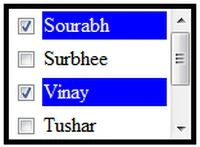
Figure: Checkbox List
So in this article, I explain how to create a checkboxlist in MVC.
Please follow these steps:
Step 1
Click "File" -> "New" -> "Project...".
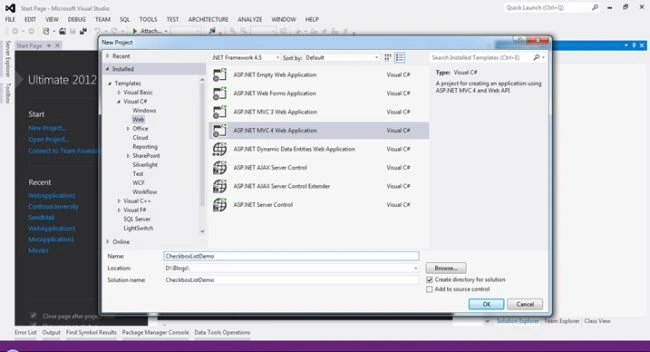
Figure 1: Create New MVC Project
Step 2
Select "ASP.Net MVC4 WebApplication", provide your Project Name, for example I used "CheckboxListDemo", then click "Ok".
Step 3
Now select "Internet Application", and then click "Ok".
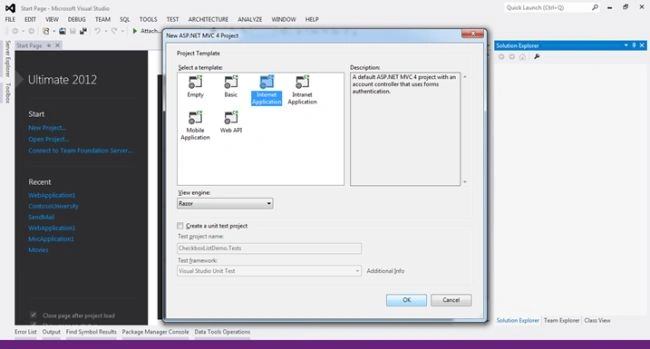
Figure 2: Select Project Template
Step 4
For this application we will create a Model. So right-click on the Model folder then click on "Add" -> "Class".
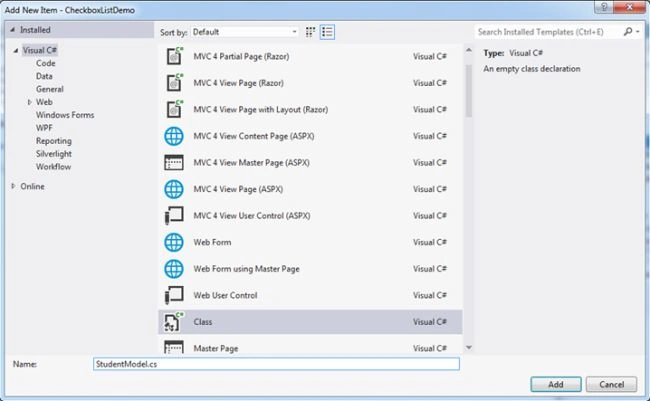
Figure 3: Add a New model.
Here we will create "StudentModel". Now click on the "Add" Button.
Now add the following code.
- using System;
- using System.Collections.Generic;
- using System.Linq;
- using System.Web;
- using System.Web.Mvc;
- namespace CheckboxListDemo.Models
- {
- public class StudentModel
- {
- public IList<SelectListItem> StudentNames { get; set; }
- }
- }
In the code above, I create am "IList<SelectListItem>" type propery. This SelectListItem returns both text and a value that is helpful for lists (like Dropdownlist, Listbox etcetera).
We will now write the code for a Controller.
Right-click on the Controller folder then seelct "Add" >> "Controller".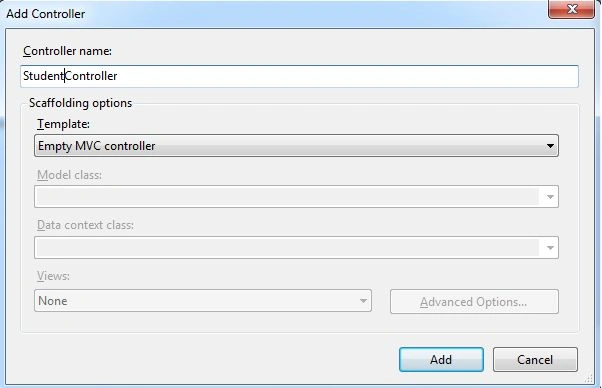
Figure 4: Add New Controller
Now this is our Empty MVC Controller, click on the "Add" button. We will now write the code.
- using System;
- using System.Collections.Generic;
- using System.Linq;
- using System.Web;
- using System.Web.Mvc;
- using CheckboxListDemo.Models;
- namespace CheckboxListDemo.Controllers
- {
- public class StudentController : Controller
- {
- public ActionResult Index()
- {
- return View();
- }
- // GET: /Student/
- public ActionResult Student()
- {
- StudentModel objStudentModel = new StudentModel();
- List<SelectListItem> names = new List<SelectListItem>();
- names.Add(new SelectListItem { Text = "Sourabh", Value = "1" });
- names.Add(new SelectListItem { Text = "Surbhee", Value = "2" });
- names.Add(new SelectListItem { Text = "Vinay", Value = "3" });
- names.Add(new SelectListItem { Text = "Tushar", Value = "4" });
- names.Add(new SelectListItem { Text = "John", Value = "5" });
- names.Add(new SelectListItem { Text = "Tom", Value = "6" });
- objStudentModel.StudentNames = names;
- return View(objStudentModel);
- }
- }
- }
In the code above, I create a new ActionMethod and Student. In this Action Method , I am returning a model, that has a list of student names.
If you notice in the code above, I use SelectListItem and SelectListItem having the two properties Text and Value, that are helpful for a list like Dropdownlist, Listbox etcetera.
Now add a new view, so right-click and click on "Add View".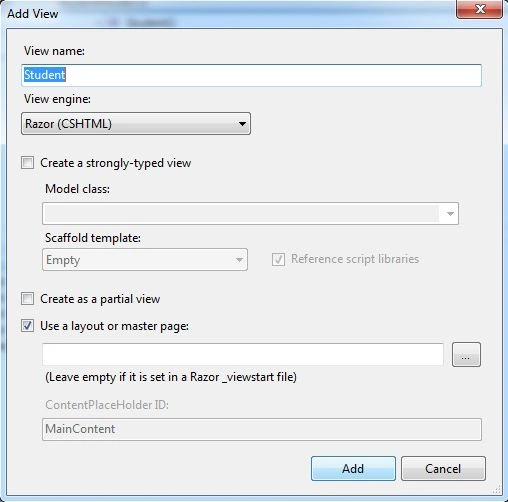
Figure 5: Add View
Now click on the "Add" button. Now add the following code:
Student.cshtml
- @model CheckboxListDemo.Models.StudentModel
- @{
- ViewBag.Title = "Student";
- }
- <h2>Student</h2>
- <script src="~/Scripts/jquery-1.7.1.min.js"></script>
- <script>
- $(document).ready(function () {
- $('.chkclass').click(function () {
- var getchkid = $(this).attr('id');
- var isChecked = $('#' + getchkid).is(':checked');
- if ($('#' + getchkid).is(':checked') == true) {
- $('#td' + $(this).val()).css("color", "white");
- $('#td' + $(this).val()).css("background-color", "blue");
- }
- else {
- $('#td' + $(this).val()).css("color", "black");
- $('#td' + $(this).val()).css("background-color", "white");
- }
- });
- $('#bttn_Click').click(function () {
- var studentListVal = null;
- studentListVal = [];
- $('input:checkbox:checked').each(function () {
- studentListVal.push($(this).attr('value'));
- });
- $.ajax({
- type: "post",
- url: "/Student/Studentl",
- data: { Name: studentListVal },
- datatype: "json",
- traditional: true,
- success: function (data) {
- var selectedIds;
- for (var i = 0; i < data.success.length; i++)
- {
- if (selectedIds != undefined) {
- selectedIds = selectedIds + " " + data.success[i];
- }
- else {
- selectedIds = data.success[i];
- }
- }
- alert('You have Selected Student Ids- '+selectedIds);
- }
- });
- });
- });
- </script>
- <div id="divStudentlist" style="height: 100px; overflow: auto;border:solid; width:150px;">
- @foreach (var names in @Model.StudentNames)
- {
- var checkBoxId = "chk" + names.Value;
- var tdId = "td" + names.Value;
- <table width="100%">
- <tr >
- <td width="20px">
- <input type="checkbox" id="@checkBoxId" class="chkclass" value="@names.Value" />
- </td>
- <td id="@tdId" width="100px">
- @names.Text
- </td>
- </tr>
- </table>
- }
- </div>
- <div>
- <input type="button" id="bttn_Click" value="Send Checked value to Controller" />
- </div>
- using System;
- using System.Collections.Generic;
- using System.Linq;
- using System.Web;
- using System.Web.Mvc;
- using CheckboxListDemo.Models;
- namespace CheckboxListDemo.Controllers
- {
- public class StudentController : Controller
- {
- //
- // GET: /Student/
- public ActionResult Index()
- {
- return View();
- }
- public ActionResult Student()
- {
- StudentModel objStudentModel = new StudentModel();
- List<SelectListItem> names = new List<SelectListItem>();
- names.Add(new SelectListItem { Text = "Sourabh", Value = "1" });
- names.Add(new SelectListItem { Text = "Surbhee", Value = "2" });
- names.Add(new SelectListItem { Text = "Vinay", Value = "3" });
- names.Add(new SelectListItem { Text = "Tushar", Value = "4" });
- objStudentModel.StudentNames = names;
- return View(objStudentModel);
- }
- [HttpPost]
- public ActionResult Studentl(string[] Name)
- {
- return Json(new { success = Name });
- }
- }
- }
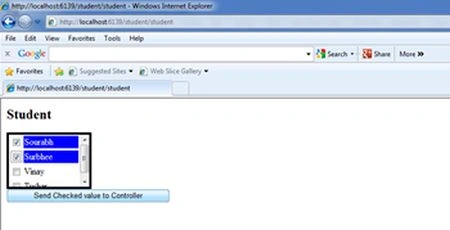
You might now wonder how this blue color appears in the background when I check a checkbox and disappears when I uncheck a checkbox. I did this using jQuery. But first you must understand how this checkbox list is created.
- <div id="divstudentlist" style="height: 110px; overflow: auto;border:solid; width:150px;">
- @foreach (var names in @Model.StudentNames)
- {
- var checkBoxId = "chk" + names.Value;
- var tdId = "td" + names.Value;
- <table width="100%">
- <tr >
- <td width="20px">
- <input type="checkbox" id="@checkBoxId" class="chkclass" value="@names.Value" />
- </td>
- <td id="@tdId" width="100px">
- @names.Text
- </td>
- </tr>
- </table>
- }
- </div>
- @foreach (var names in @Model.StudentNames)
- var checkBoxId = "chk" + names.Value;
- var tdId = "td" + names.Value;
- <table width="100%">
- <tr >
- <td width="20px">
- <input type="checkbox" id="@checkBoxId" class="chkclass" value="@names.Value" />
- </td>
- <td id="@tdId" width="100px">
- @names.Text
- </td>
- </tr>
- </table>
- <script src="~/Scripts/jquery-1.7.1.min.js"></script>
- <script>
- $(document).ready(function () {
- $('.chkclass').click(function () {
- var getchkid = $(this).attr('id');
- var isChecked = $('#' + getchkid).is(':checked');
- if ($('#' + getchkid).is(':checked') == true) {
- $('#td' + $(this).val()).css("color", "white");
- $('#td' + $(this).val()).css("background-color", "blue");
- }
- else {
- $('#td' + $(this).val()).css("color", "black");
- $('#td' + $(this).val()).css("background-color", "white");
- }
- });
- });
- </script>
- $('#bttn_Click').click(function () {
- var studentListVal = null;
- studentListVal = [];
- $('input:checkbox:checked').each(function () {
- studentListVal.push($(this).attr('value'));
- });
- $.ajax({
- type: "post",
- url: "/Student/Studentl",
- data: { Name: studentListVal },
- datatype: "json",
- traditional: true,
- success: function (data) {
- var selectedIds;
- for (var i = 0; i < data.success.length; i++)
- {
- if (selectedIds != undefined) {
- selectedIds = selectedIds + " " + data.success[i];
- }
- else {
- selectedIds = data.success[i];
- }
- }
- alert('You have Selected Student Ids- '+selectedIds);
- }
- });
- });
- $('input:checkbox:checked').each(function () {
- studentListVal.push($(this).attr('value'));
- });
- $.ajax({
- type: "post",
- url: "/Student/Studentl",
- data: { Name: studentListVal },
- datatype: "json",
- traditional: true,
- success: function (data) {
- var selectedIds;
- for (var i = 0; i < data.success.length; i++)
- {
- if (selectedIds != undefined) {
- selectedIds = selectedIds + " " + data.success[i];
- }
- else {
- selectedIds = data.success[i];
- }
- }
- alert('You have Selected Student Ids- '+selectedIds);
- }
- });
- [HttpPost]
- public ActionResult Studentl(string[] Name)
- {
- return Json(new { success = Name });
- }
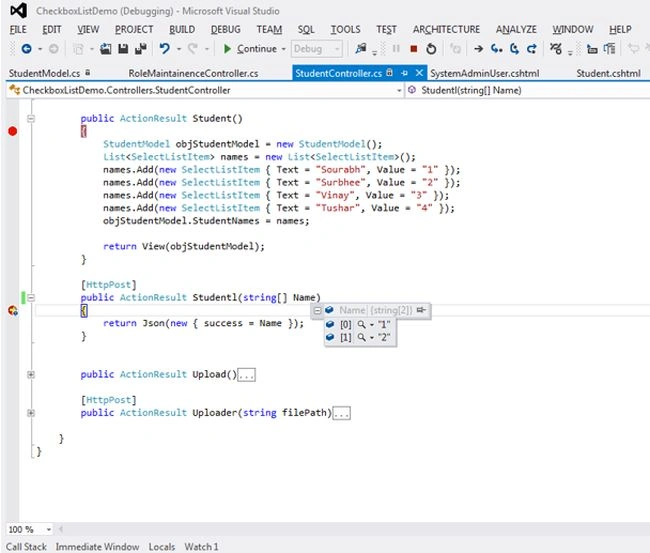
That's it. I hope you enjoy to create this checkboxlist in MVC. If you have any query, Please send your valuable Comments. Happy Programming!
Abhilash J APosted Nov 15, 2016, 12:15 AM
Hi Tuan, try this http://www.c-sharpcorner.com/blogs/multiselect-dropdown-with-checkbox-in-mvc-4 and After getting all checkbox checked items each ids in controller. Then you have to separate each item using comma split function after insert each ids by using foreach. Good Luck!!!
Tuan Anh NguyenPosted Nov 14, 2016, 11:34 PM
Hi. After sent data to Controller I have selected, I want to insert data to SQL tables, So how I can do it? Thanks in advance
Srinivas Rao BolisettiPosted Aug 6, 2016, 10:49 AM
Hi Sourabh...I am getting Null Json Data....I just copy pasted ur code.I want this functionality now.And also Checkbox event not firing...Please guide me...Thanks in advance
pramod buttePosted Jul 5, 2016, 5:54 AM
Hi sir i have used same code but didnt get selected values
shivu bellaryPosted Oct 30, 2015, 10:12 AM
hi sourabh i have used your code but in controller its not showing the selected checkbox value so how could i access it. and please update me the code. for example if i select sourabh and surbhee, vinay i need to store it as 3 rows like 1 sourabh 2 surbhee 3 vinay. please help me out of this.
shivu bellaryPosted Oct 30, 2015, 10:09 AM
Hi sourabh
Abhilash J APosted Aug 20, 2015, 10:31 AM
how to use viewbag data in checkbox for the Edit Methods and Edit View mvc4. $("#checkBoxId").val(@ViewBag.listProductItem)
Nur SyarafanaPosted Dec 21, 2014, 1:49 AM
how to send value to database
ankita bansalPosted May 28, 2014, 6:00 AM
sir, thank you so much . i have used your code successfully but now i need to retrieve selected checkbox value then how should i do this. please can you provide code for this. and then at the time of editing need to select checkbox which were selected at the time of submission.
Mukesh PrajapatiPosted Dec 28, 2013, 5:00 AM
Whenever i add filed like public IList<SelectListItem> StudentNames { get; set; } in my existing class file(Model) then get error like... : One or more validation errors were detected during model generation: \tSystem.Data.Entity.Edm.EdmEntityType: : EntityType 'SelectListItem' has no key defined. Define the key for this EntityType. \tSystem.Data.Entity.Edm.EdmEntitySet: EntityType: EntitySet 'SelectListItems' is based on type 'SelectListItem' that has no keys defined.
Bhushan ShahPosted Oct 19, 2013, 7:07 AM
Hi, how to post data at time of submit and how to retrieve value from db into checkboxlist?