

In this article we will be seeing how to configure multi tenancy in SharePoint
2010.
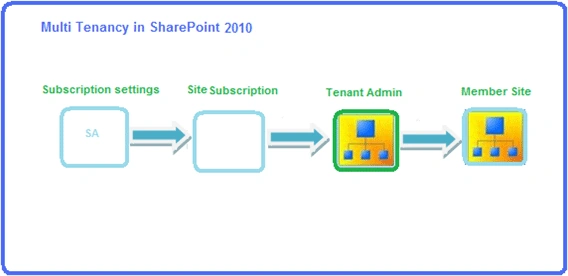
In this article:
- Create Subscription settings Service Application and Proxy
- Create new site subscription
- Create Tenant Administration site
- Create Member Site
Create Subscription settings Service Application and Proxy
- Subscription settings service application is used to keep track of Multi - Tenant services and subscription ID's.
- Go to Central Administration => Application Management => Manage services on server.
- Start the service "Microsoft SharePoint
Foundation Subscription Settings Service".

- Create a new subscription settings service
application using the following powershell command.
$applicationPool = New-SPServiceApplicationPool -Name "Subscription Settings Service Pool" -Account domain\username
$serviceApplication = New-SPSubscriptionSettingsServiceApplication –Name "Subscription Settings Service Test" –Databasename "SubscriptionSettingsServiceTestDB" –applicationpool $applicationPool
$serviceApplicationProxy = new-SPSubscriptionSettingsServiceApplicationProxy –ServiceApplication $serviceApplication
- Go to Central Administration => Application Management =>Manage service applications.
- You could see a new Subscription settings
service application is created successfully.

Create new site subscription:
- SharePoint 2010 introduces a new concept called Site Subscriptions.
- Site Subscriptions are also known as Tenants.
- It is used to represent a collection of all SPSite objects that currently subscribe to service partitions, settings, and features.
- Site collections for each tenant are grouped together with a Subscription ID.
- Subscription ID is used to map features, services, and sites to tenants.
- Create a new site subscription using the
following powershell command.
$subscription = New-SPSiteSubscription

Create Tenant Administration site:
- Tenant Administration Site is a new site
type that is used for managing all the features and sites assigned to the
site subscription.
- From tenant administration new site
collections can be created, but it requires that Self Service Site creation
is enabled for the web application.
- Self Service Site creation is web
application scoped.
- Create a tenant administration site using
the following powershell command.
New-SPSite –url "http://serverName:2/sites/Tenant Administration" –Template "tenantadmin#0" –OwnerAlias domain\userName –SiteSubscription $subscription -AdministrationSiteType TenantAdministration
- Template "tenantadmin#0": A new site template in SharePoint 2010 which is used to manage tenant site collections.
- SiteSubscription: This is used to associate the tenant administration site with the Site Subscription. A site collection can be associated with only one tenant administration site whereas a tenant administration site can be associated with many site collections.
- AdministrationSiteType: It sets a flag at site collection creation time that is used to manage tenant site collections.
Create Member site:
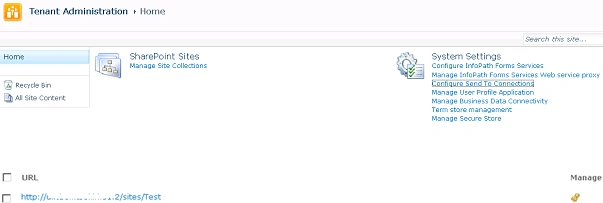
- Go to Tenant Administration => Manage Site
Collections => Click on "New" to create a new site collection (Enable Self
Service Site Creation- refer Enable Self Service Site creation in SharePoint
2010 ).
- Using powershell how to set the site
collection to the subscription.
$site = Get-SPSite | where {$_.url -eq "http://serverName:2/sites/Test"}
Set-SPSite -Identity $site -SiteSubscription $subscription
ranjeeth kumarPosted Jun 11, 2013, 2:31 PM
Hi, Could you please share me Business Data Connectivity Service Application creation in multi tenant site share point ?