

Introduction
Whenever a Stored Procedure or parameterized query is executed, the query optimizer tries to reuse the execution plan. If an execution plan already exists for a Stored Procedure or parameterized query in the cache then the query optimizer will blindly reuse it. If an execution plan is not present in the cache then the query optimizer creates a well-optimized execution plan based on input parameter values. The query optimizer will use the same execution plan for the next call of the Stored Procedure. This is known as parameter sniffing. Parameter sniffing is enabled by default in SQL Server. The cached execution plan may not be well-optimized for the new parameter, hence the second call of the query may be very slow.
The advantage of this behavior of the optimizer, is that the optimizer needs not re-create the execution plan to execute the same query multiple times. The optimizer will go and search the execution plan that is compiled earlier from the cache. This looks beneficial when good statistcs are maintained and typical parameters are used.
Parameter Sniffing Workaround
Disabling the parameter sniffing is helpful when there are several parameters in a Stored Procedure and there is also no favorite combination of parameters. If the value of parameters is not known at the time of compilation then there is nothing to be sniffed.
Using following, we may avoid the issue with parameter sniffing.
In this article I am using the same example from my previous article:
Parameter Sniffing in SQL Server
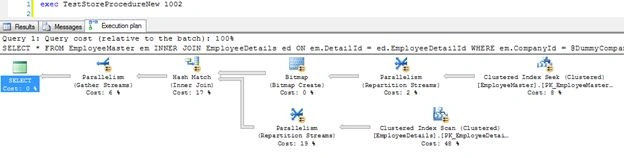
Use dummy variables that are not directly used as parameters
Use of a dummy variable that is not used as a parameter also ensures the stability of the execution plan.
CREATE PROCEDURE TestStoreProcedureNew
(
@CompanyId INT
)
AS
BEGIN
DECLARE @DummyCompanyId INT
SET @DummyCompanyId = @CompanyId
SELECT * FROM EmployeeMaster em
INNER JOIN EmployeeDetails ed ON em.DetailId = ed.EmployeeDetailId
WHERE em.CompanyId = @DummyCompanyId
END
Execute Stored Procedure using "WITH RECOMPILE" option
This solution enforces recompilation of the Stored Procedure on each run, so every time the optimizer creates a new execution plan for the current parameters.
EXEC TestStoreProcedureNew 1002 WITH RECOMPILE
--OR
CREATE PROCEDURE TestStoreProcedureWithRecompile
(
@CompanyId INT
)
WITH RECOMPILE
AS
BEGIN
SELECT * FROM EmployeeMaster em
INNER JOIN EmployeeDetails ed ON em.DetailId = ed.EmployeeDetailId
WHERE em.CompanyId = @CompanyId
END
Query hint RECOMPILE
SQL Server offers the new query hint RECOMPILE that forces query recompilation. This is a better way in which only a specific query is recompiled but in the above method entire the Stored Procedure is recompiled on every call. OPTIMIZE FOR in a query hint allows us to specify a constant that is used by the optimizer while optimizing the query.
CREATE PROCEDURE TestStoreProcedureQueryHint
(
@CompanyId INT
)
AS
BEGIN
SELECT * FROM EmployeeMaster em
INNER JOIN EmployeeDetails ed ON em.DetailId = ed.EmployeeDetailId
WHERE em.CompanyId = @CompanyId
OPTION (OPTIMIZE FOR UNKNOWN)
END
Disable auto-update statistics during the batch
Statistics are database objects that contains the information about the value distribution in one or more columns of a table and views. The optimizer uses this statistical data to estimate the number of rows in the query result and based on the number of rows the optimizer will select the execution plan. In the case when the statistics are very old or invalid or out of date then the optimizer chooses the wrong execution plan, hence query performance is degraded.
Using the system Stored Procedure "sp_updatestats" we can update the statics of the database. Frequently, update statistics are a bad option for dealing with parameter sniffing.
To disable the "Auto Update Statistics", go to the database property and select the "Option" tab and set the "Auto Update Statistics" property to false.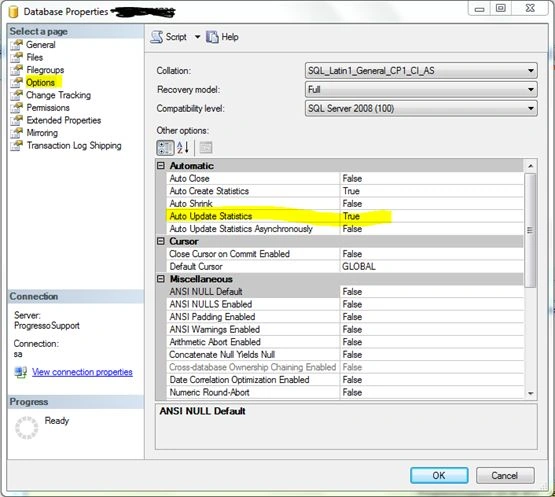
Alternatively we can also use the following script to disable the Auto Update Statistics.
ALTER DATABASE DatabaseName SET AUTO_UPDATE_STATISTICS OFF
Use Decision Tree algorithm in Stored Procedure
A decision tree Stored Procedure decides which Stored Procedure is called and the decision making is based on the parameter value.
the
In the preceding example, the Stored Procedure "TestStoreProcedureDecisionTree" determines if the parameter value is 1001 then it calls a "TestStoreProcedureCompany1", if the parameter value 1002 is found then it calls a "TestStoreProcedureCompany2" Stored Procedure. Here both sub Stored Procedures have the same procedure body, in other words both are identical.
CREATE PROCEDURE TestStoreProcedureDecisionTree
(
@CompanyId INT
)
AS
BEGIN
IF(@CompanyId = 1001)
BEGIN
EXEC TestStoreProcedureCompany1 @CompanyId
END
ELSE IF(@CompanyId = 1002)
BEGIN
EXEC TestStoreProcedureCompany2 @CompanyId
END
END
GO
CREATE PROCEDURE TestStoreProcedureCompany1
(
@CompanyId INT
)
AS
BEGIN
SELECT * FROM EmployeeMaster em
INNER JOIN EmployeeDetails ed ON em.DetailId = ed.EmployeeDetailId
WHERE em.CompanyId = @CompanyId
END
GO
CREATE PROCEDURE TestStoreProcedureCompany2
(
@CompanyId INT
)
AS
BEGIN
SELECT * FROM EmployeeMaster em
INNER JOIN EmployeeDetails ed ON em.DetailId = ed.EmployeeDetailId
WHERE em.CompanyId = @CompanyId
END
Execution plan 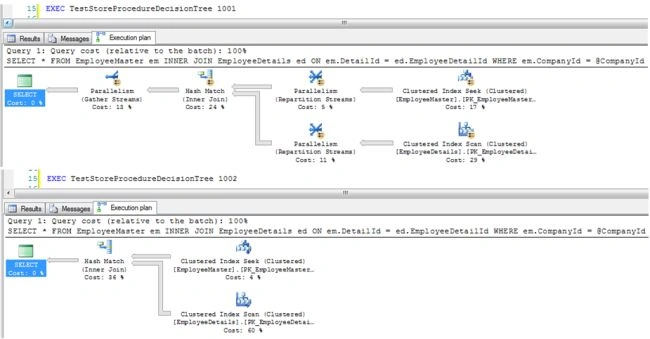
This solution allows us to reuse the execution plans and this is better than other options or solutions such as recompilation of a query or Stored Procedure in terms of performance.
Summary
In short, parameter sniffing is one plan for all parameter combinations.
Common work around of parameter sniffing:
- Use Optimize for unknown or optimized for @Variable (Query hint)
- Use Plan guide
- Recompile procedure option
- Avoid use of a parameter in a where clause directly instead of using a dummy variable
- Use the decision tree algorithm within a Stored Procedure for a different value of the parameter
Keyur PatelPosted Nov 18, 2013, 4:57 AM
Detail explanation on controlling parameter sniffing in Sql server. Good article.