
Introduction
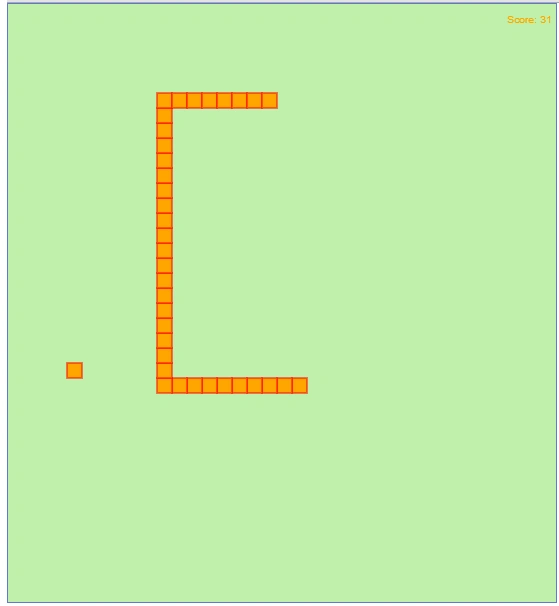
These days, I'm working on HTML5, so I decided to make some examples using the HTML5 Canvas. Canvas is one of the best features of HTML5, and you can create beautiful designs using it. In this article, I have tried to make a very old and classy game example that we played many times in our childhood. We used the HTML5 Canvas and a little jQuery to create our "Classic Snake Game".
Step 1. Create a canvas in your application's body and provide its size, whatever you want. Now, here we create a canvas with 600px width and 600px height:
<canvas id="drawCanvas" width="600" height="600"></canvas>Step 2. In the head section, we need to write our jQuery code in a <script> tag. So, now declare some variables for our canvas that we need in our code.
var drawCanvas = $("#drawCanvas")[0];
var context = drawCanvas.getContext("2d");
var width = $("#drawCanvas").width();
var height = $("#drawCanvas").height();
Step 3. Now, we declare some variables inside our start() method. For some easy control, you can save the width of a cell into a variable:
var cell_width = 15;
var defaultRun;
var snake_food;
var userscore;
Now, to create a snake, we need to define an array of cells:
var mySnakeArray;Now, to start our game, we need a function that helps us run our game:
function start()Set the default direction of the snake to go to the right:
defaultRun = "right";To create our snake's food, we need to create a function:
createFood();Also, we need to display our score so we can define a variable for it:
userscore = 0;To move our snake, we can use a timer that will trigger the paintSnake method every 70ms:
if (typeof game_loop != "undefined") clearInterval(game_loop);
game_loop = setInterval(paintSnake, 70);
Step 4. Now, it's time to create our Snake using the createSnake() method. In this method, we also define the size of our snake and use an empty array to start:
function createSnake() {
     var snakeSize = 6;
     mySnakeArray = [];
     for (var m = 0; m<snakeSize-1;m++) {
This line will create a horizontal snake starting from the middle left. You can change its position by giving the value of x or y:
mySnakeArray.push({ x: 0, y: 20 });Step 5. Now it's time to create some food for our little hungry snake. Here, we used some mathematical functions that will create a cell with x/y between 0-44 because there are 45(450/10) positions across the rows and columns:
function createFood() {
    snake_food = {
        x: Math.round(Math.random() * (width - cell_width) / cell_width),
        y: Math.round(Math.random() * (height - cell_width) / cell_width),
    };
 }
Step 6. After creating our snake, we need a paintSnake() method to paint a snake. We need to paint the Background on every frame to avoid the snake trail:
function paintSnake()First, we need to paint our canvas:
context.fillStyle = "#c0f0aa";
context.fillRect(0, 0, width, height);
context.strokeStyle = "0000ff";
context.strokeRect(0, 0, width, height);
Now, we need to move our snake. Here, we use two variables that will pop out the last cell, and it will be placed in front of the head cell:
var pop_x = mySnakeArray[0].x;
var pop_y = mySnakeArray[0].y;
These are the positions of the head cell. We need to increment it to get the new head position of our snake. Now add some proper direction moment:
if (defaultRun == "right") pop_x++;
else if (defaultRun == "left") pop_x--;
else if (defaultRun == "down") pop_y++;
else if (defaultRun == "up") pop_y--;
It's time to add the game, so it will restart our game if our snake hits the wall. Also, add the body collision code so that if our snake's head bumps into the body, then our game will restart:
if (pop_x == -1 || pop_x == width / cell_width || pop_y == -1 || pop_y == height / cell_width || check_collision(pop_x, pop_y, mySnakeArray)) {The start() method will restart our game, and return helps to organize our code:
     start();
     return;
}
Step 7. Now we need to write some code so that our little hungry snake will eat his food. The logic is very simple: if the new head position matches the food, then create a new head instead of moving the snake's tail:
if (pop_x == snake_food.x && pop_y == snake_food.y) {
     var snake_tail = { x: pop_x, y: pop_y };
     userscore++;
     createFood();    //It will create our snakes food.
}
else {
    var snake_tail = mySnakeArray.pop();
    snake_tail.x = pop_x; snake_tail.y = pop_y;
}
Finally, our little hungry snake is able to eat his food. Now, we need to return the snake's tail to the first cell:
mySnakeArray.unshift(snake_tail);If you remember, we declared our cell width; we now paint a 15px wide cell using "paintCell(k.x, k.y)". After that, we will paint the food & score both:
paintCell(snake_food.x, snake_food.y);
var score_text = "Score: " + userscore;
context.fillText(score_text, width-50, 20);
Step 8. Now, create a generic function that will paint cells:
function paintCell(x, y) {
     context.fillStyle = "orange";
     context.fillRect(x * cell_width, y * cell_width, cell_width, cell_width);
     context.strokeStyle = "red";
     context.strokeRect(x * cell_width, y * cell_width, cell_width, cell_width);
 }
Step 9. This is a very important method that will check if the given x/y coordinates exist already in an array of cells or not.
function check_collision(x, y, array) {
    for (var i = 0; i < array.length; i++) {
        if (array[i].x == x && aIntroductionrray[i].y == y)
            return true;
    }
    return false;
}
Step 10. In this final step, we will add the keyboard controls so that we can control our little snake using our keyboard arrow keys.
$(document).keydown(function (e) {
      var keyInput = e.which;
We will add another clause to prevent reverse gear:
if (keyInput == "40" && defaultRun != "up") defaultRun = "down";
else if (keyInput == "39" && defaultRun != "left") defaultRun = "right";
else if (keyInput == "38" && defaultRun != "down") defaultRun = "up";
else if (keyInput == "37" && defaultRun != "right") defaultRun = "left";
We have created our snake game in just ten simple steps, and now it's ready to play. I'm providing the complete code below, or you can also download the code from the link above.
<%@ Page Language="C#" AutoEventWireup="true" CodeFile="snake.aspx.cs" Inherits="snake" %>

<!DOCTYPE html>

<html xmlns="http://www.w3.org/1999/xhtml">
<head runat="server">
    <title></title>
    <style type="text/css">
        body {
            margin: 0 auto;
            padding : 0;
        }
    </style>
    <!-- Jquery -->
    <script src="http://ajax.googleapis.com/ajax/libs/jquery/1.7.1/jquery.min.js" type="text/javascript"></script>
    <script>
        $(document).ready(function () {
            //Canvas stuff
            var drawCanvas = $("#drawCanvas")[0];
            var context = drawCanvas.getContext("2d");
            var width = $("#drawCanvas").width();
            var height = $("#drawCanvas").height();

            var cell_width = 15;
            var defaultRun;
            var snake_food;
            var userscore;
            var mySnakeArray;

           function start() {
                defaultRun = "right";
                createSnake();
                createFood();
                userscore = 0;

                if (typeof game_loop != "undefined") clearInterval(game_loop);
                game_loop = setInterval(paintSnake, 70);
            }
            start();

           function createSnake() {
                var snakeSize = 6;
                mySnakeArray = [];
                for (var m = 0; m<snakeSize-1;m++) {
                    mySnakeArray.push({ x: 0, y: 20 });
                }
            }

            function createFood() {
                snake_food = {  Introduction
                    x: Math.round(Math.random() * (width - cell_width) / cell_width),
                    y: Math.round(Math.random() * (height - cell_width) / cell_width),
                };
             }

            function paintSnake() {
                context.fillStyle = "#c0f0aa";
                context.fillRect(0, 0, width, height);
                context.strokeStyle = "0000ff";
                context.strokeRect(0, 0, width, height);

                var pop_x = mySnakeArray[0].x;
                var pop_y = mySnakeArray[0].y;

                if (defaultRun == "right") pop_x++;
                else if (defaultRun == "left") pop_x--;
                else if (defaultRun == "down") pop_y++;
                else if (defaultRun == "up") pop_y--;


                 if (pop_x == -1 || pop_x == width / cell_width || pop_y == -1 || pop_y == height / cell_width || check_collision(pop_x, pop_y, mySnakeArray)) {
                     start();
                     return;
                }

                 if (pop_x == snake_food.x && pop_y == snake_food.y) {
                    var snake_tail = { x: pop_x, y: pop_y };
                    userscore++;
                     createFood();
                }
                else {
                    var snake_tail = mySnakeArray.pop();
                    snake_tail.x = pop_x; snake_tail.y = pop_y;
                }

                mySnakeArray.unshift(snake_tail);

                for (var i = 0; i < mySnakeArray.length; i++) {
                    var k = mySnakeArray[i];

                    paintCell(k.x, k.y);
                }


                paintCell(snake_food.x, snake_food.y);

                var score_text = "Score: " + userscore;
                context.fillText(score_text, width-50, 20);
            }

           function paintCell(x, y) {
                context.fillStyle = "orange";
                context.fillRect(x * cell_width, y * cell_width, cell_width, cell_width);
                context.strokeStyle = "red";
                context.strokeRect(x * cell_width, y * cell_width, cell_width, cell_width);
            }

            function check_collision(x, y, array) {
                for (var i = 0; i < array.length; i++) {
                    if (array[i].x == x && array[i].y == y)
                        return true;
                }
                return false;
            }

          $(document).keydown(function (e) {
                var keyInput = e.which;
                if (keyInput == "40" && defaultRun != "up") defaultRun = "down";
                else if (keyInput == "39" && defaultRun != "left") defaultRun = "right";
                else if (keyInput == "38" && defaultRun != "down") defaultRun = "up";
                else if (keyInput == "37" && defaultRun != "right") defaultRun = "left";
            })
        })
    </script>
</head>
<body>
    <form id="form1" runat="server">
        <div>
             <canvas id="drawCanvas" width="550" height="600"></canvas>

        </div>
    </form>
</body>
</html>

Sam HobbsPosted Aug 11, 2013, 12:39 PM EDT
That looks both fun and educational. Thank you for the detailed explanation.