

Introduction
In this article we will use the Ajax calls and HttpRequests to the domains to create an AJAX request that would be considered cross-domain between these two applications. First we will create a simple action in the Web API controller "Values Controller". And the second process is to create a view that will perform an AJAX call to this project and retrieve the message from the controller.
Now let's create an application:
- Create a Web API application:
- Start Visual Studio 2013.
- From the Start window select "New Project" .
- Select "Installed" -> "Template" -> "Visual Studio 2012" and then select "ASP.NET MVC4 Web Application".
- Click on the "OK" button.
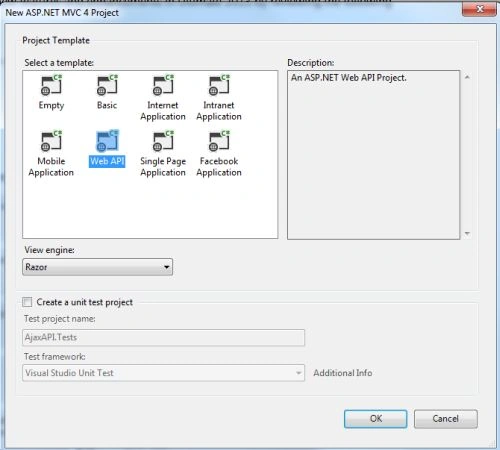
- From the MVC4 project window select "Web API".

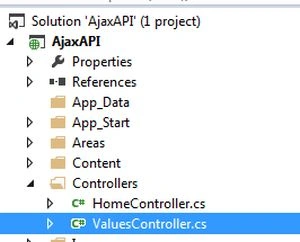
- No we add a action in the "ValuesController". This file exists in the Controller Folder that exists in the Solution Explorer. Select this class and write this code of line.
- public class ValuesController : ApiController
- {
- // GET api/values
- public string Get()
- {
- return "Can you Read This Example?";
- }
- }
- Now we create a View in which we create an AJAX call. This file exists in the Home Folder.

- <html>
- <head runat="server">
- <meta name="viewport" content="width=device-width" />
- <title>Ground Control</title>
- <!-- jQuery Reference to handle AJAX call -->
- <script src="@Url.Content("~/Scripts/jquery-1.8.2.js")"></script>
- <!-- Our script to actually fire the call itself -->
- <script type="text/javascript">
- //When the page loads
- $(function () {
- //Fire this AJAX call
- $.ajax({
- url: "http://localhost:3035/api/values",
- type: "GET",
- success: function (data) {
- alert(data);
- },
- error: function (event) {
- //If any errors occurred - detail them here
- alert("Operation Failes(Error generated)");
- }
- });
- });
- </script>
- </head>
- <body>
- </body>
- </html>
In the code above we defined the port "3035", we can easily set it through the project property depending on your choice.
- In the Solution Explorer.
- Right-click on the project and select "properties".
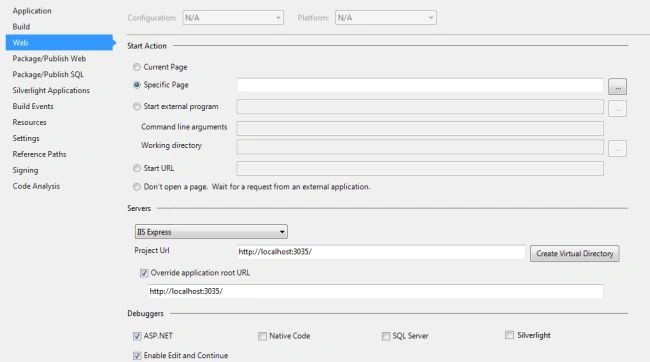
- In the property window select the the "Web" and the in the project URL set the desired URL.
- Now click on the "Override application root URL" and paste the preceding URL and click on the "create virtual directory" button.

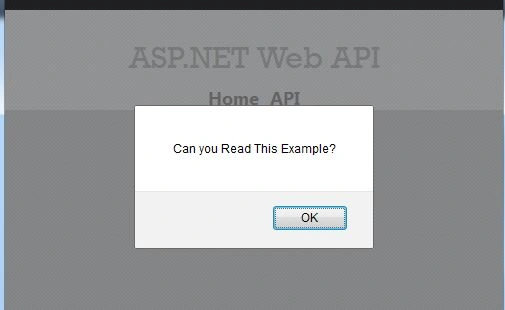
- Now execute the application. When the page loads it retrieves the message and displays it in the alert box.
Join the conversation! Your thoughts help the community grow.