

Background
Recently, I was working on a proof of concept to SharePoint to GSuite data/content migration. As part of this POC, I was required to use Google API to create a spreadsheet and add data to the spreadsheet using .NET. The source data was to be read from SharePoint List items using CSOM.
The Generic Idea here is to create a new spreadsheet using Drive API and then use the Sheet API to update data in the spreadsheet.
If you don't have the basic understanding of Drive and Sheet API, I would request you to go through the below links.
- https://developers.google.com/drive/api/
- https://developers.google.com/sheets/api/
Prerequisites
- Enable Google Drive and Spreadsheet API to generate the client Id and client secret (crendentials.json) which will be used later. There are many articles already available on how to do this. So, I won't explain it here. Please refer to the below links for quick reference.
https://developers.google.com/drive/api/v3/quickstart/dotnet
https://developers.google.com/sheets/api/quickstart/dotnet
Please note that if you are doing this in ASP.NET, you have to generate the client id and secret for the web application.
- Create a Windows Console application or web application (using Visual Studio)
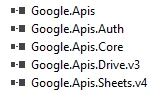
- Add a reference to Google API dll via NuGet package. Alternatively, you can download it manually from nuget.org link and add references.
- Below is a screenshot of DLLs required.
Now, let us start with code snippets.
Create a Spreadsheet
Call the below method to create a spreadsheet. I have added comments to explain.
- public Google.Apis.Drive.v3.Data.File CreateSheet()
- {
- string[] scopes = new string[] { DriveService.Scope.Drive,
- DriveService.Scope.DriveFile,};
- var clientId = "123456337-wajklowlksflmxiowerasjdflsl.apps.googleusercontent.com"; // From https://console.developers.google.com
- var clientSecret = "kkslfdkiwowol_ssdwerss"; // From https://console.developers.google.com
- // here is where we Request the user to give us access, or use the Refresh Token that was previously stored in %AppData%
- var credential = GoogleWebAuthorizationBroker.AuthorizeAsync(new ClientSecrets
- {
- ClientId = clientId,
- ClientSecret = clientSecret
- },scopes,
- Environment.UserName,CancellationToken.None,new FileDataStore("MyAppsToken")).Result;
- //Once consent is recieved, your token will be stored locally on the AppData directory, so that next time you wont be prompted for consent.
- DriveService _service = new DriveService(new BaseClientService.Initializer()
- {
- HttpClientInitializer = credential,
- ApplicationName = "MyAppName",
- });
- var _parent = "";//ID of folder if you want to create spreadsheet in specific folder
- var filename = "helloworld";
- var fileMetadata = new Google.Apis.Drive.v3.Data.File()
- {
- Name = filename,
- MimeType = "application/vnd.google-apps.spreadsheet",
- //TeamDriveId = teamDriveID, // IF you want to add to specific team drive
- };
- FilesResource.CreateRequest request = _service.Files.Create(fileMetadata);
- request.SupportsTeamDrives = true;
- fileMetadata.Parents = new List<string> { _parent }; // Parent folder id or TeamDriveID
- request.Fields = "id";
- System.Net.ServicePointManager.ServerCertificateValidationCallback = delegate (object sender, X509Certificate certificate, X509Chain chain, SslPolicyErrors sslPolicyErrors) { return true; };
- var file = request.Execute();
- MessageBox.Show("File ID: " + file.Id);
- return file;
- }
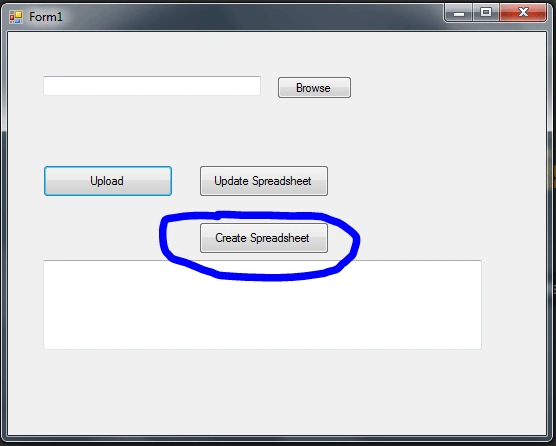
Now, let us see what will happen when the above method is executed, assuming we are calling this method on button click of a Windows application like the below 'Create Spreadsheet'.
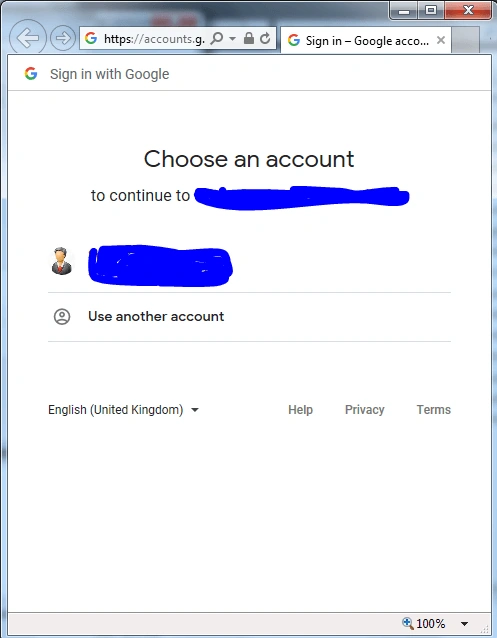
A new browser window would open asking to authenticate the user. Enter your Google credentials.
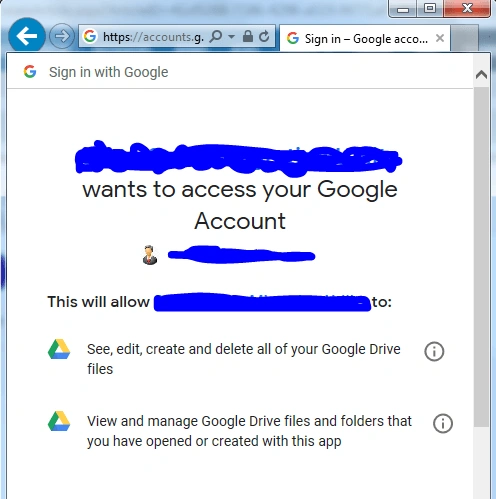
The User Consent screen will be displayed. Provide access to the Google Drive.
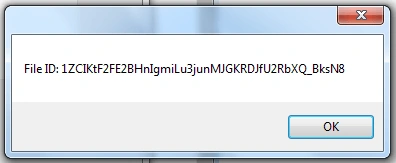
A success message will be displayed with the file's id.
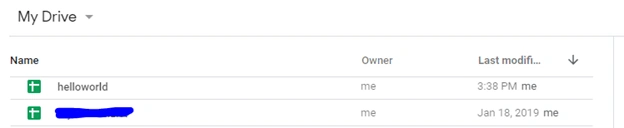
Go to Google drive; a file with name 'helloworld' will be created of type spreadsheet.
Update SpreadSheet
Call the below method to add data to the spreadsheet created above. To reuse some code, I have segregated the logic into different methods. All the supporting methods are also added here for reference.
- private UpdateSpreadSheet()
- {
- // SpreadhSheetID of above created document.
- var SheetId = "1ZCIKtF2FE2BHnIgmiLu3junMJGKRDJfU2RbXQ_BksN8";
- var service = AuthorizeGoogleAppForSheetsService();
- string newRange = GetRange(service,SheetId);
- IList<IList<Object>> objNeRecords = GenerateData();
- UpdatGoogleSheetinBatch(objNeRecords, SheetId, newRange, service);
- MessageBox.Show("done!");
- }
Method to start authorization flow
Note
Here, we are using the spreadsheetcredentials.json file to pass client id and client secret. This is another way to pass client id and secret rather than hardcoding in code. This JSON file can be downloaded from console.developers.google.com.
Here, we are using the spreadsheetcredentials.json file to pass client id and client secret. This is another way to pass client id and secret rather than hardcoding in code. This JSON file can be downloaded from console.developers.google.com.
- private static SheetsService AuthorizeGoogleAppForSheetsService()
- {
- // If modifying these scopes, delete your previously saved credentials
- // at ~/.credentials/sheets.googleapis.com-dotnet-quickstart.json
- string[] Scopes = { SheetsService.Scope.Spreadsheets };
- string ApplicationName = "Google Sheets API .NET Quickstart";
- UserCredential credential;
- using (var stream =
- new FileStream("spreadsheetcredentials.json", FileMode.Open, FileAccess.Read))
- {
- credential = GoogleWebAuthorizationBroker.AuthorizeAsync(
- GoogleClientSecrets.Load(stream).Secrets,
- Scopes,
- "user",
- CancellationToken.None,
- new FileDataStore("MyAppsToken")).Result;
- }
- // Create Google Sheets API service.
- var service = new SheetsService(new BaseClientService.Initializer()
- {
- HttpClientInitializer = credential,
- ApplicationName = ApplicationName,
- });
- return service;
- }
Method to get the range of row and column from where we need to add data to the spreadsheet -- if there are no previous values added, start from the first row and column.
- protected static string GetRange(SheetsService service,string SheetId)
- {
- // Define request parameters.
- String spreadsheetId = SheetId;
- String range = "A:A";
- SpreadsheetsResource.ValuesResource.GetRequest getRequest =
- service.Spreadsheets.Values.Get(spreadsheetId, range);
- System.Net.ServicePointManager.ServerCertificateValidationCallback = delegate (object sender, X509Certificate certificate, X509Chain chain, SslPolicyErrors sslPolicyErrors) { return true; };
- ValueRange getResponse = getRequest.Execute();
- IList<IList<Object>> getValues = getResponse.Values;
- if(getValues == null)
- {
- // spreadsheet is empty return Row A Column A
- return "A:A";
- }
- int currentCount = getValues.Count() + 1;
- String newRange = "A" + currentCount + ":A";
- return newRange;
- }
- private static IList<IList<Object>> GenerateData()
- {
- List<IList<Object>> objNewRecords = new List<IList<Object>>();
- int maxrows = 5;
- for (var i = 1;i<=maxrows;i++ )
- {
- IList<Object> obj = new List<Object>();
- obj.Add("Data row value - " + i + "A");
- obj.Add("Data row value - " + i + "B");
- obj.Add("Data row value - " + i + "C");
- objNewRecords.Add(obj);
- }
- return objNewRecords;
- }
- private static void UpdatGoogleSheetinBatch(IList<IList<Object>> values, string spreadsheetId, string newRange, SheetsService service)
- {
- SpreadsheetsResource.ValuesResource.AppendRequest request =
- service.Spreadsheets.Values.Append(new ValueRange() { Values = values }, spreadsheetId, newRange);
- request.InsertDataOption = SpreadsheetsResource.ValuesResource.AppendRequest.InsertDataOptionEnum.INSERTROWS;
- request.ValueInputOption = SpreadsheetsResource.ValuesResource.AppendRequest.ValueInputOptionEnum.RAW;
- var response = request.Execute();
- }
We have all our methods ready. Now, let us see what will happen when the above UpdateSpreadSheet is executed, assuming we are calling this method on button click of a Windows application 'Update Spreadsheet'. If the user is not authenticated, we will go through the similar process where a browser window will ask to authenticate user.
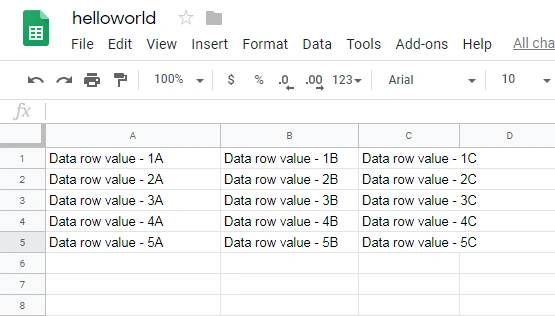
Once the process is completed, we will get a Message box with 'done!'. Let us go to Google Drive and open the same helloworld file to see the changes.
Hope this helps...Happy coding.!!!!
Faisal zubiarPosted Aug 29, 2022, 12:37 PM
Siddharth can you please post article on BatchUpdateByDataFilter? it will be very helpful for us.
Faisal zubiarPosted Aug 29, 2022, 11:44 AM
Siddharth is this an example of BatchUpdateByDataFilter?
Faj'run Ni'amPosted Nov 18, 2021, 2:44 AM
Thanks for this. can you help me? coding to read and write google spreadsheets via google api net library ? thanks
vimal rajPosted Jan 28, 2021, 8:39 AM
Thanks for this. The local system is working fine. my web application, after deploying Into production, ive a error like like ‘Access to the path 'C:\Windows\system32\config\systemprofile' is denied.’
José Roberto García MartínezPosted Dec 24, 2019, 3:05 AM
Hello Siddharth, I am trying to create a spreadsheet, but this error is thrown: Google.GoogleApiException: 'Google.Apis.Requests.RequestErrorFile not found: . [404] Errors [ Message[File not found: .] Location[fileId - parameter] Reason[notFound] Domain[global]
Dinesh GabhanePosted Nov 6, 2019, 1:33 AM
Nice Article