

Introduction
In a web application, if you fill some form and unknowingly click on other navigation, you might lose your data filled in the form. It might be difficult for a user to fill in the form once again. We can monitor the changes and we can give an alert to the user. In this article, I will show you how to implement unsaved changes alert to a user in Angular 7.
Step 1 - Create an Injectable class which implements CanDeactivate interface
Create an injectable export class (SampleChangesGuard) which implements the CanDeactivate interface and an export interface (SampleComponentCanDeactivate) like below.
- import { CanDeactivate } from "@angular/router";
- import { Injectable } from "@angular/core";
- import { Observable } from "rxjs/Observable";
- export interface SampleComponentCanDeactivate {
- SamplecanDeactivate: () => boolean | Observable<boolean>;
- }
- @Injectable()
- export class SampleChangesGuard implements CanDeactivate<SampleComponentCanDeactivate> {
- constructor() {
- }
- canDeactivate(
- component: SampleComponentCanDeactivate
- ): boolean | Observable<boolean> {
- return component.SamplecanDeactivate()
- ? true
- : confirm(
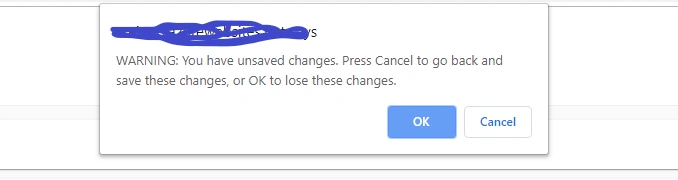
- "WARNING: You have unsaved changes. Press Cancel to go back and save these changes, or OK to lose these changes."
- );
- }
- }
We need to configure the routing. Import SampleChangesGuard in the app-routing.module.ts file.
- import { SampleChangesGuard } from './guards/sellout-changes-guard';
- {
- path: 'test',
- component: TestComponent,
- canActivate:[SampleChangesGuard]
- }
First, we need to import SampleComponentCanDeactivate like below in the component where we have a form.
- import { SampleComponentCanDeactivate } from './../../guards/sellout-changes-guard';
We need to check the form and implement the SampleComponentCanDeactivate like below. We need to add the below sample of code in the declaration part.
Whenever a user fills the sampleForm and tries to navigate, he/she will get an alert like this.
- @HostListener("window:beforeunload")
- selloutcanDeactivate(): Observable<boolean> | boolean {
- return (
- !this.sampleForm.dirty
- );
- }
- sampleForm: FormGroup;
Summary
In this article, I discussed how to create an unsaved changes alert using inbuilt CanDeactivate interface in Angular 7. Hope this article is useful.
Join the conversation! Your thoughts help the community grow.