

Background
This article explains creation of a CAPTCHA using the Google reCAPTCHA API to prevent input from an automated system. Let us learn about it step-by-step.
The Need for CAPTCHA
I have seen one of the best examples for why a CAPTCHA is necessary in applications when I was in one of the top orgnizations that use the one application for attendance that when Employee enters an EMPId and word into respective textboxes and by clicking on the login button the employee attendance is registered.
Now what has happened now is that most developers have created a script that runs automatically on a scheduled time and that gets the registered attendance without coming to the office. So to overcome this type of problem CAPTCHA plays a very important role that prevents automated input. You can create a CAPTCHA in many ways but Google provides a free reCAPTCHA with better security without any cost.
Let us learn about the Google reCAPTCHA
What is reCAPTCHA?
This is a free service from Google that helps protect websites from spam and abuse that restricts the automated input sent by a system and allows only input from a real human.
Step 1
Create a simple web application to show the use of CAPTCHA.
- "Start" - "All Programs" - "Microsoft Visual Studio 2010".
- "File" - "New WebSite" - "C#" - "Empty WebSite" (to avoid adding a master page).
- Provide the web site a name such as "Googelrecaptcha" or another as you wish and specify the location.
- Then right-click on Solution Explorer - "Add New Item" - Add Web Form.
- Drag and drop one button and label and two Textboxes onto the <form> section of the Default.aspx page.
- Now the default.aspx page source code will look as follows.
- <%@ Page Language="C#" AutoEventWireup="true" CodeBehind="Default.aspx.cs" Inherits="UsingGoogleRecaptcha.Default" %>
- <!DOCTYPE html PUBLIC "-//W3C//DTD XHTML 1.0 Transitional//EN" "http://www.w3.org/TR/xhtml1/DTD/xhtml1-transitional.dtd">
- <html xmlns="http://www.w3.org/1999/xhtml">
- <head runat="server">
- <title></title>
- </head>
- <body>
- <form id="form1" runat="server">
- UserId: <asp:TextBox ID="TextBox1" runat="server"></asp:TextBox> <br>
- word:<asp:TextBox TextMode="word" ID="TextBox2" runat="server"></asp:TextBox></td>
- <asp:Button ID="btnLogin" runat="server" Text="Submit" OnClick="btnLogin_Click" /><br />
- <asp:Label ID="lblResult" runat="server" Text="Label"></asp:Label>
- </form>
- </body>
- </html>
Step 2
Download the Google reCAPTCHA library for ASP.NET.
Download the library using this link reCAPTCHA ASP.NET library DownLoad.
Step 3
Add a reference for the downloaded library, Recaptcha.dll, into the web application as in the following:
- Right-click on the web application, then click on Add reference.
- After Add reference choose Browse then find the location of the downloaded library.
- Select Recaptcha.dll and click on OK.
- After adding the Recaptcha.dll reference into the web application the bin folder will look such as follows.
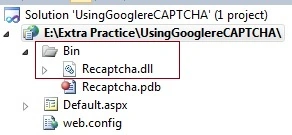
In the preceding image you have seen how the Recaptcha.dll reference was added.
Step 4
Add the Recaptcha control page header to the ASP.NET Page as in the following:
- <%@ Register TagPrefix="recaptcha" Namespace="Recaptcha" Assembly="Recaptcha" %>
Step 5
Place the Google Recaptcha control on the Default.aspx page under the form tag as:
- <recaptcha:RecaptchaControl
- ID="recaptcha"
- runat="server"
- PublicKey="your_public_key"
- PrivateKey="your_private_key"
- />
Understanding the Properties of RecaptchaControl
The RecaptchaControl provides many properties as a simple control but the following are some of the common properties:
- PublicKey: This is a mandatory property that valiadates the user request at the client-side. This is unique key is provided by Google for the web site with respect to the web site domain.
- PrivateKey: This is a mandatory property that valiadates the user request at the server-side with the Google server. This is a unique secret key provided by Google for the web site with respect to the web site domain basically for communicating between our server and the Google server.
- ErrorMessage: This is an optional property that sets an error message when the user enters an invalid CAPTCHA.
- AllowMultipleInstances: This is an optional property that decides the number of CAPTCHA code generations at a time. By default, it is false. If it is set to true then two CAPTCHA codes are generated for a single request.
- Theme: This is used to set the background color for the CAPTCHA control.
Step 6
Generate a Private and Public key from Google.
To generate the Private and Public Key we must use the following process:
- You must have a Google account.
- Navigate to this link Get Recaptcha API Key
- You will be redirected to the following page:
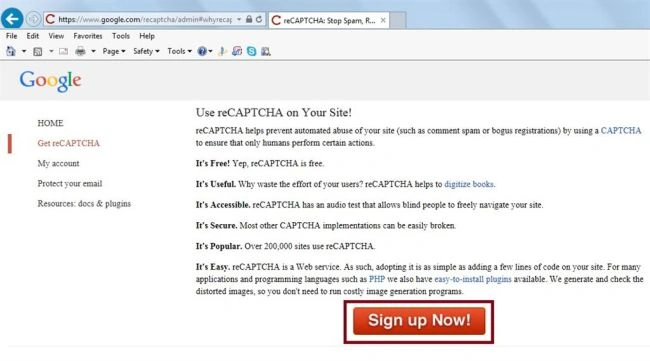
After clicking on the "Sign Up Now!" button it will redirect to the Gmail account LoginPage, after Login into the Gmail it shows the following screen.
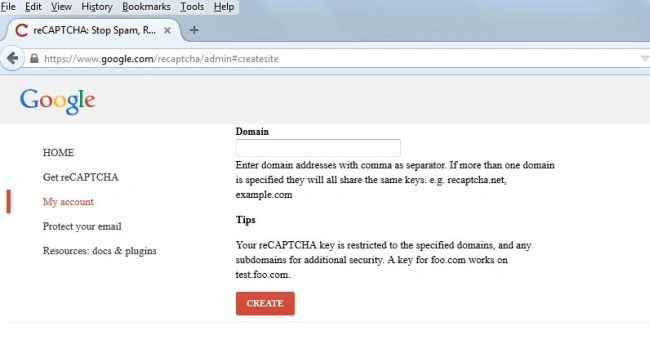
Now in the preceding Domain TextBox enter your full domain of the web site. Now we have the local host application hence we will use the domain as localhost and click on the create button.
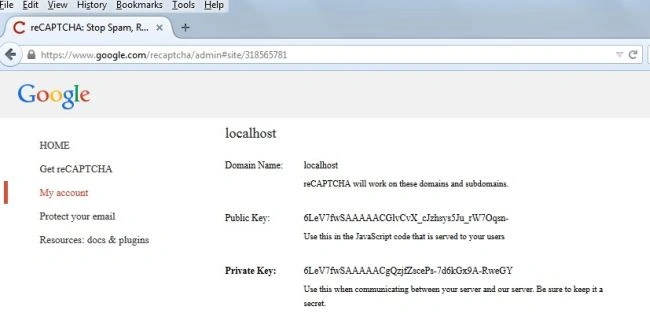
In the preceding image you have seen that it generated a Unique Public and Private API key with the specifics of our website domain address. Now set these keys to RecaptchaControl as in the following:
- <recaptcha:RecaptchaControl
- ID="recaptcha" runat="server"
- PublicKey="6LeV7fwSAAAAACGlvCvX_cJzhsys5Ju_rW7Oqsn-"
- PrivateKey="6LeV7fwSAAAAACgQzjfZscePs-7d6kGx9A-RweGY" >
After doing all of the preceding process, the Default.aspx source code will look as follows:
- <%@ Page Language="C#" AutoEventWireup="true" CodeFile="Default.aspx.cs" Inherits="_Default" %>
- <!DOCTYPE html PUBLIC "-//W3C//DTD XHTML 1.0 Transitional//EN" "http://www.w3.org/TR/xhtml1/DTD/xhtml1-transitional.dtd">
- <%@ Register TagPrefix="recaptcha" Namespace="Recaptcha" Assembly="Recaptcha" %>
- <html xmlns="http://www.w3.org/1999/xhtml">
- <head runat="server">
- <title></title>
- </head>
- <body>
- <form id="form1" runat="server">
- <table style="margin-top: 40px">
- <tr>
- <td>
- UserId
- </td>
- <td>
- <asp:TextBox ID="TextBox1" runat="server"></asp:TextBox>
- </td>
- </tr>
- <tr>
- <td>
- Word
- </td>
- <td>
- <asp:TextBox TextMode="word" ID="TextBox2" runat="server"></asp:TextBox>
- </td>
- </tr>
- <tr>
- <td>
- </td>
- <td>
- <recaptcha:RecaptchaControl ID="recaptcha" runat="server" PublicKey="6LeV7fwSAAAAACGlvCvX_cJzhsys5Ju_rW7Oqsn-"
- PrivateKey="6LeV7fwSAAAAACgQzjfZscePs-7d6kGx9A-RweGY" />
- </td>
- </tr>
- <tr>
- <td>
- </td>
- <td>
- <asp:Button ID="btnLogin" runat="server" Text="Login" OnClick="btnLogin_Click" />
- </td>
- </tr>
- </table>
- <br />
- <asp:Label ID="lblResult" runat="server" Text="Label"></asp:Label>
- </form>
- </body>
- </html>
Step 7
Now open the default.aspx.cs file and add the following code to the OnClick event of the btnLogin button to ensure that the CAPTCHA code is validated successfully:
- protected void btnLogin_Click(object sender, EventArgs e)
- {
- if (recaptcha.IsValid)
- {
- lblResult.Text = "Login Sucesfully at "+DateTime.Now.ToString("dd-MM-yyyy");
- lblResult.ForeColor = Color.Green;
- }
- else
- {
- lblResult.Text = "The verification Code Is incorrect.";
- lblResult.ForeColor = Color.Red;
- }
- }
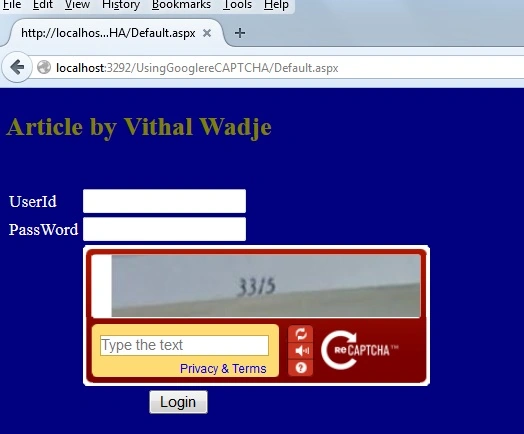
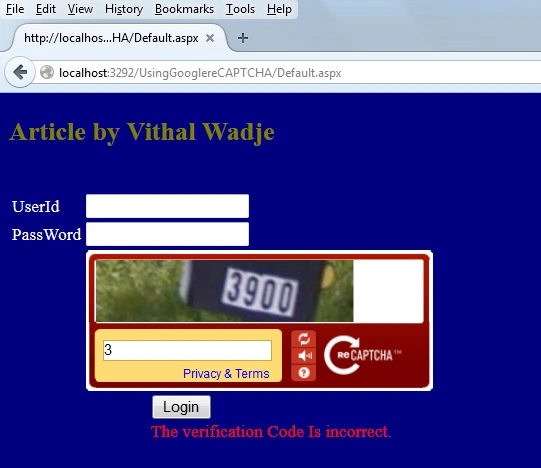
Now enter an invalid code and click on the Login button. It will show the following message:
Now enter the proper code and click on the Login button. It will show the following message.
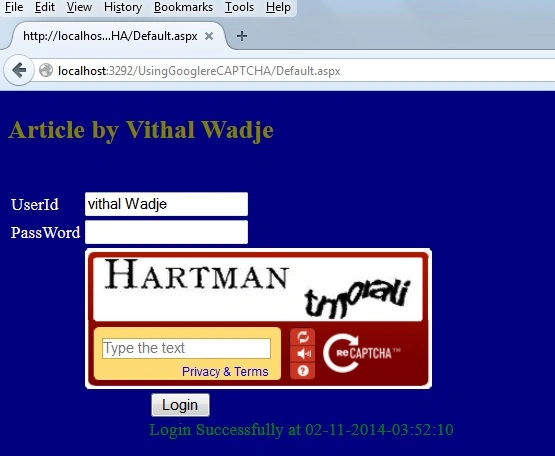
Now from all the preceding examples we have learned about the Google reCaptcha implementation.
Feature of Google reCAPTCHA
- You can regenerate a reCAPTCHA if you don't understand one.
- If you don't understand the CAPTCHA or are unable to read it then you can also get audio help.
- It is a free service from Google, there is no need to pay any money.
- Better security for your application.
Note
- For the detailed code, please download the sample Zip file.
- You need an active internet connection.
Summary
For all the examples above, we have learned how to use Google reCAPTCHA. I hope this article is useful for all readers. If you have a suggestion then please contact me.
Aman BhardwajPosted Sep 21, 2017, 11:18 PM
Nice article for google captcha it is easy to understand and describe easy method
Aman BhardwajPosted Sep 21, 2017, 11:17 PM
Nice article foe google captcha
shaik mohiuddinPosted Feb 9, 2017, 5:15 AM
Thanks ,its working fine but how to validate recaptcha if its empty at client side is it possible
Vithal WadjePosted Oct 1, 2016, 3:02 AM
Thanks
Sadasiva VPosted Sep 30, 2016, 3:03 AM
Good Article
Vithal WadjePosted Dec 1, 2015, 9:18 AM
Write capacha code in div tag
kapil madanPosted Dec 1, 2015, 5:39 AM
nice article.To align the capacha to center .What code to be written in recapacha code
ib belladPosted Mar 25, 2015, 1:05 AM
if tagprefix and id name same there then It will give Error like "'recaptcha': member names cannot be the same as their enclosing type"
ib belladPosted Mar 25, 2015, 1:04 AM
Checked everything.. One more thing if used the <recaptcha:RecaptchaControl ID="recaptcha" runat="server" PublicKey="$$$$$$$$$$$" PrivateKey="#######" />
Vithal WadjePosted Mar 24, 2015, 12:48 PM
check if (recaptcha.IsValid)
ib belladPosted Mar 24, 2015, 8:48 AM
reCaptcha is not validating...!
Vithal WadjePosted Nov 30, 2014, 12:49 AM
Thanks Rahul sir
Rahul Kumar SaxenaPosted Nov 29, 2014, 7:04 AM
Congrats for article of the day....
Vithal WadjePosted Nov 28, 2014, 3:28 AM
Thanks ABHINAV KUMAR sir
Vithal WadjePosted Nov 28, 2014, 3:27 AM
thanks Sahil Sharma sir
ABHINAV KUMARPosted Nov 28, 2014, 2:12 AM
Very useful article...
Sahil SharmaPosted Nov 28, 2014, 12:55 AM
Congrats for being selected as "Article of the Day" on ASP.NET Site
Vithal WadjePosted Nov 3, 2014, 5:20 AM
Thanks Vishal sir
Vishal JadhavPosted Nov 3, 2014, 5:04 AM
Thanks for the information given by both of you. It will be very helpful.
Vithal WadjePosted Nov 2, 2014, 10:01 PM
Thanks Sam sir for useful information i have noted your point.
Sam HobbsPosted Nov 2, 2014, 9:18 PM
People should understand how desirable it is for hackers to crack things like this. There is probably already software available that can crack it but probably not for free. Google itself wrote software that could crack Google's reCAPTCHA (at that time) but supposedly Google's reCAPTCHA has been improved after that. See: http://blogs.wsj.com/digits/2014/04/17/google-is-quite-good-at-cracking-its-own-captcha-security-puzzles/