

Introduction
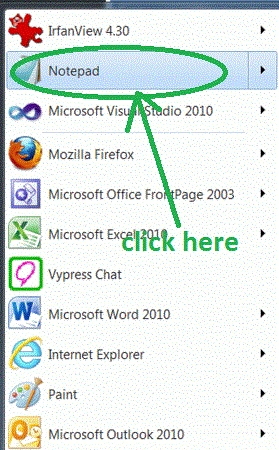
- Open start->Notepad.
- The name of the editor is "Glory."
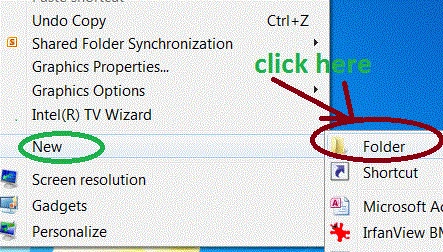
- Right-click on desktop->new->Folder.
- The name of the folder is "Text".
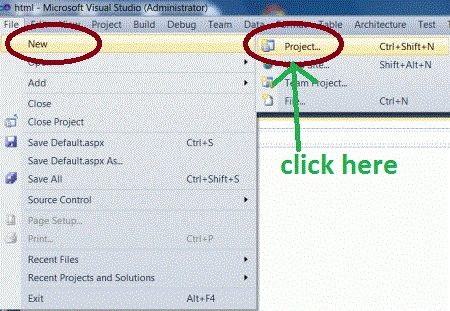
- Go to file -> New->Projects.
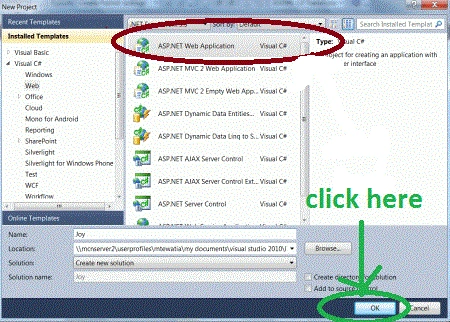
- Create an ASP. NET Web Application.
- Name of "TextGlory.aspx".
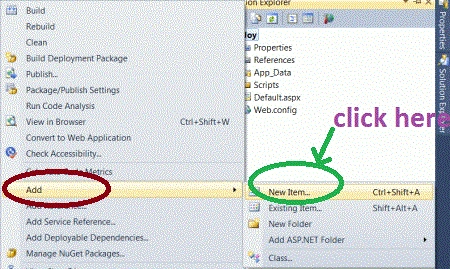
- Right-click on Solution Explorer.
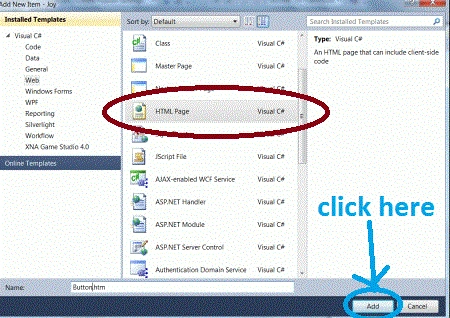
- Add->add new item->HTML form.
- The Name of the HTML form is "Html.html".
Code
- <body>
- <div class="text-glow">
- <a href="#">
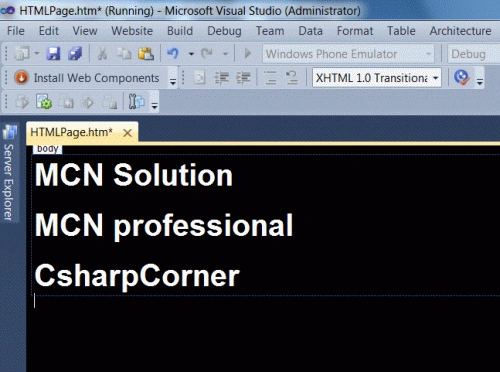
- <h1>MCN Solution</h1>
- <h1>MCN professional</h1>
- <h1>CsharpCorner</h1>
- </a>
- </div>
- </body>
Code
- .text-glow {
- font-size: 4em;
- color: Green;
- font-family: Arial;
- }
Code
- .text-glow:hover,.text-glow:focus.text-glow:active {
- ctx-stroke-width: 5.3px;
- ctx-stroke-color: Green;
- ctx-fill-color: Green;
- text-shadow: 1px 0px 20px Red;
- ctx-transition: width 0.3s;
- transition: width 0.3s;
- moz-transition: width 0.3s;
- o-transition: width 0.3s;
- }
Step 8: In the above step we define a hover, focus and active attributes of a text glow class. Now in the second phase, we define link attributes.
Code
- .text-glow a {
- ctx-transition: all 0.3s ease-in;
- ctx-transition: all 0.3s ease-in;
- M-transition: all 0.3s ease-in;
- O-transition: all 0.3s ease-in;
- text-decoration: none;
- color: white;
- }
Step 9: This step we set the transition effect, which is very popular with CSS3 designers. To implement this effect on your page simply set the div class and add an href tag around the text that you want to link and glow.
Code
- <body>
- <div class="text-glow">
- <a href="#"></a>
- </div>
- </body>
Code
- <html>
- <header>
- <style>
- .text-glow
- {
- font-size:4em;
- color:Green;
- font-family:Arial;
- }
- .text-glow:hover,
- .text-glow:focus
- .text-glow:active
- {
- ctx-stroke-width: 5.3px;
- ctx-stroke-color: Green;
- ctx-fill-color: Green;
- text-shadow: 1px 0px 20px Red;
- ctx-transition: width 0.3s;
- transition: width 0.3s;
- moz-transition: width 0.3s;
- o-transition: width 0.3s;
- .text-glow a
- {
- ctx-transition: all 0.3s ease-in;
- ctx-transition: all 0.3s ease-in;
- M-transition: all 0.3s ease-in;
- O-transition: all 0.3s ease-in;
- text-decoration:none;
- color:white;
- }
- body
- {
- background-color: #000000;
- }
- </style>
- </head>
- <body>
- <div class="text-glow">
- <a href="#">
- <h1>MCN Solution</h1>
- <h1>MCN professional</h1>
- <h1>CsharpCorner</h1>
- </a>
- </div>
- </body>
Output


Resources
Here are some useful resources:
Join the conversation! Your thoughts help the community grow.