
We can use JSOM for creating custom SharePoint groups and assign permissions to groups in SharePoint 2013. I’ll explain the basics of this using CEWP and jQuery. This script can be used in SharePoint Online, SharePoint App and Farm solutions with ease.
Prerequisites: User/App must have full control on site.
Solution:
- Create a web part page in your SharePoint 2013 or Office 365 SharePoint Site.
- Add Content Editor web part on the page.
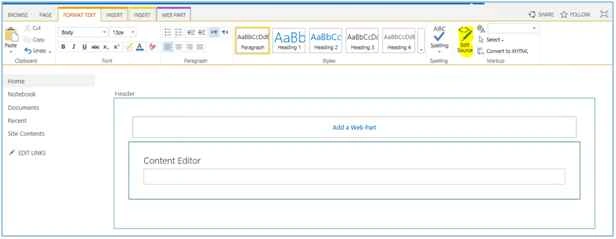
- Edit ‘HTML Source’ of content editor web part and copy the following html and hit OK.
- <script src="https://ajax.googleapis.com/ajax/libs/jquery/1.11.1/jquery.min.js"></script>
- <script src="/_layouts/15/sp.js" type="text/javascript"></script>
- <script src="/_layouts/15/SP.RequestExecutor.js" type="text/javascript"></script>
- <script src="/_layouts/15/SP.search.js" type="text/javascript"></script>
- <script type="text/javascript">
- $(function() {
- $('#btnCreateCustomGroup').click(btnCreateCustomGroup_Click);
- });
- function btnCreateCustomGroup_Click() {
- var grpName = "DSAuditors"
- var grpDesc = "Auditors custom group with edit access";
- var grpRole = "Edit";
- var appweburl = _spPageContextInfo.siteAbsoluteUrl;
- var clientContext = new SP.ClientContext(appweburl);
- CreateCustomGroup(clientContext, grpName, grpDesc, grpRole, true, false, true,
- function success() {
- alert("Successfully created group: " + grpName);
- },
- function fail(src, info) {
- alert("Failed to create group: " + grpName + ". " + info.get_message());
- });
- }
- function CreateCustomGroup(context, name, desc, roleName, canMembersEdit, visibleToMembersOnly, addCurrentUser, success, fail) {
- var web = context.get_web();
- //Get all groups in site
- var groupCollection = web.get_siteGroups();
- // Create Group information for Group
- var newGRP = new SP.GroupCreationInformation();
- newGRP.set_title(name);
- newGRP.set_description(desc);
- var currentUser = web.get_currentUser();
- context.load(currentUser);
- context.load(web, 'Title', 'HasUniqueRoleAssignments');
- context.executeQueryAsync(function() {
- if (!web.get_hasUniqueRoleAssignments()) {
- web.breakRoleInheritance(true, false);
- }
- //add group to site gorup collection
- var newCreateGroup = groupCollection.add(newGRP);
- //Role Definition
- var rolDef = web.get_roleDefinitions().getByName(roleName);
- var rolDefColl = SP.RoleDefinitionBindingCollection.newObject(context);
- rolDefColl.add(rolDef);
- // Get the RoleAssignmentCollection for the target web.
- var roleAssignments = web.get_roleAssignments();
- // assign the group to the new RoleDefinitionBindingCollection.
- roleAssignments.add(newCreateGroup, rolDefColl);
- //Set group properties
- newCreateGroup.set_allowMembersEditMembership(canMembersEdit);
- newCreateGroup.set_onlyAllowMembersViewMembership(visibleToMembersOnly);
- //add currect user to group
- if (addCurrentUser) {
- newCreateGroup.get_users().addUser(currentUser);
- }
- newCreateGroup.update();
- context.load(newCreateGroup);
- //Execute Query
- context.executeQueryAsync(success, fail);
- }, fail);
- }
- </script>
- <div>
- <h1>Create SharePoint Group </h1>
- <br/>
- <input id="btnCreateCustomGroup" type="button" value="Create SPGroup" />
- </div>
- Web part page will be displayed like the following screenshot:
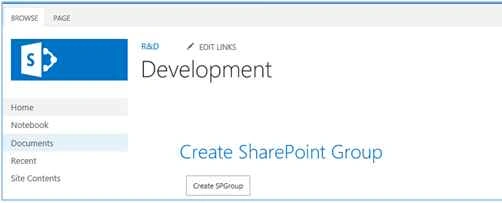
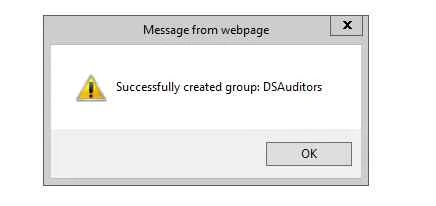
- Click on ‘Create SPGroup’ button to create a SharePoint group ‘DSAuditors’ with ‘Edit’ permission. It would display success/fail message.
JS explained
JS starts with required script references (jQuery, sp.js etc.). In document ready, button click event is associated to the button. Function btnCreateCustomGroup_Click get the client context and calls function createCustomGroups; which accepts various group properties as parameter.


Robbie MarianoPosted Sep 25, 2017, 4:42 PM EDT
Wow thanks nice share
Saineshwar BageriPosted Sep 25, 2015, 4:35 AM EDT
Nice one
Harshad PansuriyaPosted Sep 23, 2015, 4:26 AM EDT
Nice One
Sibeesh VenuTOP 100Posted Sep 22, 2015, 11:05 PM EDT
Nice Share
Ankit BansalPosted Sep 22, 2015, 9:51 PM EDT
thanks for sharing..
Sujeet SumanPosted Sep 22, 2015, 9:08 PM EDT
Nice Article................
Jacob RobinsonPosted Sep 22, 2015, 8:22 PM EDT
Good One..
Karthikeyan KPosted Sep 22, 2015, 7:16 PM EDT
Nice One..
Santhakumar MunuswamyPosted Sep 22, 2015, 11:01 AM EDT
Thanks for nice share
Rajeesh MenothPosted Sep 22, 2015, 10:06 AM EDT
Nice One..
Pankaj Kumar ChoudharyTOP 100Posted Sep 22, 2015, 9:35 AM EDT
Nice Explain Sir......
Gopi ChandPosted Sep 22, 2015, 9:27 AM EDT
Its nice one :)