
One of the most important steps when building a Retrieval-Augmented Generation (RAG) solution in Databricks is creating and configuring the Vector Search index correctly.
A Vector Search index provides the retrieval layer that allows an AI application to search through documents, identify relevant information, and retrieve contextual data before passing it to a Large Language Model (LLM).
In this article, I'll walk through the important configuration settings involved in creating a Hybrid Vector Search Index in Databricks, using a healthcare document processing solution as an example.
1. Understanding Databricks Vector Search
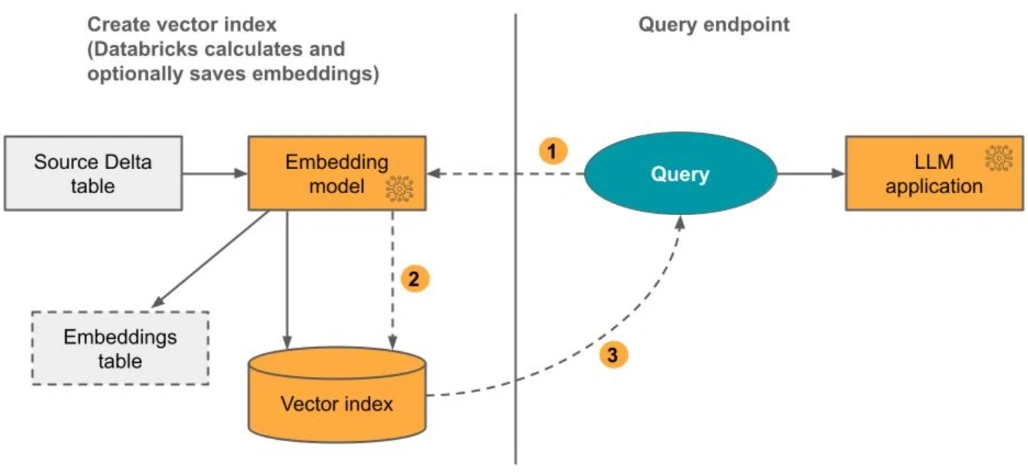
Databricks Vector Search allows you to search through unstructured and structured data using vector representations of text.
In a typical RAG architecture, documents are first extracted, processed, and split into smaller chunks. These chunks are then stored in a Delta table.
The next step is to create a Vector Search index that makes those document chunks searchable.
For example, imagine you're building a healthcare AI application that allows users to ask questions about clinical documents.
Rather than passing thousands of PDF documents directly to an LLM, you can generate embeddings for the document chunks, index them, and retrieve only the most relevant content when a user submits a question.
This is where Databricks Vector Search becomes particularly useful.
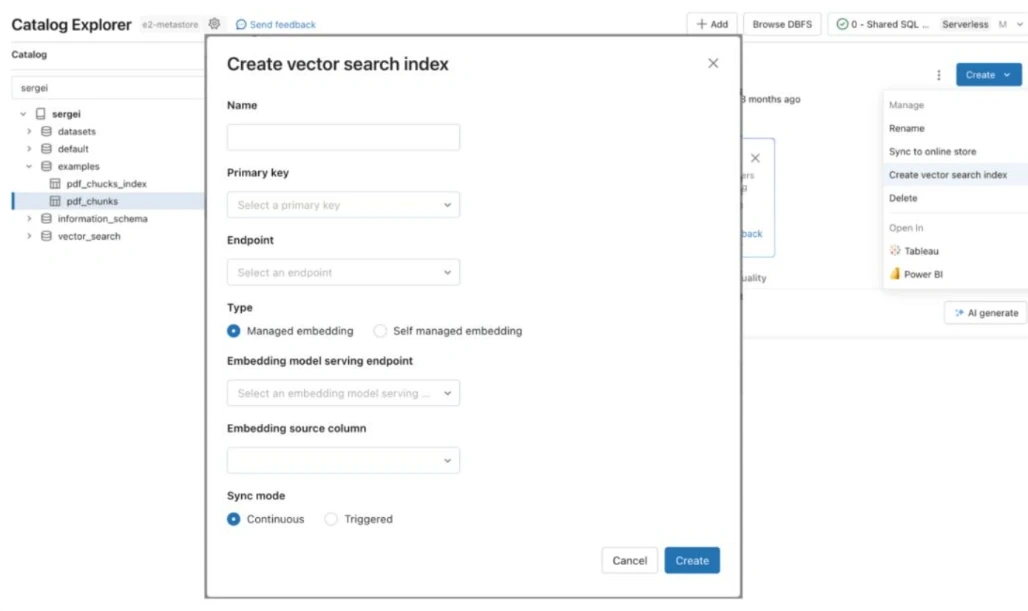
In my example, I'm creating an index using the following source table:
healthcare_ai.gold.pdf_chunksThis table contains the extracted and processed chunks from the original clinical PDF documents.
Before creating the index, Databricks provides a confirmation screen where you can review the configuration.
Let's examine each setting.
Source Table
healthcare_ai.gold.pdf_chunksThe source table contains the document chunks that will be indexed.
In a typical RAG pipeline, this table is created after extracting text from PDF documents and splitting the extracted content into smaller, meaningful chunks.
Each row represents a document chunk that can subsequently be retrieved through semantic or hybrid search.
Index Name
healthcare_ai.gold.pdf_chunks_indexThis is the name assigned to the Vector Search index.
Using a meaningful naming convention makes it easier to identify and manage indexes, particularly when working with multiple datasets or AI applications.
Primary Key
chunk_idThe primary key uniquely identifies each record in the source table.
In this example, chunk_id identifies individual document chunks.
This is important because the Vector Search index needs a unique identifier to distinguish records and manage index updates.
Index Type: Hybrid
One of the most interesting settings in this configuration is the Hybrid index type.
Hybrid search combines two retrieval approaches:
- Vector search: Finds information based on semantic similarity and the meaning of the user's query.
- Keyword search: Finds information based on matching words and terms.
Why is this important?
Imagine a healthcare professional searches for a particular medical procedure using its exact name or a specific clinical term.
A keyword search can identify documents containing that exact term, while vector search can retrieve related content even when different words are used.
Combining both approaches provides greater flexibility when retrieving relevant information.
This is particularly useful when building RAG applications where both semantic relevance and exact terminology matter.
Embeddings: Compute Embeddings
Compute embeddingsIn this configuration, Databricks is responsible for generating embeddings from the selected text column.
An embedding is a numerical representation of text that captures semantic information.
These numerical representations allow the search engine to identify relationships between text based on meaning rather than relying exclusively on exact word matching.
For example, two sentences can have similar meanings even when they use different words.
Embeddings help make that possible.
Embedding Column
chunk_textThis is the column containing the actual text used to generate embeddings.
In our healthcare example, chunk_text contains the extracted text from individual PDF document sections.
Databricks processes the content in this column and generates vector representations using the selected embedding model.
It is important to ensure that the selected column contains meaningful text rather than document identifiers or unrelated metadata.
Embedding Model
databricks-gte-large-enThe embedding model converts the document text into numerical vectors.
In this example, I'm using databricks-gte-large-en.
The generated embeddings are used to support semantic retrieval when users submit questions to the healthcare AI application.
The choice of embedding model matters because it influences how text is represented and how effectively relevant information can be retrieved.
You should also consider the language of your documents, model compatibility, performance, and the requirements of your application.
Endpoint
aisearch-healthcareThe endpoint is the Vector Search serving endpoint associated with the index.
It provides the infrastructure through which applications interact with the Vector Search index.
For example, when a user submits a question through a healthcare chatbot, the application can send a search request to this endpoint to retrieve relevant document chunks.
The retrieved content can then be passed to an LLM as contextual information.
Index Update Mode: Triggered
TriggeredThe final setting is the index update mode.
In this example, I'm using Triggered rather than Continuous synchronization.
Triggered synchronization allows you to initiate index updates when required instead of continuously synchronizing changes.
This can be useful when your document ingestion pipeline runs at scheduled intervals.
For example, if new clinical PDFs are uploaded and processed every morning, you can initiate an index synchronization after the document chunks have been written to the source Delta table.
This helps coordinate document ingestion and search index updates.
3. How These Configurations Fit into a RAG Architecture
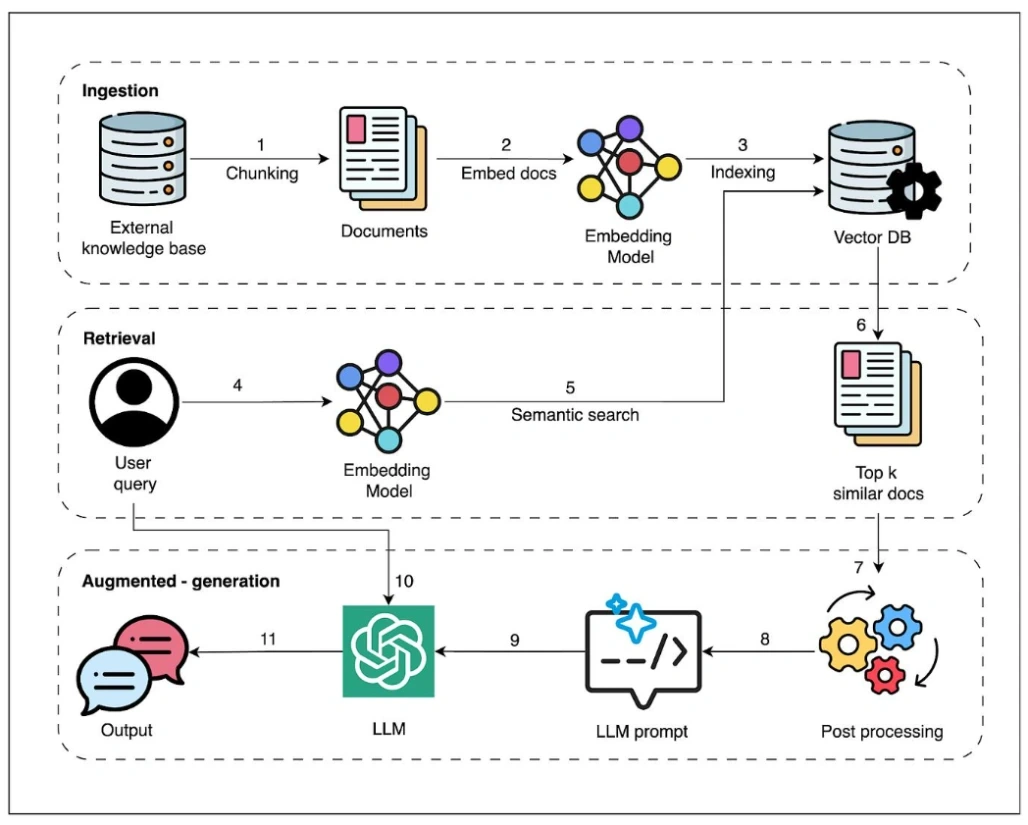
The configurations above are not independent settings. Together, they establish the retrieval foundation of a RAG application.
A simplified healthcare RAG workflow looks like this:
- Document ingestion: Clinical PDF documents are uploaded into a Unity Catalog Volume.
- Text extraction: Text is extracted from the PDF documents.
- Chunking: Extracted text is split into smaller sections.
- Delta table: The document chunks are stored in
healthcare_ai.gold.pdf_chunks. - Embedding generation: Databricks generates embeddings from the
chunk_textcolumn. - Vector Search indexing: The generated embeddings and searchable content are made available through the Hybrid Vector Search index.
- User query: A healthcare professional submits a question.
- Retrieval: The application searches the index for relevant document chunks.
- LLM response: The retrieved context is supplied to an LLM to generate a grounded response.
This architecture helps the application retrieve relevant information from a large collection of documents without requiring the entire document collection to be supplied to the LLM for every question.
4. Why Getting the Index Configuration Right Matters
When building production-grade AI applications, the Vector Search index should not be treated as an afterthought.
A few configuration decisions can significantly influence how the retrieval layer operates.
Here are some considerations:
- Primary key selection: Ensure every indexed record has a unique and stable identifier.
- Embedding model selection: Choose a model appropriate for your document language and retrieval requirements.
- Index type: Consider whether vector-only or hybrid search is more suitable for your application.
- Update strategy: Choose an update mode that aligns with your document ingestion frequency.
- Source table design: Store meaningful document chunks alongside useful metadata such as document IDs, page numbers, and source filenames.
For healthcare applications, retaining metadata is particularly useful because it allows retrieved information to be associated with its original document and location.
It also supports traceability when presenting retrieved information to users.
5. Final Thoughts
Creating a Vector Search index is an important milestone when building RAG applications with Databricks.
However, the real value comes from understanding what each configuration does and how it contributes to the overall retrieval architecture.
In this example, I've configured a Hybrid Vector Search index using a healthcare document chunks table, the databricks-gte-large-en embedding model, and a Triggered index update strategy.
These settings provide the foundation for retrieving relevant clinical document chunks and supplying contextual information to an LLM.
Remember: A good RAG application is not just about choosing a powerful LLM. The quality of your document processing, chunking, embeddings, and retrieval strategy matters just as much.

Join the conversation! Your thoughts help the community grow.