

I previously wrote this article in my blog, Think Big!.
Introduction
By default, arrays are stored in the managed heap with all of the overhead involved and that's because arrays simply are instances of type System.Array that inherits from System.Object. Storing an object into heap means that it will not be removed from the memory until a garbage collection (whether automatic or by calling System.GC.Collect()) occurs. Also, storing it into the heap means suffering from low-performance and the overhead (for the CLR) of storing and retrieving it into and from the heap.
To overcome the performance issues and to create short-lived high-performance arrays or even if you want to interoperate with other unmanaged code then you need to work with stack-based arrays. Stack-based arrays stored in the stack. Means high-performance and short-live for the array because we are stepping out the CLR and working with the memory directly.
It might be worth mentioning that types inherit -directly or indirectly- from System.Object are heap-based. Conversely, Types inherit -directly or indirectly- from System.ValueType are stack-based. Although, System.ValueType inherits from System.Object, it is stack-based. Examples of stack-based types are all enumerations, structures, and primitive data types (like Int32 and Boolean).
Creating a Stack-Based Array
Creating stack-based arrays is very simple. But first, you need to allow unsafe code for the project, and this can be done through the project properties in the Build tab. After that, you can write your code.
The code for creating the stack-based array is as follows:
|
public unsafe static void CreateArray() // Creating Int32 stack-based array with a specific length // This code also sets the first value // Setting the second value to 2 // This code also sets the second value // Prints: // Setting all values // Retrieving all values // Prints: |
Code Explanation:
First, we created the array using the stackalloc keyword giving the length for the new array and the type of which is Int32 for our example (you can change it to any value type.) Because Int32 reserves 4-bytes in memory we end up reserving 40 bytes (length 10 multiplied by the Int32 size 4) memory block in the stack for our array.
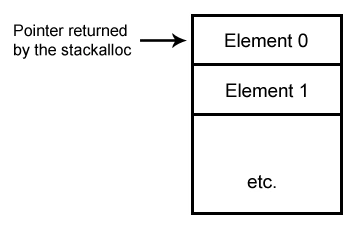
The last figure shows the pointer returned by the stackalloc, which is always a pointer to the first element of the array. Note that every block is an element of the array. In our example it is 4-bytes.
After creating our array putting the last figure into mind we have many ways for accessing array elements.
A Note About Scope
If you come to this point I think you know well what scope is and how it does affect the code flow. But, I think it is worth noting that you can create new scopes using just two curly brackets. See the following sample class:
|
public class ClassScope public void Method1() { public void Method2() if (true) while (true) |
Quickly Copying Arrays
It is very handful using pointers to pass the CLR and work directly with memory pointers to copy elements from an array to another the fastest we can. The following code segment does this:
|
unsafe static void Copy(int[] src, int srcIdx, int[] dst, int dstIdx, int count) // Ensuring copying the required count only |
Code explanation:
Because normal arrays are heap-based, it can be moved from its location when a garbage collection occurs, so we tell the CLR that there're references to it, so we do not need it to be moved any where until finishing up.
Honestly, you strictly should avoid using unsafe code when possible. Because, you are working with memory directly. At least you might by mistake overwrite any data stored in the memory without being notified about.
Join the conversation! Your thoughts help the community grow.