

Introduction
According to Aspiring Minds National Employability Report, which is based on a study of more than 1,500,000 engineering students who graduated in 2015 from over 650 colleges, 80% of them are unemployable.
Over 1.5 million engineering students graduate every year in India. This makes it difficult for everyone to get a job. I think self-employment is a good solution for this crisis. The creation of useful applications for mobile, web and desktop is a good choice for earning money.
In this article series, I intend to disclose my Windows desktop accounting software creation experience for you.
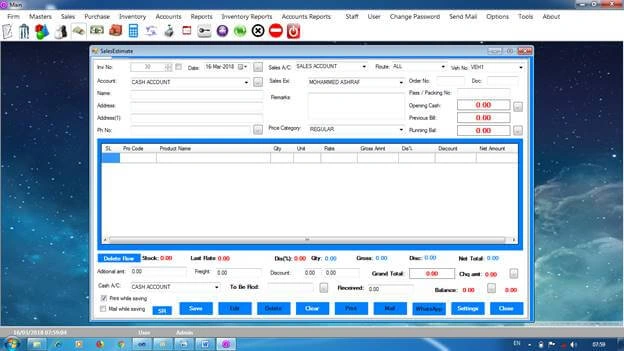
To know more about the accounting application I have made, please click on the link.
Requirement
| 1 | Basic Computer Knowledge | |
| 1 | Windows PC(Desktop or Laptop) | |
| 2 | Visual Studio (VS 2010 or above) | |
Topics Covering In this Series
| 1 | Accounting Basics |
| 2 | C# programing language |
| 3 | Visual Studio |
| 4 | Windows Form Application |
| 5 | T-SQL |
| 6 | SQL Server |
| 7 | Ado.net |
| 8 | Linq |
| 9 | Storing data in XML |
| 10 | DataGridview in details |
| 11 | Printing Technics |
| 12 | Publishing the Application (Setup Creation with Database) |
| 13 | ASMX web service |
| 14 | Security (Prevention of Reverse Engineering) |
Accounting Basics
To create an accounting application we need to know something about accounting.
The foundation of accounting is Debit and Credit -- debt comes in and credit goes out.
For example, we are purchasing furniture for our company office by paying cash of Rs. 500. So, debit Rs. 500 in the furniture account and credit the same in the cash account. The value of the furniture is increased by the addition of Rs. 500 and at the same time the amount of cash in hand is decreased by paying Rs. 500.
In accounting applications, all transactions are in voucher type. In a voucher table normally there are the followings columns.
| 1 | VoucherId |
| 2 | VoucherType |
| 3 | vouchernumber |
| 4 | VoucherDate |
| 5 | AccountingID |
| 6 | OppositeAccountingId |
| 7 | DebitAmount |
| 8 | CreditAmount |
| 9 | Narration |
| 10 | EntryDate |
| 11 | EnteredBy |
In here, we want to create two voucher entries. Please note that for every accounting transaction there will be two accounts. So we want two entries.
| A | B | ||
| 1 | VoucherId | 1 | 2 |
| 2 | VocherType | PurchaseOfFixedAsset | PurchaseOfFixedAsset |
| 3 | VoucherNumber | 1 | 1 |
| 4 | VoucherDate | 15/03/2018 | 15/03/2018 |
| 5 | AccountId | FurnitureAccountID | CashAccountID |
| 6 | OppsiteAccountId | CashAccountID | FurnitureAccountID |
| 7 | DebitAmount | 500 | 0.00 |
| 8 | CrditAmount | 0.00 | 500 |
| 9 | Narration | A chair Purchased | A chair Purchased |
| 10 | EntryDate | 04/03/2018 | 04/03/2018 |
| 11 | EnteredBy | EnteredPersonID | EnteredPersonID |
This is the basic idea. But we have to mention in detail about ledger group, ledger account, trading account, profit and loss account and balance sheet, etc. In the coming chapters, we will cover all these accounting topics. Also, we have to mention about Inventory.
Inventory
In accounting, maintaining inventory is important. Products and services are Inventory.
There are two types of products, manufacturing products and purchased products. We want to make an entry to maintain the stock of the product. That is, when we sell one product to a person there are two types of entries.
| 1 | Accounting entries |
| 2 | Inventory Entry |
Beside the accounting entry we want to make an Inventory entry. Earlier, we have seen that in accounting, all transactions are in voucher type. Normally there will be the following columns for Inventory Transaction Table.
| 1 | TransactionId |
| 2 | VoucherID |
| 3 | ProductId |
| 4 | UnitId |
| 5 | QuantityIn |
| 6 | QuantityOut |
By giving the format of the table, I think you will understand about an inventory type transaction. In the case of the purchase, the stock of that particular product is increasing. At the same time in the case of a sale, the stock of such a product is decreasing.
For example, I am a local dealer of Chairs. I am selling a Chair to a person. Then the following entry will happen.
| 1 | TransactionId | 1 |
| 2 | VoucherID | 1 |
| 3 | ProductId | ChairID |
| 4 | UnitId | UnitID |
| 5 | QuantityIn | 0.00 |
| 6 | QuantityOut | 1.00 |
We have mentioned two types of tables for understanding the basics of accounting entries. In an accounting application, we have to create more than 25 tables.
We have discussed about accounting, now we can go to the development section.
Firstly, we want to download Visual Studio.
Downloading Visual Studio
I am using Visual Studio 2010. But the latest version is Visual Studio 2017. You can download the community edition for free.
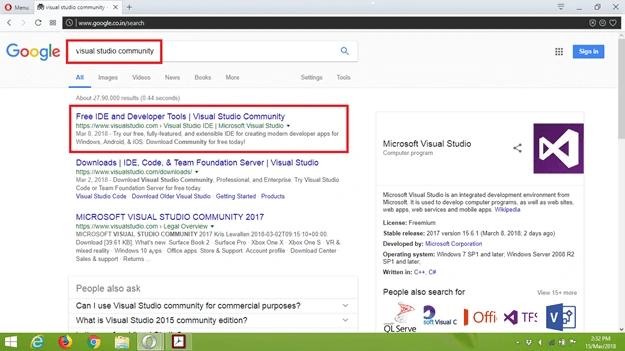
Let us type ‘Visual Studio Community’ in the Google search bar and then double click on the first link.
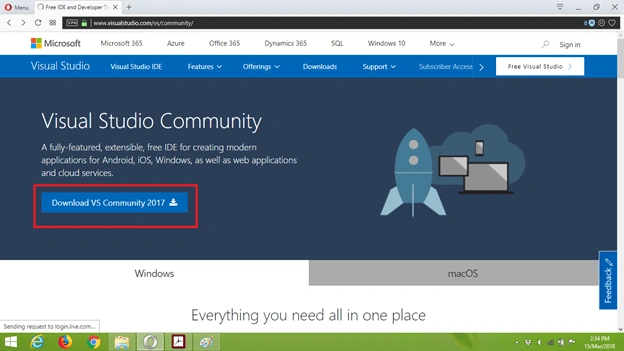
Then we can see the download page. Click the download button.
Now, the download of Visual Studio Community Installer will start. You can save the file to the Download folder or somewhere else you want.
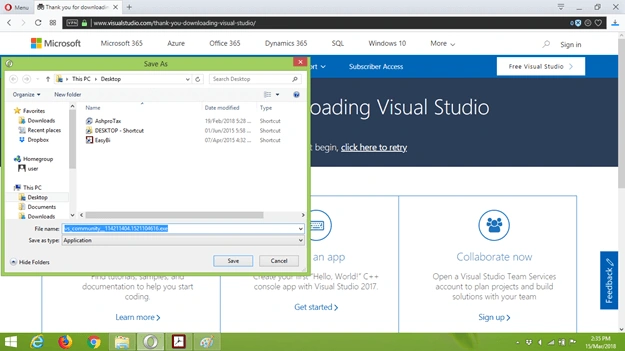
If the download process is completed, you can see the file in the download file. To start the installation, double-click on the file.
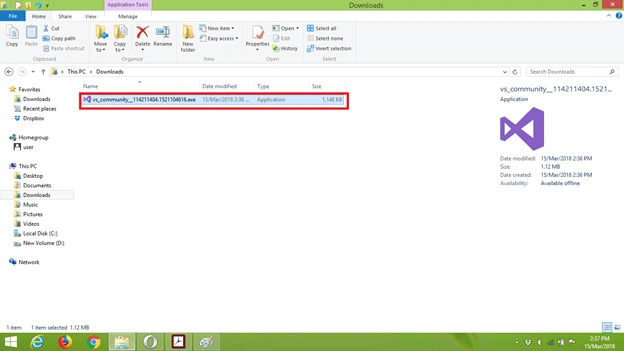
The installer will start. For that press on Continue button
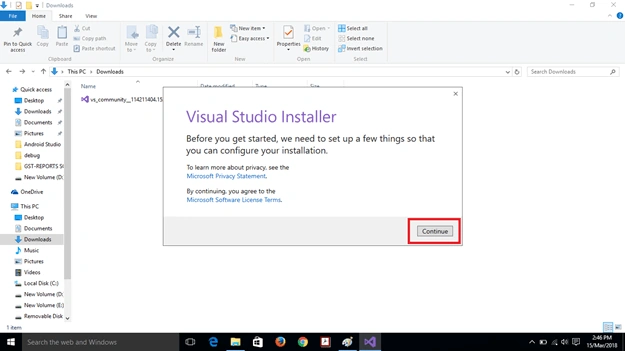
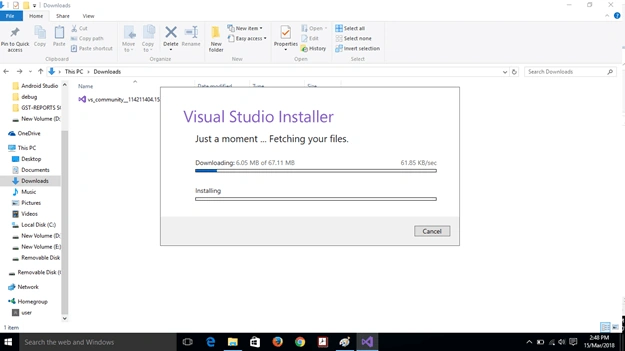
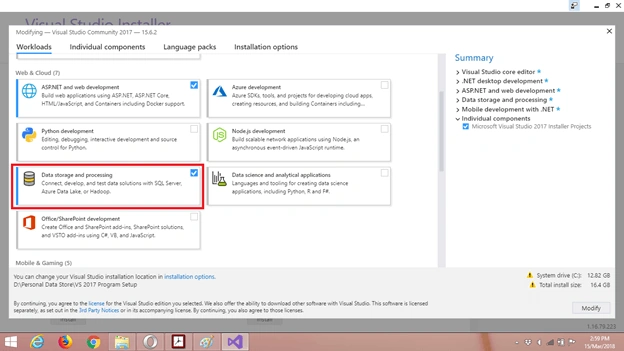
Then the Visual Studio Installer window will open. There are many options for installation. If you are a cross-platform mobile developer you can put a tick on Xamarin. And web developers can select Asp.net development option.
Here for us, we have to select two categories. One is “.Net Desktop Development” and the second is “Data Storage and Processing”.
We select .Net Desktop Development for Windows Form Application development purposes. In this platform, we will develop our Accounting Application with C# programing language.
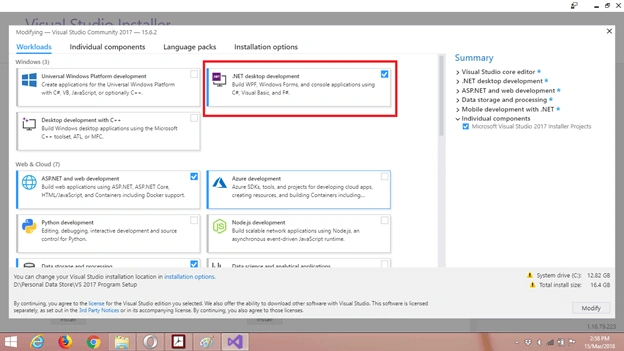
We want to store our data in SQL Server. So, we also select Data Storage and Processing option.
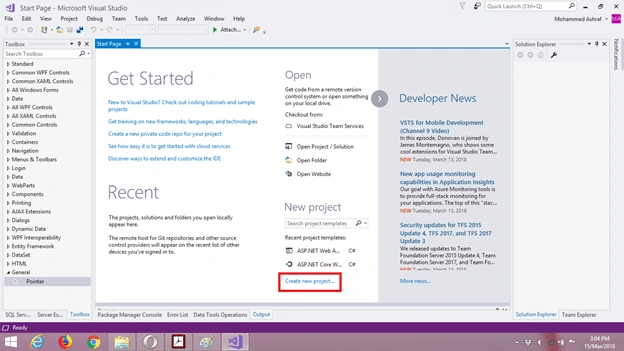
After finishing the installation, click on the start menu icon. We can see the Start Page. For creating a new project click on the link named “Create new project.”
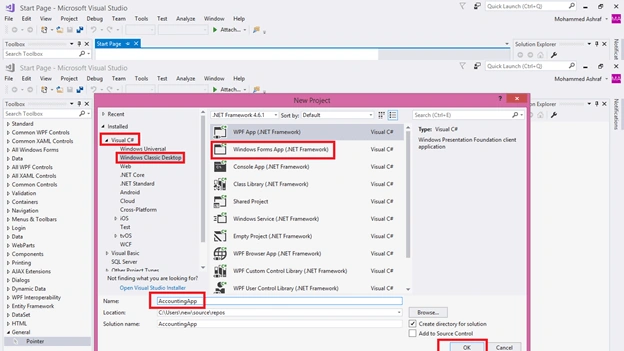
Now the project window will open.
Select C# programming language, then Windows Classic Desktop and finally select Windows Forms App. In the name section, you can type any name you want. And then press the ‘OK’ button.
Now we can see the window where all the application development process is happening. I have marked five areas. All are important in visual studio.
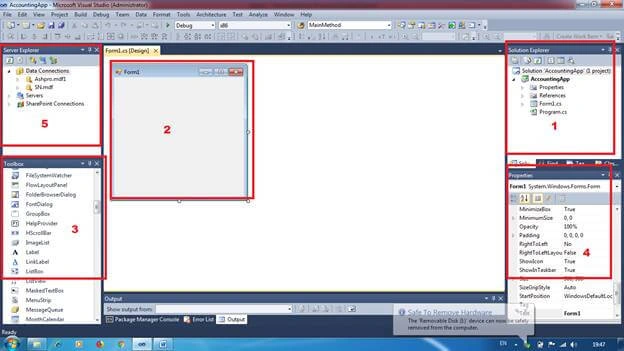
- Solution Explorer
In here, we can see the files in our project
- Graphics User Interface
This is the interface of our application. Here we create our application.
- Tool Boxes
From here we can drag and drop controls like button label and textboxes to the GUI to create the application. - Properties
From here, we can change properties of controls in the Graphic User Interface.
- Server Explorer
In here we can see the server and databases we use in the application.
Conclusion
Referring to the projects I have made will help you to understand the lessons completely. If you want them, please email me at: [email protected].
Thank you for reading this article.
himanshu valwaniPosted Mar 9, 2024, 3:35 PM
Hello sir, can you please send me the Source Code with the Database on valwani.himanshu53902gmail.com
Jon LeGrasPosted Apr 10, 2023, 11:11 PM
Is is possible to download the source for this?
Usman ShaukatPosted Nov 17, 2022, 10:42 PM
Hello sir, can you please send me the Source Code with the Database on [email protected]
Muhammad ZaigamPosted Sep 2, 2022, 8:36 AM
[email protected]
Ali HamadPosted May 13, 2022, 5:52 AM
Hi, Can you please send me a copy of source code with database. [email protected]
Zakki AhmedPosted Sep 27, 2021, 11:38 AM
Please share source code so we can use it for educational purpose....
Rodney PerelloPosted Jul 18, 2021, 11:12 AM
May I have a copy of the source code please. [email protected]
الصقر الجااارحPosted Jul 13, 2021, 3:36 PM
Can you please send me the source code of this project with database you have created to :- [email protected]
Bharat VarmaPosted Jun 6, 2021, 5:36 PM
Hi, please share me the code. Want to enhance it further. Please share at [email protected]. thanks
abdo salemPosted Mar 2, 2021, 12:32 PM
Could you kindly send me the source code to [email protected], thanks in advance
Mujahid AliPosted Nov 11, 2020, 8:04 AM
Can you please send me the source code of this project with database you have created to [email protected]
sidiq kpPosted Nov 5, 2020, 6:18 AM
Can you please send me the source code of this project with database you have created to :[email protected]
Mohammad ShaidPosted Sep 5, 2020, 3:44 AM
[email protected]
Mohammad ShaidPosted Sep 5, 2020, 3:43 AM
Can you please send me the source code of this project with database you have created to:gidefly@gmail.
Mohammad ShaidPosted Sep 5, 2020, 3:43 AM
Thank you so much and May God Bless you
Mohamed SajathPosted Aug 13, 2020, 9:04 PM
Brother, can you please send me the source code of this project with database you have created to: [email protected]
MOHAMMED OBRIPosted Jul 3, 2020, 12:33 PM
Please send mi source code and database on [email protected]
Gorakhnath ShindePosted Jun 25, 2020, 7:21 AM
Please send mi source code and database on [email protected]
Gorakhnath ShindePosted Jun 25, 2020, 7:21 AM
Can you send mi source code with database
Rohan PatilPosted May 15, 2020, 1:54 PM
Can you please send me source code to [email protected]
Sunil ShuklaPosted May 7, 2020, 5:15 AM
Can you please send me source code to [email protected]
SabiyaCo EnterprisePosted Sep 21, 2019, 10:58 AM
Can you please send source code to [email protected]
khushal pansuriyaPosted Sep 19, 2019, 5:52 AM
Can you please send source code to [email protected]
Baratha PnaduPosted Sep 8, 2019, 2:06 PM
Can you please send source code to [email protected]?
Ismail DewanPosted Aug 31, 2019, 2:07 PM
Please Send Me the source code to [email protected]
Rajeev AgarwalPosted Jul 30, 2019, 7:06 AM
Thank you for your sharing. could you send me your code to [email protected]
Dharmesh gevariyaPosted Jul 1, 2019, 4:12 AM
Hi can you send source code of this software my email id is [email protected]
pardeep mongaPosted Jun 26, 2019, 1:18 AM
Sir Can I get the database and source code of this project
Usman BroPosted Jun 19, 2019, 8:44 AM
Brother Please send me the full course [email protected]
Sagar BaruaPosted Mar 17, 2019, 9:57 AM
Pls send me the full course [email protected]
uchenna smithPosted Mar 9, 2019, 12:36 PM
Please kindly mail me at [email protected],to have a full understanding of the application. Thanks, u are good in all
SAMSAN TPosted Jan 14, 2019, 9:02 AM
Pls send me the full course [email protected]
SAMSAN TPosted Jan 14, 2019, 9:01 AM
Please send me the full course
GenuinePosted Jan 7, 2019, 3:06 PM
Can you please share the source to [email protected]?
Olagunju AdeolaPosted Nov 16, 2018, 3:11 AM
Good Morning Bro! Please kindly mail me at [email protected] to have a full understanding of the application. Thanks in advance
Darko KaracPosted Nov 9, 2018, 6:44 AM
PLS send me on email [email protected]
David GarciaPosted Nov 7, 2018, 10:33 AM
Could you send me the source codeo to [email protected], please?
Musa ButtPosted Sep 13, 2018, 6:38 AM
Please email me [email protected].
Sumit GautamPosted May 28, 2018, 2:40 AM
Can u please send me code at [email protected]
salman leoPosted May 17, 2018, 11:24 AM
Please send me code and database file at [email protected]
Ezel AmirPosted May 16, 2018, 8:36 PM
Did anyone of you get the code as a tutorial?
Ali GhaffariPosted Apr 5, 2018, 3:47 PM
Nice work. can you send me source code??I need to learn it quickely. [email protected]
Ravi MaheshwariPosted Mar 22, 2018, 11:06 AM
Also using WPF will give good value to enrich the product
Ravi MaheshwariPosted Mar 22, 2018, 11:03 AM
Try to develop in web application using AngularJS then it will boom the application. User can see his or her data from any location
Bhavesh JadavPosted Mar 21, 2018, 11:26 PM
Very good concept.... keep it up.
manish guptaPosted Mar 21, 2018, 11:01 PM
Hey Mohammed Ashraf can you send me the code on my mail please [email protected]