

In this article, I have explained how to create a dynamic accordion control from SharePoint List using PnP SPFx controls react and PNP JS.
Before creating the application, add a SharePoint list named "Accordion" in your SharePoint Site.
| Column Name | DataType |
| Title | Single line of text |
| Description | Multiline of text |
Create a SPFx project, "Dynamic Accordion" using "React" Template
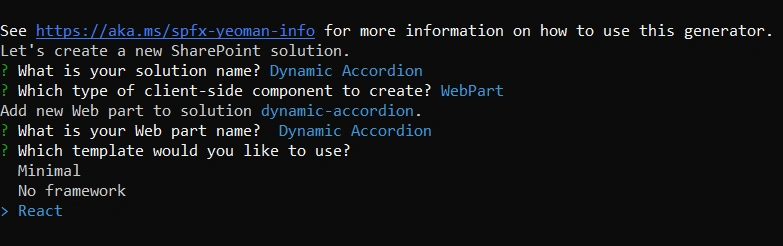
Install necessary NPM Packages
- npm install @pnp/spfx-controls-react --save --save-exac
- npm install @pnp/sp --save
Open the "DynamicAccordion.tsx" file and import the accordion control from PnP SPFx controls react and pnp/sp to interact With SharePoint API
import { SPFI } from '@pnp/sp';Create the interface to store the items in the React state
export interface AccordionState {
  Items: any[]
}
Initialize the constructor and state from the props
 private _sp: SPFI;
  constructor(props: IDynamicAccordionProps) {
    super(props)
    this.state = { Items: [] };
    this._sp = getSP();
  }
Create a private method "async" method to fetch the items from the SharePoint list "GetItems()" and set it into react state
Load the "GetItems() in the "ComponentDidMount()"
  componentDidMount(): void {
    this.GetItems();
  }
Now I am going to create a child component, "AccordionContent.tsx" to manage the accordion control and send the data over props to display in the child component.
Import the necessary NPM package from @pnp/spfx-controls react & create an interface to hold the data props.
import { Accordion } from '@pnp/spfx-controls-react';
export interface IItemprops {
    data: any[]
}
Initialize the constructor in child components and pass the IItemprops.
Inside the render method, use the let keyword to initialize the variable "Items" and set the data props like the below snippet.
  public render(): React.ReactElement<IItemprops> {
        let items = this.props.data
        if (this.props.data != null) {
            return (<div>
                <h1>Dynamic Accordion Control</h1>
                {items.map((item, index) => (
                    <Accordion title={item.Title} defaultCollapsed={true} expandedIcon={"ChevronUp"} collapsedIcon={"ChevronDown"} className={"itemCell"} key={index}>
                        <div className={"itemContent"}>
                            <div className={"itemResponse"}>{item.Description}</div>
                            <div className={"itemIndex"}>{`Langue :  ${item.Title}`}</div>
                        </div>
                    </Accordion>
                ))}
            </div>)
        } else {
            return (
                <p>No Items Found !....</p>
            )
        }
    }
The full code of "AccordionContent.tsx" look like below.
import * as React from 'react';
import { Accordion } from '@pnp/spfx-controls-react';
export interface IItemprops {
    data: any[]
}

export class AccordionContent extends React.Component<IItemprops> {

    constructor(props: IItemprops) {
        super(props)
    }
    public render(): React.ReactElement<IItemprops> {
        let items = this.props.data
        if (this.props.data != null) {
            return (<div>
                <h1>Dynamic Accordion Control</h1>
                {items.map((item, index) => (
                    <Accordion title={item.Title} defaultCollapsed={true} expandedIcon={"ChevronUp"} collapsedIcon={"ChevronDown"} className={"itemCell"} key={index}>
                        <div className={"itemContent"}>
                            <div className={"itemResponse"}>{item.Description}</div>
                            <div className={"itemIndex"}>{`Langue :  ${item.Title}`}</div>
                        </div>
                    </Accordion>
                ))}
            </div>)
        } else {
            return (
                <p>No Items Found !....</p>
            )
        }
    }
}
Finally, the full code like below in the "DynamicAccorion.tsx" file
import * as React from 'react';
import { useEffect } from 'react';
import styles from './DynamicAccordion.module.scss';
import { IDynamicAccordionProps } from './IDynamicAccordionProps';
import { escape } from '@microsoft/sp-lodash-subset';

import { AccordionContent } from "./AccordionContent";
import { SPFI } from '@pnp/sp';
import { getSP } from '../../config';
import { Async } from 'office-ui-fabric-react';
export interface AccordionState {
  Items: any[]
}

export default class DynamicAccordion extends React.Component<IDynamicAccordionProps, AccordionState> {
  private _sp: SPFI;
  constructor(props: IDynamicAccordionProps) {
    super(props)
    this.state = { Items: [] };
    this._sp = getSP();
  }

  private async GetItems() {
    let items = await this._sp.web.lists.getByTitle('Accordion').items()
    if (items.length > 0) {
      this.setState({
        Items: items
      });
    }
  }

  componentDidMount(): void {
    this.GetItems();
  }


  public render(): React.ReactElement<IDynamicAccordionProps> {
    let sampleItems = (this.state.Items.length > 0) ? this.state.Items : null;
    return (
      <AccordionContent data={sampleItems} ></AccordionContent>
    )
  }
}
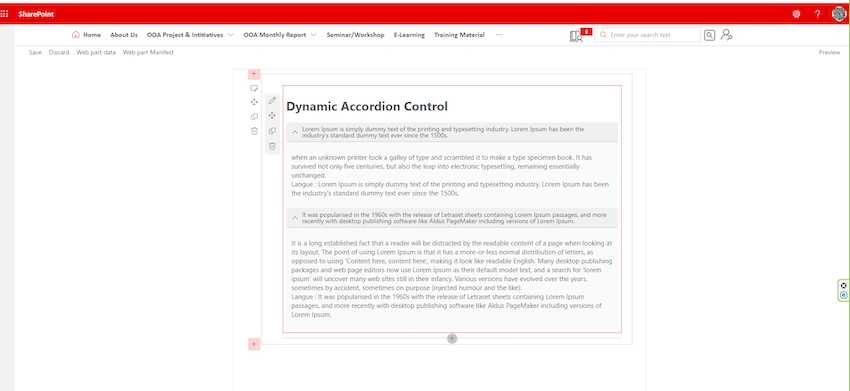
Execute "Gulp Serve" from your Visual Studio code terminal to load the SharePoint site workbench.
Sharing is caring !.....
Sangeetha SundaramoorthyPosted May 23, 2023, 3:09 AM
Keep doing your great job !..