

Introduction
The APPLY operator allows us to invoke a table-valued function for each row returned by an outer table expression of a query. The APPLY operator allows us to join two table expressions; the right table expression is processed every time for each row from the left table expression.
The left table expression is evaluated first and then the right table expression is evaluated against each row of the left table expression for the final result set. The list of columns produced by the APPLY operator is the set of columns in the left input followed by the list of columns returned by the right input.
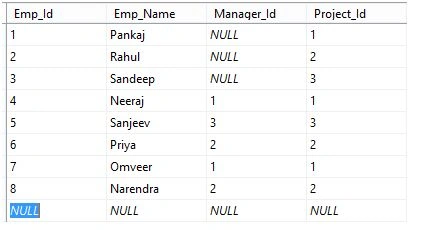
Now we create two tables, the first is Employee and the second Project table.
Employee Table
CREATE TABLE Employee
(
   Emp_Id int PRIMARYKEY,
   Emp_Name [nvarchar](max),
   Manager_Id int,
   Project_Id int
)
Now insert some data into the Employee table.
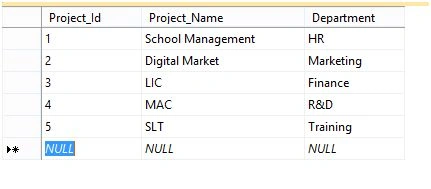
Project Table
CREATE TABLE Project
(
   Project_Id int,
   Project_Name [nvarchar](max),
   Department [nvarchar](max)
)
Insert data into the project table.
Forms of Apply
SQL Server contains two forms of Apply: CROSS APPLY and OUTER APPLY.
CROSS APPLY in SQL Server
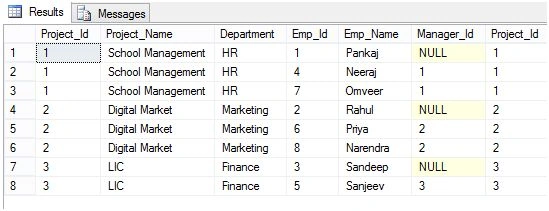
CROSS APPLY returns only rows from the outer table that produce a result set from the table-valued function. In other words, the result of CROSS APPLY doesn’t contain any row of left side table expression for which no result is obtained from right side table expression. CROSS APPLY for work as a row-by-row INNER JOIN.
INNER JOIN Query
SELECT * FROM Project AS PRO
INNER JOIN
Employee AS EMP
ON
PRO.Project_Id=EMP.Project_Id
CROSS APPLY Query
SELECT * FROM Project AS PRO
CROSS APPLY
(SELECT * FROM Employee AS EMP WHERE PRO.Project_Id=EMP.Project_Id) Tab
Both queries produce the same result.
OUTER APPLY in SQL Server
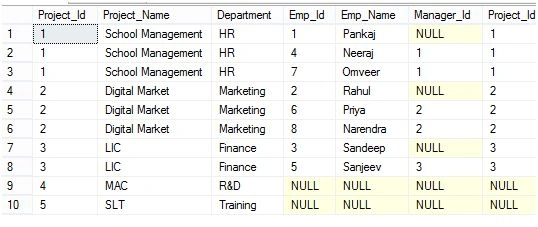
OUTER APPLY returns both rows that produce a result set, and rows that do not, with NULL values in the columns produced by the table-valued function. OUTER APPLY works as LEFT OUTER JOIN.
LEFT OUTER JOIN Query
SELECT * FROM Project AS PRO
LEFT OUTER JOIN
Employee AS EMP
ON
PRO.Project_Id=EMP.Project_Id
OUTER APPLY Query
SELECT * FROM Project AS PRO
OUTER APPLY
(SELECT*FROM Employee AS EMP WHERE PRO.Project_Id=EMP.Project_Id) Tab
Above both queries produce the same result.
APPLY with User Define a function
We can perform APPLY operation with a function that may be a scalar or table-valued function. This function will invoke each row and return a result that will be associated with the outer table.
Example 1
Firstly, create a function.
CREATE FUNCTION Return_Info(@Project_IDint)
RETURNS [nvarchar](max)
AS
BEGIN
DECLARE @Info[nvarchar](max);
SET @Info = (SELECT 'Project Name is= ' + Project.Project_Name + 'Deratment is= ' + Project.Department FROM Project WHERE Project.Project_Id = @Project_ID)
RETURN @Info
END
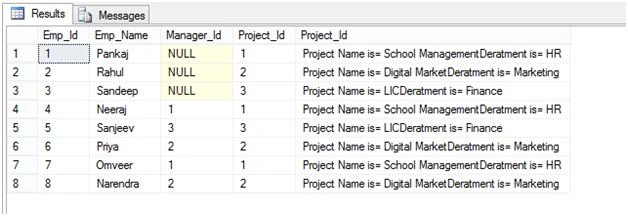
The above function will return a scalar value that is the combined result of the Department column and Project column.
Now we perform APPLY on this function.
SELECT * FROM dbo.Employee AS EMP
CROSS APPLY(select [dbo].[Return_Info](EMP.Project_Id))Tab(Project_Id)
Output
Example 2
Firstly, create a table-valued function.
CREATE FUNCTION [dbo].[fun_Return_Info](@Project_IDint)
RETURNS @Tab TABLE
(
   Project_Idint,
   Project_Namenvarchar(max),
   Department nvarchar(max)
)
AS
BEGIN
INSERT INTO @Tab
(
   Project_Id,
   Project_Name,
   Department
)
SELECT*FROM dbo.ProjectAS PRO WHERE PRO.Project_Id>@Project_ID
RETURN
END
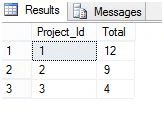
The above function return information on all project that’s Project_Id is greater than the given Project_id.
SELECT EMP.Project_Id,COUNT(EMP.Project_Id) AS [Total] FROM dbo.Employee AS EMP
OUTER APPLY
[fun_Return_Info](EMP.Project_Id)
GROUP BY EMP.Project_Id
Output
APPLY with TOP Command
SELECT * FROM
(SELECT PRO.*,EMP.Emp_Name,EMP.Emp_Id,EMP.Manager_Id,ROW_NUMBER()OVER(Partition By PRO.Project_Id Order By PRO.Project_Id)as Rank FROM dbo.Project AS PRO
LEFT OUTER JOIN
dbo.Employee AS EMP
ON
PRO.Project_Id=EMP.Project_Id)Tab1
WHERE Tab1.Rank<=2
Output
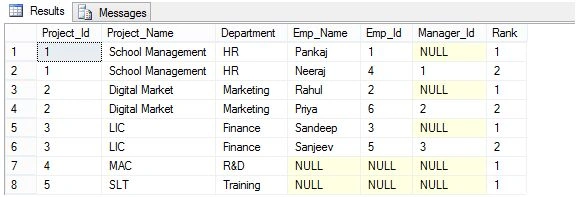
Above query return top Employee details for each project. We can perform the same operation using APPLY.
SELECT PRO.*,Tab.* FROM dbo.Project AS PRO
OUTER APPLY(SELECTTOP 2 EMP.Emp_Name,EMP.Emp_Id,EMP.Manager_Id Fromd bo.Employee AS EMP WHERE EMP.Project_Id=PRO.Project_Id)Tab
The above query produces the same result as the previous query.
Example 3
DECLARE @Tab TABLE
(
   [State] [nvarchar](max),
   City [nvarchar](max)
)

INSERT INTO @Tab
SELECT 'Rajasthan','Alwar,Laipur,Ajmer,Kota' UNION ALL
SELECT 'Haryana','Hisar,Jhajjar,Rohtak' UNION ALL
SELECT 'Maharaster','Mumbai,Pune'

SELECT * FROM @Tab AS [@TA]
Output
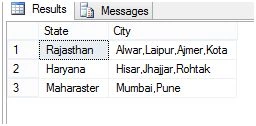
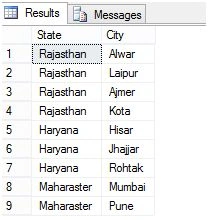
Suppose we have a table that contains State names and City names but city names are stored in comma separate manner, now we want to split each city name. For this, we can use APPLY Method as below.
For this, we create a function that split city name and return a table that contains the list of city names.
ALTER FUNCTION SplitString(@Input NVARCHAR(MAX))
RETURNS @Output TABLE(City NVARCHAR(1000))
AS
BEGIN
DECLARE @Index int;
SET @Input = @Input + ',';
WHILE(LEN(@Input) > 0)
BEGIN
SET @Index = CHARINDEX(',', @Input);
INSERT INTO @Output(City)
VALUES(SUBSTRING(@Input, 0, @Index))
SET @Input = SUBSTRING(@Input, @Index + 1, LEN(@Input));
END
RETURN
END
Now we use this function to split the city name.
DECLARE @Tab TABLE
(
[State] [nvarchar](max),
City [nvarchar](max)
)

INSERT INTO @Tab
SELECT 'Rajasthan','Alwar,Laipur,Ajmer,Kota' UNION ALL
SELECT 'Haryana','Hisar,Jhajjar,Rohtak' UNION ALL
SELECT 'Maharaster','Mumbai,Pune'

SELECT T.State,Tab.*FROM @Tab AS T
OUTERAPPLY dbo.SplitString(T.City)Tab
Output
Summary
In this article, you will learn about Apply operator in SQL Server and its types with examples. Learn Cross Apply And Outer Apply in SQL Server. Thanks for reading the article.
Michael MorrisPosted Mar 28, 2024, 2:29 PM
I appreciate the article. A few minor corrections to help future readers: 2nd to last SQL has an 'ALTER FUNCTION' ; CREATE instead. Minor typo: Deratment (shoudl be spelled) Department in the non-important 'display' text. Thank you for the article, and keep up the great work.
Santhakumar MunuswamyPosted Jan 10, 2016, 11:40 AM
Thanks for nice article
Karthikeyan KPosted Jan 10, 2016, 9:45 AM
Good one bro..
Humayun Kabir MamunPosted Jan 10, 2016, 7:34 AM
Nice...
Nanddeep NachanPosted Jan 10, 2016, 4:46 AM
Thanks for sharing. Informative.
Ankit BansalPosted Jan 10, 2016, 2:46 AM
nice one..keep sharing..
Manas MohapatraPosted Jan 10, 2016, 12:36 AM
Informative one. I got the difference between CROSSAPPLY and OUTERAPPLY in sqlserver.