

Introduction
Today, in this article let's play around with one of the interesting and most useful concepts in SharePoint 2010.
Question: What is CSS regions?
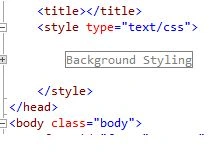
In simple terms "It enables definition of a proper outline of the CSS document by dividing the sections into regions".
Step 1: The complete code of webform1.aspx looks like this:
<%@ Page Language="C#" AutoEventWireup="true" CodeBehind="WebForm1.aspx.cs" Inherits="CSSRegionsApp.WebForm1" %>
<!DOCTYPE html>
<html xmlns="http://www.w3.org/1999/xhtml">
<head id="Head1" runat="server">
<title></title>
<style type="text/css">
/*#region Background Styling*/.body
{
background-color: #903a3a;
}
/*#endregion*/</style>
</head>
<body class="body">
<form id="form1" runat="server">
<div>
<center>
<table>
<tr>
<th>
Id
</th>
<th>
First Name
</th>
<th>
Last Name
</th>
<th>
Age
</th>
</tr>
<tr>
<td>
<asp:TextBox ID="TextBox1" runat="server"></asp:TextBox>
</td>
<td>
<asp:TextBox ID="TextBox2" runat="server"></asp:TextBox>
</td>
<td>
<asp:TextBox ID="TextBox3" runat="server"></asp:TextBox>
</td>
<td>
<asp:TextBox ID="TextBox4" runat="server"></asp:TextBox>
</td>
</tr>
</table>
</center>
</div>
</form>
</body>
</html>
Step 2: The output of the application looks like this:
I hope this article is useful for you.
Join the conversation! Your thoughts help the community grow.