

Finally customer data type is available in Dynamics CRM 2016. Let’s see how it can be useful in your next CRM implementation. In Dynamics CRM, the customer information can be stored using two entities: Account and Contact.
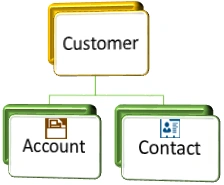
Generally, an account is used to represent a company whereas a contact is used to represent individual clients or a point of contact from some company. Depending on the requirement, sometimes we use account and sometimes we use contact to store the customer information, but sometimes a record can be related to an account or a contact, for example, case. We may get a support case request from an account or a contact. To deal with these kinds of requirements, some of the CRM entity contains a special customer lookup field, which is a system field. Following is the list of entities which have a customer lookup where we can set an account or a contact:
Generally, an account is used to represent a company whereas a contact is used to represent individual clients or a point of contact from some company. Depending on the requirement, sometimes we use account and sometimes we use contact to store the customer information, but sometimes a record can be related to an account or a contact, for example, case. We may get a support case request from an account or a contact. To deal with these kinds of requirements, some of the CRM entity contains a special customer lookup field, which is a system field. Following is the list of entities which have a customer lookup where we can set an account or a contact:
- Case
- Lead
- Opportunity
- Quote
- Order
- Invoice
- Contract
Earlier, there was no supported way to create similar type of lookup, so when we needed to deal with the customer we needed to create two separate lookups; one for an account, and one for a contact, but with the release of Dynamics CRM 2016 update 1, we can create new customer lookups. Let’s see how we can create customer field in our custom entity.
- Navigate to Settings->Customizations->Customize the System.
- Navigate to your custom entity -> Fields->New.
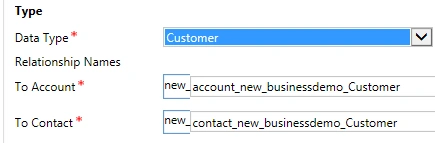
- Select customer data type from data type drop down and you will see the relationship names, as shown below. It will setup two N:1 relationships between your custom, an account and similarly with contact entity.
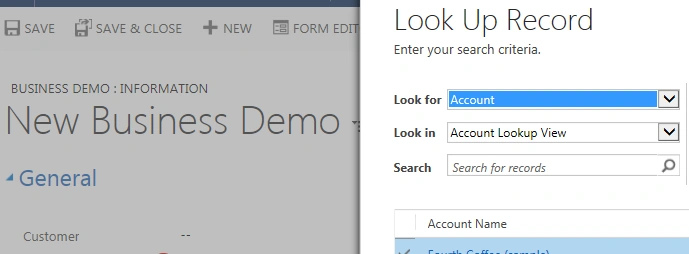
After placing this lookup field over our entity form, we can set an account or a contact in this field, as shown below:
Now, next time, if you need to deal with a customer,there is no need to create two lookups and if you are already using two lookups in your custom entities, you can create a customer field and can use on-demand workflow to copy the value from old lookups to new customer lookups.
Stay tuned for more updates.
Santhakumar MunuswamyPosted Jun 25, 2016, 3:21 AM
Nice share
Kuppurasu NagarajPosted Jun 14, 2016, 1:20 PM
Nice Sharing..