
Introduction
A DataGridView control can be used to display data from a database. A table can be displayed from a database in a DataGridView, using the DataAdapter class and data logic. You can easily update a database from a DataGridView.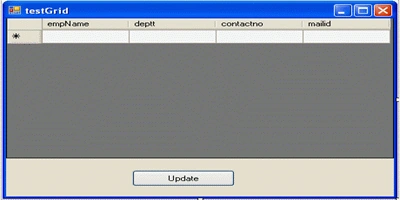
Step 1
Create a Windows Forms Application Project, and place a DataGridView on the form.
Step 2
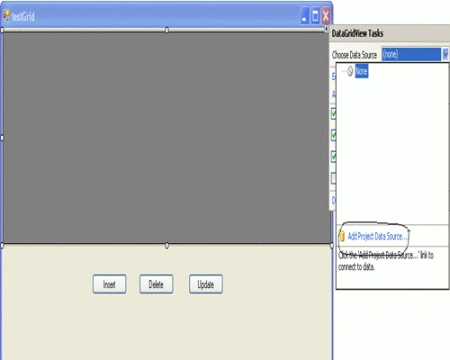
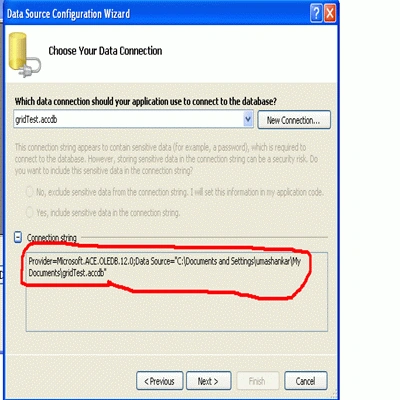
Click on the pin button on right-up side of DataGridView and click add project DataSource. And follow these simple steps.
- Choose DataSourceType Database
- New Connection, Make Connection
- Select Table and Column names
- Finish
Step 3
Your DataSet now has been created. You can see it from the Solution Explorer. 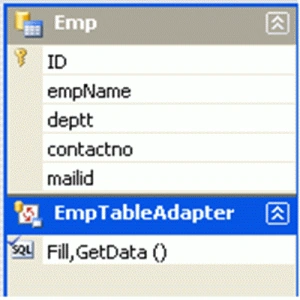
Step 4
See the properties of the Adapter on DataSet, whether it has a query for updating or not. If not then add an update query.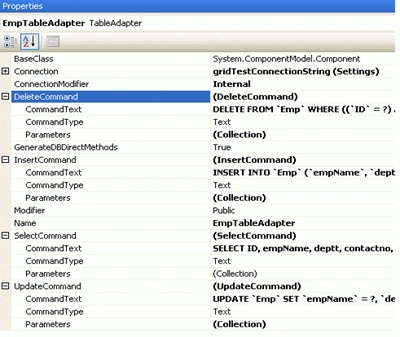
Step 5
A line is automatically generated, when you bind the DataGridView to the dataset. As:
private void testGrid_Load(object sender, EventArgs e)
{
// TODO: This line of code loads data into the 'gridTestDataSet.Emp' table. You can move, or remove it, as needed.
this.empTableAdapter.Fill(this.gridTestDataSet.Emp);
}
On Click Event of Update button
private void button3_Click(object sender, EventArgs e)
{
//Update button update dataset after insertion,upadtion or deletion
DialogResult dr = MessageBox.Show("Are you sure to save Changes", "Message", MessageBoxButtons.YesNoCancel, MessageBoxIcon.Information);
if (dr == DialogResult.Yes)
{
this.empTableAdapter.Update(gridTestDataSet.Emp);
dataGridView1.Refresh();
MessageBox.Show("Record Updated");
}
}
Points of Interest
You can insert a row and click the update button; a row in the database will be inserted.
If you update any cell and click the update button, then the database will be updated.
To delete, select the rows and then press the Delete key and click the update button; the rows will be deleted. All your insertions, updates, and deletions will be effected by the single button.


Krishna Rajput SinghPosted Mar 26, 2016, 1:42 AM EDT
dipak shah for you i hope help for you http://www.c-sharpcorner.com/UploadFile/a5f59f/how-to-create-log-in-form-in-visual-studio-and-connection-wi/ if need more ask me question
lbs yinPosted Feb 12, 2014, 8:50 AM EST
very good
dipak shahPosted Sep 8, 2013, 10:22 AM EDT
my mail id is [email protected] so please help in above query....
dipak shahPosted Sep 8, 2013, 10:21 AM EDT
in my tableadapter properties not displayed properties like step 4 in above example.then what the error i have ...please help me...sir...thanks in advanced
Mohammed GamalPosted Dec 17, 2012, 11:46 PM EST
i like this article, but i have a question by this method how can i make a SQL query ?
Thabang SesediPosted Oct 4, 2012, 2:33 PM EDT
It wont update
Thabang SesediPosted Oct 4, 2012, 2:33 PM EDT
It wont update
Thabang SesediPosted Oct 4, 2012, 2:33 PM EDT
It wont update
Anubhav sahuPosted Sep 6, 2012, 3:32 AM EDT
nice....
Sunil SharmaPosted Aug 27, 2012, 8:25 AM EDT
very simple
Bhushan InjePosted Mar 26, 2012, 3:37 AM EDT
it is very nice code and trick
Sonakshi SinghPosted Feb 6, 2012, 5:57 PM EST
Useful for me
Dinesh BeniwalTOP 10Posted Jan 6, 2012, 6:41 PM EST
Good start, Welcome to the C# Corner.
Akash AhlawatPosted Jan 6, 2012, 6:07 PM EST
Well done
Arjun PanwarPosted Jan 6, 2012, 6:05 PM EST
Thanks for sharing