

new System.Drawing.Font("Arial", 35, FontStyle.Bold)
-
Using the above line you can set your font...
-
You can set your font type, which means in which font type you want to draw your string. Here I use "Arial" as font type.
-
After that you can set the font size of your string which you want to show in that size in your form.
-
After that you can set the Font Style like BOLD, ITALIC, UNDERLINE, STRIKEOUT & REGULAR.
new Rectangle(10, 10, 100, 100)
-
Using the above line it will create a new Rectangle for creating gradient for your string.
-
Initialize the new instance of the System.Drawing.Rectangle class with the specified Location & Size.
System.Drawing.Drawing2D.LinearGradientMode.ForwardDiagonal
-
LinearGradientMode: Specifies the direction of your Linear Gradient.
-
Two Modes of "LinearGradientMode".
-
ForwardDiagonal : Specifies a Gradient from the upper left to lower right. Here I use FarwardDiagonal.
-
BackwardDiagonal : Specifies a Gradient from the upper right to lower left.
new PointF(12.0F, 12.0F)
-
Initialize a new instance of the System.Drawing.PointF class with the specified Coordinates. Here one thing to keep in mind is that the points must be the Float type.
new System.Drawing.Drawing2D.LinearGradientBrush(new Rectangle(10, 10, 100, 100), Color.Red, Color.Blue, System.Drawing.Drawing2D.LinearGradientMode.ForwardDiagonal)
/// <summary>
/// System.Drawing.Drawing2D.LinearGradientBrush : It will be used to draw a given string into linear gradient.
/// </summary>
/// <param name="rect">Set here your rectangle</param>
/// <param name="color 1">Set here your color 1, which will use in gradient as first color. </param>
/// <param name="color 2">Set here your color 2, which will use in gradient as second color. </param>
/// <param name="lineargradientmode">Set here any one linear gradient mode. </param>
myGradientGraphic.DrawString("Ghanashyam Nayak", new System.Drawing.Font("Arial", 35, FontStyle.Bold), new System.Drawing.Drawing2D.LinearGradientBrush(new Rectangle(10, 10, 100, 100), Color.Red, Color.Blue, System.Drawing.Drawing2D.LinearGradientMode.ForwardDiagonal), new PointF(12.0F, 12.0F), myStringFormat);
/// <summary>
/// DrawString : It will draw a given string into your current form.
/// </summary>
/// <param name="s">Write here your string which you want to show into form.</param>
/// <param name="font">Set here your font like font type, it's size, font style.</param>
/// <param name="brush">Set here your brush in which color(s) you want to display your string.</param>
/// <param name="point">Set here folating point of X & Y coordinates of your form at which coordiantes you want to display your string.</param>
/// <param name="format">Set here format of your string. </param>
-
Below Is The Main Code:
using System;
using System.Collections.Generic;
using System.ComponentModel;
using System.Data;
using System.Drawing;
using System.Linq;
using System.Text;
using System.Windows.Forms;
namespace MyBlog
{
public partial class Form1 : Form
{
public Form1()
{
InitializeComponent();
}
private void button1_Click(object sender, EventArgs e)
{
//To initialize a new System.Drawing.StringFormat object
StringFormat myStringFormat = new StringFormat();
using (Graphics myGradientGraphic = this.CreateGraphics())
{
//Draw your given string as VERTCAL Direction...
myStringFormat.FormatFlags = StringFormatFlags.DirectionVertical;
myGradientGraphic.DrawString("Ghanashyam Nayak", new System.Drawing.Font("Arial", 35, FontStyle.Bold), new
System.Drawing.Drawing2D.LinearGradientBrush(new Rectangle(10, 10, 100, 100), Color.Red, Color.Blue,
System.Drawing.Drawing2D.LinearGradientMode.ForwardDiagonal), new PointF(12.0F, 12.0F), myStringFormat);
}
}
}
}
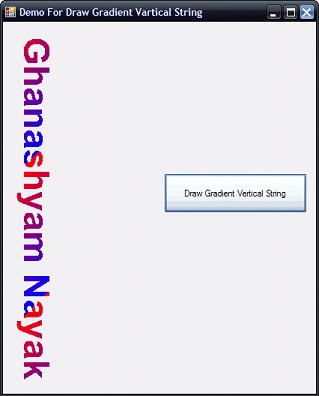
See the image below for a more clear view:
Join the conversation! Your thoughts help the community grow.