




Introduction
AngularJS is an MVC based framework. Google developed AngularJS. AngularJS is an open source project, which can be used freely, modified and shared by others.
AngularJS is an MVC based framework. Google developed AngularJS. AngularJS is an open source project, which can be used freely, modified and shared by others.
Top features Of AngularJS
- Two Way Data-Binding
This means that any changes to the model update the view and any changes to the view updates the model. - Dependency Injection
AngularJS has a built-in Dependency Injection, which makes application easier to develop, maintain and debug in addition to the test. - Testing
Angular will test any of its code through both unit testing and end-to-end testing. - Model View Controller
Split your application into MVC components. Maintaining these components and connecting them together means setting up Angular.
For More Details Visit My Below Article,
Prerequisites
- Visual Studio 2017 Version 15.7.3
- Microsoft .NET Framework Version 4.7
- Microsoft SQL Server 2016
- SQL Server Management Studio v17.7
Description
In this project, the description is about the steps to create treeview structure of File and SubFile using AngularJS in MVC and This procedure can be implemented in case of Modules and related pages under each module in ERP type of project.
So, here I show you a project which you can implement in a real-time scenario for better understanding of how many pages there are under respective Modules and the relation between Module and its corresponding pages.
Steps To Be Followed:
Step 1
Create a table named "Treeviewtbl".
Here I have a general script of Table creation with some dummy records inserted. You can find this SQL file inside the project folder named
"Treeviewtbl.sql"
Step 2
Then I have created an MVC application named "FileStructureAngular".
Step 3
Here I have added Entity Data Model named "SatyaModel.edmx" .
Go to Solution Explorer > Right Click on Project name form Solution Explorer > Add > New item > Select ADO.net Entity Data Model under data > Enter model name > Add. A popup window will come (Entity Data Model Wizard) > Select Generate from database > Next >
Chose your data connection > select your database > next > Select tables > enter Model Namespace > Finish.
Step 4
Inside HomeController I've added the following code.
Code Ref
- using System;
- using System.Collections.Generic;
- using System.Linq;
- using System.Web;
- using System.Web.Mvc;
- namespace FileStructureAngular.Controllers
- {
- public class HomeController : Controller
- {
- //
- // GET: /Home/
- public ActionResult Index()
- {
- return View();
- }
- public JsonResult GetFileStructure()
- {
- List<Treeviewtbl> list = new List<Treeviewtbl>();
- using (CrystalGranite2016Entities dc = new CrystalGranite2016Entities())
- {
- list = dc.Treeviewtbls.OrderBy(a => a.FileName).ToList();
- }
- List<Treeviewtbl> treelist = new List<Treeviewtbl>();
- if (list.Count > 0)
- {
- treelist = BuildTree(list);
- }
- return new JsonResult { Data = new { treeList = treelist }, JsonRequestBehavior = JsonRequestBehavior.AllowGet };
- }
- public void GetTreeview(List<Treeviewtbl> list, Treeviewtbl current, ref List<Treeviewtbl> returnList)
- {
- var childs = list.Where(a => a.ParentID == current.ID).ToList();
- current.Childrens = new List<Treeviewtbl>();
- current.Childrens.AddRange(childs);
- foreach (var i in childs)
- {
- GetTreeview(list, i, ref returnList);
- }
- }
- public List<Treeviewtbl> BuildTree(List<Treeviewtbl> list)
- {
- List<Treeviewtbl> returnList = new List<Treeviewtbl>();
- var topLevels = list.Where(a => a.ParentID == list.OrderBy(b => b.ParentID).FirstOrDefault().ParentID);
- returnList.AddRange(topLevels);
- foreach (var i in topLevels)
- {
- GetTreeview(list, i, ref returnList);
- }
- return returnList;
- }
- }
- }
Fetch data from the database and return it as a JSON result.
- public JsonResult GetFileStructure()
- {
- List<Treeviewtbl> list = new List<Treeviewtbl>();
- using (CrystalGranite2016Entities dc = new CrystalGranite2016Entities())
- {
- list = dc.Treeviewtbls.OrderBy(a => a.FileName).ToList();
- }
- List<Treeviewtbl> treelist = new List<Treeviewtbl>();
- if (list.Count > 0)
- {
- treelist = BuildTree(list);
- }
- return new JsonResult { Data = new { treeList = treelist }, JsonRequestBehavior = JsonRequestBehavior.AllowGet };
- }
I used a recursion method required for angularTreeview directive.
Recursion method for recursively getting all child nodes and getting a child of the current item:
- public void GetTreeview(List<Treeviewtbl> list, Treeviewtbl current, ref List<Treeviewtbl> returnList)
- {
- var childs = list.Where(a => a.ParentID == current.ID).ToList();
- current.Childrens = new List<Treeviewtbl>();
- current.Childrens.AddRange(childs);
- foreach (var i in childs)
- {
- GetTreeview(list, i, ref returnList);
- }
- }
- public List<Treeviewtbl> BuildTree(List<Treeviewtbl> list)
- {
- List<Treeviewtbl> returnList = new List<Treeviewtbl>();
- var topLevels = list.Where(a => a.ParentID == list.OrderBy(b => b.ParentID).FirstOrDefault().ParentID);
- returnList.AddRange(topLevels);
- foreach (var i in topLevels)
- {
- GetTreeview(list, i, ref returnList);
- }
- return returnList;
- }
Add a partial class of "Treeviewtbl" class for adding an additional field for holding child items.
Code Ref
- using System;
- using System.Collections.Generic;
- using System.Linq;
- using System.Web;
- namespace FileStructureAngular
- {
- public partial class Treeviewtbl
- {
- public List<Treeviewtbl> Childrens { get; set; }
- }
- }
Here is a field property "children" for identifying child nodes. So we need to add an additional field in our Model. So, I will add a partial class to add an additional field to hold child items.
Step 6
Add required files into our project. In this article, I am going to use angularTreeview directive. This a very popular directive to render treeview from hierarchical data in AngularJS application.
- angular.treeview.css
- angular.treeview.js
- image folder
Here folders are the Modules and files are the pages under respective modules.
Step 7
I have added a Javascript file, where we will write AngularJS code for creating an Angular module and an Angular controller.
In our application, I will add a Javascript file into the Scripts folder. Go to Solution Explorer > Right click on "Scripts" folder > Add > New Item > Select Javascript file under Scripts > Enter file name (here in my application it is "myApp.js") > and then click on Add button.
Code Ref
- var app = angular.module('myApp', ['angularTreeview']);
- app.controller('myController', ['$scope', '$http', function ($scope, $http) {
- $http.get('/home/GetFileStructure').then(function (response) {
- $scope.List = response.data.treeList;
- })
- }])
Add a dependency to your application module.
- var app = angular.module('myApp', ['angularTreeview']);
Here I created a module named myApp and registered a controller named myController and then added GetFileStructure controller action method of HomeController for fetching data from the database and it returned as a JSON result.
- $http.get('/home/GetFileStructure').then(function (response) {
- $scope.List = response.data.treeList;
- })
Add view for that (here index action) named "Index.cshtml".
Code Ref
- @{
- ViewBag.Title = "Satyaprakash - Website Modules In Treeview";
- }
- @*<h2>Website Modules In Treeview</h2>*@
- <fieldset>
- <legend style="font-family:Arial Black;color:blue">Website Modules In Treeview File Structure</legend>
- <div ng-app="myApp" ng-controller="myController">
- <span style="font-family:Arial Black;color:forestgreen">Selected Node : <span style="font-family:Arial Black;color:red">{{mytree.currentNode.FileName}}</span> </span>
- <br/>
- <br/>
- <div data-angular-treeview="true"
- data-tree-id="mytree"
- data-tree-model="List"
- data-node-id="ID"
- data-node-label="FileName"
- data-node-children="Childrens">
- </div>
- </div>
- <link href="~/Content/angular.treeview.css" rel="stylesheet" />
- @section Scripts{
- <script src="http://ajax.googleapis.com/ajax/libs/angularjs/1.0.6/angular.min.js"></script>
- <script src="~/Scripts/angular.treeview.js"></script>
- <script src="~/Scripts/myApp.js"></script>
- }
- </fieldset>
Here I have created a module name and registered a controller name under this module.
- <div ng-app="myApp" ng-controller="myController">
Copy the script and css into your project and add a script and link tag to your page.
- <link href="~/Content/angular.treeview.css" rel="stylesheet" />
- @section Scripts{
- <script src="http://ajax.googleapis.com/ajax/libs/angularjs/1.0.6/angular.min.js"></script>
- <script src="~/Scripts/angular.treeview.js"></script>
- <script src="~/Scripts/myApp.js"></script>
- }
Attributes of angular treeview are below.
- angular-treeview: the treeview directive.
- tree-id : each tree's unique id.
- tree-model : the tree model on $scope.
- node-id : each node's id.
- node-label : each node's label.
- node-children: each node's children.
- <div data-angular-treeview="true"
- data-tree-id="mytree"
- data-tree-model="List"
- data-node-id="ID"
- data-node-label="FileName"
- data-node-children="Childrens">
- </div>
- <span style="font-family:Arial Black;color:forestgreen">Selected Node : <span style="font-family:Arial Black;color:red">{{mytree.currentNode.FileName}}</span> </span>
- angular-treeview: the treeview directive
- tree-id : each tree's unique id.
- tree-model : the tree model on $scope.
- node-id : each node's id
- node-label : each node's label
- node-children: each node's children
Note
I have used angularTreeview directive for generating treeview from hierarchical data.
OUTPUT
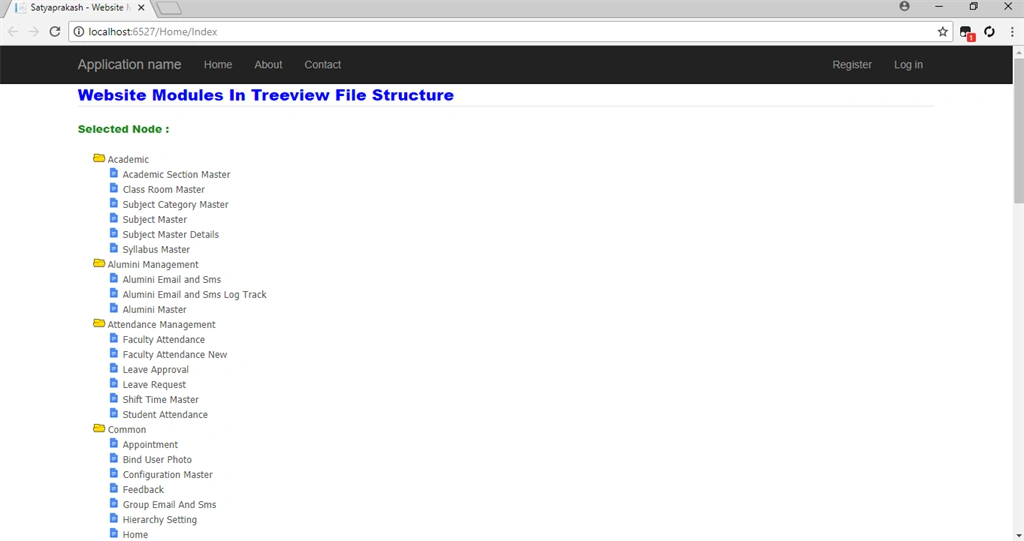
For initial page load, here all folders or modules are open and all related files or pages of corresponding modules are as shown below in blue icon.
- Folder or Module in the yellow icon.
- Files or Pages in the blue icon.
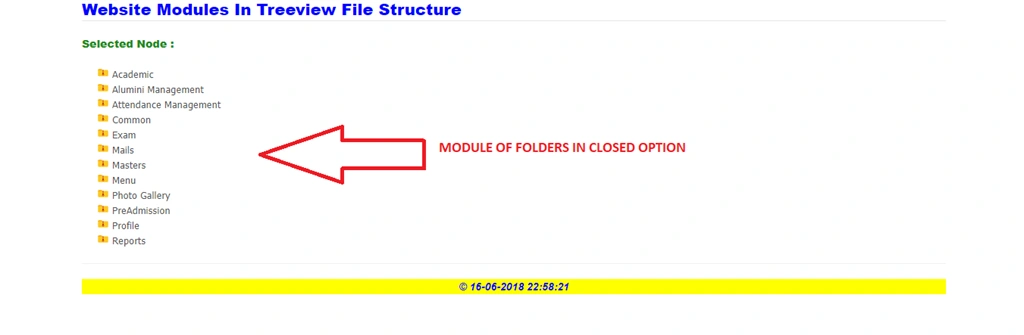
Folder or Module In Closed Option.
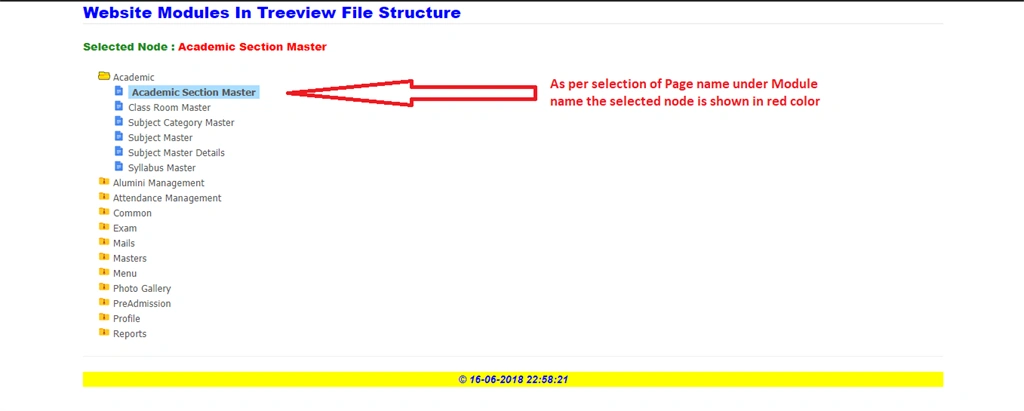
As per selection of module or pages, the text is shown in red.
SUMMARY
- Treeview using AngularJS in MVC.
- AngularTreeview directive for generating treeview from hierarchical data.
- Sample project about Modules and Pages in treeview.
- Implement Recursion method for recursively getting all children.
Sundaram SubramanianPosted Jun 19, 2018, 4:40 AM
Thanks for sharing a worth content. Keep sharing.