
Introduction
Having a menu and sub menus with links is very normal in a Web application. Typically, we create static menu and menu items. But sometimes we need dynamic menus when we do not know what the menu names and links will be called.
In this article, we will see how to create dynamic menu and sub menus in an ASP.NET application.
Mainly
in CMS application we require to customary web layout, Menu and Submenu Items.
In this article, you learn how to dynamically add Menu and Sub Menu Links for our
Web Application.
Step 1: Create Database say (Database.mdf)
Add 2 tables to the database - MainMenu and SubMenu. The table design looks like the following:
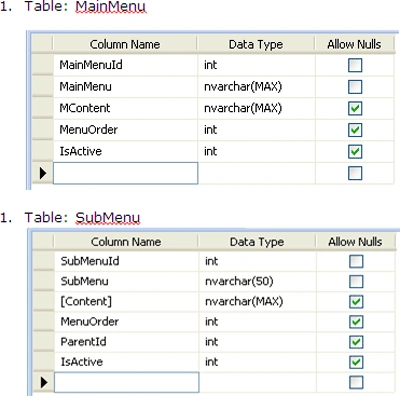
Step 2: add ConnectionString in web.config. as given below.
- <connectionStrings>
- <add name="ConnectionString" connectionString="Data Source=.; AttachDbFilename= DynamicallyControlCreationOfMenuSubmenuItems \App_Data\Database.mdf;User ID=**;Password=*****;Pooling=False" providerName=".NET Framework Data Provider for SQL Server"/>
- </connectionStrings>

Step 4: Open Solution Explorer ->Add New item
Add CreateMenu.aspx

Step 5: Design the page and Place required Controls in it. As you can see from this design, a user can enter a Menu name, content, order and activate it. Same applies to the sub menu except the fact that user will have to select a main menu.


Step 6: Add Main Menu Items by double click on submit Button -> Now write the below code.
- protected void btnMainmenu_Click(object sender, EventArgs e)
- {
- int active;
- if (chkMActive.Checked)
- {
- active = 1;
- }
- else
- {
- active = 0;
- }
- SqlConnection conn = new SqlConnection(connection);
- string sql = "INSERT INTO MainMenu(MainMenu, MContent, MenuOrder, IsActive)VALUES('" + txtMainmenu.Text + "','" + txtMContent.Text + "'," + Convert.ToInt16(ddlMOrder.SelectedItem.Value) + "," + active + ")";
- SqlCommand cmd = new SqlCommand(sql, conn);
- conn.Open();
- cmd.CommandType = CommandType.Text;
- cmd.ExecuteNonQuery();
- conn.Close();
- FillddlMainMenu();
- Response.Redirect("SuccessMsg.aspx");
- }
- For this we first need to populate
dropdown of Main Menu. Below is the code.
- protected void Page_Load(object sender, EventArgs e)
- {
- if (!IsPostBack)
- {
- FillddlMainMenu();
- }
- }
- public void FillddlMainMenu()
- {
- SqlConnection conn = new SqlConnection(connection);
- DataSet DS = new DataSet();
- SqlDataAdapter dataadapter = new SqlDataAdapter();
- SqlCommand cmd = new SqlCommand("Select MainMenuId,MainMenu from MainMenu", conn);
- //cmd.CommandType = CommandType.Text;
- dataadapter.SelectCommand = cmd;
- dataadapter.Fill(DS);
- ddlMainMenu.DataSource = DS;
- ddlMainMenu.DataBind();
- }
- Double click on submit Button -> Now write
the below code.
- protected void btnSubmenu_Click(object sender, EventArgs e)
- {
- int active;
- if (chkSActive.Checked)
- {
- active = 1;
- }
- else
- {
- active = 0;
- }
- SqlConnection conn = new SqlConnection(connection);
- string sql = "INSERT INTO SubMenu(SubMenu, Content, MenuOrder,ParentId, IsActive)VALUES('" + txtSubmenu.Text + "','" + txtSContent.Text + "'," + Convert.ToInt16(ddlSOrder.SelectedItem.Value) + "," + Convert.ToInt16(ddlMainMenu.SelectedItem.Value) + "," + active + ")";
- SqlCommand cmd = new SqlCommand(sql, conn);
- conn.Open();
- cmd.CommandType = CommandType.Text;
- cmd.ExecuteNonQuery();
- conn.Close();
- Response.Redirect("SuccessMsg.aspx");
- }
Step 8: Now to Show Menu Items we need to add another page. Add 2 Data lists for Main Menu(Horizontally) Submenus Items(Vertically).

Step 9: Now Write Code for populating Main Menu Items in datalist to show as menuBar.
- protected void Page_Load(object sender, EventArgs e)
- {
- FillMenu();
- }
- public void FillMenu()
- {
- DataSet ds = new DataSet();
- SqlConnection conn = new SqlConnection(connection);
- SqlDataAdapter dataadapter = new SqlDataAdapter();
- SqlCommand cmd = new SqlCommand("Select * from MainMenu ORDER BY MenuOrder", conn);
- //cmd.CommandType = CommandType.Text;
- dataadapter.SelectCommand = cmd;
- dataadapter.Fill(ds);
- return ds;
- dlSubMenu.DataSource = ds1;
- dlSubMenu.DataBind();
- }
Now we need to populate submenus on selected mainmenu link. We will write code
on datalist ItemCommand event.
Step 10: datalist ->Properties ->Add ItemCommand Event.
- protected void dlMenu_ItemCommand(object source, DataListCommandEventArgs e)
- {
- LinkButton lnkLink = e.Item.FindControl("lnkLink") as LinkButton;
- Label lblPageId = e.Item.FindControl("lblpageId") as Label;
- Session["Sublink"] = lblPageId.Text;
- if (lnkLink.Text != null)
- {
- Session["Choice"] = "Main";
- DataSet ds1 = new DataSet();
- SqlConnection conn = new SqlConnection(connection);
- SqlDataAdapter dataadapter = new SqlDataAdapter();
- SqlCommand cmd = new SqlCommand("Select * from SubMenu where IsActive=1 and ParentId='" + Convert.ToInt16(lblPageId.Text) + "' ORDER BY MenuOrder", conn);
- dataadapter.SelectCommand = cmd;
- dataadapter.Fill(ds1);
- dlSubMenu.DataSource = ds1;
- dlSubMenu.DataBind();
- }
- }
Step 11: Run application (Press F5).
Summary
The Final Layouts Will be as given Below.


Summary
In this article, we discussed how to create a Web site with dynamic menus. The menus and related links were stored in a database and the menus were created at run-time by reading values from the database.


Dinesh GabhanePosted Nov 12, 2019, 7:12 PM EST
Nice Article...
Habibul RehmanTOP 100Posted Aug 29, 2019, 8:42 AM EDT
Nice Article...
Sibeesh VenuTOP 100Posted Dec 29, 2015, 11:02 PM EST
Nice Share
Dhanik SahniPosted Nov 18, 2015, 8:10 PM EST
Easy to follow
Sujeet SumanPosted Oct 16, 2015, 11:47 PM EDT
Nice Article...............
Ashutosh TripathiPosted Oct 16, 2015, 12:35 AM EDT
very nice article
Ekrem TapanPosted Oct 15, 2015, 11:06 PM EDT
nice article
Rajeesh MenothPosted Aug 15, 2015, 9:32 PM EDT
Good One
Anand VigneshPosted Aug 13, 2015, 10:16 PM EDT
useful article
vinayaga jothiPosted Aug 11, 2015, 10:30 PM EDT
nice
BANNARI IT DepartmentPosted Jun 16, 2015, 3:47 AM EDT
Hi Parul..Can u Please update the Menu Based on Roles...
Upendra Pratap ShahiPosted May 25, 2015, 10:01 PM EDT
nice..
Najim MullaPosted Dec 10, 2014, 12:51 AM EST
but how can constant menu when loging user untill loggout time.............
Satish SharmaPosted Sep 3, 2014, 10:11 AM EDT
Realy Nice Article
Ashok SharmaPosted Aug 7, 2014, 1:31 AM EDT
Nice article
Pankil AgrawalPosted Aug 5, 2014, 3:39 AM EDT
thx
Amit KumarPosted May 10, 2014, 3:16 AM EDT
nice article.
Amit KumarPosted May 10, 2014, 3:16 AM EDT
thanks Parul ........................
ram zyPosted Apr 26, 2014, 4:21 AM EDT
nice article :)
Kailas PawasePosted Apr 2, 2014, 11:31 PM EDT
very good article for fresher, really helpfull.............
Majid AliPosted Mar 19, 2014, 10:44 AM EDT
good one
sandeep chowdaryPosted Oct 6, 2012, 2:58 AM EDT
i must appreciate...
sanju vishPosted Aug 31, 2012, 3:36 AM EDT
Very nice and explain in very easy format, if u ve menu-->sub menu--> sub-submenu or mean to say multilevel menu code, plz share with us, really appreciated....
vamsidhar JeditedPosted Aug 28, 2012, 9:12 AM EDTEdited Aug 28, 2012, 9:12 AM EDT
really good one...and more important...keep this type of elaborated code, for step by step understanding..for different modules.really appreciated....
Paresh SojitraPosted Jul 8, 2012, 6:15 AM EDT
nice Article, i'm finding this from many days, i was tried to do this but i was not completed this!
NaveenPosted Jul 2, 2012, 11:17 PM EDT
Nice code...Thanks
Jitendra KumarPosted Jun 27, 2012, 1:29 AM EDT
nice
Biswarup SahaPosted Jun 26, 2012, 11:05 PM EDT
Great resource...thanks for sharing... Keep posting.. Happie Koding [:)]
salman ansariPosted Jun 7, 2012, 11:56 PM EDT
Nice Code
satish chhalotrePosted Mar 29, 2012, 6:09 AM EDT
Acutually mam mujhe menu ke mouseover par submenu show karne hai...... How solve this problem... please help me.........
george wambuiPosted Mar 27, 2012, 10:43 PM EDT
thank you alot for your help, but when i use the code it give me an error of 'ds' and 'dll' doesnot contain in the context. please advice me accordly and am using odbc connection. regard george
satish chhalotrePosted Feb 3, 2012, 2:34 AM EST
Very Good Article Mam............
Gohil JayendrasinhPosted Dec 19, 2011, 7:03 PM EST
Good For Beginners...
Dinesh BeniwalTOP 10Posted Dec 3, 2011, 5:26 PM EST
Good start Parul.
Satyapriya NayakTOP 100Posted Dec 3, 2011, 7:29 AM EST
Nice!!!