The article is about edit, update, and delete records in a simple way inside repeater control.
The HTML source page with repeater control should look like the following
HTML / XML
<asp:Repeater ID="cpRepeater" runat="server"
    onitemcommand="cpRepeater_ItemCommand"
    onitemdatabound="cpRepeater_ItemDataBound">
<HeaderTemplate>
<table width="500px" border="1px">
<tr style="background-color:#fb7700">
<td >Check</td>
<td >Member</td>
<td >Type</td>
<td >Options</td>
</tr>
</HeaderTemplate>
<ItemTemplate>
<tr style="background-color:#ffffff">
<td >
 <asp:CheckBox ID="chkDelete" runat="server" />
</td>
<td >
    <asp:Label ID="lblID" Visible="false" runat="server" Text='<%# DataBinder.Eval(Container.DataItem, "ID") %>'></asp:Label>
    <asp:Label ID="lblName" runat="server" Text='<%# DataBinder.Eval(Container.DataItem, "Member")%>'></asp:Label>
    <asp:TextBox ID="txtName" BackColor="#d4d0c8" runat="server" Text='<%# DataBinder.Eval(Container.DataItem, "Member")%>' Visible="false"></asp:TextBox>
 </td>
 <td>
    <asp:DropDownList ID="ddlType" runat="server">
    </asp:DropDownList>
 </td>
 <td ><asp:LinkButton ID="lnkEdit" runat="server" CommandName="edit" CommandArgument='<%# DataBinder.Eval(Container.DataItem, "ID") %>'>Edit</asp:LinkButton>
    <asp:LinkButton Visible="false" ID="lnkUpdate" runat="server" CommandName="update" CommandArgument='<%# DataBinder.Eval(Container.DataItem, "ID") %>'>Update</asp:LinkButton>
    <asp:LinkButton Visible="false" ID="lnkCancel" runat="server" CommandName="cancel" CommandArgument='<%# DataBinder.Eval(Container.DataItem, "ID") %>'>Cancel</asp:LinkButton>
    <asp:LinkButton ID="lnkDelete" runat="server" CommandName="delete" OnClientClick='javascript:return confirm("Are you sure you want to delete?")'
    CommandArgument='<%# DataBinder.Eval(Container.DataItem, "ID") %>'>Delete</asp:LinkButton>

</td>
</tr>
</ItemTemplate>
<FooterTemplate>
<tr style="background-color:#15880a">
<td colspan="5">
    </FooterTemplate>
</asp:Repeater>
<asp:LinkButton ID="lnkDelSelected" ForeColor="White" runat="server" onclick="LinkButton1_Click" OnClientClick='javascript:return confirm("Are you sure you want to delete?")'>Delete Selected</asp:LinkButton>
Connection string in Web.Config
Code
<appSettings>
    <add key="ConnectionString" value="Data Source=MADHU\MUKRAM_SQL2005;Initial Catalog=EcareDiary;User ID=sa;Password=;"/>
</appSettings>
Aspx.cs looks like:
To display the records.
C#
private void BindRepeater()
{
    SqlConnection SqlCnn = new SqlConnection(ConfigurationManager.AppSettings["ConnectionString"]);
    SqlCommand SqlCmd = new SqlCommand("select * from CPMEMBERS", SqlCnn);
    SqlDataAdapter SqlAd1 = new SqlDataAdapter(SqlCmd);
    DataSet ds = new DataSet();
    SqlAd1.Fill(ds, "CPMEMBERS");
    cpRepeater.DataSource = ds;
    cpRepeater.DataBind();
}
The code in ItemDataBound event of repeater.
Populating the dropdownlist dynamically.
C#
protected void cpRepeater_ItemDataBound(object sender, RepeaterItemEventArgs e)
{
    DropDownList ddlType = (DropDownList)e.Item.FindControl("ddlType");
    if (e.Item.ItemType == ListItemType.Item || e.Item.ItemType == ListItemType.AlternatingItem)
    {
        SqlConnection SqlCnn = new SqlConnection(ConfigurationManager.AppSettings["ConnectionString"]);
        SqlCommand SqlCmd = new SqlCommand("select * from CPMEMBERS", SqlCnn);
        SqlDataAdapter SqlAd1 = new SqlDataAdapter(SqlCmd);
        DataSet ds = new DataSet();
        DataTable dt = new DataTable();
        SqlAd1.Fill(dt);
        ddlType.DataTextField = "Type";
        ddlType.DataSource = dt;
        ddlType.DataBind();

        ddlType.SelectedValue = DataBinder.Eval(e.Item.DataItem, "UpdatedType").ToString();
    }
}
Updating and deleting of the records using Item Command Event of repeater
C#
if (e.CommandName == "update")
{
    SqlConnection SqlCnn = new SqlConnection(ConfigurationManager.AppSettings["ConnectionString"]);
    SqlCommand SqlCmd = new SqlCommand("update CPMEMBERS set Member=@Member, UpdatedType=@UpdatedType where id=@ID", SqlCnn);
    SqlCmd.Parameters.Add("@Member", SqlDbType.VarChar).Value = txtName.Text;
    SqlCmd.Parameters.Add("@UpdatedType", SqlDbType.VarChar).Value = ddlType.SelectedItem.Text;
    SqlCmd.Parameters.Add("@ID", SqlDbType.VarChar).Value = e.CommandArgument;
    try
    {
        SqlCnn.Open();
        SqlCmd.ExecuteNonQuery();

    }
    catch (Exception ex)
    {
        ex.Message.ToString();
    }
    finally
    {
        if (SqlCnn.State == ConnectionState.Open)
            SqlCnn.Close();
    }
    BindRepeater();
}
if (e.CommandName == "delete")
{
    SqlConnection SqlCnn = new SqlConnection(ConfigurationManager.AppSettings["ConnectionString"]);
    SqlCommand SqlCmd = new SqlCommand("delete CPMEMBERS where id=@ID", SqlCnn);
    SqlCmd.Parameters.Add("@ID", SqlDbType.VarChar).Value = e.CommandArgument;
    try
    {
        SqlCnn.Open();
        SqlCmd.ExecuteNonQuery();

    }
    catch (Exception ex)
    {
        ex.Message.ToString();
    }
    finally
    {
        if (SqlCnn.State == ConnectionState.Open)
            SqlCnn.Close();
    }
    BindRepeater();
}
Output looks like the following.
Output
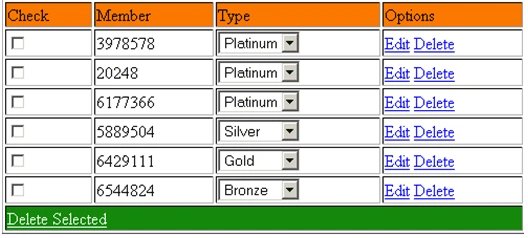
In edit mode(after clicking edit button)

Repeater after updating
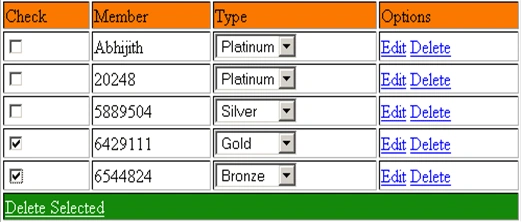
After Deleting the multiple rows repeater looks as



laxman KollilakshmaiahPosted Oct 29, 2023, 2:04 AM EDT
Please add PageNation.it Will Be Help More
Kaustubh JadhavPosted Apr 4, 2018, 8:55 AM EDT
The Name dose not exist in current context
Damien SullivanPosted Nov 19, 2016, 5:25 AM EST
Can someone tell me what the database table structure is for this please?
Rajeev KumarPosted Feb 8, 2015, 8:30 AM EST
if dropdown list outside from the repeter then how we update
Nayeem MansooriPosted Aug 2, 2014, 5:54 AM EDT
Nice Article keep it up..... :)
AdhirPosted Apr 8, 2014, 11:41 PM EDT
Hi while looking for edit update delete in repeater control I found this article very useful and easy to understand: http://www.codingfusion.com/Post/Repeater-Edit-Update-Delete-in-Asp-net-using-Ado
Rama KrishnaPosted Mar 27, 2014, 10:01 PM EDT
Very Nice Article Thank You Very Much
Somil LohaniPosted Dec 27, 2013, 8:37 PM EST
why you have created instance of Dataset??
suthakarPosted Dec 18, 2012, 4:50 AM EST
delete control does not work my item template is <ItemTemplate> <tr> <td id="sno" runat="server"> <%#DataBinder.Eval(Container.DataItem,"ID") %></td> <td><%#Eval("name") %></td> <td class="center"><%#DataBinder.Eval(Container.DataItem,"dateofreg") %></td> <td class="center"><%#DataBinder.Eval(Container.DataItem,"sex") %></td> <td class="center"> <span class="label label-success">pending</span> </td> <td class="center"> <a class="btn btn-success" target="_parent" href="#"> <i class="icon-zoom-in icon-white"></i> View </a> <a class="btn btn-info" href="#"> <i class="icon-edit icon-white"></i> Edit <asp:Linkbutton ID="linkdelete" runat="server" class="btn btn-danger" CommandArgument='<%#DataBinder.Eval(Container.DataItem,"ID") %>' CommandName="delete" OnClientClick='javascript:return confirm("Are you sure you want to delete?")' ><i class="icon-trash icon-white"></i> Delete</asp:Linkbutton> </td> </tr> </ItemTemplate> and my code behind is: protected void Repeater1_itemcommand(object source, RepeaterCommandEventArgs e) { LinkButton linkdelete = (LinkButton)e.Item.FindControl("linkdelete"); if (e.CommandName == "delete") { MySqlConnection con = new MySqlConnection(ConfigurationManager.AppSettings["connectionstring"]); MySqlCommand cmd = new MySqlCommand(" DELETE FROM registration WHERE id=@ID;", con); cmd.Parameters.Add("@ID",MySqlDbType.VarChar).Value=e.CommandArgument; try { con.Open(); cmd.ExecuteNonQuery(); } catch (Exception ex) { ex.Message.ToString(); } finally { if (con.State == ConnectionState.Open) con.Close(); } binddata(); } }
salman ansariPosted May 28, 2012, 1:58 AM EDT
Nice for everyone
salman ansariPosted May 28, 2012, 1:58 AM EDT
Nice for everyone
MaheshPosted Apr 30, 2012, 2:45 AM EDT
Nice article
MaheshPosted Apr 30, 2012, 2:45 AM EDT
Nice article
ahmad awwadPosted Mar 9, 2011, 12:00 AM EST
Thank You Very Match
Mark johnyPosted Oct 13, 2010, 7:10 PM EDT
it's nice article
Sam HobbsPosted Oct 12, 2010, 2:19 PM EDT
Thank you for this; it does look useful. I can use the code to create a similar appplication, but I am interested in trying it using the data that your sample uses if possible. Is the data in the zip file? I don't see the data in the zip file so I assume it is not there. Is there a copy of the data someplace we can access? If not, then can you tell us what the fields are that the sample code is designed to use so we can create some sample data?