

Introduction
This article shows how to access a SQL Server database with the Entity Framework Code First Approach and later we will also look at how to use a Stored Procedure with the Fluent API.
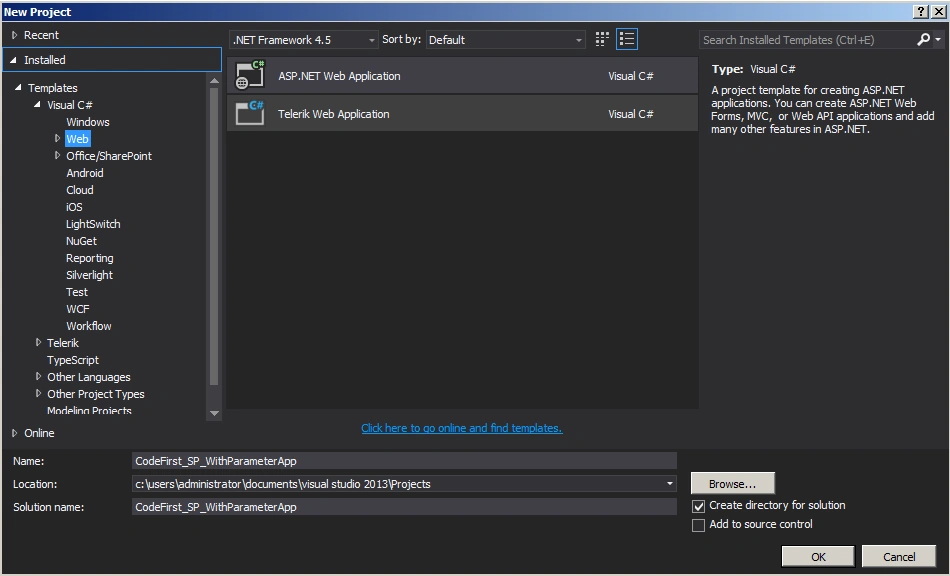
Step 1: Create an ASP.Net web application
Employee.cs
- using System;
- using System.Collections.Generic;
- using System.ComponentModel.DataAnnotations;
- using System.ComponentModel.DataAnnotations.Schema;
- using System.Linq;
- using System.Web;
- namespace CodeFirst_SP_WithParameterApp
- {
- public class Employee
- {
- public Employee() {}
- [Key]
- [DatabaseGenerated(DatabaseGeneratedOption.Identity)]
- public int Id
- {
- get;
- set;
- }
- public string FirstName
- {
- get;
- set;
- }
- public string LastName
- {
- get;
- set;
- }
- }
- }
Employeecontext.cs
- using System;
- using System.Collections.Generic;
- using System.Data.Entity;
- using System.Linq;
- using System.Web;
- namespace CodeFirst_SP_WithParameterApp
- {
- public class EmployeeContext: DbContext
- {
- public EmployeeContext(): base("EmployeeConn")
- {
- Database.SetInitializer < EmployeeContext > (new CreateDatabaseIfNotExists < EmployeeContext > ());
- }
- public DbSet < Employee > Employees
- {get;set;}
- protected override void OnModelCreating(DbModelBuilder modelBuilder) {
- modelBuilder.Entity < Employee > ()
- .MapToStoredProcedures(p = > p.Insert(sp = > sp.HasName("sp_InsertStudent").Parameter(pm = > pm.FirstName, "FirstName").Result(rs = > rs.Id, "Id")));
- }
- }
- }
Web.config
- <connectionStrings>
- <add name="EmployeeConn"
- connectionString="Data Source=WIN-B4KJ8JI75VF;Initial Catalog=EmployeeDB;Integrated Security=true"
- providerName="System.Data.SqlClient"/>
- </connectionStrings>
Webform1.aspx
- using System;
- using System.Collections.Generic;
- using System.Linq;
- using System.Web;
- using System.Web.UI;
- using System.Web.UI.WebControls;
- namespace CodeFirst_SP_WithParameterApp
- {
- public partial class WebForm1: System.Web.UI.Page
- {
- protected void Page_Load(object sender, EventArgs e)
- {
- EmployeeContext empContext = new EmployeeContext();
- Employee emp = new Employee()
- {
- FirstName = "Haney",
- LastName = "Jow"
- };
- empContext.Employees.Add(emp);
- empContext.SaveChanges();
- }
- }
- }
Summary
In this article, we saw how to access a SQL Server database with the Entity Framework Code First Approach and how to use a Stored Procedure with the Fluent API. Happy coding.
Santhakumar MunuswamyPosted May 6, 2015, 2:32 PM
Thanks for nice one