

Introduction
In this article, we will learn how to create email validation in Vue.js
Prerequisites
- Basic Knowledge of Vue.js
- Visual Studio Code
- Node and NPM installed
- Bootstrap
Create VueJS Project
Create a Vue.js project by using the following command.
JavaScript
vue create emailvaildappAdd Bootstrap (Optional)
Install bootstrap using the following command.
JavaScript
npm install bootstrapNow open the main.js file and add following code.
JavaScript
import 'bootstrap/dist/css/bootstrap.css';Now right click on the components folder and add a new component named 'Home .vue'. Now open Home.vue component and add the following code.
JavaScript
<template>
    <div id="visa">
        <div class="container">
            <div class="large-12 medium-12 ">

                <div style="margin: 20px;" class="col-sm-12 btn btn-info"> Email Validation in Vue.js </div>
                <form @submit.prevent="handleSubmission">
                    <div class="row form-group">
                        <div class="col-sm-4">
                            <label class="control-label col-sm-4" for="Mobilenumber"> <label for="email">Email
                                    Address:</label></label>
                        </div>
                        <div class="col-sm-8">
                            <input type="text" v-model="email" required class="form-control"> <br>
                            <span v-if="msg.email" className="text-danger mrgnbtn">{{ msg.email }}</span>
                        </div>
                    </div>
                </form>
            </div>
        </div>
    </div>
</template>

<script>
export default {
    name: 'Home',
    data() {
        return {
            email: '',
            msg: [],
        }
    },
    watch: {
        email(value) {
            this.validateEmail(value);
        }
    },
    methods: {
        validateEmail(value) {
            //eslint-disable-next-line
            if (/^\w+([\.-]?\w+)*@\w+([\.-]?\w+)*(\.\w{2,3})+$/.test(value)) {
                this.msg['email'] = '';
            } else {
                this.msg['email'] = 'Invalid Email Address';
            }
        },

    }
}
</script>
  <!-- Add "scoped" attribute to limit CSS to this component only -->
<style scoped>
</style>
Now open App.vue and add following code
JavaScript
<template>
  <Home msg="Welcome to Your Vue.js App"/>
</template>

<script>
import Home from './components/Home.vue'
export default {
  name: 'App',
  components: {
    Home
  }
}
</script>

<style>
#app {
  font-family: Avenir, Helvetica, Arial, sans-serif;
  -webkit-font-smoothing: antialiased;
  -moz-osx-font-smoothing: grayscale;
  text-align: center;
  color: #2c3e50;
  margin-top: 60px;
}
</style>
Now run the project and enter value in the textbox
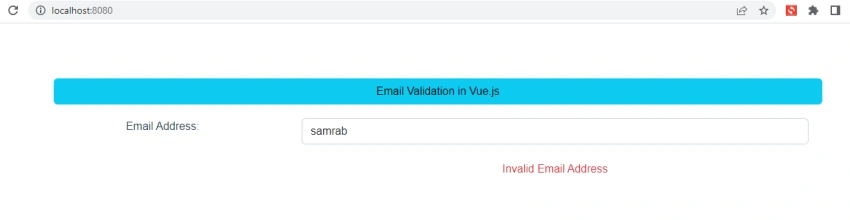
Now enter a valid email address in the textbox

Summary
In this article, we learned how to create email validation in Vue.js.
Join the conversation! Your thoughts help the community grow.