
This article shows how to apply the style.css effect in the Embed code feature in SharePoint 2013.
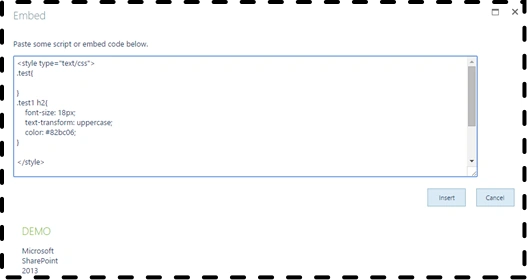
In SharePoint 2013 a new feature is introduced called Embed Code. It inserts an embedded object, HTML snippets or scripts onto the page. This SharePoint new feature is located in the ribbon when the user edits the page.
Create a new page and insert the HTML and CSS to edit the page and embed a code tab into the page.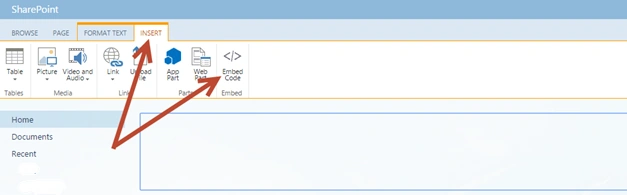
Click on the Insert Tab in the ribbon Embed Code option there. Click on Embed code a window is shown.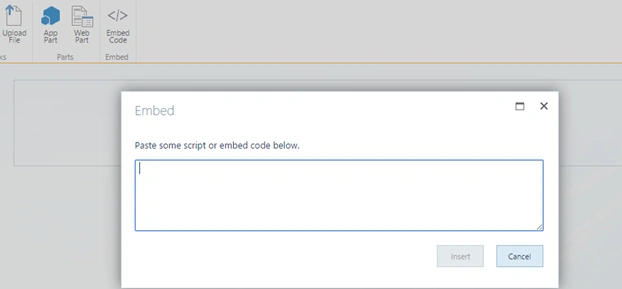
Insert your HTML code and CSS content to display on the page.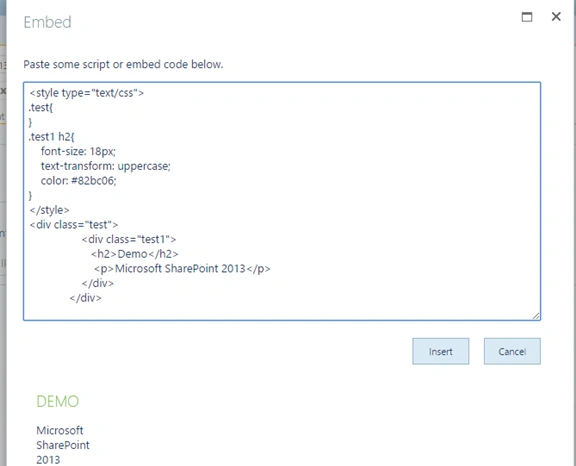
Click on the Insert On page to display the content that you provided.
Now you can see that the style.css is not applied to the current content. Now to reproduce the effect we need to edit the embedded code file again and do the some modification on style.
Click on the edit page option and edit the web part.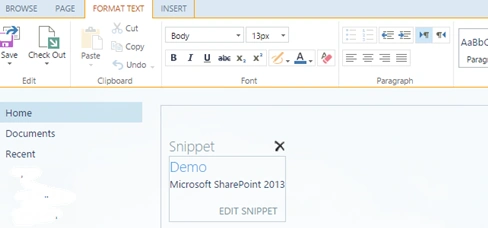
Insert your HTML and code again and change "style" to "Script" and save the changes and refresh the page.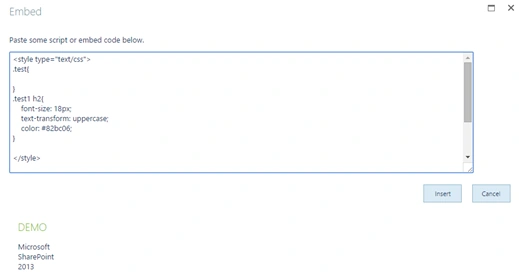
Again edit the page then change "script" to "style" and click on insert.
Now refresh the page. You will get content with the desired changes with CSS effect.
I hope this will help SharePoint beginners to apply the style.css changes in the embed code feature.


Karthikeyan KPosted Aug 22, 2015, 5:35 PM EDT
Good one sir...Thanks for sharing
Gopi ChandPosted Aug 22, 2015, 9:32 AM EDT
Nice one
Gowtham KTOP 100Posted Aug 22, 2015, 7:44 AM EDT
Good one
Sumit JoshiPosted Aug 22, 2015, 6:27 AM EDT
thanks for sharing.
Yashwanth MuthineniPosted Aug 22, 2015, 3:01 AM EDT
Nice Share
Santhakumar MunuswamyPosted Aug 22, 2015, 2:31 AM EDT
Nice Article. Thanks for sharing
Sumit DeshmukhPosted Aug 22, 2015, 12:39 AM EDT
Thanks you all of..
Vaikesh K PPosted Aug 21, 2015, 10:59 PM EDT
Good One
Mohammed IbrahimPosted Aug 21, 2015, 10:54 PM EDT
nice share
Chervine BhiwooPosted Aug 21, 2015, 9:53 PM EDT
NIce one!
Rajeesh MenothPosted Aug 21, 2015, 9:42 PM EDT
Thanks for sharing...
Nilesh JadavPosted Aug 21, 2015, 8:04 PM EDT
Good one sir
Gopi ChandPosted Aug 21, 2015, 7:40 PM EDT
Well explained
Sumit DeshmukhPosted Aug 21, 2015, 7:25 PM EDT
Thank you Abhay
Abhay ShankerPosted Aug 21, 2015, 5:43 PM EDT
Nice One...
Karthikeyan KPosted Aug 21, 2015, 5:23 PM EDT
Good one sir..Thanks for share
Pankaj Kumar ChoudharyTOP 100Posted Aug 21, 2015, 4:38 PM EDT
Nice Explain Sir........