
This is a series of articles to discuss CORS (Cross Origin Resource Sharing) issue for both setup and consuming.
Introduction
In the previous articles, Consume Web API By MVC In .NET Core (1), (2), we created a ASP.NET Core MVC app and associated a Web API service in Part I, and we made a MVC app as a client to consume Web API in the same app (origin) in Part II.
In this series of articles, we will make a separated Web API server and consume it by a ASP.NET MVC Client in .NET Core in a different app (origin). In the first article, we will
- Briefly describ the concept of CORS
- Build the Web API server, and a separated consumer, MVC client, according to previous work;
- Access Web API from the Same Origin by MVC
- Ready for enabling CORS in the articles followed
A - Brief Discussion of CORS
Due to the fact that there is a lot of discussion online, we just make a very brief concept introduction here.
Browser security prevents a web page from making requests to a different domain than the one that served the web page. This restriction is called the same-origin policy.
Same Origin
Two URLs have the same origin if they have identical schemes, hosts, and ports (RFC 6454).
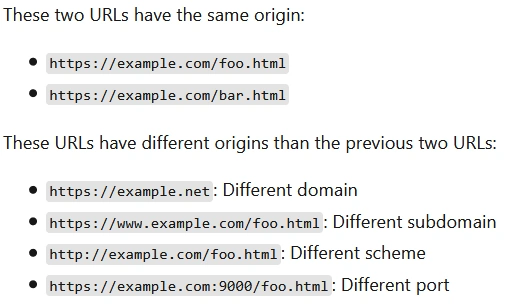

Understanding the CORS (graph from)
Enable CORS
There are two ways to enable CORS,
- JSONP while making the AJAX call
- Enabling CORS in ASP.NET WEB API
The later one is safer and more flexible than earlier techniques, such as JSONP (see).
B - Set up Separated Server and Client
From previous articles, we already have had an app with three modules (controllers), one Web API server, one MVC module, and another MVC as client to consume a Web API server. Now, we can use the previous app as either the server or client, and then create another counter part. For the simplest method, we use the MVC client from previous articles, and recreate the Web API server below (for the reader's convinience, I repeat the whole procedure without explanations),
- Step 1: Create an ASP.NET Core Web API application;
- Step 2: Set up Database;
- Step 3,:Set up Entity Model in Visual Studio Web API Project;
- Step 4: Set up a Database Context;
- Step 5: Scaffold API Controller with Action using Entity Framework;
- Step 6: Run and Test app
Step 1 - Create an ASP.NET Core Web API application
We use the current version of Visual Studio 2019 16.8 and .NET 5.0 SDK to build the app.
- Start Visual Studio and select Create a new project.
- In the Create a new project dialog, select ASP.NET Core Web Application > Next.
- In the Configure your new project dialog, enter
WebAPIStoresfor Project name. - Select Create.
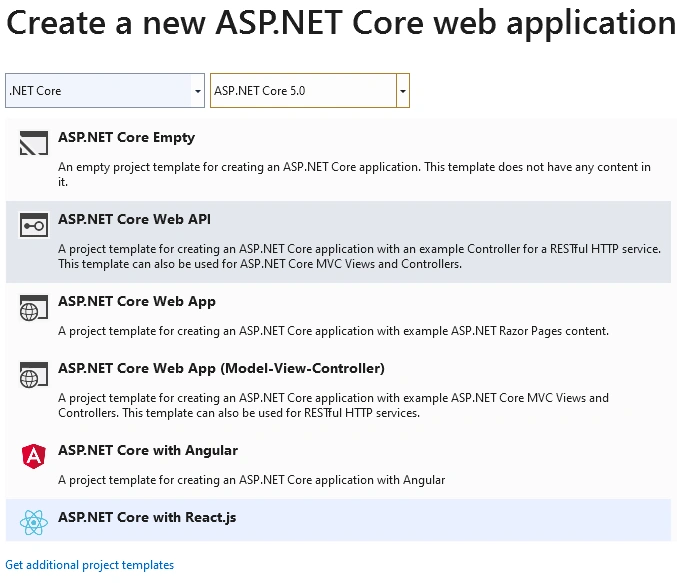
- In the Create a new ASP.NET Core web application dialog, select,
- .NET Core and ASP.NET Core 5.0 in the dropdowns.
- ASP.NET Core Web Api.
- Create
Step 2 - Set up Database
We use the database table Stores created in database DB_Demo_API,
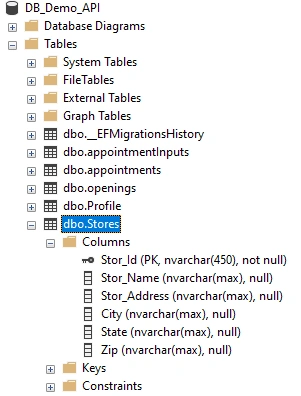
The code for the table,
SQL
USE [DB_Demo_API]
GO

/****** Object:  Table [dbo].[Stores]    Script Date: 12/26/2020 1:47:06 PM ******/
SET ANSI_NULLS ON
GO

SET QUOTED_IDENTIFIER ON
GO

CREATE TABLE [dbo].[Stores](
    [Stor_Id] [nvarchar](450) NOT NULL,
    [Stor_Name] [nvarchar](max) NULL,
    [Stor_Address] [nvarchar](max) NULL,
    [City] [nvarchar](max) NULL,
    [State] [nvarchar](max) NULL,
    [Zip] [nvarchar](max) NULL,
 CONSTRAINT [PK_Stores] PRIMARY KEY CLUSTERED
(
    [Stor_Id] ASC
)WITH (PAD_INDEX = OFF, STATISTICS_NORECOMPUTE = OFF, IGNORE_DUP_KEY = OFF, ALLOW_ROW_LOCKS = ON, ALLOW_PAGE_LOCKS = ON, OPTIMIZE_FOR_SEQUENTIAL_KEY = OFF) ON [PRIMARY]
) ON [PRIMARY] TEXTIMAGE_ON [PRIMARY]
GO
Step 3 - Set up Entity Model in Visual Studio Web API Project
Right click project => add => New Folder, named as Model, then add a class Store,
C#
using System.ComponentModel.DataAnnotations;

namespace WebAPIStores.Models
{
    public partial class Store
    {
        [Key]
        public string Stor_Id { get; set; }
        public string Stor_Name { get; set; }
        public string Stor_Address { get; set; }
        public string City { get; set; }
        public string State { get; set; }
        public string Zip { get; set; }
    }
}
Step 4 - Set up a Database Context
1. Create a new Database Context class, named DB_Demo_APIContext.cs,
C#
using Microsoft.EntityFrameworkCore;
#nullable disable
namespace MVCCallWebAPI.Models.DB {
    public partial class DB_Demo_APIContext: DbContext {
        public DB_Demo_APIContext() {}
        public DB_Demo_APIContext(DbContextOptions < DB_Demo_APIContext > options): base(options) {}
        public virtual DbSet < Store > Stores {
            get;
            set;
        }
    }
}
2. Add the new Connection in the appsettings.json file,
C#
{
  "Logging": {
    "LogLevel": {
      "Default": "Information",
      "Microsoft": "Warning",
      "Microsoft.Hosting.Lifetime": "Information"
    }
  },

  "ConnectionStrings": {
    "DB_Demo_APIConnection": "Data Source=localhost;Initial Catalog=DB_Demo_API;Integrated Security=True;Connect Timeout=30;Encrypt=False;TrustServerCertificate=False;ApplicationIntent=ReadWrite;MultiSubnetFailover=False"
  },

  "AllowedHosts": "*"
}
3. Register the database connection context into Class starup.cs inside ConfigureServices,
C#
// This method gets called by the runtime. Use this method to add services to the container.
public void ConfigureServices(IServiceCollection services)
{
    // Register SQL database configuration context as services.
    services.AddDbContext<DB_Demo_APIContext>(options =>
    {
        options.UseSqlServer(Configuration.GetConnectionString("DB_Demo_APIConnection"));
    });

    services.AddControllers();
    services.AddSwaggerGen(c =>
    {
        c.SwaggerDoc("v1", new OpenApiInfo { Title = "WebAPIStores", Version = "v1" });
    });
}
Step 5 - Scaffold API Controller with Action using Entity Framework
Note, you might need to add 'Microsoft.EntityFrameworkCore.SqlServer', and 'Microsoft.EntityFrameworkCore.Design' here if you did not.
-
Select API Controller with actions, using Entity Framework, and then select Add.
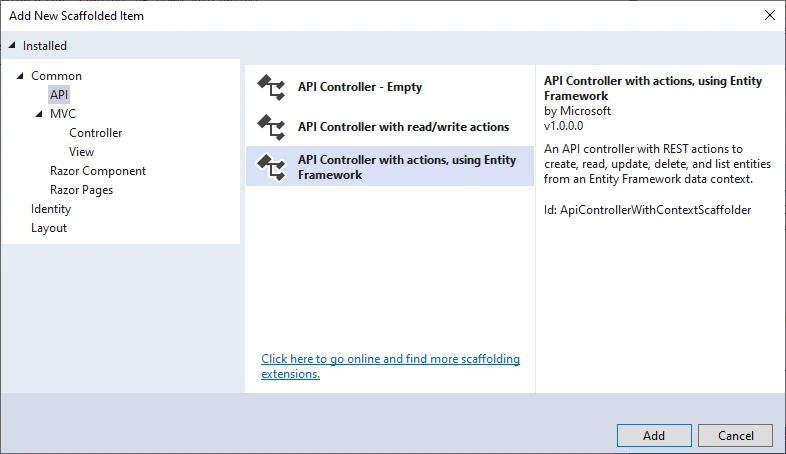
-
In the Add API Controller with actions, using Entity Framework dialog,
- Model class -Store(MVCCallWebAPI.Models)
- Data context class - DB_Demo_APIContext (MVCCallWebAPI.Models)
- Controller name - Change the default StoresController to StoresWebAPIController
- Select Add
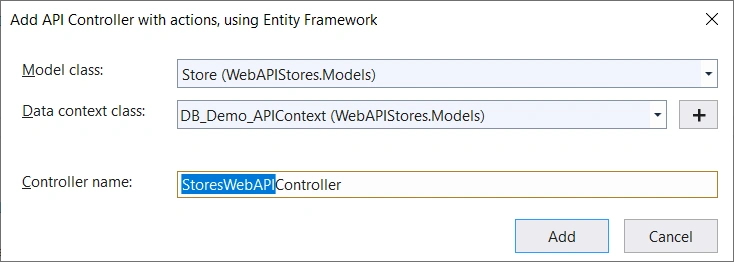
Here, we make the controller the same name as previous parts, so you do not need to change code in the client MVC model.
Step 6 - Run and Test app
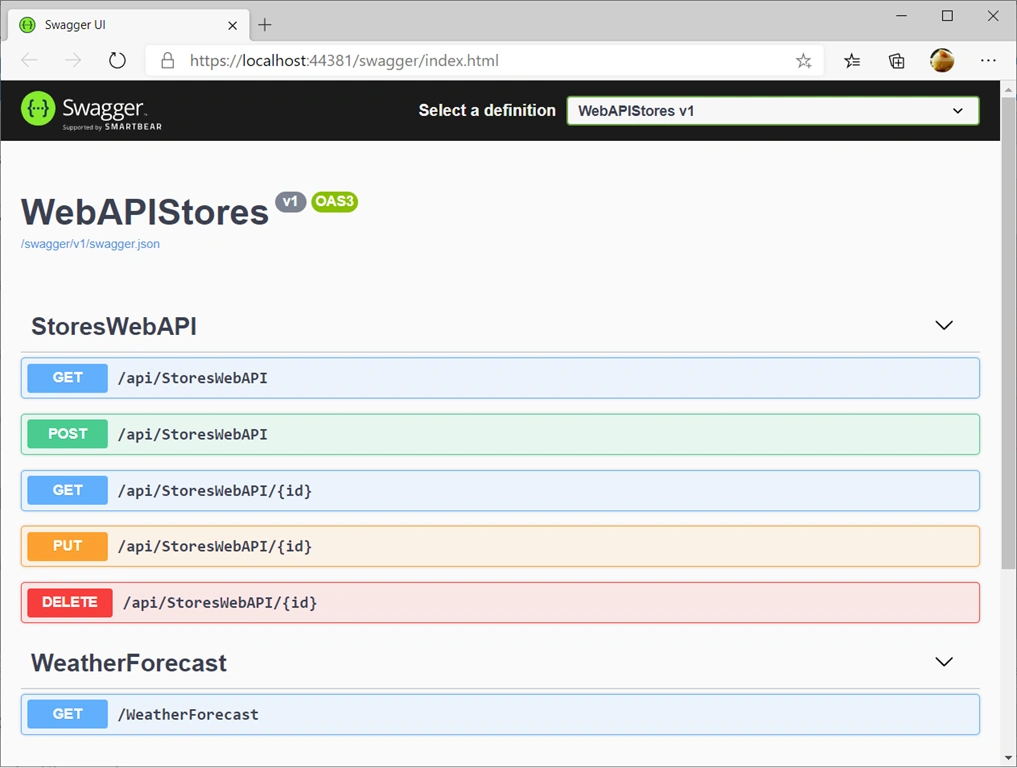
You will see the Swagger interface directly by using .NET Core 5.0,
C - Access Web API from a Same Origin Client
We use the app from the previous article (Part II) as a Same Origin Client to consume the server above by modifying one line of code to change the server address below. Then, we are ready for the CORS test.
C#
using System.Collections.Generic;
using System.Linq;
using System.Net.Http;
using System.Net.Http.Json;
using System.Threading.Tasks;
using Microsoft.AspNetCore.Mvc;
using Microsoft.EntityFrameworkCore;
using MVCCallWebAPI.Models.DB;
using Newtonsoft.Json;

namespace MVCCallWebAPI.Controllers
{
    public class StoresMVCCallWebAPIController : Controller
    {
        private readonly pubsContext _context;

       HttpClient client = new HttpClient();

       // string url = "https://localhost:44350/api/storesWebAPI/";
       string url = "https://localhost:44381/api/storesWebAPI/";

        public StoresMVCCallWebAPIController(pubsContext context)
        {
            _context = context;
        }


        // GET: StoresMVCCallAPI
        public async Task<IActionResult> Index()
        {
            // Original code:
            //return View(await _context.Stores.ToListAsync());

            // Consume API
            return View(JsonConvert.DeserializeObject<List<Store>>(await client.GetStringAsync(url)).ToList());
        }

        // GET: StoresMVCCallWebAPI/Details/5
        public async Task<IActionResult> Details(string id)
        {
            if (id == null)
            {
                return NotFound();
            }

            // Original code:
            //var store = await _context.Stores
            //    .FirstOrDefaultAsync(m => m.Stor_Id == id);

            // Consume API
            var store = JsonConvert.DeserializeObject<Store>(await client.GetStringAsync(url + id));

            if (store == null)
            {
                return NotFound();
            }

            return View(store);
        }

        // GET: StoresMVCCallWebAPI/Create
        public IActionResult Create()
        {
            return View();
        }

        // POST: StoresMVCCallWebAPI/Create
        // To protect from overposting attacks, enable the specific properties you want to bind to.
        // For more details, see http://go.microsoft.com/fwlink/?LinkId=317598.
        [HttpPost]
        [ValidateAntiForgeryToken]
        public async Task<IActionResult> Create([Bind("Stor_Id,Stor_Name,Stor_Address,City,State,Zip")] Store store)
        {
            if (ModelState.IsValid)
            {
                // Original code:
                //_context.Add(store);
                //await _context.SaveChangesAsync();

                // Consume API
                await client.PostAsJsonAsync<Store>(url, store);

                return RedirectToAction(nameof(Index));
            }
            return View(store);
        }

        // GET: StoresMVCCallWebAPI/Edit/5
        public async Task<IActionResult> Edit(string id)
        {
            if (id == null)
            {
                return NotFound();
            }

            // Original code:
            //var store = await _context.Stores.FindAsync(id);

            // Consume API
            var store = JsonConvert.DeserializeObject<Store>(await client.GetStringAsync(url + id));

            if (store == null)
            {
                return NotFound();
            }
            return View(store);
        }

        // POST: StoresMVCCallWebAPI/Edit/5
        // To protect from overposting attacks, enable the specific properties you want to bind to.
        // For more details, see http://go.microsoft.com/fwlink/?LinkId=317598.
        [HttpPost]
        [ValidateAntiForgeryToken]
        public async Task<IActionResult> Edit(string id, [Bind("Stor_Id,Stor_Name,Stor_Address,City,State,Zip")] Store store)
        {
            if (id != store.Stor_Id)
            {
                return NotFound();
            }

            if (ModelState.IsValid)
            {
                try
                {
                    // Original code:
                    //_context.Update(store);
                    //await _context.SaveChangesAsync();

                    // Consume API
                    await client.PutAsJsonAsync<Store>(url + id, store);
                }
                catch (DbUpdateConcurrencyException)
                {
                    if (!StoreExists(store.Stor_Id))
                    {
                        return NotFound();
                    }
                    else
                    {
                        throw;
                    }
                }
                return RedirectToAction(nameof(Index));
            }
            return View(store);
        }

        // GET: StoresMVCCallWebAPI/Delete/5
        public async Task<IActionResult> Delete(string id)
        {
            if (id == null)
            {
                return NotFound();
            }

            // Original code:
            //var store = await _context.Stores
            //    .FirstOrDefaultAsync(m => m.Stor_Id == id);

            // Consume API
            var store = JsonConvert.DeserializeObject<Store>(await client.GetStringAsync(url + id));

            if (store == null)
            {
                return NotFound();
            }

            return View(store);
        }

        // POST: StoresMVCCallWebAPI/Delete/5
        [HttpPost, ActionName("Delete")]
        [ValidateAntiForgeryToken]
        public async Task<IActionResult> DeleteConfirmed(string id)
        {
            // Original Code:
            //var store = await _context.Stores.FindAsync(id);
            //_context.Stores.Remove(store);
            //await _context.SaveChangesAsync();

            // Consume API
            await client.DeleteAsync(url + id);

            return RedirectToAction(nameof(Index));
        }

        private bool StoreExists(string id)
        {
            return _context.Stores.Any(e => e.Stor_Id == id);
        }
    }
}
Summary
In this article, we have made a separated Web API server, modified the existing ASP.NET MVC as a Same Origin Client to consume the Web API Server. In the next article, we will make another Web API consumer, an Angular client, and show the effect of the CORS issue. And in the third article, we will demostrate to enable CORS for different situations.

Join the conversation! Your thoughts help the community grow.