

Introduction
You guys are aware of Android activity transitions but there are some animated ways also to do a transition. Explode Animation consists of three parts - entering the scene, exiting the scene, and a shared transaction between the activities.
Android supports some kind of animations as follows,
- Explode - move the View in or out from the center of the scene.
- Slide - move the View in or out from the edge of the scene.
- Fade - addition and removal of View from the scene.
What is Explode Animation?
A transition followed by a tapping on the View to let that View fly in the middle of the screen and vice versa with activity transition is called Explode Animation.
- An enter transition is the first phase of animation in which the View enters the scene. This can be understood from an example of when we touch a view it will fly towards the center.
- An exit transition determines how a touched view exits the scene and goes to its previous place like the reverse of entering the scene is exiting the scene.
- Shared elements transaction is between of these two scenes of entering and exit. This shows how a view is shared between transitions of the activities.
However, the default animation between the activity transitions is cross-fading animation. With the use of custom animation, we can change the transition behavior of the application.
According to Google, Android supports some of the following shared elements transition,
build.gradle
- ChangeBounds
- ChangeClipBounds
- ChangeTransform
- ChangeImageTransform
- buildscript {
- repositories {
- jcenter()
- google()
- }
- dependencies {
- classpath 'com.android.tools.build:gradle:3.0.1'
- }
- }
- apply plugin: 'com.android.application'
- repositories {
- jcenter()
- google()
- }
- dependencies {
- compile "com.android.support:support-v4:27.0.2"
- compile "com.android.support:support-v13:27.0.2"
- compile "com.android.support:cardview-v7:27.0.2"
- compile "com.android.support:appcompat-v7:27.0.2"
- compile 'com.squareup.picasso:picasso:2.4.0'
- implementation 'com.android.support:recyclerview-v7:27.0.0'
- implementation 'com.google.code.gson:gson:2.8.4'
- }
- // The sample build uses multiple directories to
- // keep boilerplate and common code separate from
- // the main sample code.
- List<String> dirs = [
- 'main', // main sample code; look here for the interesting stuff.
- 'common', // components that are reused by multiple samples
- 'template'] // boilerplate code that is generated by the sample template process
- android {
- compileSdkVersion 27
- buildToolsVersion "27.0.2"
- defaultConfig {
- minSdkVersion 21
- targetSdkVersion 27
- }
- compileOptions {
- sourceCompatibility JavaVersion.VERSION_1_7
- targetCompatibility JavaVersion.VERSION_1_7
- }
- sourceSets {
- main {
- dirs.each { dir ->
- java.srcDirs "src/${dir}/java"
- res.srcDirs "src/${dir}/res"
- }
- }
- androidTest.setRoot('tests')
- androidTest.java.srcDirs = ['tests/src']
- }
- }
- public class SquareFrameLayout extends FrameLayout {
- public SquareFrameLayout(Context context) {
- super(context);
- }
- public SquareFrameLayout(Context context, AttributeSet attrs) {
- super(context, attrs);
- }
- public SquareFrameLayout(Context context, AttributeSet attrs, int defStyleAttr) {
- super(context, attrs, defStyleAttr);
- }
- public SquareFrameLayout(Context context, AttributeSet attrs,
- int defStyleAttr, int defStyleRes) {
- super(context, attrs, defStyleAttr, defStyleRes);
- }
- @Override
- protected void onMeasure(int widthMeasureSpec, int heightMeasureSpec) {
- final int widthSize = MeasureSpec.getSize(widthMeasureSpec);
- final int heightSize = MeasureSpec.getSize(heightMeasureSpec);
- if (widthSize == 0 && heightSize == 0) {
- // If there are no constraints on size, let FrameLayout measure
- super.onMeasure(widthMeasureSpec, heightMeasureSpec);
- // Now use the smallest of the measured dimensions for both dimensions
- final int minSize = Math.min(getMeasuredWidth(), getMeasuredHeight());
- setMeasuredDimension(minSize, minSize);
- return;
- }
- final int size;
- if (widthSize == 0 || heightSize == 0) {
- // If one of the dimensions has no restriction on size, set both dimensions to be the
- // on that does
- size = Math.max(widthSize, heightSize);
- } else {
- // Both dimensions have restrictions on size, set both dimensions to be the
- // smallest of the two
- size = Math.min(widthSize, heightSize);
- }
- final int newMeasureSpec = MeasureSpec.makeMeasureSpec(size, MeasureSpec.EXACTLY);
- super.onMeasure(newMeasureSpec, newMeasureSpec);
- }
- }
- <LinearLayout xmlns:android="http://schemas.android.com/apk/res/android"
- android:layout_width="match_parent"
- android:layout_height="wrap_content"
- android:orientation="vertical">
- <com.example.android.activityscenetransitionbasic.SquareFrameLayout
- android:layout_width="match_parent"
- android:layout_height="wrap_content">
- <ImageView
- android:id="@+id/imageview_item"
- android:layout_width="match_parent"
- android:layout_height="match_parent"
- android:scaleType="centerCrop" />
- </com.example.android.activityscenetransitionbasic.SquareFrameLayout>
- <TextView
- android:id="@+id/textview_name"
- android:layout_width="match_parent"
- android:layout_height="wrap_content"
- android:background="?android:attr/colorPrimary"
- android:theme="@android:style/Theme.Material"
- android:textAppearance="@android:style/TextAppearance.Material.Subhead"
- android:maxLines="1"
- android:padding="16dp" />
- </LinearLayout>
- public class Item {
- private static final String LARGE_BASE_URL = "http://storage.googleapis.com/androiddevelopers/sample_data/activity_transition/large/";
- private static final String THUMB_BASE_URL = "http://storage.googleapis.com/androiddevelopers/sample_data/activity_transition/thumbs/";
- public static Item[] ITEMS = new Item[] {
- new Item("Flying in the Light", "Romain Guy", "flying_in_the_light.jpg"),
- new Item("Caterpillar", "Romain Guy", "caterpillar.jpg"),
- new Item("Look Me in the Eye", "Romain Guy", "look_me_in_the_eye.jpg"),
- new Item("Flamingo", "Romain Guy", "flamingo.jpg"),
- new Item("Rainbow", "Romain Guy", "rainbow.jpg"),
- new Item("Over there", "Romain Guy", "over_there.jpg"),
- new Item("Jelly Fish 2", "Romain Guy", "jelly_fish_2.jpg"),
- new Item("Lone Pine Sunset", "Romain Guy", "lone_pine_sunset.jpg"),
- };
- public static Item getItem(int id) {
- for (Item item : ITEMS) {
- if (item.getId() == id) {
- return item;
- }
- }
- return null;
- }
- private final String mName;
- private final String mAuthor;
- private final String mFileName;
- Item (String name, String author, String fileName) {
- mName = name;
- mAuthor = author;
- mFileName = fileName;
- }
- public int getId() {
- return mName.hashCode() + mFileName.hashCode();
- }
- public String getAuthor() {
- return mAuthor;
- }
- public String getName() {
- return mName;
- }
- public String getPhotoUrl() {
- return LARGE_BASE_URL + mFileName;
- }
- public String getThumbnailUrl() {
- return THUMB_BASE_URL + mFileName;
- }
- }
Let's code the MainActivity.java and its details - DetailActivity.java.
First, let us look into MainActivity.java.
- public class MainActivity extends Activity implements UserAdapter.OnItemClickListener {
- RecyclerView mRecyclerView;
- private UserAdapter mAdapter;
- private ArrayList<Item> list;
- @Override
- public void onCreate(Bundle savedInstanceState) {
- super.onCreate(savedInstanceState);
- setContentView(R.layout.activity_main);
- list = new ArrayList<>();
- mRecyclerView = findViewById(R.id.recycler_view);
- populateList();
- mAdapter = new UserAdapter(list,this,this);
- GridLayoutManager gridLayoutManager = new GridLayoutManager(this, 3);
- mRecyclerView.setLayoutManager(gridLayoutManager);
- mRecyclerView.setItemAnimator(new DefaultItemAnimator());
- mRecyclerView.setAdapter(mAdapter);
- }
- private void populateList() {
- Item item = new Item("Flying in the Light", "Romain Guy", "flying_in_the_light.jpg");
- list.add(item);
- item = new Item("Caterpillar", "Romain Guy", "caterpillar.jpg");
- list.add(item);
- item = new Item("Look Me in the Eye", "Romain Guy", "look_me_in_the_eye.jpg");
- list.add(item);
- item = new Item("Flamingo", "Romain Guy", "flamingo.jpg");
- list.add(item);
- item = new Item("Rainbow", "Romain Guy", "rainbow.jpg");
- list.add(item);
- item = new Item("Over there", "Romain Guy", "over_there.jpg");
- list.add(item);
- item = new Item("Jelly Fish 2", "Romain Guy", "jelly_fish_2.jpg");
- list.add(item);
- item = new Item("Lone Pine Sunset", "Romain Guy", "lone_pine_sunset.jpg");
- list.add(item);
- }
- @Override
- public void onItemClick(Item item, UserAdapter.ViewHolder viewHolder) {
- Intent intent = new Intent(this, DetailActivity.class);
- intent.putExtra(DetailActivity.EXTRA_OBJ, new Gson().toJson(item));
- ActivityOptionsCompat activityOptions = ActivityOptionsCompat.makeSceneTransitionAnimation(
- this, new Pair<View, String>(viewHolder.imgView.findViewById(R.id.imageview_item),
- DetailActivity.VIEW_NAME_HEADER_IMAGE),
- new Pair<View, String>(viewHolder.nameTextView.findViewById(R.id.textview_name),
- DetailActivity.VIEW_NAME_HEADER_TITLE));
- ActivityCompat.startActivity(this, intent, activityOptions.toBundle());
- }
- <?xml version="1.0" encoding="utf-8"?>
- <android.support.v7.widget.RecyclerView xmlns:android="http://schemas.android.com/apk/res/android"
- android:id="@+id/recycler_view"
- android:layout_width="match_parent"
- android:layout_height="match_parent" />
- public class DetailActivity extends Activity {
- public static final String EXTRA_OBJ = "name";
- public static final String VIEW_NAME_HEADER_IMAGE = "detail:header:image";
- public static final String VIEW_NAME_HEADER_TITLE = "detail:header:title";
- private ImageView mHeaderImageView;
- private TextView mHeaderTitle;
- private Item mItem;
- @Override
- protected void onCreate(Bundle savedInstanceState) {
- super.onCreate(savedInstanceState);
- setContentView(R.layout.details);
- if (getIntent() != null) {
- mItem = new Gson().fromJson(getIntent().getStringExtra(EXTRA_OBJ), Item.class);
- }
- mHeaderImageView = (ImageView) findViewById(R.id.imageview_header);
- mHeaderTitle = (TextView) findViewById(R.id.textview_title);
- ViewCompat.setTransitionName(mHeaderImageView, VIEW_NAME_HEADER_IMAGE);
- ViewCompat.setTransitionName(mHeaderTitle, VIEW_NAME_HEADER_TITLE);
- loadItem();
- }
- private void loadItem() {
- mHeaderTitle.setText(getString(R.string.image_header, mItem.getName(), mItem.getAuthor()));
- if (Build.VERSION.SDK_INT >= Build.VERSION_CODES.LOLLIPOP && addTransitionListener()) {
- // If we're running on Lollipop and we have added a listener to the shared element
- // transition, load the thumbnail. The listener will load the full-size image when
- // the transition is complete.
- loadThumbnail();
- } else {
- // If all other cases we should just load the full-size image now
- loadFullSizeImage();
- }
- }
- /**
- * Load the item's thumbnail image into our {@link ImageView}.
- */
- private void loadThumbnail() {
- Picasso.with(mHeaderImageView.getContext())
- .load(mItem.getThumbnailUrl())
- .noFade()
- .into(mHeaderImageView);
- }
- /**
- * Load the item's full-size image into our {@link ImageView}.
- */
- private void loadFullSizeImage() {
- Picasso.with(mHeaderImageView.getContext())
- .load(mItem.getPhotoUrl())
- .noFade()
- .noPlaceholder()
- .into(mHeaderImageView);
- }
- /**
- * Try and add a {@link Transition.TransitionListener} to the entering shared element
- * {@link Transition}. We do this so that we can load the full-size image after the transition
- * has completed.
- *
- * @return true if we were successful in adding a listener to the enter transition
- */
- private boolean addTransitionListener() {
- final Transition transition = getWindow().getSharedElementEnterTransition();
- if (transition != null) {
- // There is an entering shared element transition so add a listener to it
- transition.addListener(new Transition.TransitionListener() {
- @Override
- public void onTransitionEnd(Transition transition) {
- // As the transition has ended, we can now load the full-size image
- loadFullSizeImage();
- // Make sure we remove ourselves as a listener
- transition.removeListener(this);
- }
- @Override
- public void onTransitionStart(Transition transition) {
- // No-op
- }
- @Override
- public void onTransitionCancel(Transition transition) {
- // Make sure we remove ourselves as a listener
- transition.removeListener(this);
- }
- @Override
- public void onTransitionPause(Transition transition) {
- // No-op
- }
- @Override
- public void onTransitionResume(Transition transition) {
- // No-op
- }
- });
- return true;
- }
- // If we reach here then we have not added a listener
- return false;
- }
- }
- public class UserAdapter extends RecyclerView.Adapter<UserAdapter.ViewHolder> {
- private ArrayList<Item> mlist;
- Context ctx;
- OnItemClickListener listener;
- public UserAdapter(ArrayList<Item> list, Context context, OnItemClickListener listen) {
- mlist = list;
- ctx = context;
- listener = listen;
- }
- @NonNull
- @Override
- public ViewHolder onCreateViewHolder(@NonNull ViewGroup parent, int i) {
- View itemView = LayoutInflater.from(parent.getContext())
- .inflate(R.layout.grid_item, parent, false);
- return new ViewHolder(itemView);
- }
- @Override
- public void onBindViewHolder(@NonNull final ViewHolder viewHolder, final int i) {
- Picasso.with(ctx).load(mlist.get(i).getThumbnailUrl()).into(viewHolder.imgView);
- viewHolder.nameTextView.setText(mlist.get(i).getName());
- viewHolder.frontView.setOnClickListener(new View.OnClickListener() {
- @Override
- public void onClick(View v) {
- listener.onItemClick(mlist.get(i), viewHolder);
- }
- });
- }
- @Override
- public int getItemCount() {
- return mlist.size();
- }
- public class ViewHolder extends RecyclerView.ViewHolder {
- TextView nameTextView;
- ImageView imgView;
- LinearLayout frontView;
- public ViewHolder(View itemView) {
- super(itemView);
- nameTextView = itemView.findViewById(R.id.textview_name);
- imgView = itemView.findViewById(R.id.imageview_item);
- frontView = itemView.findViewById(R.id.front_view);
- }
- }
- public interface OnItemClickListener {
- void onItemClick(Item item, ViewHolder viewHolder);
- }
- }
Output
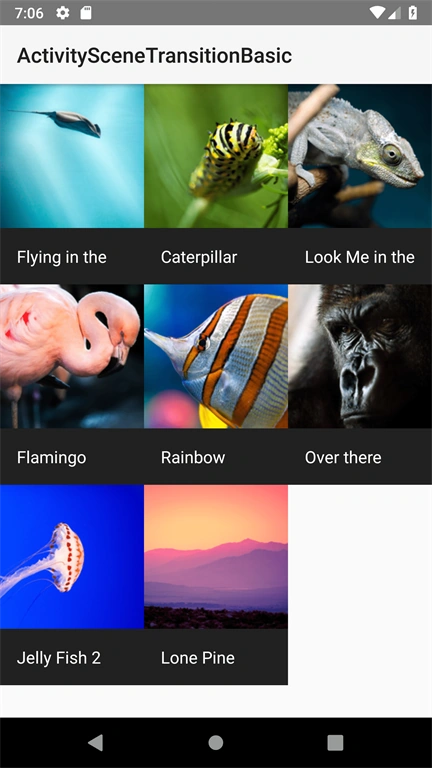
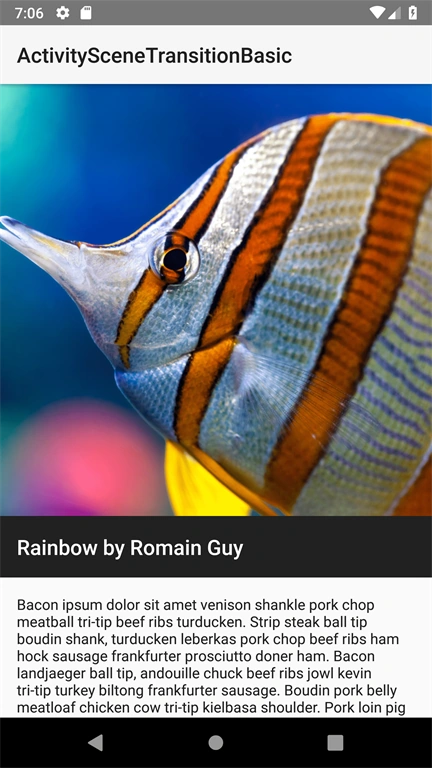
Join the conversation! Your thoughts help the community grow.