

Introduction
This article explains how to find the objects with the same property from a JSON and separate them to be shown in the UI. I hope you will like it.
Please see this article in my blog: Find JSON Objects With Same Property and Separate Them.
Background
Yesterday I came across a situation where there was a need to find the objects with the same property from some JSON data and separate them. So I thought of sharing that with you all.
Using the code
First of all we will add a jQuery reference as in the following code snippet:
Background
Yesterday I came across a situation where there was a need to find the objects with the same property from some JSON data and separate them. So I thought of sharing that with you all.
Using the code
First of all we will add a jQuery reference as in the following code snippet:
- <script src="jquery-2.1.4.min.js"></script>
- var data = '[{"name":2014,"data":[{"x":"1","y":222808746.81}]},{"name":2013,"data":[{"x":"2","y":289647045.18}]},{"name":2014,"data":[{"x":"2","y":285136890.07}]},{"name":2013,"data":[{"x":"3","y":370853178.74}]},{"name":2014,"data":[{"x":"3","y":403272964.28}]},{"name":2012,"data":[{"x":"4","y":217294031.36}]},{"name":2013,"data":[{"x":"4","y":224715039.94}]},{"name":2014,"data":[{"x":"4","y":249034460.23}]},{"name":2012,"data":[{"x":"5","y":215978054.15}]},{"name":2013,"data":[{"x":"5","y":241211810.92}]},{"name":2014,"data":[{"x":"5","y":245950715.8}]},{"name":2012,"data":[{"x":"6","y":262898180.85}]},{"name":2013,"data":[{"x":"6","y":280550623.51}]},{"name":2014,"data":[{"x":"6","y":295780079.03}]},{"name":2012,"data":[{"x":"7","y":217310275.85}]},{"name":2013,"data":[{"x":"7","y":230973675.47}]},{"name":2014,"data":[{"x":"7","y":238227382.03}]}]';
- <div id="initialData"></div>
- <div id="newData"></div>
- <button id="separateme">Make Me Separate</button>
- $(function () {
- $('#newData').hide();
- loadinitialData();
- });
- function loadinitialData()
- {
- jsonObject = $.parseJSON(data);
- var html = '<table><th>Year</th><th>X Value</th><th>Y Value</th>';
- for (i = 0; i < jsonObject.length; i++) {
- html += '<tr><td>' + jsonObject[i].name + '</td><td>' + jsonObject[i].data[0].x + '</td><td>' + jsonObject[i].data[0].y + '</td></tr>';
- }
- html += '</table>';
- $('#initialData').append(html);
- }
Now after running it, you will get the following output.
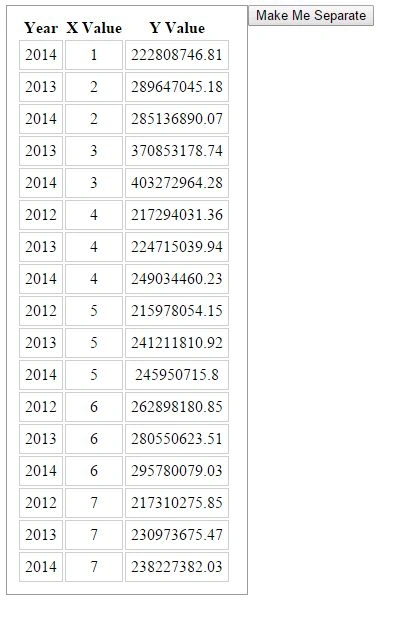
We have successfully formatted our data and shown it to our UI. Cool, right?
So shall we go and separate our data? I guess you said "Yes". Awesome. Now we will create a click event for our "Make me sort" button as in the following:
- $('#separateme').click(function () {
- loadnewData();
- $('#separateme').hide();
- $('#newData').show();
- });
- function loadnewData()
- {
- for (i = 0; i < uniqueNames.length; i++)
- {
- var currentName = uniqueNames[i];
- var uniqueDataArray = $.grep(jsonObject, function (data) {
- return data.name == currentName;
- });
- var html = '<table><th>Year</th><th>X Value</th><th>Y Value</th>';
- for (j = 0; j < uniqueDataArray.length; j++) {
- html += '<tr><td>' + uniqueDataArray[j].name + '</td><td>' + uniqueDataArray[j].data[0].x + '</td><td>' + uniqueDataArray[j].data[0].y + '</td></tr>';
- }
- html += '</table>';
- $('#newData').append(html);
- }
- }
- var uniqueDataArray = $.grep(jsonObject, function (data) {
- return data.name == currentName;
- });
- return data.name == currentName;
Complete Code
- <!DOCTYPE html>
- <html>
- <head>
- <title>Find JSON Object by its property,separate and show demo - Sibeesh Passion</title>
- <script src="jquery-2.1.4.min.js"></script>
- <style>
- #initialData {
- border: 1px solid #999;
- width:220px;
- padding:10px;
- float:left;
- }
- #newData {
- border: 1px solid #999;
- width:220px;
- padding:10px;
- float:left;
- }
- td {
- border: 1px solid #ccc;
- padding: 5px;
- text-align: center;
- }
- </style>
- <script>
- var data = '[{"name":2014,"data":[{"x":"1","y":222808746.81}]},{"name":2013,"data":[{"x":"2","y":289647045.18}]},{"name":2014,"data":[{"x":"2","y":285136890.07}]},{"name":2013,"data":[{"x":"3","y":370853178.74}]},{"name":2014,"data":[{"x":"3","y":403272964.28}]},{"name":2012,"data":[{"x":"4","y":217294031.36}]},{"name":2013,"data":[{"x":"4","y":224715039.94}]},{"name":2014,"data":[{"x":"4","y":249034460.23}]},{"name":2012,"data":[{"x":"5","y":215978054.15}]},{"name":2013,"data":[{"x":"5","y":241211810.92}]},{"name":2014,"data":[{"x":"5","y":245950715.8}]},{"name":2012,"data":[{"x":"6","y":262898180.85}]},{"name":2013,"data":[{"x":"6","y":280550623.51}]},{"name":2014,"data":[{"x":"6","y":295780079.03}]},{"name":2012,"data":[{"x":"7","y":217310275.85}]},{"name":2013,"data":[{"x":"7","y":230973675.47}]},{"name":2014,"data":[{"x":"7","y":238227382.03}]}]';
- var jsonObject;
- var uniqueNames = [2013, 2012, 2014];
- $(function () {
- $('#newData').hide();
- loadinitialData();
- $('#separateme').click(function () {
- loadnewData();
- $('#separateme').hide();
- $('#newData').show();
- });
- });
- function loadinitialData() {
- jsonObject = $.parseJSON(data);
- var html = '<table><th>Year</th><th>X Value</th><th>Y Value</th>';
- for (i = 0; i < jsonObject.length; i++) {
- html += '<tr><td>' + jsonObject[i].name + '</td><td>' + jsonObject[i].data[0].x + '</td><td>' + jsonObject[i].data[0].y + '</td></tr>';
- }
- html += '</table>';
- $('#initialData').append(html);
- }
- function loadnewData() {
- for (i = 0; i < uniqueNames.length; i++) {
- var currentName = uniqueNames[i];
- var uniqueDataArray = $.grep(jsonObject, function (data) {
- return data.name == currentName;
- });
- var html = '<table><th>Year</th><th>X Value</th><th>Y Value</th>';
- for (j = 0; j < uniqueDataArray.length; j++) {
- html += '<tr><td>' + uniqueDataArray[j].name + '</td><td>' + uniqueDataArray[j].data[0].x + '</td><td>' + uniqueDataArray[j].data[0].y + '</td></tr>';
- }
- html += '</table>';
- $('#newData').append(html);
- }
- }
- </script>
- </head>
- <body>
- <div id="initialData"></div>
- <div id="newData"></div>
- <button id="separateme">Make Me Separate</button>
- </body>
- </html>
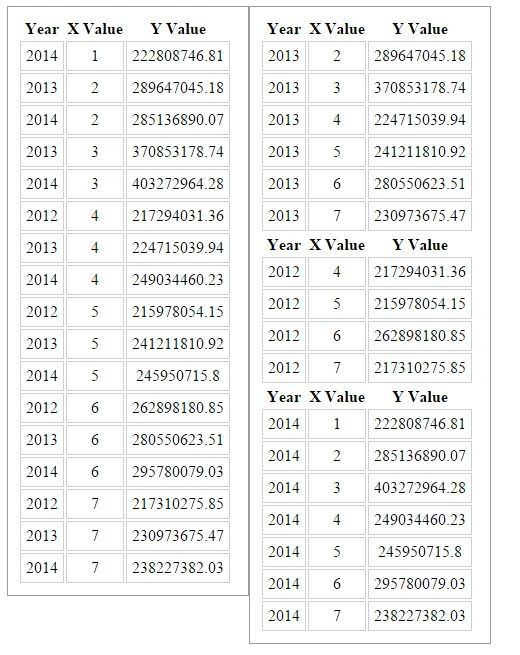
You can find we have separated our object and shown it in a separate table. Cool. That is all for the day. I will return with another article soon.
Conclusion
I hope you liked this article. Please share with me your valuable thoughts and comments. Your feedback is always welcomed.
Happy coding!
NitinPosted May 30, 2015, 10:20 AM
Good one
Guest UserPosted May 29, 2015, 10:29 AM
yes
Sibeesh VenuPosted May 29, 2015, 4:23 AM
Sumit Jolly You mean to include a new repository there right?
Sibeesh VenuPosted May 29, 2015, 4:21 AM
Santhakumar Munuswamy Thank you
Santhakumar MunuswamyPosted May 29, 2015, 3:29 AM
Thanks for good work
Sibeesh VenuPosted May 28, 2015, 10:16 PM
Sumit Jolly thank you so much. Sure I will try that.
Guest UserPosted May 28, 2015, 9:04 PM
Good one Sibeesh! I suggest put this code as JSON sort based on object on GIT also
Sibeesh VenuPosted May 28, 2015, 11:15 AM
Gowtham Rajamanickam Thank you
Gowtham RajamanickamPosted May 28, 2015, 10:33 AM
good..