

Step 1: Create Default.aspx file like
<%@ Page Language="C#" AutoEventWireup="true" CodeFile="Default.aspx.cs" Inherits="_Default" %>
<!DOCTYPE html PUBLIC "-//W3C//DTD XHTML 1.0 Transitional//EN" "http://www.w3.org/TR/xhtml1/DTD/xhtml1-transitional.dtd">
<html xmlns="http://www.w3.org/1999/xhtml">
<head id="Head1" runat="server">
<title>Untitled Page</title>
</head>
<body>
<form id="form1" runat="server">
<div align="center">
<table >
<tr>
<td>
<div align="center">
<table >
<tr>
<td>
<asp:GridView ID="GridView1" runat="server" AutoGenerateColumns="False"
onpageindexchanging="GridView1_PageIndexChanging">
<Columns>
<asp:TemplateField>
<ItemTemplate>
<asp:CheckBox ID="ch1" runat="server" />
</ItemTemplate>
</asp:TemplateField>
<asp:BoundField HeaderText="EMPLOYEE ID" DataField="id" />
<asp:BoundField HeaderText="EMPLOYEE NAME" DataField="name" />
<asp:BoundField HeaderText="CITY" DataField="empcity" />
</Columns>
</asp:GridView>
</td>
</tr>
<tr>
<td>
<asp:Button ID="Button1" runat="server" Text="Delete" onclick="Button1_Click" />
</td>
</tr>
</table>
</div>
</td>
</tr>
</table>
</div>
</form>
</body>
</html>
Step 2 : Script file for create empinfo table.
SET ANSI_NULLS ON
GO
SET QUOTED_IDENTIFIER ON
GO
IF NOT EXISTS (SELECT * FROM sys.objects WHERE object_id = OBJECT_ID(N'[dbo].[empinfo]') AND type in (N'U'))
BEGIN
CREATE TABLE [dbo].[empinfo](
[empid] [int] IDENTITY(1,1) NOT NULL,
[empname] [text] NOT NULL,
[cityid] [int] NOT NULL,
CONSTRAINT [PK_empinfo] PRIMARY KEY CLUSTERED
(
[empid] ASC
)WITH (PAD_INDEX = OFF, IGNORE_DUP_KEY = OFF) ON [PRIMARY]
) ON [PRIMARY] TEXTIMAGE_ON [PRIMARY]
END
GO
SET ANSI_NULLS ON
GO
SET QUOTED_IDENTIFIER ON
GO
IF NOT EXISTS (SELECT * FROM sys.objects WHERE object_id = OBJECT_ID(N'[dbo].[city]') AND type in (N'U'))
BEGIN
CREATE TABLE [dbo].[city](
[cityid] [int] IDENTITY(1,1) NOT NULL,
[cityname] [nvarchar](50) NOT NULL,
CONSTRAINT [PK_city] PRIMARY KEY CLUSTERED
(
[cityid] ASC
)WITH (PAD_INDEX = OFF, IGNORE_DUP_KEY = OFF) ON [PRIMARY]
) ON [PRIMARY]
END
Step 3 : Create Default.aspx.cs file like
using System;
using System.Configuration;
using System.Data;
using System.Linq;
using System.Web;
using System.Web.Security;
using System.Web.UI;
using System.Web.UI.HtmlControls;
using System.Web.UI.WebControls;
using System.Web.UI.WebControls.WebParts;
using System.Xml.Linq;
using System.Data.Linq.Mapping;
using System.Windows.Forms;
using System.Collections;
public partial class _Default : System.Web.UI.Page
{
private int currentpage = 0;
ArrayList alist = new ArrayList();
protected void Page_Load(object sender, EventArgs e)
{
if (!IsPostBack)
{
Bindgridview(); //Bind Gridview.
}
}
private void Bindgridview()
{
using (testgridviewDataContext db = new testgridviewDataContext())
{
var info = from emp in db.empinfos
join cityinfo in db.cities on emp.cityid equals cityinfo.cityid
select new
{
id = emp.empid,
name = emp.empname,
empcity = cityinfo.cityname
};
if (info != null)
{
GridView1.AllowPaging = true;
GridView1.PageSize = 5;
GridView1.PageIndex = currentpage;
GridView1.DataSource = info;
GridView1.DataBind();
}
}
}
protected void GridView1_PageIndexChanging(object sender, GridViewPageEventArgs e)
{
currentpage = e.NewPageIndex;
Bindgridview();
}
protected void Button1_Click(object sender, EventArgs e)
{
for (int i = 0; i < GridView1.Rows.Count; i++)
{
System.Web.UI.WebControls.CheckBox cbb = (System.Web.UI.WebControls.CheckBox)GridView1.Rows[i].FindControl("ch1");
if (cbb.Checked == true)
{
int id = Convert.ToInt32(GridView1.Rows[i].Cells[1].Text);
alist.Add(id);
}
}
using (testgridviewDataContext db = new testgridviewDataContext())
{
for (int j = 0; j < alist.Count; j++)
{
int id = Convert.ToInt32(alist[j]);
var info = from p in db.empinfos
where p.empid == id
select p;
foreach (var deleteinfo in info)
{
db.empinfos.DeleteOnSubmit(deleteinfo);
}
try
{
db.SubmitChanges();
}
catch (Exception ex)
{
Response.Write("Error:" + ex.Message);
}
}
}
currentpage = 0;
Bindgridview();
}
}
Step 4 : Run your project. Page output like this.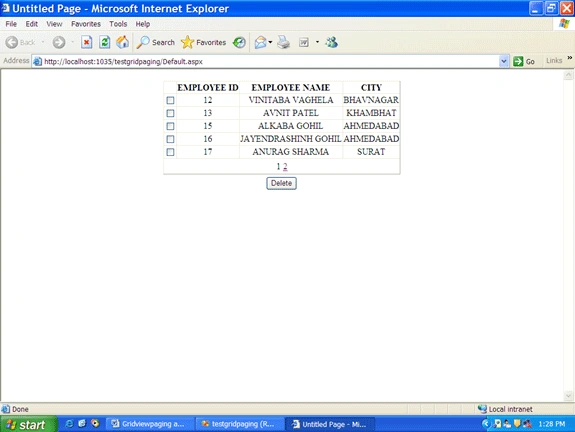
For more information download my source code.
sukh DHALIWALPosted Jul 9, 2012, 1:10 AM
Thanks. This is exact code what I want. thank you very much . this is going to help me .. thanks a lot .
Rajamanikkam SPosted Mar 31, 2012, 2:10 AM
hi , I have using data gridview inside the header template bind the data in dropdown list ....it have plan like message plan,free cost plan...if i select message plan who are all have message plan only display in grid view ..any one help for me
SairamPosted Apr 7, 2011, 4:23 AM
hi i can't open the database file and it says thatconnection to the sqlserver files require sql server express 2005 to function properly ..can u help me on that
swapnil zarbadePosted Oct 22, 2010, 3:23 AM
Thanks. This is exact code what I want.
abas shahenPosted Aug 16, 2009, 12:11 PM
excelent example , man im new in linq and i want to use stored procedure with linq rather than linq query its possible? and has the same efficiency??