

Purpose
Many times it is useful to have regular expression support in SQL Server. This article discusses how to create a Regex library of CLR functions for SQL Server. CLR Integration is available in SQL Server 2005 and above.
Implementation Details
Create a SQL Server Project in Visual Studio 2008.
Add a new User-Defined Function file to the project.
Create CLR functions in this file as in the following sample.
[Microsoft.SqlServer.Server.SqlFunction] public static SqlBoolean RegexMatch(string input, string pattern) { return Regex.Match(input, pattern).Success; }
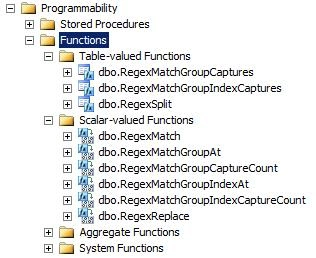
Build and deploy the solution to the database. The CLR functions will show up in the database Functions section under Programmability as shown below.
Ensure that CLR Integration is enabled in the SQL Server Surface Area Configuration tool.
Enable CLR for the database as shown below
EXEC sp_configure 'clr enabled' , '1'
Sample Usage
You can use the CLR functions in your SQL as show below.
Java |
Results for above SQL
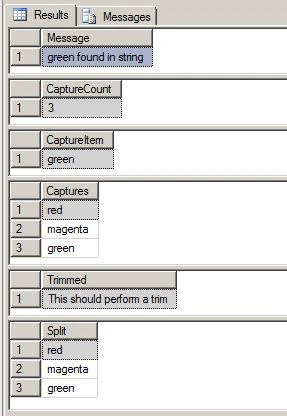
Regex Library for SQL Server
Project Toolkit.SqlServer.CLR contains code that provides the following API to support Regular Expressions in the database. 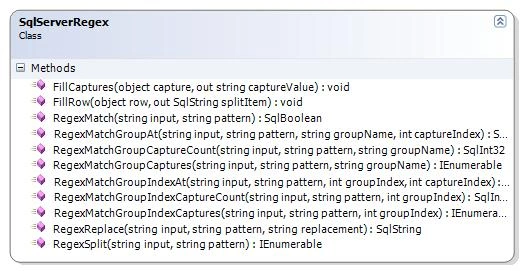
CLR Functions Library :
|
Function |
Parameters | ||||||||||||
|
RegexMatch |
Return type : SqlBoolean Returns true if matched else false. | ||||||||||||
|
RegexMatchGroupAt |
Returns: SqlString The value of the capture for the group at the index. | ||||||||||||
|
RegexMatchGroupIndexAt |
Returns: SqlString The value of the capture for the group at the index. | ||||||||||||
|
RegexMatchGroupCaptureCount |
Returns: SqlInt32 The number of captures for a specified named group. | ||||||||||||
|
RegexMatchGroupIndexCaptureCount |
Returns: SqlInt32 The number of captures for a specified named group. | ||||||||||||
|
RegexMatchGroupCaptures |
Returns: IEnumerable i.e. a Table Valued Variable containing the capture values | ||||||||||||
|
RegexMatchGroupIndexCaptures |
Returns: IEnumerable i.e. a Table Valued Variable containing the capture values | ||||||||||||
|
RegexReplace |
Returns: SqlString The string after the replacement. | ||||||||||||
|
RegexSplit |
Returns: IEnumerable i.e. a Table Valued Variable containing the split values |
Roy JacksonPosted Jun 30, 2016, 2:48 PM
The zip file opens with 7zip not windows archive tool
Ken FieldsPosted Jun 3, 2016, 2:00 PM
Same problem as Rod. ZIP appears to be corrupted.
Rod BarnesPosted May 18, 2016, 5:51 PM
The ZIP is no longer valid. When it is downloaded, it is not recognized as a ZIP file.