

Here I have taken three textboxes and bound these values at run time with the help of AngularJS. AngularJS is a powerful programming framework based on JavaScript provided by Google.
AngularJS extends HTML with new attributes. This is perfect for Single Page Applications.
What should you already know before learning the AngularJS:
- HTML
- CSS
- JavaScript(Master of web programming)
AngularJS is spread as JavaScript file and add with Script tag such as :
- <script src="http://ajax.googleapis.com/ajax/libs/angularjs/1.4.8/angular.min.js"></script>
- ng-app directive define an AngularJS application.
- ng-model directive define an AngularJS model and bind the value of HTML control to application data.
- ng-bind directives binds application data to HTML view.
Now I have shown an example to bind data with HTML using AngularJS.
I have taken a page named AngularJsTest.html andthe page looks like below,
- <!DOCTYPE html>
- <html>
- <head></head>
- <body>
- <div>
- </div>
- </body>
- </html>
- <form id="form1">
- <div>
- Name:<input type="text">
- <br>
- <br/>
- Email:<input type="text">
- <br>
- <br>
- Address:<input type="text">
- <br>
- <br>
- </div>
- </form>
- <!DOCTYPE html>
- <html xmlns="http://www.w3.org/1999/xhtml">
- <head>
- <title>Angular JS Test</title>
- <script src="http://ajax.googleapis.com/ajax/libs/angularjs/1.4.8/angular.min.js"></script>
- </head>
- <body>
- <form id="form1">
- <div>
- Name:<input type="text">
- <br>
- <br/>
- Email:<input type="text">
- <br>
- <br>
- Address:<input type="text">
- <br>
- </div>
- </form>
- </body>
- </html>
- <!DOCTYPE html>
- <html xmlns="http://www.w3.org/1999/xhtml">
- <head>
- <title>Angular JS Test</title>
- <script src="http://ajax.googleapis.com/ajax/libs/angularjs/1.4.8/angular.min.js"></script>
- <script>
- var app = angular.module('myApp', []);
- app.controller('personCtrl', function ($scope) {
- $scope.Name = "UpendraPratapShahi";
- $scope.Email = "upendra.pratap@****.com";
- $scope.Address = "Noida, India";
- $scope.EMP_Info = function () {
- return$scope.Name + " , " + $scope.Email + " , " + $scope.Address;
- }
- });
- </script>
- </head>
- <body>
- <form id="form1">
- <div>
- Name:<input type="text">
- <br>
- <br/>
- Email:<input type="text">
- <br>
- <br>
- Address:<input type="text">
- <br>
- </div>
- </form>
- </body>
- </html>
Now add define directives to the HTML controls,
- <!DOCTYPE html>
- <html xmlns="http://www.w3.org/1999/xhtml">
- <head>
- <title>Angular JS Test</title>
- <script src="http://ajax.googleapis.com/ajax/libs/angularjs/1.4.8/angular.min.js"></script>
- <script>
- var app = angular.module('myApp', []);
- app.controller('personCtrl', function($scope)
- {
- $scope.Name = "UpendraPratapShahi";
- $scope.Email = "upendra.pratap@****.com";
- $scope.Address = "Noida, India";
- $scope.EMP_Info = function()
- {
- return$scope.Name + " , " + $scope.Email + " , " + $scope.Address;
- }
- });
- </script>
- </head>
- <body>
- <form id="form1">
- <div ng-app="myApp" ng-controller="personCtrl">
- Name:
- <input type="text" ng-model="Name">
- <br>
- <br/> Email:
- <input type="text" ng-model="Email">
- <br>
- <br> Address:
- <input type="text" ng-model="Address">
- <br>
- <br>
- <b>Employee Information :</b> {{EMP_Info()}}
- </div>
- </form>
- </body>
- </html>
Now render on browser as in the following image,
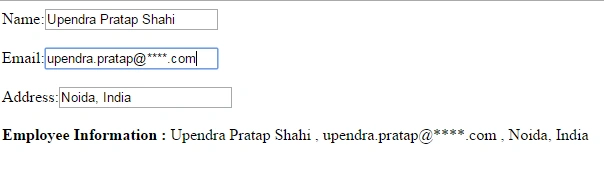
Now I have made changes in value on browser and see what happens,
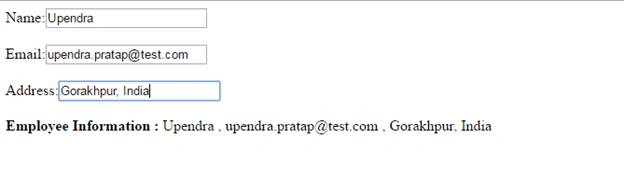
Above was some information regarding AngularJS. I hope all you have enjoyed article and I welcome your feedback.
Read more articles on AngularJS:
kalu singh raoPosted Jul 4, 2016, 1:59 AM
Nice...
Thiruppathi RPosted May 2, 2016, 1:24 AM
Nice
Bhuvanesh MohankumarPosted Apr 29, 2016, 7:34 AM
Nice
Ramesh JangirPosted Apr 26, 2016, 8:30 AM
Good one
Gowtham RajamanickamPosted Apr 25, 2016, 2:57 AM
nice share
Vivek KumarPosted Apr 17, 2016, 10:09 AM
Good one.
Debasis SahaPosted Apr 16, 2016, 6:06 AM
Nice one..
Kuppurasu NagarajPosted Apr 9, 2016, 10:40 AM
Nice article..
Vignesh ManiPosted Apr 5, 2016, 8:24 AM
good one