

Introduction
In this article, I will explain about how to create a clock using Angular.
Prerequisites
- Angular 7
- HTML/Bootstrap
In this article we will learn how to create a clock using canvas in Angular.
Step 1
I have created a project using the following command in the Command Prompt.
- ng new clockexample
Step 2
Open a project in Visual Studio Code using the following commands.
- cd clockexample
- code.
Step 3
Create a new component using the following commands.
- ng g c clock
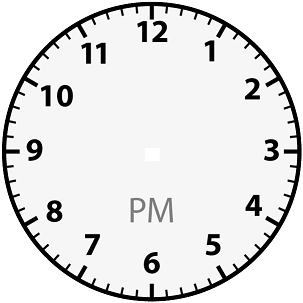
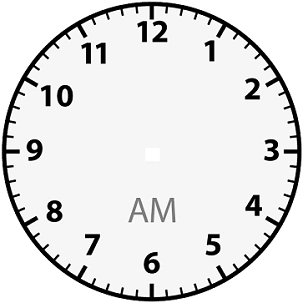
Import the following image in Assets folder:
Import the following dependancy in clock.component.ts:
- import { Component, ViewChild, ElementRef, Input, OnInit, AfterViewInit, OnDestroy } from '@angular/core';
- import { ChangeDetectionStrategy, NgZone } from '@angular/core';
- import { Observable, timer, Subscription } from 'rxjs';
- import { timeInterval, tap, map } from 'rxjs/operators';
- import { TDate } from '../tdate';
- import { formatDate } from '@angular/common';
- import { DatePipe } from '@angular/common';
clock.component.ts
Add the following code in clock.component.ts:
- import { Component, ViewChild, ElementRef, Input, OnInit, AfterViewInit, OnDestroy } from '@angular/core';
- import { ChangeDetectionStrategy, NgZone } from '@angular/core';
- import { Observable, timer, Subscription } from 'rxjs';
- import { timeInterval, tap, map } from 'rxjs/operators';
- import { TDate } from '../tdate';
- import { formatDate } from '@angular/common';
- import { DatePipe } from '@angular/common';
- @Component({
- selector: 'cs-canvas-clock',
- template: '<canvas #mycanvas></canvas>',
- styles: [],
- changeDetection: ChangeDetectionStrategy.OnPush
- })
- export class ClockComponent implements OnInit, OnDestroy, AfterViewInit {
- @ViewChild('mycanvas', { static: false, read: ElementRef }) canvasRef: ElementRef;
- public tdate=new Date();
- @Input() public width = 100;
- @Input() public height = 100;
- canvasContext: CanvasRenderingContext2D;
- subscription: Subscription;
- constructor(private ngZone: NgZone,private datePipe: DatePipe) {
- }
- ngOnInit() { }
- ngAfterViewInit() {
- const canvasEl: HTMLCanvasElement = this.canvasRef.nativeElement;
- canvasEl.width = this.width;
- canvasEl.height = this.height;
- const radius = canvasEl.height / 2;
- const innerRadius = radius * 0.89;
- this.canvasContext = canvasEl.getContext('2d');
- this.canvasContext.translate(radius, radius);
- this.ngZone.runOutsideAngular(() => this.draw(innerRadius));
- }
- ngOnChanges(change) {
- if (this.subscription) {
- this.subscription.unsubscribe();
- }
- if (change.tdate) {
- this.tdate = change.tdate.currentValue;
- if(this.canvasRef)
- {
- const canvasEl: HTMLCanvasElement = this.canvasRef.nativeElement;
- canvasEl.width = this.width;
- canvasEl.height = this.height;
- const radius = canvasEl.height / 2;
- const innerRadius = radius * 0.89;
- this.canvasContext = canvasEl.getContext('2d');
- this.canvasContext.translate(radius, radius);
- this.ngZone.runOutsideAngular(() => this.draw(innerRadius));
- }
- }
- }
- ngOnDestroy() {
- }
- draw(innerRadius: number) {
- this.drawBackground(this.canvasContext, innerRadius);
- }
- drawBackground(canvasContext, innerRadius) {
- var background = new Image();
- let date =new Date(this.tdate) ;
- let dp= this.datePipe;
- let am_pm=dp.transform(date,"a");
- if(am_pm=='AM' && background.src != "/assets/clockAM.png")
- {
- background.src = "/assets/clockAM.png";
- }
- else if(am_pm=='PM' && background.src != "/assets/clockPM.png")
- {
- background.src = "/assets/clockPM.png";
- }
- let $this = this;
- background.onload = function () {
- $this.subscription = timer(0, 1000)
- .pipe(
- tap(t => {
- canvasContext.clearRect($this.width / 2 * -1, $this.height / 2 * -1, $this.height, $this.width);
- date=new Date(date.setSeconds(date.getSeconds()+1));
- canvasContext.drawImage(background, -50, -50, 100, 100);
- $this.drawTime(canvasContext, innerRadius,date);
- })
- )
- .subscribe(s=>{
- }
- );
- }
- }
- drawFace(ctx, radius) {
- ctx.beginPath();
- ctx.arc(0, 0, radius, 0, 2 * Math.PI);
- ctx.fillStyle = 'white';
- ctx.fill();
- const grad = ctx.createRadialGradient(0, 0, radius, 0.95, 0, 0, radius, 1.05);
- grad.addColorStop(0.5, '#333');
- grad.addColorStop(0, '#1ABB9C');
- ctx.strokeStyle = grad;
- ctx.lineWidth = radius * 0.050;
- ctx.stroke();
- ctx.beginPath();
- ctx.arc(0, 0, radius, 0.1, 0, 2, Math.PI);
- ctx.fillStyle = '#333';
- ctx.fill();
- }
- drawNumbers(ctx, radius) {
- let ang;
- let num;
- let dot = '.';
- ctx.font = radius * 0.1 + 'px arial';
- ctx.font = "10pt Courier";
- ctx.textBaseline = 'middle';
- ctx.textAlign = 'center';
- for (num = 1; num < 13; num++) {
- ang = num * Math.PI / 6;
- ctx.rotate(ang);
- ctx.translate(0, -radius * 0.85);
- ctx.rotate(-ang);
- ctx.fillText(dot, 0, 0);
- ctx.rotate(ang);
- ctx.translate(0, radius * 0.85);
- ctx.rotate(-ang);
- }
- }
- drawTime(ctx, radius,date) {
- const { seconds, minutes, hours } = new TDate(date);
- const hourHand =
- (hours % 12) * Math.PI / 6 + minutes * Math.PI / (6 * 60) + seconds * Math.PI / (360 * 60);
- //this.drawHand(ctx, hourHand, radius * 0.5, radius * 0.07);
- this.drawHourHand(ctx, date, radius * 0.6, radius * 0.05);
- const minuteHand = minutes * Math.PI / 30 + seconds * Math.PI / (30 * 60);
- this.drawMinuteHand(ctx, date, radius * 0.8, radius * 0.04);
- //this.drawHand(ctx, minuteHand, radius * 0.8, radius * 0.07);
- const secondHand = seconds * Math.PI / 30;
- this.drawSecondHand(ctx, date, radius * 0.9, radius * 0.03);
- //this.drawHand(ctx, secondHand, radius * 0.9, radius * 0.02);
- }
- // drawHand(ctx, pos, length, width) {
- // ctx.beginPath();
- // ctx.lineWidth = width;
- // ctx.lineCap = 'round';
- // ctx.moveTo(0, 0);
- // ctx.rotate(pos);
- // ctx.lineTo(0, -length);
- // ctx.stroke();
- // ctx.rotate(-pos);
- // }
- degreesToRadians(degrees) {
- return (Math.PI / 180) * degrees
- }
- drawHourHand(ctx, theDate, length, width) {
- var hours = theDate.getHours() + theDate.getMinutes() / 60;
- var degrees = (hours * 360 / 12) % 360;
- ctx.save();
- ctx.fillStyle = 'black';
- ctx.strokeStyle = '#555';
- ctx.rotate(this.degreesToRadians(degrees));
- this.drawHand(ctx, length, width, 3);
- ctx.restore();
- }
- drawMinuteHand(ctx, theDate, length, width) {
- var minutes = theDate.getMinutes() + theDate.getSeconds() / 60;
- ctx.save();
- ctx.fillStyle = 'black';
- ctx.strokeStyle = '#555';
- ctx.rotate(this.degreesToRadians(minutes * 6));
- this.drawHand(ctx, length, width, 5);
- ctx.restore();
- }
- drawHand(ctx, size, thickness, shadowOffset) {
- thickness = thickness || 4;
- // ctx.shadowColor = '#555';
- // ctx.shadowBlur = 10;
- // ctx.shadowOffsetX = shadowOffset;
- // ctx.shadowOffsetY = shadowOffset;
- ctx.beginPath();
- ctx.moveTo(0, 0); // center
- ctx.lineTo(thickness * -1, -10);
- ctx.lineTo(0, size * -1);
- ctx.lineTo(thickness, -10);
- ctx.lineTo(0, 0);
- ctx.fill();
- ctx.stroke();
- }
- drawSecondHand(ctx, theDate, length, width) {
- var seconds = theDate.getSeconds();
- ctx.save();
- ctx.fillStyle = '#1ABB9C';
- ctx.strokeStyle = "#1ABB9C";
- ctx.globalAlpha = 0.8;
- ctx.rotate(this.degreesToRadians(seconds * 6));
- this.drawHand(ctx, length, width, 0);
- ctx.restore();
- }
- }
App.module.ts
- import { BrowserModule } from '@angular/platform-browser';
- import { NgModule } from '@angular/core';
- import { DatePipe } from '@angular/common';
- import { AppRoutingModule } from './app-routing.module';
- import { AppComponent } from './app.component';
- import { ClockComponent } from './clock/clock.component';
- @NgModule({
- declarations: [
- AppComponent,
- ClockComponent
- ],
- imports: [
- BrowserModule,
- AppRoutingModule,
- ],
- providers: [DatePipe],
- bootstrap: [AppComponent]
- })
- export class AppModule { }
App.components.html
- <span height="70" align="right" class="float-right" id="canvasClock">
- <cs-canvas-clock></cs-canvas-clock>
- </span>
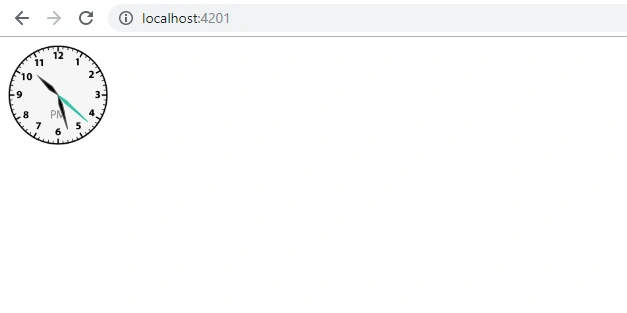
Now, run the project using the following command:
- ng serve
Summary
In this article, I have discussed how to create a clock using canvas in Angular.
Join the conversation! Your thoughts help the community grow.