

I am creating a row of controls dynamically which includes one dropdownlist, 12 textboxes and one checkbox as soon as user clicks on "Add New Row" button.
Textboxes are kept for receiving inputs for the values of 12 months.
Here I am taking a panel and then I am adding the newly created table to this panel which serves as a placeholder for the table.
Inside the table I am adding these controls. Look the code it is very easy.
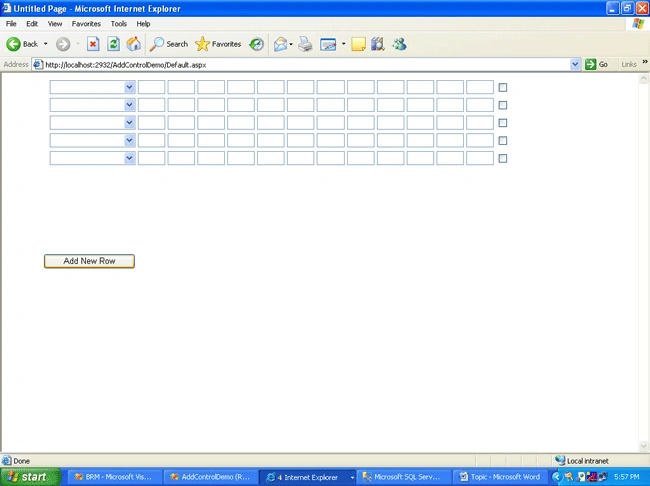
Code Default.aspx.cs
using System;
using System.Data;
using System.Configuration;
using System.Web;
using System.Web.Security;
using System.Web.UI;
using System.Web.UI.WebControls;
using System.Web.UI.WebControls.WebParts;
using System.Web.UI.HtmlControls;
public partial class _Default :
System.Web.UI.Page
{
private int
numOfColumns = 12;
public static int ctr = 0;
static Table table = new Table();
protected void
Page_Load(object sender, EventArgs e)
{
table.ID = "table1";
Panel1.Controls.Add(table);
}
protected void
btnAddNewRow_Click(object sender, EventArgs e)
{
numOfColumns =
12;
//Generate the Table based from the inputs
GenerateTable(numOfColumns);
}
private void
GenerateTable(int colsCount)
{
ctr++;
// Now iterate through the table and add your controls
TableRow row = new TableRow();
row.ID = "row" + ctr;
TableCell cell1 = new
TableCell();
DropDownList dl = new
DropDownList();
dl.ID = "DrpDwnBrand" + ctr;
dl.AutoPostBack
= false;
dl.Width = 135;
// Add the control to the TableCell
cell1.Controls.Add(dl);
// Add the TableCell to the TableRow
row.Cells.Add(cell1);
for (int j = 1; j
<= colsCount; j++)
{
TableCell cell2 = new
TableCell();
TextBox tb = new TextBox();
if (j == 1)
{
tb.ID =
"txtJan" + ctr;
}
else if (j == 2)
{
tb.ID =
"txtFeb" + ctr;
}
else if (j == 3)
{
tb.ID =
"txtMar" + ctr;
}
else if (j == 4)
{
tb.ID =
"txtApr" + ctr;
}
else if (j == 5)
{
tb.ID =
"txtMay" + ctr;
}
else if (j == 6)
{
tb.ID =
"txtJun" + ctr;
}
else if (j == 7)
{
tb.ID = "txtJul"
+ ctr;
}
else if (j == 8)
{
tb.ID =
"txtAug" + ctr;
}
else if (j == 9)
{
tb.ID =
"txtSep" + ctr;
}
else if (j == 10)
{
tb.ID =
"txtOct" + ctr;
}
else if (j == 11)
{
tb.ID =
"txtNov" + ctr;
}
else if (j == 12)
{
tb.ID =
"txtDec" + ctr;
}
tb.Width =
37;
// Add the control to the TableCell
cell2.Controls.Add(tb);
// Add the TableCell to the TableRow
row.Cells.Add(cell2);
}
TableCell cell3 = new
TableCell();
CheckBox cb = new CheckBox();
cb.Controls.Clear();
cb.ID = "chkSameAll" + ctr;
cb.AutoPostBack
= false;
cb.Width = 10;
// Add the control to the TableCell
cell3.Controls.Add(cb);
// Add the TableCell to the TableRow
row.Cells.Add(cell3);
// Add the TableRow to the Table
table.Rows.Add(row);
}
}
Default.aspx
<%@ Page Language="C#"
AutoEventWireup="true" CodeFile="Default.aspx.cs" Inherits="_Default" %>
<!DOCTYPE html PUBLIC
"-//W3C//DTD XHTML 1.0 Transitional//EN"
"http://www.w3.org/TR/xhtml1/DTD/xhtml1-transitional.dtd">
<html xmlns="http://www.w3.org/1999/xhtml"
>
<head runat="server">
<title>Untitled Page</title>
</head>
<body>
<form id="form1" runat="server">
<div>
<br />
<br />
<asp:Button ID="btnAddNewRow"
runat="server"
OnClick="btnAddNewRow_Click"
Style="z-index:
100;
left: 66px; position: absolute; top: 287px" Text="Add New Row" Width="145px" />
<asp:Panel ID="Panel1" runat="server"
Height="50px"
Style="z-index:
102; left: 73px;
position: absolute; top: 8px" Width="125px">
</asp:Panel>
</div>
</form>
</body>
</html>
krunal agrawalPosted Feb 11, 2017, 10:01 PM
Very helpful tutorial..how to read values of all generated controlls thank you
Mathew RudkinPosted Apr 29, 2014, 9:55 PM
Thank you! I have previously been using a poor technique. Cheers!
laurent blacherePosted Oct 3, 2010, 10:32 AM
Hello, Thanks for sharing this code for asp.net dynamic controls. While trying your code, I discovered that it is extremely difficult to make those controls persist their state automatically. So I search on the web and found a solution here : How to create deeply nested Asp.net Dynamic Controls ? There is an amazing online demo and the source code within. Laurent.