

Introduction
In this article, I will explain about how to implement control value accessor in Angular. Control Value Accessor is an interface that provides us the power to leverage the Angular forms API and create a communication between Angular Form API and the DOM element. It provides us many facilities in angular like we can create custom controls or custom component with the help of control value accessor interface.

Prerequisites
- Angular 12
- HTML/Bootstrap
For this article, I have created an Angular project using Angular 12. For creating an Angular project, we need to follow the following steps:
Create Project
I have created a project using the following command in the Command Prompt.
ng new controlValueAccessorExampleOpen a project in Visual Studio Code using the following commands.
cd controlValueAccessorExample
Code .
Now in Visual Studio your project looks like as below.
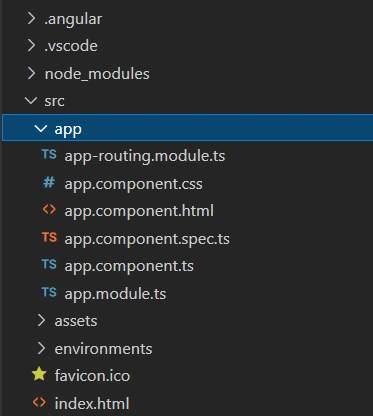
Let's create Custom Component using the following command:
ng g c CustomSo now 4 files will automatically created in your project like as below
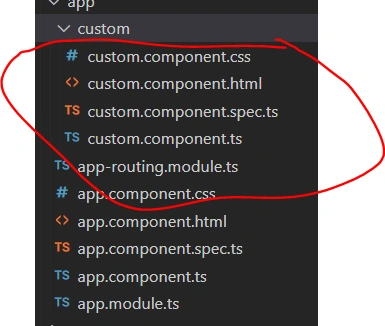
So first of all you need to implement ControlValueAccessor interface in custom component. After implementation you will have three methods in component.ts file as below:
import { Component, OnInit } from '@angular/core';
import { ControlValueAccessor } from '@angular/forms';

@Component({
  selector: 'app-custom',
  templateUrl: './custom.component.html',
  styleUrls: ['./custom.component.css']
})
export class CustomComponent implements ControlValueAccessor {

  constructor() { }

  onChange: any = () => {}
  onTouch: any = () => {}

  set value(val: string){}

  writeValue(obj: any): void {
    throw new Error('Method not implemented.');
  }
  registerOnChange(fn: any): void {
    throw new Error('Method not implemented.');
  }
  registerOnTouched(fn: any): void {
    throw new Error('Method not implemented.');
  }

}
So first all of you need to understand these methods what functionality they will provide:
- onChange - the callback function to register on UI change
- onTouch - the callback function to register on element touch
- set value(val: any) - sets the value used by the ngModel of the element
- writeValue(obj: any) - This will write the value to the view if the value changes occur on the model programmatically
- registerOnChange(fn: any) - When the value in the UI is changed, this method will invoke a callback function
- registerOnTouch(fn: any) - When the element is touched, this method will get called
Now we can use ControlValueAccessor like as below code:
import { Component, forwardRef } from '@angular/core';
import { ControlValueAccessor, NG_VALUE_ACCESSOR } from '@angular/forms';

@Component({
  selector: 'app-custom',
  templateUrl: './custom.component.html',
  styleUrls: ['./custom.component.css'],
  providers: [
    {
      provide: NG_VALUE_ACCESSOR,
      useExisting: CustomComponent,
      multi: true
    }]
})

export class CustomComponent implements ControlValueAccessor {
  field= "";

  constructor() { }

  onChange: any = () => {}
  onTouch: any = () => {}

  // sets the value used by the ngModel of the element
  set value(val: string){
      this.field = val
      this.onChange(val)
      this.onTouch(val)
  }

  // This will will write the value to the view if the the value changes occur on the model programmatically
  writeValue(value: any){
    this.value = value
  }

  // When the value in the UI is changed, this method will invoke a callback function
  registerOnChange(fn: any){
    this.onChange = fn
  }

  // When the element is touched, this method will get called
  registerOnTouched(onTouched: Function) {
    this.onTouch = onTouched;
  }
}
Custom.Component.html
<input [(ngModel)]="value"/>
<p>Internal data field:{{field}}</p>
App.componet.html
<app-custom  [(ngModel)]="data"></app-custom>
<p>Data here:{{data}}</p>
App.componet.ts
import { Component, ViewChild } from '@angular/core';
import { CustomComponent } from './custom/custom.component';

@Component({
  selector: 'app-root',
  templateUrl: './app.component.html',
  styleUrls: ['./app.component.css']
})
export class AppComponent {
  data:string='';
}
Let's run the project using following command:
ng serve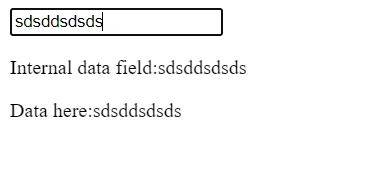
Summary
In this article, I have discussed about implementation of control value accessor in Angular.
Join the conversation! Your thoughts help the community grow.