
This example shows how to retrieve all users from a group in SharePoint using REST. Develop the project using the following method in the NAPA Tool.
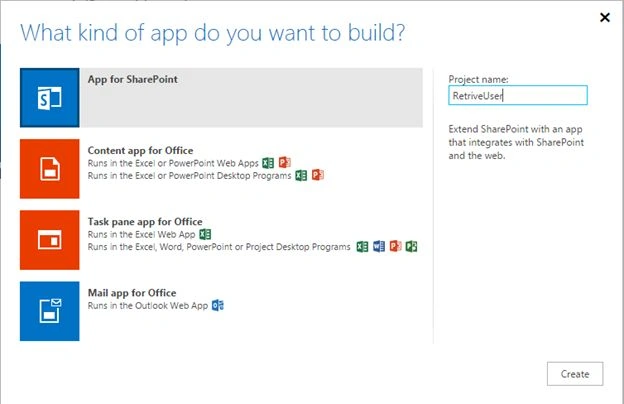
On your Developer Site, open the "Napa" Office 365 Development Tools and then choose Add New Project.
- Choose the App for SharePoint template, name the project Create Site and then choose the Create button.
- Replace APP.js with the following source code below.
- Publish Your App.
Prerequisites
The following is the important procedure to be done before creating the app.
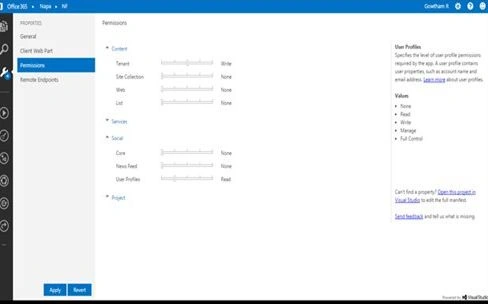
Specify the permissions that your app needs as in the following.
Choose the Properties button at the bottom of the page.
- In the Properties window, choose Permissions.
- In the Content category, set the Write permissions for the Tenant scope.
- In the Social category, set the Read permissions for the User Profiles scope.
- Close the Properties window.
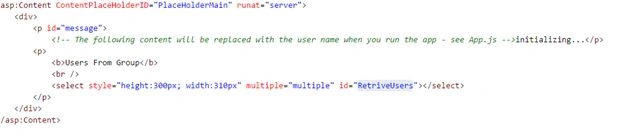
Default ASPX
Source Code
- 'use strict';
- var hostweburl;
- var appweburl;
- // Get the URLs for the app web the host web URL from the query string.
- $(document).ready(function()
- {
- //Get the URI decoded URLs.
- hostweburl = decodeURIComponent(getQueryStringParameter("SPHostUrl"));
- appweburl = decodeURIComponent(getQueryStringParameter("SPAppWebUrl"));
- // Resources are in URLs in the form:
- // web_url/_layouts/15/resource
- // Load the js file and continue to load the page with information about the folders.
- // SP.RequestExecutor.js to make cross-domain requests
- $.getScript(hostweburl + "/_layouts/15/SP.RequestExecutor.js", getuser);
- });
- function getuser()
- {
- var executor;
- var userEmail = "[email protected]";
- // Initialize the RequestExecutor with the app web URL.
- executor = new SP.RequestExecutor(appweburl);
- executor.executeAsync({
- url: appweburl + "/_api/SP.AppContextSite(@target)/web/sitegroups(6)/users?@target='" + hostweburl + "'",
- method: "GET",
- headers: {
- "Accept": "application/json; odata=verbose"
- },
- success: getUsersFromGroupSuccess,
- error: getUsersFromGroupError
- });
- }
- //Populate the selectUsers control after retrieving all of the users from group.
- function getUsersFromGroupSuccess(data)
- {
- var jsonObject = JSON.parse(data.body);
- var RetriveUsers = document.getElementById("RetriveUsers");
- if (RetriveUsers.hasChildNodes())
- {
- while (RetriveUsers.childNodes.length >= 1)
- {
- RetriveUsers.removeChild(RetriveUsers.firstChild);
- }
- }
- var results = jsonObject.d.results;
- for (var i = 0; i < results.length; i++)
- {
- var selectOption = document.createElement("option");
- selectOption.value = results[i].LoginName;
- selectOption.innerText = results[i].LoginName;
- RetriveUsers.appendChild(selectOption);
- }
- }
- function getUsersFromGroupError(data, errorCode, errorMessage)
- {
- alert("Could not get users from group: " + errorMessage);
- }
- //Utilities
- // Retrieve a query string value.
- // For production purposes you may want to use a library to handle the query string.
- function getQueryStringParameter(paramToRetrieve)
- {
- var params = document.URL.split("?")[1].split("&");
- for (var i = 0; i < params.length; i = i + 1)
- {
- var singleParam = params[i].split("=");
- if (singleParam[0] == paramToRetrieve) return singleParam[1];
- }
- }
Publish the app and click the Trust it Button.
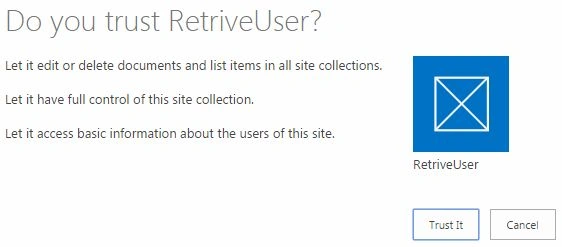
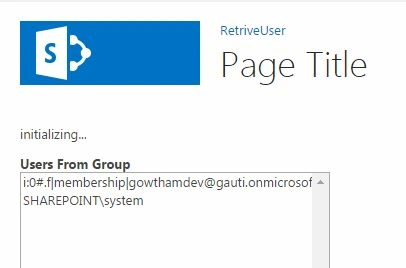
Output
All users are retrieved from the Group Successfully.


Gowtham RajamanickamTOP 100Posted Apr 9, 2015, 4:45 AM EDT
thank u so much prasa
Gowtham RajamanickamTOP 100Posted Apr 9, 2015, 4:45 AM EDT
thank uso much vijay
Gowtham RajamanickamTOP 100Posted Apr 9, 2015, 4:45 AM EDT
thank u somuch santhakumar
Prasad PathakPosted Apr 8, 2015, 3:19 AM EDT
good article
Vijay SPosted Mar 30, 2015, 11:14 PM EDT
Well executed
Santhakumar MunuswamyPosted Mar 30, 2015, 7:19 PM EDT
Thanks for nice article
Gowtham RajamanickamTOP 100Posted Mar 30, 2015, 6:06 PM EDT
thanks u
Rahul Kumar SaxenaTOP 100Posted Mar 30, 2015, 5:11 PM EDT
Good show