
Introduction
Almost every program I have created needs a method for sorting a two-dimensional array by column one in the selected sort order, then by column two in the selected sort order, and then by column three in the selected sort order ... then by column n in the selected sort order.
Sort two-dimensional arrays
For sorting two-dimensional arrays containing different types of values, integers, strings, booleans, etc., I have used the DataGridView class and its DataGridViewSort event handler. It is easy to manipulate data in any way and offers fast sorting as well.
But sometimes, it is not possible to implement such a solution. So, I have made the decision to try to write my own universal method for sorting 2D arrays that could be used for sorting arrays in any future program that I am going to write.
After a while, I have written this method.
/// <summary>
/// Sorts a two-dimensional array of strings by selected columns in selected sort order using the Selection Sort Algorithm.
/// </summary>
/// <param name="array">
/// Two-dimensional array of strings containing values that are going to be sorted.
/// </param>
/// <param name="sort_directive">
/// Two-dimensional array of integers. First column contains the order of the column indexes
/// by which the array will be sorted. Second column contains column sort order.
/// Sort order for each column is defined by integer values:
/// -1 - sort column values in Descending sort order
///  0 - column is not going to be sorted
///  1 - sort column values in Ascending sort order
/// </param>
/// <returns>
/// Sorted array by selected columns in selected sort order.
/// </returns>
public string[,] SortStringArray(string[,] array, int[,] sort_directive)
{
    int arrayRows = array.GetLength(0);
    int arrayColumns = array.Length / arrayRows;
    int sortDirectiveColumns = sort_directive.GetLength(0);

    for (int i = 0; i < arrayRows - 1; i++)
    {
        for (int j = i + 1; j < arrayRows; j++)
        {
            for (int c = 0; c < sortDirectiveColumns; c++)
            {
                int columnToSort = sort_directive[c, 0];
                int sortOrder = sort_directive[c, 1];

                int comparisonResult = array[i, columnToSort].CompareTo(array[j, columnToSort]);

                if ((sortOrder == -1 && comparisonResult < 0) ||
                    (sortOrder == 1 && comparisonResult > 0))
                {
                    for (int d = 0; d < arrayColumns; d++)
                    {
                        string temp = array[j, d];
                        array[j, d] = array[i, d];
                        array[i, d] = temp;
                    }

                    break;
                }
                else if ((sortOrder == -1 && comparisonResult > 0) ||
                         (sortOrder == 1 && comparisonResult < 0))
                {
                    break;
                }
            }
        }
    }

    return array;
}
How did I develop the Sort method?
The first decision was that the 2D array should strictly be the type of string.
Since any other type of data (int, double, float, decimal, char, boolean, ...) can be represented as a string value, and because of that, the 2D array type of string could contain diverse types of data that could be easily manipulated and sorted.
Important
Data stored inside the array type of string are always represented (memorized) as a type of String. When sorting, all data are compared as strings and numbers. If there is a need to sort numbers, it is necessary to adjust the format of data so that the sort routine returns the correct result.
numerical data as strings | numerical data formated for sorting as number values | sorted correctly as numbers |
"1" | "0001" | "0001" |
"10" | "0010" | "0003" |
"214" | "0214" | "0004" |
"3" | "0003" | "0005" |
"4" | "0004" | "0010" |
"5" | "0005" | "0214" |
"1024" | "1024" | "1024" |
numerical data as strings | numerical data not formated for sorting as number values | sorted correctly as strings |
"1" | "1" | "1" |
"10" | "10" | "10" |
"214" | "214" | "1024" |
"3" | "3" | "214" |
"4" | "4" | "3" |
"5" | "5" | "4" |
"1024" | "1024" | "5" |
Example of formatting numerical data.
int numerical_data = 100;
string format = "000000";
string formated_data = numerical_data.ToString(format);
Result of formatting.
Numerical data | Formated data |
100 | 000100 |
1000 | 001000 |
10000 | 010000 |
The name of the 2D array inside the program shall be TABLE.
Declaration of TABLE with 10 rows and 10 columns, max 100 elements.
int rows = 10;
int columns = 10;
string [,] TABLE = new string[rows,columns];
The second decision was to use a 2D array type of integer for storing TABLE sort directives.
A simple sort directive looks like this.
Sort TABLE by Column One in Ascending sort order.
As shown, the sort directive consists of the selected TABLE column index and its sort order.
So this array should have only two columns.
The first column shall contain a selected column index.
The second column contains column sort order defined by integer values.
- 1: Sort column values in Descending sort order
0: The column is not going to be sorted
1: Sort column values in Ascending sort order
The number of rows depends on how many sort directives are entered by the user.
The name of the 2D array inside the program shall be SORT_DIRECTIVE.
Declaration of SORT_DIRECTIVE,
int rows = number of sort directives;
int columns = 2;
int [,] SORT_DIRECTIVE = new string[rows,columns];
Example of sort directive and SORT_DIRECTIVE element values
TABLE has seven rows and three columns,
Sort TABLE by Column One in Ascending sort order, then by
Column Two in Descending sort order then by
Column Three in Ascending sort order.
SORT_DIRECTIVE
Column Index | Sort Order |
1 | 1 |
2 | -1 |
3 | 1 |
The third and final decision was the selection of the Sort Algorithm.
I have decided to use the Selection Sort Algorithm for its simplicity of implementation. Also, it is fast enough for a small amount of data, up to 1000 records.
How does SORT_DIRECTIVE work?
Create and fill the TABLE with data. Be careful if some column should contain numbers. Numbers must be specially formatted for sorting as described in the important notice above.
// Create and fill TABLE
string[,] TABLE = new string[7, 3]
{
    { "John", "Porter", "1234 Oak street, Pensacola, FL 32503" },
    { "John", "Porter", "1891 3rd Street North Westlake, OH 44145" },
    { "William", "Patterson", "4534 Virginia Street Dallas, GA 30132" },
    { "Marry", "Cortez", "7642 Fairview Avenue Milwaukee, WI 53204" },
    { "John", "Patterson", "1368 Street Road Morristown, NJ 07960" },
    { "Elizabet", "Cortez", "3698 Cedar Avenue Saratoga Springs, NY 12886" },
    { "Marry", "Mosley", "4575 11th Street Sacramento, CA 95820" }
};
Then, create and fill SORT_DIRECTIVE.
//
// Table SORT DIRECTIVE contains order of columns
// by which array is going to be sorted and sort order
// for each selected column
//
//  0 - do not sort column
// -1 - sort in Descending order
//  1 - sort in Ascending order
//
int [,] SORT_DIRECTIVE=new int[3,2]
{
    {0,  1},
    {1, -1},
    {2,  1}
};
Call method.
//
// Call sort method
//
TABLE = Sort_String(TABLE,SORT_DIRECTIVE);
When finished, the method returns a sorted array TABLE by values inside SORT_DIRECTIVE.
//
// Print sorted TABLE
//
Console.WriteLine();
Console.WriteLine("  SORTED TABLE");
Console.WriteLine(" --------------");
Console.WriteLine();
for(int n=0;n<7;n++)
{
    Console.WriteLine("  {0,-10}{1,-10}{2,-10}",TABLE[n,0],TABLE[n,1],TABLE[n,2]);
}
Console.WriteLine(" --------------");
//
Here is the program's screenshot.
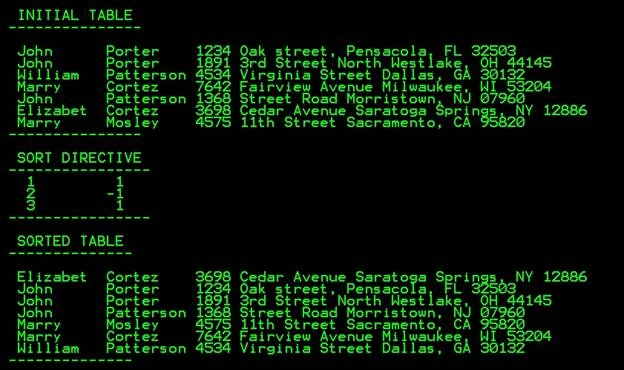
Note. The names and addresses shown in the picture are fictional.
Conclusion
For sorting up to a thousand rows filled with data, this method is almost as fast as DataGridView with its SortEventHandler. If there is a need for sorting more data than that, perhaps by implementing a faster sort algorithm, things would be better. This method can easily be changed to sort 2D arrays of any type.
Sort_String
Sort_Int
Sort_Double
Sort_Decimal
Sort_Float
The name of the method shows what is the type of array that is going to be sorted.
    class Sort_2D_Array
	{
		/// <summary>
		/// Sorts two dimensional array type of string,
		/// by selected culumns, in selected sort order.
		/// Selection Sort Algorithm is implemented
		/// for sorting values inside array.
		/// </summary>
		/// <param name="array">
		/// Two dimensional array, type of string,
		/// contaning values that are going to be sorted.
		/// </param>
		/// <param name="sort_directive">
		/// Two dimensional array, type of int.
		/// First column contains the order of the column indexes
		/// by which the array will be sorted.
		/// Second column contains column sort order.
		/// Sort order for each column is defined by ineger values :
		/// -1 - sort column values in Descending sort order
		///  0 - column is not going to be sorted
		///  1 - sort column values in Ascending sort order
		/// </param>
		/// <returns>
		/// Sorted array by selected columns in selected sort order.
		/// </returns>
		public string[,] Sort_String(string [,] array, int [,] sort_directive)
		{
			// number of rows iside array
			int array_rows = array.GetLength(0);
			// number of columns inside array
			int array_columns = array.Length/array_rows;
			// number of columns to be sorted
			int sort_directive_columns = sort_directive.GetLength(0);
			//
			for(int i=0;i<array_rows-1;i++)
			{
				for(int j=i+1;j<array_rows;j++)
				{
					for(int c=0;c<sort_directive_columns;c++)
					{
						//
						// sort array values in descending sort order
						//
						if(sort_directive[c,1]==-1 &&
						   array[i,sort_directive[c,0]].CompareTo(array[j,sort_directive[c,0]])<0)
						{
							//
							// if values are in ascending sort order
							// swap values
							//
							for(int d=0;d<array_columns;d++)
							{
								string h = array[j,d];
								array[j,d]=array[i,d];
								array[i,d]=h;
							}

							break;
						}
						//
						// if values are in correct sort order break
						//
						else if(sort_directive[c,1]==-1 &&
						        array[i,sort_directive[c,0]].CompareTo(array[j,sort_directive[c,0]])>0)
							break;
						//
						// sort array values in ascending sort order
						//
						else if(sort_directive[c,1]==1 &&
						        array[i,sort_directive[c,0]].CompareTo(array[j,sort_directive[c,0]])>0)
						{
							//
							// if values are in descending sort order
							// swap values
							//
							for(int d=0;d<array_columns;d++)
							{
								string h = array[j,d];
								array[j,d]=array[i,d];
								array[i,d]=h;
							}

							break;
						}
						//
						// if values are in correct sort order break
						//
						else if(sort_directive[c,1]==1 &&
						        array[i,sort_directive[c,0]].CompareTo(array[j,sort_directive[c,0]])<0)
							break;
						//
						// if values are equal
						// select next sort directive
						//
					}
				}
			}

			//
			// return sorted array
			//
			return array;
		}

		/// <summary>
		/// Sorts two dimensional array type of int,
		/// by selected culumns, in selected sort order.
		/// Selection Sort Algorithm is implemented
		/// for sorting values inside array.
		/// </summary>
		/// <param name="array">
		/// Two dimensional array, type of int,
		/// contaning values that are going to be sorted.
		/// </param>
		/// <param name="sort_directive">
		/// Two dimensional array, type of int.
		/// First column contains the order of the column indexes
		/// by which the array will be sorted.
		/// Second column contains column sort order.
		/// Sort order for each column is defined by ineger values :
		/// -1 - sort column values in Descending sort order
		///  0 - column is not going to be sorted
		///  1 - sort column values in Ascending sort order
		/// </param>
		/// <returns>
		/// Sorted array by selected columns in selected sort order.
		/// </returns>
		public int[,] Sort_Int(int [,] array, int [,] sort_directive)
		{
			// number of rows iside array
			int array_rows = array.GetLength(0);
			// number of columns inside array
			int array_columns = array.Length/array_rows;
			// number of columns to be sorted
			int sort_directive_columns = sort_directive.GetLength(0);
			//
			for(int i=0;i<array_rows-1;i++)
			{
				for(int j=i+1;j<array_rows;j++)
				{
					for(int c=0;c<sort_directive_columns;c++)
					{
						//
						// sort array values in descending sort order
						//
						if(sort_directive[c,1]==-1 &&
						   array[i,sort_directive[c,0]].CompareTo(array[j,sort_directive[c,0]])<0)
						{
							//
							// if values are in ascending sort order
							// swap values
							//
							for(int d=0;d<array_columns;d++)
							{
								int h = array[j,d];
								array[j,d]=array[i,d];
								array[i,d]=h;
							}

							break;
						}
						//
						// if values are in correct sort order break
						//
						else if(sort_directive[c,1]==-1 &&
						        array[i,sort_directive[c,0]].CompareTo(array[j,sort_directive[c,0]])>0)
							break;
						//
						// sort array values in ascending sort order
						//
						else if(sort_directive[c,1]==1 &&
						        array[i,sort_directive[c,0]].CompareTo(array[j,sort_directive[c,0]])>0)
						{
							//
							// if values are in descending sort order
							// swap values
							//
							for(int d=0;d<array_columns;d++)
							{
								int h = array[j,d];
								array[j,d]=array[i,d];
								array[i,d]=h;
							}

							break;
						}
						//
						// if values are in correct sort order break
						//
						else if(sort_directive[c,1]==1 &&
						        array[i,sort_directive[c,0]].CompareTo(array[j,sort_directive[c,0]])<0)
							break;
						//
						// if values are equal
						// select next sort directive
						//
					}
				}
			}

			//
			// return sorted array
			//

			return array;
		}

		/// <summary>
		/// Sorts two dimensional array type of double,
		/// by selected culumns, in selected sort order.
		/// Selection Sort Algorithm is implemented
		/// for sorting values inside array.
		/// </summary>
		/// <param name="array">
		/// Two dimensional array, type of double,
		/// contaning values that are going to be sorted.
		/// </param>
		/// <param name="sort_directive">
		/// Two dimensional array, type of int.
		/// First column contains the order of the column indexes
		/// by which the array will be sorted.
		/// Second column contains column sort order.
		/// Sort order for each column is defined by ineger values :
		/// -1 - sort column values in Descending sort order
		///  0 - column is not going to be sorted
		///  1 - sort column values in Ascending sort order
		/// </param>
		/// <returns>
		/// Sorted array by selected columns in selected sort order.
		/// </returns>
		public double[,] Sort_Double(double [,] array, int [,] sort_directive)
		{
			// number of rows iside array
			int array_rows = array.GetLength(0);
			// number of columns inside array
			int array_columns = array.Length/array_rows;
			// number of columns to be sorted
			int sort_directive_columns = sort_directive.GetLength(0);
			//
			for(int i=0;i<array_rows-1;i++)
			{
				for(int j=i+1;j<array_rows;j++)
				{
					for(int c=0;c<sort_directive_columns;c++)
					{
						//
						// sort array values in descending sort order
						//
						if(sort_directive[c,1]==-1 &&
						   array[i,sort_directive[c,0]].CompareTo(array[j,sort_directive[c,0]])<0)
						{
							//
							// if values are in ascending sort order
							// swap values
							//
							for(int d=0;d<array_columns;d++)
							{
								double h = array[j,d];
								array[j,d]=array[i,d];
								array[i,d]=h;
							}

							break;
						}
						//
						// if values are in correct sort order break
						//
						else if(sort_directive[c,1]==-1 &&
						        array[i,sort_directive[c,0]].CompareTo(array[j,sort_directive[c,0]])>0)
							break;
						//
						// sort array values in ascending sort order
						//
						else if(sort_directive[c,1]==1 &&
						        array[i,sort_directive[c,0]].CompareTo(array[j,sort_directive[c,0]])>0)
						{
							//
							// if values are in descending sort order
							// swap values
							//
							for(int d=0;d<array_columns;d++)
							{
								double h = array[j,d];
								array[j,d]=array[i,d];
								array[i,d]=h;
							}

							break;
						}
						//
						// if values are in correct sort order break
						//
						else if(sort_directive[c,1]==1 &&
						        array[i,sort_directive[c,0]].CompareTo(array[j,sort_directive[c,0]])<0)
							break;
						//
						// if values are equal
						// select next sort directive
						//
					}
				}
			}

			//
			// return sorted array
			//
			return array;
		}

		/// <summary>
		/// Sorts two dimensional array type of decimal,
		/// by selected culumns, in selected sort order.
		/// Selection Sort Algorithm is implemented
		/// for sorting values inside array.
		/// </summary>
		/// <param name="array">
		/// Two dimensional array, type of decimal,
		/// contaning values that are going to be sorted.
		/// </param>
		/// <param name="sort_directive">
		/// Two dimensional array, type of int.
		/// First column contains the order of the column indexes
		/// by which the array will be sorted.
		/// Second column contains column sort order.
		/// Sort order for each column is defined by ineger values :
		/// -1 - sort column values in Descending sort order
		///  0 - column is not going to be sorted
		///  1 - sort column values in Ascending sort order
		/// </param>
		/// <returns>
		/// Sorted array by selected columns in selected sort order.
		/// </returns>
		public decimal[,] Sort_Decimal(decimal [,] array, int [,] sort_directive)
		{
			// number of rows iside array
			int array_rows = array.GetLength(0);
			// number of columns inside array
			int array_columns = array.Length/array_rows;
			// number of columns to be sorted
			int sort_directive_columns = sort_directive.GetLength(0);
			//
			for(int i=0;i<array_rows-1;i++)
			{
				for(int j=i+1;j<array_rows;j++)
				{
					for(int c=0;c<sort_directive_columns;c++)
					{
						//
						// sort array values in descending sort order
						//
						if(sort_directive[c,1]==-1 &&
						   array[i,sort_directive[c,0]].CompareTo(array[j,sort_directive[c,0]])<0)
						{
							//
							// if values are in ascending sort order
							// swap values
							//
							for(int d=0;d<array_columns;d++)
							{
								decimal h = array[j,d];
								array[j,d]=array[i,d];
								array[i,d]=h;
							}

							break;
						}
						//
						// if values are in correct sort order break
						//
						else if(sort_directive[c,1]==-1 &&
						        array[i,sort_directive[c,0]].CompareTo(array[j,sort_directive[c,0]])>0)
							break;
						//
						// sort array values in ascending sort order
						//
						else if(sort_directive[c,1]==1 &&
						        array[i,sort_directive[c,0]].CompareTo(array[j,sort_directive[c,0]])>0)
						{
							//
							// if values are in descending sort order
							// swap values
							//
							for(int d=0;d<array_columns;d++)
							{
								decimal h = array[j,d];
								array[j,d]=array[i,d];
								array[i,d]=h;
							}

							break;
						}
						//
						// if values are in correct sort order break
						//
						else if(sort_directive[c,1]==1 &&
						        array[i,sort_directive[c,0]].CompareTo(array[j,sort_directive[c,0]])<0)
							break;
						//
						// if values are equal
						// select next sort directive
						//
					}
				}
			}

			//
			// return sorted array
			//

			return array;
		}

		/// <summary>
		/// Sorts two dimensional array type of float,
		/// by selected culumns, in selected sort order.
		/// Selection Sort Algorithm is implemented
		/// for sorting values inside array.
		/// </summary>
		/// <param name="array">
		/// Two dimensional array, type of float,
		/// contaning values that are going to be sorted.
		/// </param>
		/// <param name="sort_directive">
		/// Two dimensional array, type of int.
		/// First column contains the order of the column indexes
		/// by which the array will be sorted.
		/// Second column contains column sort order.
		/// Sort order for each column is defined by ineger values :
		/// -1 - sort column values in Descending sort order
		///  0 - column is not going to be sorted
		///  1 - sort column values in Ascending sort order
		/// </param>
		/// <returns>
		/// Sorted array by selected columns in selected sort order.
		/// </returns>
		public float[,] Sort_Float(float [,] array, int [,] sort_directive)
		{
			// number of rows iside array
			int array_rows = array.GetLength(0);
			// number of columns inside array
			int array_columns = array.Length/array_rows;
			// number of columns to be sorted
			int sort_directive_columns = sort_directive.GetLength(0);
			//
			for(int i=0;i<array_rows-1;i++)
			{
				for(int j=i+1;j<array_rows;j++)
				{
					for(int c=0;c<sort_directive_columns;c++)
					{
						//
						// sort array values in descending sort order
						//
						if(sort_directive[c,1]==-1 &&
						   array[i,sort_directive[c,0]].CompareTo(array[j,sort_directive[c,0]])<0)
						{
							//
							// if values are in ascending sort order
							// swap values
							//
							for(int d=0;d<array_columns;d++)
							{
								float h = array[j,d];
								array[j,d]=array[i,d];
								array[i,d]=h;
							}

							break;
						}
						//
						// if values are in correct sort order break
						//
						else if(sort_directive[c,1]==-1 &&
						        array[i,sort_directive[c,0]].CompareTo(array[j,sort_directive[c,0]])>0)
							break;
						//
						// sort array values in ascending sort order
						//
						else if(sort_directive[c,1]==1 &&
						        array[i,sort_directive[c,0]].CompareTo(array[j,sort_directive[c,0]])>0)
						{
							//
							// if values are in descending sort order
							// swap values
							//
							for(int d=0;d<array_columns;d++)
							{
								float h = array[j,d];
								array[j,d]=array[i,d];
								array[i,d]=h;
							}

							break;
						}
						//
						// if values are in correct sort order break
						//
						else if(sort_directive[c,1]==1 &&
						        array[i,sort_directive[c,0]].CompareTo(array[j,sort_directive[c,0]])<0)
							break;
						//
						// if values are equal
						// select next sort directive
						//
					}
				}
			}

			//
			// return sorted array
			//
			return array;
		}
	}
Updated on October 18, 2026
Instead of a five separate methods, for different data types, here is an expanded C# extension class, SortExtensions, designed to significantly boost sorting performance for both traditional two-dimensional arrays (T[,]) and modern high-performance jagged arrays (T[][]). It incorporates advanced algorithms including QuickSort, Selection Sort, and a lightning-fast "Fast Sort" utilizing .NET's optimized IntroSort (Array.Sort) paired with a zero-allocation struct comparer.
To sort an array, the methods are exposed as public static extension methods, which can be called directly on any supported array type:
public static void FastSortArray<T>(this T[][] array, int[,] sort_directive)
    where T : IComparable<T>
The generic parameter T indicates that the methods can sort arrays of any type that implements the IComparable<T> interface, making it extremely versatile for various data types.
Using SortExtensions to sort an array involves just a few steps:
Define the Array (either as a jagged array
T[][]for maximum performance or traditional 2D arrayT[,]),Define the Sorting Directives, and call the method directly on the array object passing the sorting directives as the argument.
Since it's an extension method, you can call it directly on the array object, passing the sorting directives as the second argument.
//
// Call FastSort method on a jagged array for maximum performance
//
TABLE.FastSortArray(SORT_DIRECTIVE);

OR

//
// Call QuickSort or SelectionSort methods
//
TABLE.QuickSortArray(SORT_DIRECTIVE);
TABLE.SelectionSortArray(SORT_DIRECTIVE);


/// <summary>
/// Provides high-performance extension methods for sorting multi-dimensional (2D)
/// and jagged arrays using advanced sorting algorithms and custom multi-column directives.
/// </summary>
public static class SortExtensions
{
    #region Fast Sort (Jagged Arrays)

    /// <summary>
    /// Sorts a jagged array using the .NET IntroSort algorithm paired with a zero-allocation
    /// struct comparer. This method provides maximum performance.
    /// </summary>
    /// <typeparam name="T">The type of elements in the array, must implement IComparable.</typeparam>
    /// <param name="array">The jagged array of rows to be sorted.</param>
    /// <param name="sort_directive">A 2D integer array specifying column indices and
    /// sort orders (1 for ascending, -1 for descending).</param>
    public static void FastSortArray<T>(this T[][] array, int[,] sort_directive)
        where T : IComparable<T>
    {
        // Guard clause: Exit early if the array is null or has 1 or fewer rows
        if (array == null || array.Length <= 1)
            return;

        // Extract the number of sorting rules from the 2D directive array
        int dirCount = sort_directive.GetLength(0);

        // Allocate a 1D struct array for directives to maximize CPU cache locality
        var directives = new SortDirective[dirCount];

        // Populate the 1D struct array from the 2D configuration matrix
        for (int i = 0; i < dirCount; i++)
        {
            directives[i] = new SortDirective
            {
                Column = sort_directive[i, 0], // Target column index
                Order = sort_directive[i, 1]   // Sort direction (1 = ASC, -1 = DESC)
            };
        }

        // Invoke optimized .NET Array.Sort (IntroSort) with a zero-allocation struct comparer
        Array.Sort(array, new JaggedRowComparer<T>(directives));
    }

    #endregion

    #region Quick Sort for Jagged Arrays (High Performance)

    /// <summary>
    /// Sorts a jagged array based on multi-column sort directives using the QuickSort algorithm.
    /// Swaps row references instead of copying elements individually, offering high performance.
    /// </summary>
    /// <typeparam name="T">The type of elements in the array.</typeparam>
    /// <param name="array">The jagged array to sort.</param>
    /// <param name="sort_directive">The sorting rules specifying column index and order.</param>
    public static void QuickSortArray<T>(this T[][] array, int[,] sort_directive)
        where T : IComparable<T>
    {
        // Exit if the array is empty or contains a single row
        if (array == null || array.Length <= 1)
            return;

        // Get total number of sorting rules
        int dirCount = sort_directive.GetLength(0);

        // Convert 2D rule matrix into a fast 1D struct array
        var directives = new SortDirective[dirCount];
        for (int i = 0; i < dirCount; i++)
        {
            directives[i] = new SortDirective
            {
                Column = sort_directive[i, 0],
                Order = sort_directive[i, 1]
            };
        }

        // Start the recursive QuickSort partitioning process for jagged arrays
        QuickSortJagged(array, directives, 0, array.Length - 1);
    }

    // Core recursive QuickSort method for jagged arrays
    private static void QuickSortJagged<T>(T[][] array, SortDirective[] directives, int low, int high)
        where T : IComparable<T>
    {
        // Continue sorting only if the segment has more than one element
        if (low < high)
        {
            // Partition the array around a pivot and get its final sorted index
            int pi = PartitionJagged(array, directives, low, high);

            // Recursively sort elements before and after the partition index
            QuickSortJagged(array, directives, low, pi - 1);
            QuickSortJagged(array, directives, pi + 1, high);
        }
    }

    // Partitions the jagged array segment using the last row as a pivot
    private static int PartitionJagged<T>(T[][] array, SortDirective[] directives, int low, int high)
        where T : IComparable<T>
    {
        // Select the last row as the pivot reference
        T[] pivot = array[high];
        int i = low - 1; // Index of smaller element

        // Scan through the segment and rearrange rows based on multi-column rules
        for (int j = low; j < high; j++)
        {
            // Check if current row should precede the pivot
            if (IsBeforeJagged(array[j], pivot, directives))
            {
                i++;
                SwapJaggedRows(array, i, j); // Swap rows via reference pointers
            }
        }

        // Place the pivot into its correct sorted position
        SwapJaggedRows(array, i + 1, high);
        return i + 1; // Return the partition index
    }

    // Evaluates multi-column sorting precedence between a row and the pivot
    private static bool IsBeforeJagged<T>(T[] row, T[] pivot, SortDirective[] directives)
        where T : IComparable<T>
    {
        // Iterate through each sorting directive sequentially (primary, secondary, etc.)
        for (int i = 0; i < directives.Length; i++)
        {
            int col = directives[i].Column;
            int order = directives[i].Order;

            // Compare individual cell values at the target column
            int comparison = row[col].CompareTo(pivot[col]);

            // If values are not equal, determine precedence based on sort order
            if (comparison != 0)
            {
                return order == 1 ? comparison < 0 : comparison > 0;
            }
        }
        // If all columns are identical, keep original relative order
        return true;
    }

    // Extremely fast row swapping via reference redirection (no cell copying)
    private static void SwapJaggedRows<T>(T[][] array, int i, int j)
    {
        T[] temp = array[i];
        array[i] = array[j];
        array[j] = temp;
    }

    #endregion

    #region Quick Sort for Traditional 2D Arrays (T[,])

    /// <summary>
    /// Sorts a traditional two-dimensional array based on sort directives using QuickSort.
    /// </summary>
    /// <typeparam name="T">The type of elements in the array.</typeparam>
    /// <param name="array">The 2D array to sort.</param>
    /// <param name="sort_directive">The sorting directives.</param>
    public static void QuickSortArray<T>(this T[,] array, int[,] sort_directive)
        where T : IComparable<T>
    {
        // Guard clause for 2D array row count
        if (array == null || array.GetLength(0) <= 1)
            return;

        // Initiate recursive 2D QuickSort
        QuickSort2D(array, sort_directive, 0, array.GetLength(0) - 1);
    }

    // Recursive helper for 2D array QuickSort
    private static void QuickSort2D<T>(T[,] array, int[,] sort_directive, int low, int high)
        where T : IComparable<T>
    {
        if (low < high)
        {
            int pi = Partition2D(array, sort_directive, low, high);

            QuickSort2D(array, sort_directive, low, pi - 1);
            QuickSort2D(array, sort_directive, pi + 1, high);
        }
    }

    // Partitions a traditional 2D array by copying the pivot row into a temporary 1D buffer
    private static int Partition2D<T>(T[,] array, int[,] sort_directive, int low, int high)
        where T : IComparable<T>
    {
        int cols = array.GetLength(1);
        T[] pivot = new T[cols];

        // Extract the pivot row from the 2D array
        for (int k = 0; k < cols; k++)
        {
            pivot[k] = array[high, k];
        }

        int i = low - 1;

        for (int j = low; j < high; j++)
        {
            if (IsBefore2D(array, sort_directive, j, pivot))
            {
                i++;
                SwapRows2D(array, i, j); // Physically swaps cells column by column
            }
        }

        SwapRows2D(array, i + 1, high);
        return i + 1;
    }

    // Evaluates sorting precedence for 2D array elements
    private static bool IsBefore2D<T>(T[,] array, int[,] sort_directive, int row, T[] pivot)
        where T : IComparable<T>
    {
        for (int i = 0; i < sort_directive.GetLength(0); i++)
        {
            int column = sort_directive[i, 0];
            int order = sort_directive[i, 1];

            int comparison = array[row, column].CompareTo(pivot[column]);

            if (comparison != 0)
            {
                if ((order == 1 && comparison > 0) || (order == -1 && comparison < 0))
                {
                    return false;
                }
                else if ((order == -1 && comparison > 0) || (order == 1 && comparison < 0))
                {
                    return true;
                }
            }
        }
        return true;
    }

    // Physically swaps all individual elements across columns for two rows in a 2D array
    private static void SwapRows2D<T>(T[,] array, int i, int j)
    {
        int cols = array.GetLength(1);
        for (int col = 0; col < cols; col++)
        {
            T temp = array[i, col];
            array[i, col] = array[j, col];
            array[j, col] = temp;
        }
    }

    #endregion

    #region Selection Sort for Traditional 2D Arrays (T[,])

    /// <summary>
    /// Sorts a traditional two-dimensional array using the Selection Sort algorithm
    /// based on multi-column sorting directives.
    /// </summary>
    /// <typeparam name="T">The type of elements in the array.</typeparam>
    /// <param name="array">The 2D array to sort.</param>
    /// <param name="sort_directive">The sorting directives.</param>
    public static void SelectionSortArray<T>(this T[,] array, int[,] sort_directive)
        where T : IComparable<T>
    {
        // Guard clause for null or single-row 2D arrays
        if (array == null || array.GetLength(0) <= 1)
            return;

        int arrayRows = array.GetLength(0);
        int arrayColumns = array.GetLength(1);
        int sortDirectiveColumns = sort_directive.GetLength(0);

        // Selection sort outer loop
        for (int i = 0; i < arrayRows - 1; i++)
        {
            int minIndex = i;

            // Inner loop to find the extreme element according to multi-column rules
            for (int j = i + 1; j < arrayRows; j++)
            {
                bool shouldSwap = false;

                for (int c = 0; c < sortDirectiveColumns; c++)
                {
                    int columnToSort = sort_directive[c, 0];
                    int sortOrder = sort_directive[c, 1];

                    T valueI = array[minIndex, columnToSort];
                    T valueJ = array[j, columnToSort];

                    int comparisonResult = valueI.CompareTo(valueJ);

                    int compRule = sortOrder == -1 ? -comparisonResult : comparisonResult;
                    if (compRule < 0)
                    {
                        shouldSwap = true;
                        break;
                    }
                    else if (compRule > 0)
                    {
                        break;
                    }
                }

                if (shouldSwap)
                {
                    minIndex = j;
                }
            }

            // Swap rows if a new minimum/maximum row was found
            if (minIndex != i)
            {
                for (int d = 0; d < arrayColumns; d++)
                {
                    T temp = array[minIndex, d];
                    array[minIndex, d] = array[i, d];
                    array[i, d] = temp;
                }
            }
        }
    }

    #endregion

    #region Shared Supporting Structures

    /// <summary>
    /// Represents a single sorting rule defining the target column index and sort order.
    /// </summary>
    private struct SortDirective
    {
        public int Column;
        public int Order;
    }

    /// <summary>
    /// A high-performance, zero-allocation struct-based comparer for jagged array rows.
    /// Enables JIT compiler devirtualization and inlining for maximum execution speed.
    /// </summary>
    private struct JaggedRowComparer<T> : IComparer<T[]>
        where T : IComparable<T>
    {
        private readonly SortDirective[] _directives;

        // Constructor initializing the sort rules inside the struct
        public JaggedRowComparer(SortDirective[] directives)
        {
            _directives = directives;
        }

        // Custom comparison logic executed millions of times during sorting
        public int Compare(T[] rowA, T[] rowB)
        {
            // Handle null reference edge cases
            if (rowA == rowB)
                return 0;
            if (rowA == null)
                return -1;
            if (rowB == null)
                return 1;

            // Iterate through multi-column directives sequentially
            for (int i = 0; i < _directives.Length; i++)
            {
                int col = _directives[i].Column;
                int order = _directives[i].Order;

                int comparison = rowA[col].CompareTo(rowB[col]);

                // Return comparison outcome adjusted by sort direction
                if (comparison != 0)
                {
                    return order == 1 ? comparison : -comparison;
                }
            }
            return 0;
        }
    }

    #endregion
}
Performance Benchmark Analysis
To rigorously evaluate and compare the performance of traditional two-dimensional arrays (T[,]), modern jagged arrays (T[][]), our custom QuickSort implementations, the optimized FastSortArray (.NET IntroSort with a zero-allocation struct comparer), and standard LINQ, a comprehensive benchmarking script was developed.
Test Environment & Hardware Specifications
All benchmark tests were executed on a high-performance development workstation featuring the following hardware configuration:
Processor: Intel Core i7-1360P @ 2.20 GHz ([Geekbench 7Hardware Reference](Intel CoreT i7-1360P @ 2.20 GHz 1 Processor, 12 Cores, 16 Threads - Geekbench))
Architecture: 1Physical Processor, 12 Cores, 16 Threads
Platform Target: Any CPU (64-bit .NET Runtime execution mode)
Project Configuration (Platform Target: Any CPU)
When building and running the performance tests—especially with massive datasets scaling up to 1,000,000 rows and heavy string payloads—ensure that your project's platform target in Visual Studio is set to "Any CPU" (found under Project Properties -> Build -> General -> Platform target).
Why it matters: Setting the target to
Any CPUallows the .NET runtime to execute in 64-bit mode on 64-bit operating systems. This grants the application full access to system RAM, preventing fatalOutOfMemoryExceptionerrors that would otherwise restrict execution under 32-bit (x86) memory limits (~2–3 GB).
Data Generation Utility (RandomListGenerator)
To simulate heavy workloads typical of real-world enterprise datasets, a dedicated generator creates random multi-column tables with managed duplicate value pools to test deep multi-column sorting:
using System.Text;

namespace Sort
{
    public class RandomListGenerator
    {
        private static Random random = new Random();

        public static List<List<string>> GenerateRandomList(int rows, int columns)
        {
            var table = new List<List<string>>(rows);
            const string chars = "ABCDEFGHIJKLMNOPQRSTUVWXYZabcdefghijklmnopqrstuvwxyz0123456789";

            // Create a value pool of unique items for each column.
            // Decreasing the pool size (e.g., rows / 5 or rows / 10) increases duplicate values (ties),
            // forcing the algorithm to exercise deep multi-column sorting.
            int poolSize = Math.Max(10, rows / 5);

            var columnPools = new List<List<string>>(columns);
            for (int j = 0; j < columns; j++)
            {
                var pool = new List<string>(poolSize);
                for (int p = 0; p < poolSize; p++)
                {
                    StringBuilder sb = new StringBuilder(1024);
                    for (int k = 0; k < 1024; k++)
                    {
                        sb.Append(chars[random.Next(chars.Length)]);
                    }
                    pool.Add(sb.ToString());
                }
                columnPools.Add(pool);
            }

            // Generate rows by randomly selecting values from the pre-generated pool for each column
            for (int i = 0; i < rows; i++)
            {
                var row = new List<string>(columns);
                for (int j = 0; j < columns; j++)
                {
                    var pool = columnPools[j];
                    string randomValue = pool[random.Next(pool.Count)];
                    row.Add(randomValue);
                }
                table.Add(row);
            }

            return table;
        }

        public static List<List<string>> DeepCopyList(List<List<string>> original)
        {
            var copy = new List<List<string>>(original.Count);
            foreach (var row in original)
            {
                var newRow = new List<string>(row);
                copy.Add(newRow);
            }
            return copy;
        }
    }
}
Benchmark Methodology and Configuration
The benchmark measures execution time across 10 iterations for varying dataset sizes (ranging from 100 to 1,000,000 rows across 10 columns). To eliminate outliers caused by background system processes or Garbage Collection (GC) pauses, a trimmed average is calculated by discarding the minimum and highest recorded values, leaving a reliable average of the remaining 8 measurements:
// Helper method to discard min and max values and calculate the average of the remaining 8 measurements
private static double CalculateTrimmedAverage(List<double> times)
{
    times.Sort();
    double sum = 0;
    for (int i = 1; i < times.Count - 1; i++)
    {
        sum += times[i];
    }
    return sum / (times.Count - 2);
}
Comparative Performance Results
Below are the final benchmark results (displayed as trimmed averages of 8 measurements in seconds) across different dataset sizes:
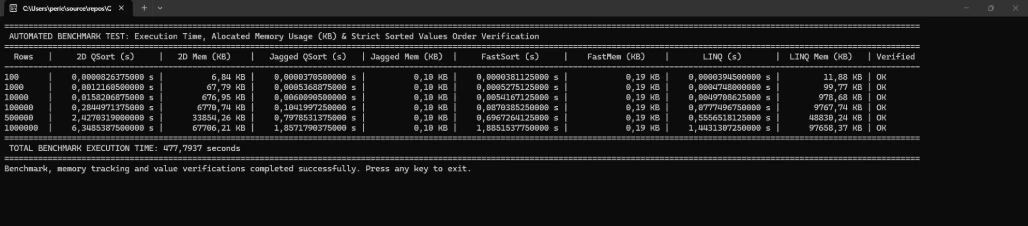
Console output from the actual test machine.
Dataset Size (Rows) | 2D QSort (s) | 2D Mem (KB) | Jagged QSort (s) | Jagged Mem (KB) | FastSort (s) | Fast Mem (KB) | LINQ (s) | LINQ Mem (KB) | Verified |
100 | 0,0000826375000 s | 6,84 KB | 0,0000370500000 s | 0,10 KB | 0,0000381125000 s | 0,19 KB | 0,0000394500000 s | 11,88 KB | OK |
1000 | 0,0012160500000 s | 67,79 KB | 0,0005368875000 s | 0,10 KB | 0,0005275125000 s | 0,19 KB | 0,0004748000000 s | 99,77 KB | OK |
10000 | 0,0158206875000 s | 676,95 KB | 0,0060090500000 s | 0,10 KB | 0,0054167125000 s | 0,19 KB | 0,0049708625000 s | 978,68 KB | OK |
100000 | 0,2844971375000 s | 6770,74 KB | 0,1041997250000 s | 0,10 KB | 0,0870385250000 s | 0,19 KB | 0,0777496750000 s | 9767,74 KB | OK |
500000 | 2,4270319000000 s | 33854,26 KB | 0,7978531375000 s | 0,10 KB | 0,6967264125000 s | 0,19 KB | 0,5556518125000 s | 48830,24 KB | OK |
1000000 | 6,3485387500000 s | 67706,21 KB | 1,8571790375000 s | 0,10 KB | 1,8851537750000 s | 0,19 KB | 1,4431307250000 s | 97658,37 KB | OK |
Notice: Each row in this test has 10 columns
Performance Analysis & Managed Memory Allocation Insights
Analyzing the benchmark results reveals critical architectural insights into how different data structures and algorithms handle execution speed and managed memory allocation in .NET:
1. Understanding Managed Memory Allocation (GC.GetAllocatedBytesForCurrentThread):
It is vital to clarify what the memory column represents. The benchmark measures bytes allocated on the managed heap strictly during the sorting operation itself, not the total RAM occupied by the dataset. The dataset (consisting of millions of strings) is already pre-allocated in memory before the stopwatch starts.
- Why Jagged and FastSort show ~0.10 KB to 0.19 KB: Algorithms operating on jagged arrays (T[][]) sort the dataset entirely in-place by re-pointing row object references, bypassing the need to duplicate massive strings or allocate heavy intermediate objects. The negligible allocation (~100–200 bytes) comes solely from minor stack/struct overhead for recursion frames or helper structures. This proves they are truly zero-allocation sorting engines.
- Why Traditional 2D Arrays (T[,]) allocate significantly more: Traditional 2D matrices require physical cell-by-cell element swapping (SwapRows2D) or temporary pivot buffer allocations, resulting in steady managed memory pressure that scales linearly with dataset size.
- LINQ Overhead: Standard LINQ pipelines (OrderBy/ThenBy) construct internal expression trees, caching structures, and deferred execution enumerators, causing massive managed memory allocations (reaching up to ~97 MB for 1,000,000 rows) which triggers heavy Garbage Collection pressure.
2. Execution Speed & Scalability:
- FastSort / Jagged QuickSort vs. LINQ: While LINQ achieves extremely competitive raw sorting speeds due to highly optimized internal compiler optimizations, its massive memory allocation footprint makes it vulnerable in memory-constrained or high-concurrency enterprise services.
- Jagged Arrays Superiority: Transitioning from traditional 2D arrays to jagged arrays combined with reference-swapping QuickSort or IntroSort (FastSortArray) reduces execution time by over 3.5x to 4x on large datasets (1,000,000 rows) while virtually eliminating managed memory overhead during sorting.
Conclusion
When optimizing data processing pipelines in .NET, benchmark results demonstrate that raw algorithmic efficiency is only part of the equation. Transitioning from traditional two-dimensional arrays (T[,]) to modern jagged arrays (T[][]) combined with reference-swapping QuickSort or IntroSort (FastSortArray) yields dramatic performance gains (over 3.5x to 4x faster on large datasets) while virtually eliminating managed memory allocation overhead.
However, the overarching takeaway is that there is no universal "silver bullet" sorting approach. Before selecting or implementing any sorting algorithm, it is essential to thoroughly analyze the underlying data structure, memory constraints, dataset scale, and multi-column ordering complexity. Choosing the appropriate algorithm and data representation based on this structural analysis ensures that applications achieve optimal execution speed, low Garbage Collection pressure, and robust scalability in real-world enterprise environments.


Amit MohantyPosted Jul 8, 2019, 7:19 PM EDT
Nice......