

Introduction
- OAuth2.0 And OpenID Connect (OIDC) Core Concepts - What? Why? How?
- Understanding Workflow Of OAuth2.0 Authorization Grant Types
Configuring OAuth Provider Using Owin
- Owin.Security.OAuth
- Owin.Host.SystemWeb
using System;
using System.Configuration;
using System.Security.Claims;
using System.Threading.Tasks;
using Microsoft.Owin.Security.OAuth;
namespace OAuth2App.Provider {
    public class OAuthProvider: OAuthAuthorizationServerProvider {
        public override async Task ValidateClientAuthentication(OAuthValidateClientAuthenticationContext context) {
            string clientId;
            string clientSecret;
            Guid client IdGuid;
            if (!context.TryGetBasicCredentials(outclientId, outclientSecret)) {
                context.TryGetFormCredentials(outclientId, outclientSecret);
            }
            if (null == context.ClientId || null == clientSecret || !Guid.TryParse(clientId, outclientIdGuid)) {
                context.SetError("invalid_credentials", "A valid client_Id and client_Secret must be provided.");
                context.Rejected();
                return;
            }
            //validate aginstdb or config: GetClient(clientIdGuid, clientSecret);
            bool is Valid Client = Configuration Manager.AppSettings["ClientId"] == clientId && Configuration Manager.AppSettings["ClientSecret"] == clientSecret;
            if (!isValidClient) {
                context.SetError("invalid_credentials", "A valid client_Id and client_Secret must be provided.");
                context.Rejected();
                return;
            }
            awaitTask.Run(() => context.Validated(clientId));
        }
        public override async Task GrantClientCredentials(OAuthGrantClientCredentialsContext context) {
            GuidclientId;
            Guid.TryParse(context.ClientId, outclientId);
            //validate aginstdb or config: GetByClientId(clientId);
            bool client = ConfigurationManager.AppSettings["ClientId"] == clientId.ToString().ToUpper();
            if (!client) {
                context.SetError("invalid_grant", "Invaild client.");
                context.Rejected();
                return;
            }
            var claims Identity = newClaimsIdentity(context.Options.AuthenticationType);
            claims Identity.AddClaim(new Claim("LoggedOn", DateTime.Now.ToString()));
            await Task.Run(() => context.Validated(claimsIdentity));
        }
        public override Task TokenEndpoint(OAuthTokenEndpointContext context) {
            if (context.TokenIssued) {
                context.Properties.ExpiresUtc = DateTimeOffset.UtcNow.AddSeconds(3600);
            }
            return Task.FromResult < object > (null);
        }
    }
}
Here, we have overridden three methodsc alled "ValidateClientAuthentication", "GrantClientCredentials" and “TokenEndpoint”.
- The "ValidateClientAuthentication" method is responsible for validating client id and client secret against web.config or DB.Inside it, "TryGetBasicCredentials" used to retrieve the values of the client credential from basic authorization header. In addition, "TryGetFormCredentials" used to retrieve client id and secret as form-encoded POST parameters.
- The "GrantClientCredentials" method is responsible to validate the client id before adding claims details into the access token. Based on the need, we can add different sets of claims.
- The "TokenEndpoint" method is responsible to override token lifetime. If you have multiple clients, app and token lifetime varies based on the client, then this override method will be useful to set it.
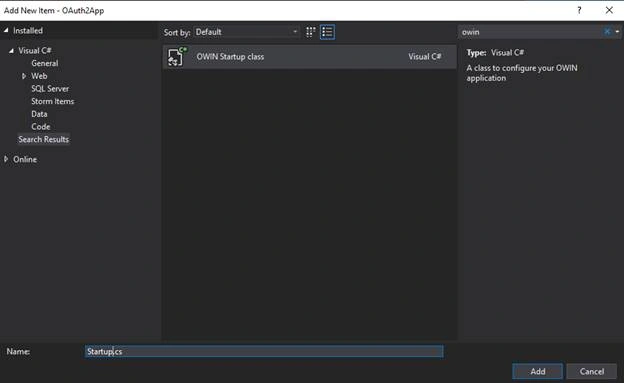
using Microsoft.Owin;
using Microsoft.Owin.Security.OAuth;
using OAuth2App.Provider;
using Owin;
using System;
[assembly: OwinStartup(typeof(OAuth2App.Startup))]
namespace OAuth2App {
    public class Startup {
        public void Configuration(IAppBuilder app) {
            Configure Auth(app);
        }
        public void ConfigureAuth(IAppBuilder app) {
            var oAuthOptions = new OAuthAuthorizationServerOptions {
                Allow InsecureHttp = true, // need set to false in PROD
                    Token EndpointPath = newPathString("/oauth2/token"),
                    Access Token ExpireTimeSpan = TimeSpan.FromMinutes(60), //token expiration time
                    Provider = new OAuthProvider(),
            };
            app.UseOAuthBearerTokens(oAuthOptions);
            app.UseOAuthAuthorizationServer(oAuthOptions);
        }
    }
}
Here we created a new instance of the "OAuthAuthorizationServerOptions" class where we set token endpoint path ashttp://localhost:port/oauth2/token and token expiry time as 60 minutes.We have also specified custom class called “OAuthProvider” to validate the client. This class has already been created in earlier steps.
OAuth Client Registration
Before using OAuth, client application must be registered into authorization server.
Random Number Generator crypto RandomDataGenerator = newRNGCryptoServiceProvider();
byte[] buffer = newbyte[32];
cryptoRandomDataGenerator.GetBytes(buffer);
string clientSecret = Convert.ToBase64String(buffer);
Creating and Authorizing an API
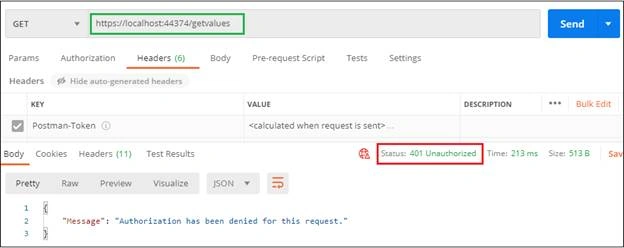
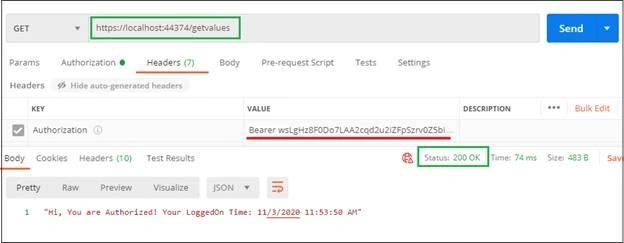
Now create an action method called "GetValues" and added [Authorize] attribute into it so that we can validate access token. Here, we will retrieve claims from token that we added during token generation.
[Authorize]
[HttpGet]
[Route("getvalues")]
public IHttp Action Result GetValues() {
    var identity = (ClaimsIdentity) User.Identity;
    var LogTime = identity.Claims.FirstOrDefault(c => c.Type == "LoggedOn").Value;
    return Ok("Hi, You are Authorized! Your LoggedOn Time: " + LogTime);
}  Generating Access Token from Postman and Used for API access
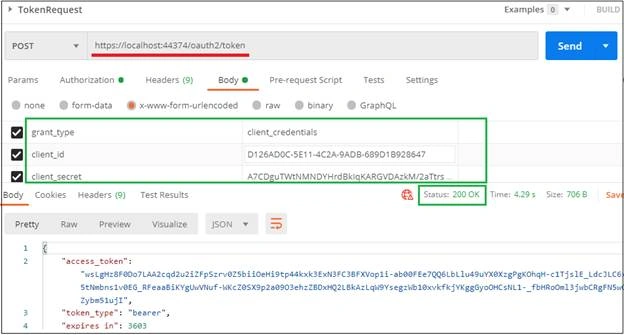
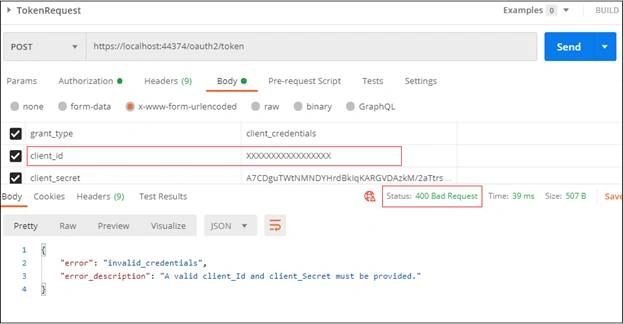
Aright! Now we are ready to run WebAPI application and test API from Postman.
Sample Http Request from .NET application using Access Token
internal class Token {
    [JsonProperty("access_token")]
    public string AccessToken {
        get;
        set;
    }
    [JsonProperty("token_type")]
    public string TokenType {
        get;
        set;
    }
    [JsonProperty("expires_in")]
    public int ExpiresIn {
        get;
        set;
    }
}
To generate access token first, An HTTP POST request made to the URL "/oauth2/token" endpoint with grant_type parameter "client_credentials"; then we will pass this token to API access.
string base Address = "https://localhost:44374";
var client = newHttpClient();
var form = new Dictionary < string,
    string > {
        {
            "grant_type",
            "client_credentials"
        },
        {
            "client_id",
            ConfigurationManager.AppSettings["ClientId"]
        },
        {
            "client_secret",
            ConfigurationManager.AppSettings["ClientSecret"]
        },
    };
var tokenResponse = client.PostAsync(baseAddress + "/oauth2/token", newFormUrlEncodedContent(form)).Result;
var token = tokenResponse.Content.ReadAsAsync < Token > (new [] {
    newJsonMediaTypeFormatter()
}).Result;
client.DefaultRequestHeaders.Authorization = newAuthenticationHeaderValue("Bearer", token.AccessToken);
var authorizedResponse = client.GetAsync(baseAddress + "/api/getvalues").Result;
Conclusion
In this article, we have implemented client credentials grant type using Owin packages. In addition, we have seen how we add claims into access token and retrieve the same while accessing the API. Hope you find this article short and simple! Happy Reading!
PrasanthPosted Feb 26, 2024, 6:46 AM
Hi, can you please implement the same in .Net core.
RickPosted Nov 20, 2023, 3:17 PM
I meant, AUTHORIZATION CODE grant. Thanks
RickPosted Nov 20, 2023, 2:57 PM
Do you have an example of how to implement the Implicit grant type, or could someone point me to an article explaining how to do it? Thanks.
mandala shivaprasadPosted Jul 26, 2023, 10:14 AM
Please attach the project file
Hugo SilvaPosted Jun 5, 2023, 7:31 PM
Why is the clientId being re-validated in GrantClientCredentials ?
hardik shahPosted Aug 26, 2022, 6:34 AM
I have implemented grant_type - password and client_credential with difference token point in same project. How authorization attribute will work ?
Thiru SarikondaPosted Sep 2, 2021, 6:30 PM
Thank you for quickly reply! do you have any code snippet which validates against Azure AD?
Thiru SarikondaPosted Sep 1, 2021, 5:45 PM
Thank you! It's a great article. But I have a question, is client id validating against the app which registered in Azure? I changed the client id in both api and postman, still I'm able to generate the token. Then what is the point in registering the app in azure because app id in Azure is different? In authorization code grant type, we can clearly see reaching the azure, validating the app id and sending the generated token to redirect uri.
Anul AgrawalPosted Aug 17, 2021, 7:03 AM
Sir can we get the project of same