

Dynamics CRM contains a duplicate detection feature, if want to know about this feature you can check here. This feature can be enabled for multiple operations; for example, we can see different options under duplicate detection settings below,
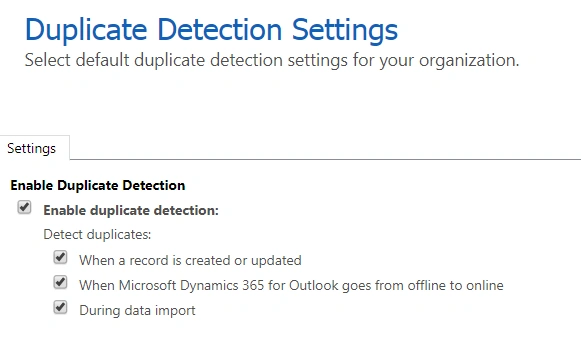
These setting work differently based on operations, for example, if a user tries to import data to respective entity for which you have duplication detection rule published, then during data import the user will get a dialog where it will ask you for Allow Duplicates record like below,
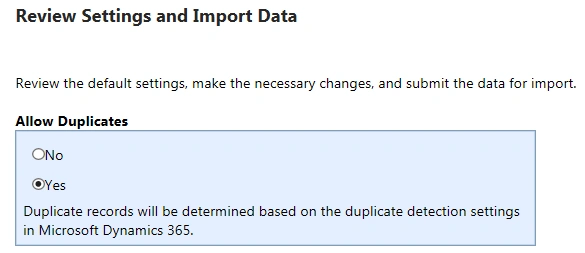
So if user says no, it won’t create any duplicate record whereas if the user tries to create duplicate record manually in CRM it will show the user a dialog but still user can click on save and it will create a duplicate record. For example let’s say we have a duplicate detection rule published for account entity to check for duplicate based on email, if user tries to create account record with the same email id again it will show user a dialog with potential duplicate record but if user clicks on Save it will allow you to save duplicate record.
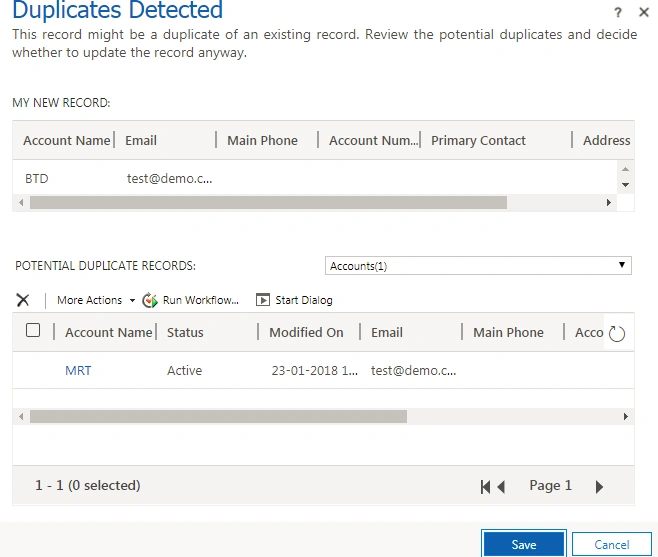
To stop creating duplicate we can simply use Keys to implement duplicate detection without any code. Let’s see how,
So if user says no, it won’t create any duplicate record whereas if the user tries to create duplicate record manually in CRM it will show the user a dialog but still user can click on save and it will create a duplicate record. For example let’s say we have a duplicate detection rule published for account entity to check for duplicate based on email, if user tries to create account record with the same email id again it will show user a dialog with potential duplicate record but if user clicks on Save it will allow you to save duplicate record.
To stop creating duplicate we can simply use Keys to implement duplicate detection without any code. Let’s see how,
- Go to Settings-> Customizations-> Customize the System
- Expend Entities node and look for Account entity
- Select Keys and click on New from right hand side
- Select Email field under Available Attributes and click on Add button
- Write Email under Display Name and click on Save.
Publish account entity and now when user will try to create account record again using email id which is used for existing account, user will get the following error and it won’t let user to create duplicate record,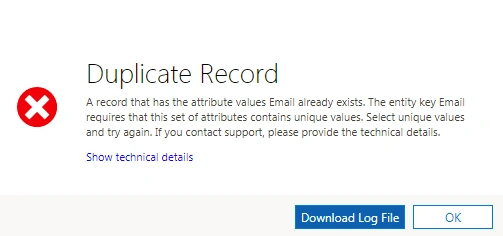
You can check our earlier article for how to use Keys for upsert.
Ravee SinghPosted Feb 4, 2018, 12:01 PM
I am new to this technology but see good future can u give me any suggestions for me