

Introduction
Today, in this article let's play around with one of the interesting and most useful concepts in SharePoint 2010.
Question: What is Import Spreadsheet?
In simple terms "It creates a new list by importing data from a spreadsheet".
I think we are now good to go and implement this wonderful concept.
Step 1: Create a new Excel sheet and enter some data into it. Save it to a local directory:

Step 2: Select "Import Spreadsheet" from the listed categories. Give a name to the list:
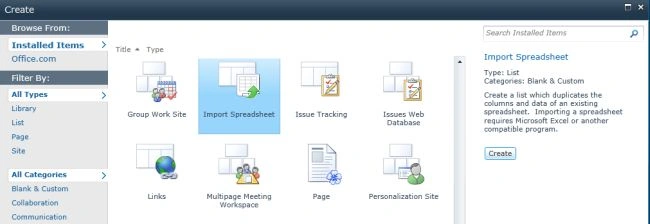
Step 3: A dialogue box appears which enables providing of a unique name for the list and to upload the document from a local directory:
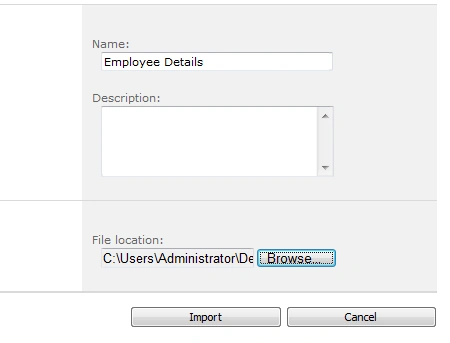
Step 4: It specifies that the user select the range in the Excel sheet:
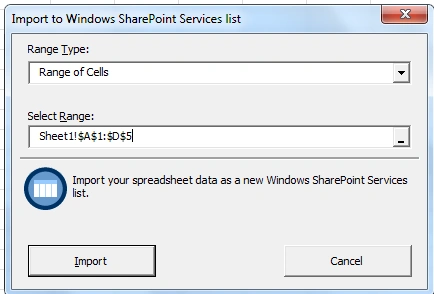
Step 5: The data is imported. The site now looks like this:

Step 6: List setting looks like this:
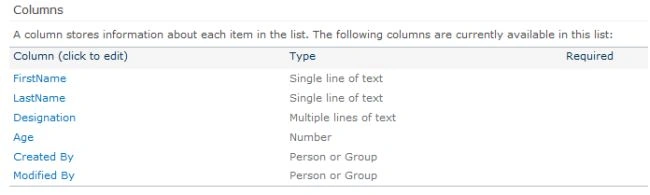
I hope this article is useful for you.
Join the conversation! Your thoughts help the community grow.