

Introduction
Question: What is insert data with SP using LINQ?
In simple terms "It enables insertion of data using a Stored Procedure with LINQ queries".
Step 1: Create a new webform project: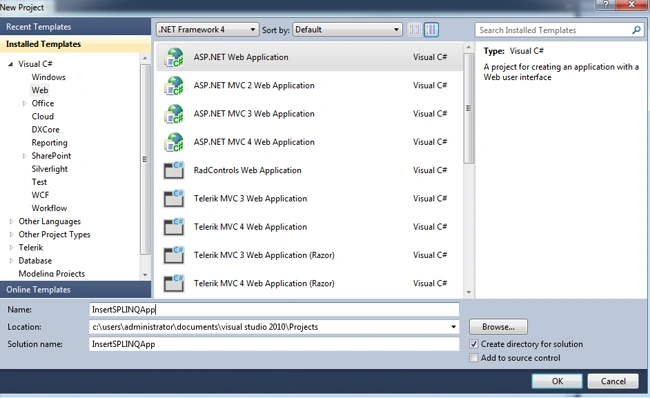
Step 2: The complete code of webform1.aspx looks like this:
<%@ Page Language="C#" AutoEventWireup="true" CodeBehind="WebForm1.aspx.cs" Inherits="InsertSPLINQApp.WebForm1" %>
<!DOCTYPE html PUBLIC "-//W3C//DTD XHTML 1.0 Transitional//EN" "http://www.w3.org/TR/xhtml1/DTD/xhtml1-transitional.dtd">
<html xmlns="http://www.w3.org/1999/xhtml">
<head id="Head1" runat="server">
<title></title>
</head>
<body>
<form id="form1" runat="server">
<div>
<center>
<table>
<tr>
<td>
<asp:Label ID="Label1" runat="server" Text="Insert using SP with LINQ" Font-Bold="true"></asp:Label>
</td>
</tr>
<tr>
<td>
<asp:GridView ID="GridView1" runat="server" BackColor="#CCCCCC" AutoGenerateColumns="true"
BorderColor="#999999" BorderStyle="Solid" BorderWidth="3px" CellPadding="4" CellSpacing="2"
ForeColor="Black" OnLoad="Page_Load">
<FooterStyle BackColor="#CCCCCC" />
<HeaderStyle BackColor="Black" Font-Bold="True" ForeColor="White" />
<PagerStyle BackColor="#CCCCCC" ForeColor="Black" HorizontalAlign="Left" />
<RowStyle BackColor="White" />
<SelectedRowStyle BackColor="#000099" Font-Bold="True" ForeColor="White" />
<SortedAscendingCellStyle BackColor="#F1F1F1" />
<SortedAscendingHeaderStyle BackColor="#808080" />
<SortedDescendingCellStyle BackColor="#CAC9C9" />
<SortedDescendingHeaderStyle BackColor="#383838" />
</asp:GridView>
</td>
</tr>
</table>
<br />
<br />
<table>
<tr>
<td>
<asp:Label ID="Label2" runat="server" Text="Please Enter FirstName: " ForeColor="Brown"
Font-Bold="true" Font-Italic="true"></asp:Label>
</td>
<td>
<asp:TextBox ID="TextBox1" runat="server"></asp:TextBox>
</td>
</tr>
<tr>
<td>
<asp:Label ID="Label3" runat="server" Text="Please Enter LastName: " ForeColor="Brown"
Font-Bold="true" Font-Italic="true"></asp:Label>
</td>
<td>
<asp:TextBox ID="TextBox2" runat="server"></asp:TextBox>
</td>
</tr>
<tr>
<td>
<asp:Label ID="Label4" runat="server" Text="Please Enter Age: " ForeColor="Brown"
Font-Bold="true" Font-Italic="true"></asp:Label>
</td>
<td>
<asp:TextBox ID="TextBox3" runat="server"></asp:TextBox>
</td>
</tr>
<tr>
<td colspan="2">
<asp:Button ID="Button1" runat="server" Text="Insert Data" OnClick="Button1_Click"
BackColor="Orange" Font-Bold="true" /><br />
<br />
</td>
</tr>
</table>
<br />
<br />
<table>
<tr>
<td colspan="3">
<asp:Label ID="Label5" runat="server" ForeColor="Red" Font-Bold="true"></asp:Label>
</td>
</tr>
</table>
</center>
</div>
</form>
</body>
</html>
Step 3: The complete code of webform1.aspx.cs looks like this:
using System;
using System.Collections.Generic;
using System.Linq;
using System.Web;
using System.Web.UI;
using System.Web.UI.WebControls;
namespace InsertSPLINQApp
{
public partial class WebForm1 : System.Web.UI.Page
{
protected void Page_Load(object sender, EventArgs e)
{
}
protected void Button1_Click(object sender, EventArgs e)
{
if(string.IsNullOrEmpty(TextBox1.Text)||string.IsNullOrEmpty(TextBox2.Text)||
string.IsNullOrEmpty(TextBox3.Text))
{
Label5.Text = "Please Enter Some Values";
Label5.ForeColor = System.Drawing.Color.Red;
}
else
{
objEntities.InsertEmployeeData(TextBox1.Text, TextBox2.Text,
int.Parse(TextBox3.Text));
var query = objEntities.SelectEmpData();
GridView1.DataSource = query;
GridView1.DataBind();
Label5.Text = "Records Inserted Successfully";
Label5.ForeColor = System.Drawing.Color.Green;
TextBox1.Text = string.Empty;
TextBox2.Text = string.Empty;
TextBox3.Text = string.Empty;
}
}
#region Instance MembersCompanyEntities1 objEntities = new CompanyEntities1();
#endregion
}
}
Step 4: The output of the application looks like this: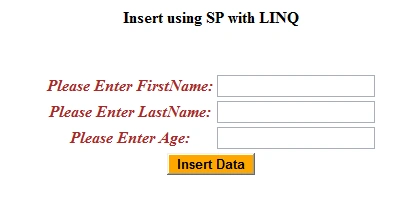
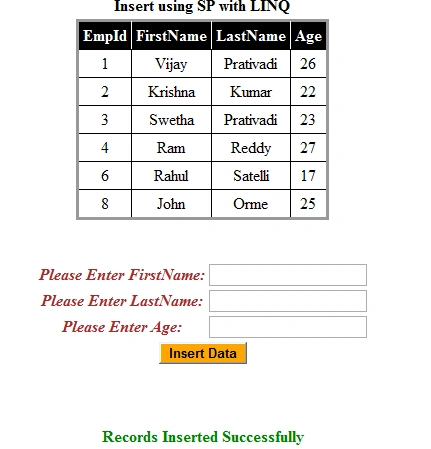
Step 5: The output of the data inserted output operation result looks like this: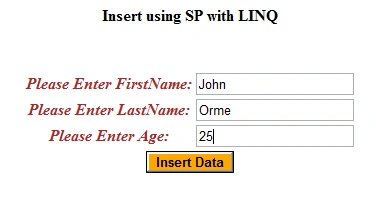
Question: What is update data with SP using LINQ?
In simple terms "It enables the update of data using a Stored Procedure with LINQ queries".
Step 1: Create a new webform project.
Step 2: The complete code of webform1.aspx looks like this:
<%@ Page Language="C#" AutoEventWireup="true" CodeBehind="WebForm1.aspx.cs" Inherits="UpdateSPLINQApp.WebForm1" %>
<!DOCTYPE html PUBLIC "-//W3C//DTD XHTML 1.0 Transitional//EN" "http://www.w3.org/TR/xhtml1/DTD/xhtml1-transitional.dtd">
<html xmlns="http://www.w3.org/1999/xhtml">
<head id="Head1" runat="server">
<title></title>
</head>
<body>
<form id="form1" runat="server">
<div>
<center>
<table>
<tr>
<td>
<asp:Label ID="Label1" runat="server" Text="Update using SP with LINQ" Font-Bold="true"></asp:Label>
</td>
</tr>
<tr>
<td>
<asp:GridView ID="GridView1" runat="server" BackColor="#CCCCCC" AutoGenerateColumns="true"
BorderColor="#999999" BorderStyle="Solid" BorderWidth="3px" CellPadding="4" CellSpacing="2"
ForeColor="Black" OnLoad="Page_Load">
<FooterStyle BackColor="#CCCCCC" />
<HeaderStyle BackColor="Black" Font-Bold="True" ForeColor="White" />
<PagerStyle BackColor="#CCCCCC" ForeColor="Black" HorizontalAlign="Left" />
<RowStyle BackColor="White" />
<SelectedRowStyle BackColor="#000099" Font-Bold="True" ForeColor="White" />
<SortedAscendingCellStyle BackColor="#F1F1F1" />
<SortedAscendingHeaderStyle BackColor="#808080" />
<SortedDescendingCellStyle BackColor="#CAC9C9" />
<SortedDescendingHeaderStyle BackColor="#383838" />
</asp:GridView>
</td>
</tr>
</table>
<br />
<br />
<table>
<tr>
<td>
<asp:Label ID="Label6" runat="server" Text="Please Enter Id: " ForeColor="Brown"
Font-Bold="true" Font-Italic="true"></asp:Label>
</td>
<td>
<asp:TextBox ID="TextBox4" runat="server"></asp:TextBox>
</td>
</tr>
<tr>
<td>
<asp:Label ID="Label2" runat="server" Text="Please Enter FirstName: " ForeColor="Brown"
Font-Bold="true" Font-Italic="true"></asp:Label>
</td>
<td>
<asp:TextBox ID="TextBox1" runat="server"></asp:TextBox>
</td>
</tr>
<tr>
<td>
<asp:Label ID="Label3" runat="server" Text="Please Enter LastName: " ForeColor="Brown"
Font-Bold="true" Font-Italic="true"></asp:Label>
</td>
<td>
<asp:TextBox ID="TextBox2" runat="server"></asp:TextBox>
</td>
</tr>
<tr>
<td>
<asp:Label ID="Label4" runat="server" Text="Please Enter Age: " ForeColor="Brown"
Font-Bold="true" Font-Italic="true"></asp:Label>
</td>
<td>
<asp:TextBox ID="TextBox3" runat="server"></asp:TextBox>
</td>
</tr>
<tr>
<td colspan="2">
<asp:Button ID="Button1" runat="server" Text="Update Data" OnClick="Button1_Click"
BackColor="Orange" Font-Bold="true" /><br />
<br />
</td>
</tr>
</table>
<br />
<br />
<table>
<tr>
<td colspan="3">
<asp:Label ID="Label5" runat="server" ForeColor="Red" Font-Bold="true"></asp:Label>
</td>
</tr>
</table>
</center>
</div>
</form>
</body>
</html>
Step 3: The complete code of webform1.aspx.cs looks like this:
using System;
using System.Collections.Generic;
using System.Linq;
using System.Web;
using System.Web.UI;
using System.Web.UI.WebControls;
namespace UpdateSPLINQApp
{
public partial class WebForm1 : System.Web.UI.Page
{
protected void Page_Load(object sender, EventArgs e)
{
}
protected void Button1_Click(object sender, EventArgs e)
{
if (string.IsNullOrEmpty(TextBox4.Text) ||
string.IsNullOrEmpty(TextBox1.Text) ||
string.IsNullOrEmpty(TextBox2.Text) ||
string.IsNullOrEmpty(TextBox3.Text))
{
Label5.Text = "Please Enter Some Values";
Label5.ForeColor = System.Drawing.Color.Red;
}
else
{
objEntities.UpdateEmployeeData(int.Parse(TextBox4.Text), TextBox1.Text,
TextBox2.Text, int.Parse(TextBox3.Text));
GridView1.DataSource = objEntities.SelectEmployeeData();
GridView1.DataBind();
Label5.Text = "Records Updated Successfully";
Label5.ForeColor = System.Drawing.Color.Green;
TextBox1.Text = string.Empty;
TextBox2.Text = string.Empty;
TextBox3.Text = string.Empty;
TextBox4.Text = string.Empty;
}
}
#region Instance MembersCompanyEntities objEntities = new CompanyEntities();
#endregion
}
}
Step 4: The output of the application looks like this: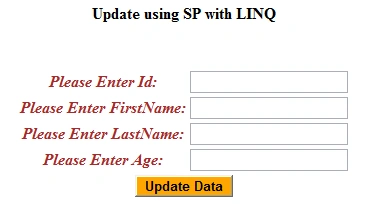
Step 5: The update operation output of the application looks like this: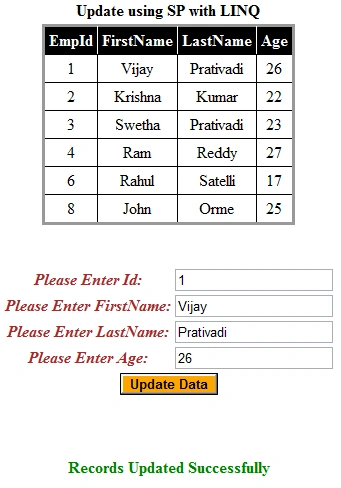
I hope this article is useful for you. I look forward for your comments and feedback. Thanks Vijay Prativadi
Insert and Update Data With SP Using LINQ
Today, in this article let's play around with the Insert and Update concept in LINQ.
Join the conversation! Your thoughts help the community grow.