Introduction
Hi guys, In this article we are going to have a
glance at the insert into statement through php. The INSERT INTO statement is
used to insert new records in a table. Here we are going to explore the concept thoroughly. You must have the required XAMPP server; if you do not have XAMPP server then go to the link
http://www.c-sharpcorner.com/UploadFile/c8aa13/installation-of-xampp-server-to-run-php-program/
Insert Data Into a Database Table
Here in this section, the INSERT INTO statement is used to add new records to a database table.
Syntax
We can use the insert into command in two forms. It is possible to write the INSERT INTO statement in two forms.
- In this it doesn't specify the column names where the data will be inserted, only their values.
- INSERT INTO table_name VALUES (value1, value2, value3,..)
- The second form specifies both the column names and the values to be inserted.
- INSERT INTO table_name (column1, column2, column3,...) VALUES (value1, value2, value3,...)
PHP Script for inserting the data into table
- <html>
- <body bgcolor="skyblue">
- <center>
- <h3> Inserting data into database table ! <h3>
- <hr>
- <?php
- $con = mysql_connect("localhost","root","");
- if (!$con)
- {
- die('Could not connect: ' . mysql_error());
- }
- mysql_select_db("dwij", $con);
- mysql_query("INSERT INTO PBL (FirstName, LastName, Age) VALUES ('DEEPAK', 'DWIJ', '25')");
- mysql_query("INSERT INTO PBL (FirstName, LastName, Age) VALUES ('Prerna', 'Kaul', '23')");
- echo "Record inserted into table PBL ! ";
- mysql_close($con);
- ?>
- </center>
- </body>
- </html>
Output
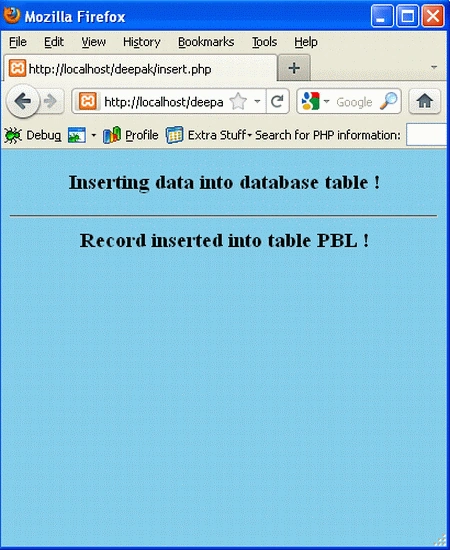
To run the code, Open the XAMPP server and start the services like Apache and MySQL. Open the browser and type: http://localhost/yourfoldername/insert.php
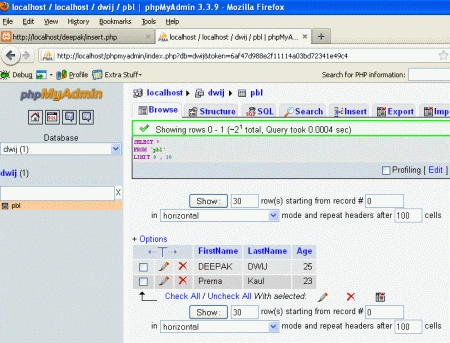
To show where the data is inserted, open the browser and type in the url:
http://localhost/phpmyadmin/index.php?db=dwij&token=6af47d988e2f11114a03bd72341e49c4
Insert Data From a Form Into a Database
Here in this section we will insert data into a database table from the front end.
HTML Script
- <html>
- <body bgcolor="Lightgreen">
- <center>
- <h2> Inserting Data into PBL table ! <h2>
- <hr>
- <form action="phppage.php" method="post">
- Firstname: <input type="text" name="firstname"><br><br>
- Lastname: <input type="text" name="lastname"><br><br>
- Age: <input type="text" name="age"><br><br><br>
- <input type="submit">
- </form>
- </center>
- </body>
- </html>
Save it as Main.php.
PHP Script
- <html>
- <body bgcolor="Skyblue">
- <center>
- <h3> Data Inserted into PBL table ! <h3>
- <hr>
- <?php
- $con = mysql_connect("localhost","root","");
- if(!$con)
- {
- die('Could not connect: ' . mysql_error());
- }
- mysql_select_db("dwij", $con);
- $sql="INSERT INTO PBL (FirstName, LastName, Age)
- VALUES('$_POST[firstname]','$_POST[lastname]','$_POST[age]')";
- if (!mysql_query($sql,$con))
- {
- die('Error: ' . mysql_error());
- }
- echo "1 record added";
- mysql_close($con)
- ?>
- </center>
- </body>
- </html>
Output
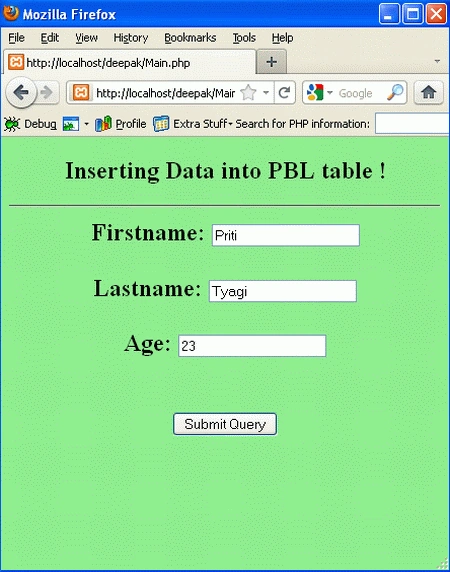
To run the code, Open the XAMPP server and start the services like Apache and MySQL. Open the browser type:
http://localhost/yourfoldername/Main.php
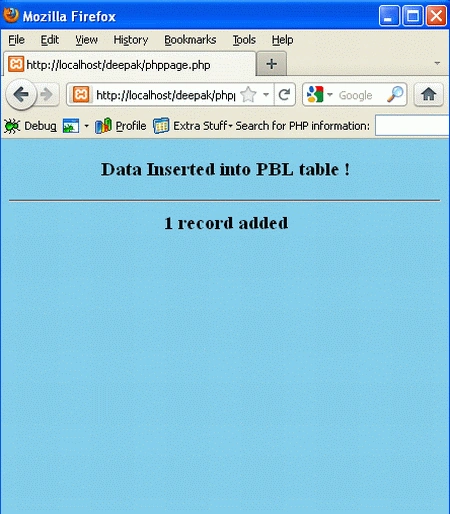
After clicking on the submit Query button the next page will be as follows:
To show where the data is inserted, open the browser and type in the url http://localhost/phpmyadmin/
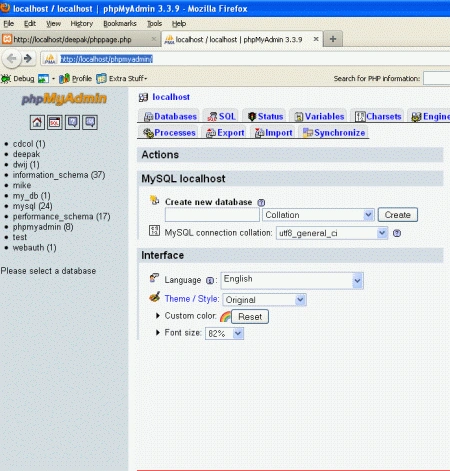
Select the database 'dwij'
from the left corner of the figure shown above.
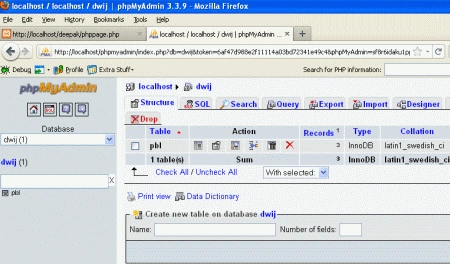
Now click on the 'pbl' from
the left corner of the page shown above; you will get the final result.
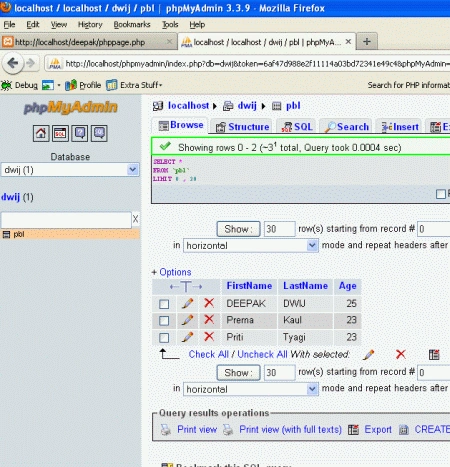
Conclusion: Inserting data from the front end is an important task; now you can easily work with Insert statement with PHP script.
Thanks!

Join the conversation! Your thoughts help the community grow.