

This article is in continuation of my previous article where I have explained how to bind Azure Queue Storage for Azure Functions. Here, we are going to discuss how to integrate the Azure Table Storage to Azure Functions.
In my last article, we ended up listening to the deserialized JSON Payload in Azure Queue Storage which is integrated with Azure Functions. Now, we are going to see how to store the order details in Azure Table Storage.
Azure Table Storage is a NoSQL datastore which stores a large amount of structured data providing a key/attribute store with a schema-less design.
Prerequisites
- Azure Subscription
- Basic knowledge of Azure Functions and Storage Service
Integrate Azure Table Storage to Azure Functions
In my last article, we created a function QueueIntegrationDemo where the output of the function is integrated with the Azure Queue Storage that holds the message by deserializing the JSON Payload from the HTTP trigger. Now, we are going to add one more output service called Azure Table Storage to the function to store the order details in a table structure.
Log into the Azure portal, go to the Functions App, and under QueueIntegrationDemo function, click on "Integrate".
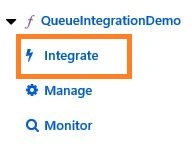
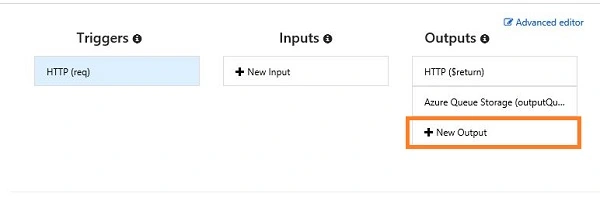
In the "Integrate" window, we need to add a new output which is Azure Table Storage, as shown in the below image.
In Azure Table Storage output form, provide the following details.
- Table parameter name - let it be the default one, i.e., outputTable
- Table Name - name it as orders
- Storage account connection - let it be AzureWebJobStorage which is used for the function earlier.
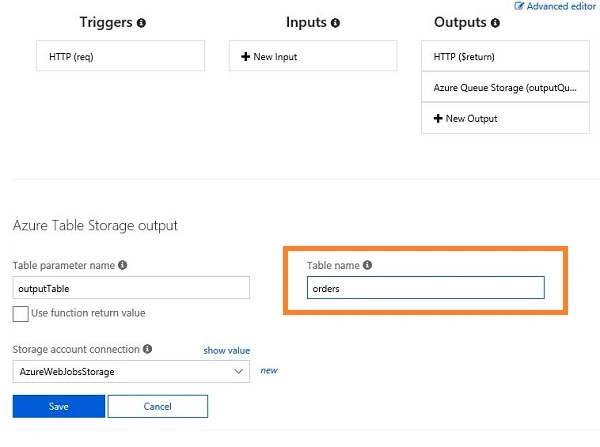
Click "Save" and jump into the code editor window. Let’s modify the code to add the order details into an Azure table.
- #r "Newtonsoft.Json"
- using System;
- using System.Net;
- using Microsoft.AspNetCore.Mvc;
- using Microsoft.Extensions.Primitives;
- using Newtonsoft.Json;
- public class Order{
- public string PartitionKey {get;set;}
- public string RowKey{get;set;}
- public string OrderId{get;set;}
- public string ProductId{get;set;}
- public string UserEmail{get;set;}
- public decimal Price {get;set;}
- }
- public static async Task<object> Run(HttpRequestMessage req, ILogger log, IAsyncCollector<Order> outputQueueItem, IAsyncCollector<Order> outputTable)
- {
- string jsonContent= await req.Content.ReadAsStringAsync();
- var myOrder= JsonConvert.DeserializeObject<Order>(jsonContent);
- log.LogInformation($"Order {myOrder.OrderId} received from {myOrder.UserEmail} for product{myOrder.ProductId}");
- myOrder.PartitionKey = "Orders";
- myOrder.RowKey=myOrder.OrderId;
- await outputQueueItem.AddAsync(myOrder);
- await outputTable.AddAsync(myOrder);
- return (object)new OkObjectResult($"Your Order is Placed with Order Id {myOrder.OrderId}, Thank you" );
- }
From the above code, you can notice that we have added the PartitionKey and RowKey properties in the Order class for Azure Table Storage.
Since our function is async like Queue, we can use IAsyncCollector<T> for the Order collection.
Just assign “Orders” for the partition key and Order Id for Row Key. The outputTable.AddAsync(myOrder) statement is used to add an entry in the Orders table.
Trigger the function using POSTMAN tool.
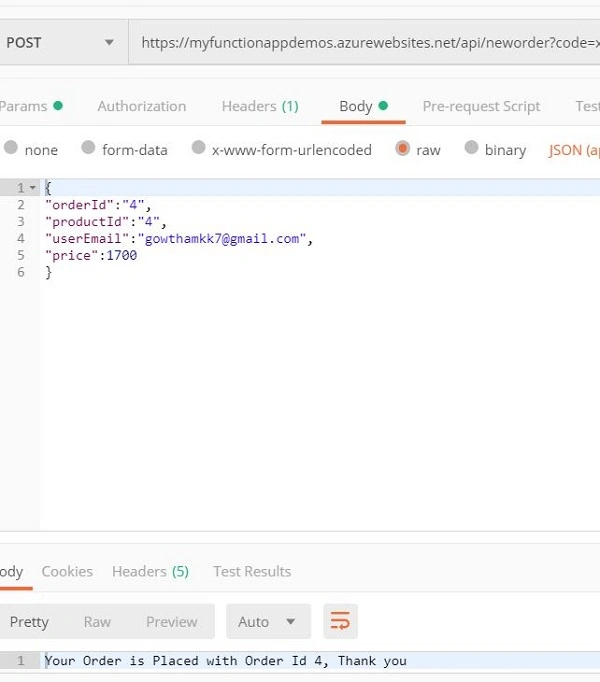
Let’s check the entry in the Azure Table. I’m using Azure Storage Explorer which is a free tool to access the Azure Storage account.
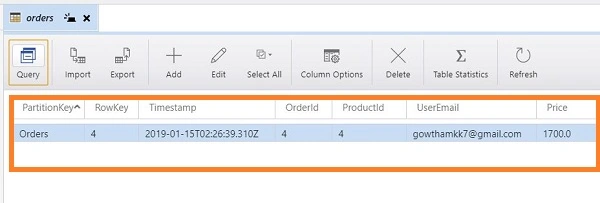
Yes, the data is successfully inserted in the Azure Table.
Conclusion
We have seen how to integrate Azure Table Storage as a service to the Azure Functions and how can we add the records to the table by triggering the function. We will see more about service binding to Azure Functions in my future articles.
Join the conversation! Your thoughts help the community grow.