
This article demonstrates how to integrate "Log in using Google account" functionality to your web application. There are many ways to integrate it. Here, I will explain how to integrate using REST API. Before you can integrate Google sign-In into your website, you must create a Google API Console project and client ID, which you need to call the sign-in API.
To understand Google API and OAuth validation, visit https://developers.google.com/identity/protocols/OpenIDConnect and https://developers.google.com/identity/sign-in/web/sign-in
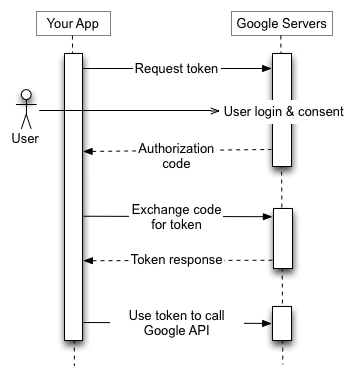
Brief request summary: Move top to bottom
To understand Google API and OAuth validation, visit https://developers.google.com/identity/protocols/OpenIDConnect and https://developers.google.com/identity/sign-in/web/sign-in
Brief request summary: Move top to bottom
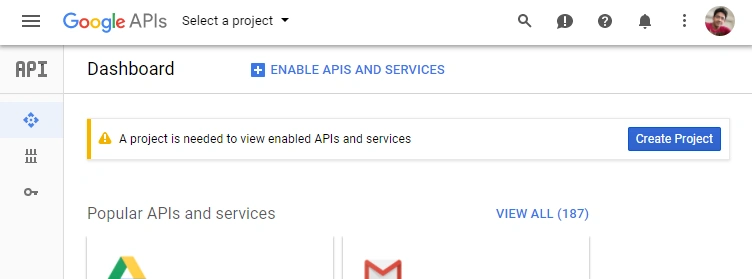
To create a project, follow the below steps.
- Log in to your Google account.
- Go to the URL https://console.developers.google.com
- Click on "Create Project" button.
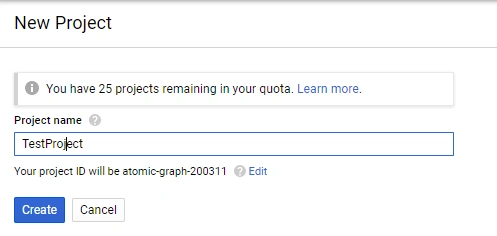
- Give your project a name.
- Go to "Credentials" section.
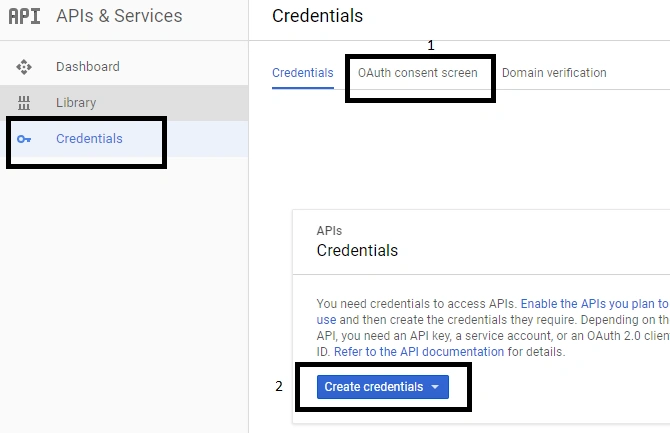
- Click on "OAuth consent screen" and enter necessary details followed by clicking on "Save" option.
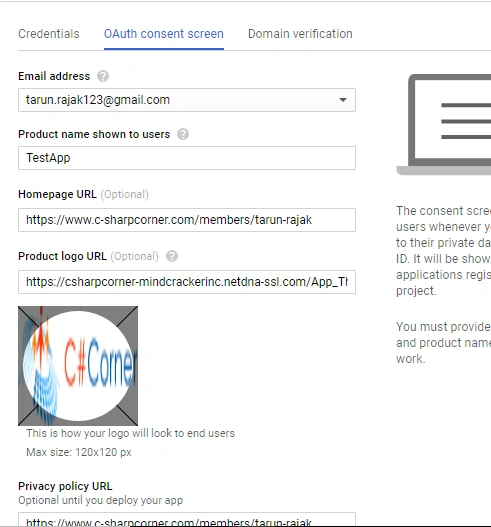
- Now, go to the "Credentials" section and click on "Create Credential" button.
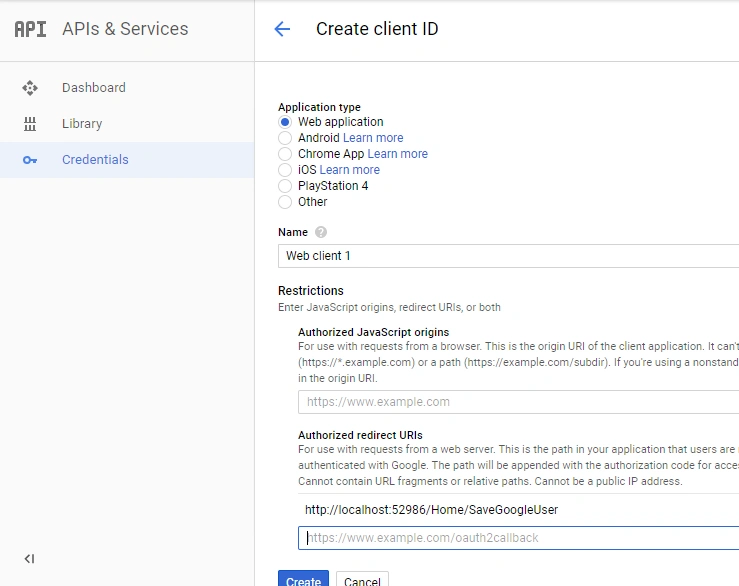
Enter Authorized redirect URL. This URL should be your app API which will capture the access code or error code returned from Google API as a parameter. Then, click on Create button. On the next page, you will be provided with a "Client Id" and "Client Secret key". Save these values separately. We will use these keys later in our web application to validate our request. Now your app is ready to use.
Add a Controller named Home and add the following code.
HomeController.cs
GmailToken.cs
File : UserProfile.cshtml : To display user data
File : Error.cshtml : To display error message
Now, we will test this functionality using an ASP.NET MVC application (.NET Framework).
- Create an MVC project using VisualStudio IDE.
- Add Newtonsoft.JSON library from NuGet Package Manager to your project. This library will be used to serialize and deserialize JSON object.
- Add System.Net.Http assembly using "Add a reference" option. This will be used to request URLs using HttpClient class instance.
HomeController.cs
- using IntegrateGoogleSignIn.Models;
- using LogInUsingLinkedinApp.Models;
- using Newtonsoft.Json;
- using System;
- using System.Collections.Generic;
- using System.Configuration;
- using System.Net.Http;
- using System.Threading.Tasks;
- using System.Web.Mvc;
- namespace IntegrateGoogleSignIn.Controllers
- {
- public class HomeController : Controller
- {
- private string ClientId = ConfigurationManager.AppSettings["Google.ClientID"];
- private string SecretKey = ConfigurationManager.AppSettings["Google.SecretKey"];
- private string RedirectUrl = ConfigurationManager.AppSettings["Google.RedirectUrl"];
- /// <summary>
- /// Returns login page if user is not logged in else return user profile
- /// </summary>
- /// <returns>return page</returns>
- public async Task<ActionResult> Index()
- {
- string token = (string)Session["user"];
- if (string.IsNullOrEmpty(token))
- {
- return View();
- }
- else
- {
- return View("UserProfile", await GetuserProfile(token));
- }
- }
- /// <summary>
- /// Hit Google API to get access code
- /// </summary>
- public void LoginUsingGoogle()
- {
- Response.Redirect($"https://accounts.google.com/o/oauth2/v2/auth?client_id={ClientId}&response_type=code&scope=openid%20email%20profile&redirect_uri={RedirectUrl}&state=abcdef");
- }
- [HttpGet]
- public ActionResult SignOut()
- {
- Session["user"] = null;
- return View("Index");
- }
- /// <summary>
- /// Listen response from Google API after user authorization
- /// </summary>
- /// <param name="code">access code returned from Google API</param>
- /// <param name="state">A value passed by application to prevent Cross-site request forgery attack</param>
- /// <param name="session_state">session state</param>
- /// <returns></returns>
- [HttpGet]
- public async Task<ActionResult> SaveGoogleUser(string code, string state, string session_state)
- {
- if(string.IsNullOrEmpty(code))
- {
- return View("Error");
- }
- var httpClient = new HttpClient
- {
- BaseAddress = new Uri("https://www.googleapis.com")
- };
- var requestUrl = $"oauth2/v4/token?code={code}&client_id={ClientId}&client_secret={SecretKey}&redirect_uri={RedirectUrl}&grant_type=authorization_code";
- var dict = new Dictionary<string, string>
- {
- { "Content-Type", "application/x-www-form-urlencoded" }
- };
- var req = new HttpRequestMessage(HttpMethod.Post, requestUrl) { Content = new FormUrlEncodedContent(dict) };
- var response = await httpClient.SendAsync(req);
- var token = JsonConvert.DeserializeObject<GmailToken>(await response.Content.ReadAsStringAsync());
- Session["user"] = token.AccessToken;
- var obj = await GetuserProfile(token.AccessToken);
- //IdToken property stores user data in Base64Encoded form
- //var data = Convert.FromBase64String(token.IdToken.Split('.')[1]);
- //var base64Decoded = System.Text.ASCIIEncoding.ASCII.GetString(data);
- return View("UserProfile", obj);
- }
- /// <summary>
- /// To fetch User Profile by access token
- /// </summary>
- /// <param name="accesstoken">access token</param>
- /// <returns>User Profile page</returns>
- public async Task<UserProfile> GetuserProfile(string accesstoken)
- {
- var httpClient = new HttpClient
- {
- BaseAddress = new Uri("https://www.googleapis.com")
- };
- string url = $"https://www.googleapis.com/oauth2/v1/userinfo?alt=json&access_token={accesstoken}";
- var response = await httpClient.GetAsync(url);
- return JsonConvert.DeserializeObject<UserProfile>(await response.Content.ReadAsStringAsync());
- }
- }
- }
Add a Models folder and add the following models. These models will be used to store the information received from Google API.
UserProfile.cs
- using Newtonsoft.Json;
- namespace IntegrateGoogleSignIn.Models
- {
- //* JsonProperty(PropertyName = "name") attribute used here
- //* to map json property name with object property name
- //* while deseralizing a json into object
- public partial class UserProfile
- {
- [JsonProperty("id")]
- public string Id { get; set; }
- [JsonProperty("email")]
- public string Email { get; set; }
- [JsonProperty("verified_email")]
- public bool VerifiedEmail { get; set; }
- [JsonProperty("name")]
- public string Name { get; set; }
- [JsonProperty("given_name")]
- public string GivenName { get; set; }
- [JsonProperty("family_name")]
- public string FamilyName { get; set; }
- [JsonProperty("link")]
- public string Link { get; set; }
- [JsonProperty("picture")]
- public string Picture { get; set; }
- [JsonProperty("gender")]
- public string Gender { get; set; }
- [JsonProperty("locale")]
- public string Locale { get; set; }
- }
- }
- using Newtonsoft.Json;
- namespace LogInUsingLinkedinApp.Models
- {
- public class GmailToken
- {
- [JsonProperty("access_token")]
- public string AccessToken { get; set; }
- [JsonProperty("token_type")]
- public string TokenType { get; set; }
- [JsonProperty("expires_in")]
- public long ExpiresIn { get; set; }
- [JsonProperty("id_token")]
- public string IdToken { get; set; }
- }
- }
Now, add views for log in page and display user profile.
File : Index.cshtml : For login using Google page
- @{
- Layout = null;
- }
- <!DOCTYPE html>
- <html>
- <head>
- <meta name="viewport" content="width=device-width" />
- <title>Login using Google</title>
- </head>
- <body style="background-color:#f3f3f3;">
- <div style="align-items:center;align-items:center;padding:50px;border:1px double #3d2487;width:260px;background-color:white">
- <h2>Hi Guest</h2>
- <p>
- <a href="~/Home/LoginUsingGoogle" ><img src="~/Resources/login-google.png" style="width:215px;height:41px" /></a>
- </p>
- </div>
- </body>
- </html>
- @model IntegrateGoogleSignIn.Models.UserProfile
- @{
- Layout = null;
- }
- <!DOCTYPE html>
- <html>
- <head>
- <meta name="viewport" content="width=device-width" />
- <title>UserProfile</title>
- </head>
- <body style="border:0px;background-color:black;color:white">
- <div>
- <table style="padding:20px">
- <tr>
- <td>
- <img src="@Model.Picture" width="300" height="300" style="border-radius:200px"/>
- </td>
- <td style="padding:20px">
- <p><b style="color:yellow">@Html.DisplayNameFor(model => model.Email) : </b> @Html.DisplayFor(model => model.Email)</p>
- <p><b style="color:yellow">@Html.DisplayNameFor(model => model.VerifiedEmail) : </b> @Html.DisplayFor(model => model.VerifiedEmail)</p>
- <p><b style="color:yellow">@Html.DisplayNameFor(model => model.Name) : </b> @Html.DisplayFor(model => model.Name)</p>
- <p><b style="color:yellow"> @Html.DisplayNameFor(model => model.GivenName): </b>@Html.DisplayFor(model => model.GivenName) </p>
- <p><b style="color:yellow">@Html.DisplayNameFor(model => model.FamilyName): </b>@Html.DisplayFor(model => model.FamilyName) </p>
- <p><b style="color:yellow">@Html.DisplayNameFor(model => model.Link) : </b> <a href="@Html.DisplayFor(model => model.Link)">@Html.DisplayFor(model => model.Link)</a> </p>
- <p><b style="color:yellow"> @Html.DisplayNameFor(model => model.Gender) : </b> @Html.DisplayFor(model => model.Gender)</p>
- <p><b style="color:yellow">@Html.DisplayNameFor(model => model.Locale) : </b>@Html.DisplayFor(model => model.Locale) </p>
- </td>
- </tr>
- </table>
- </div>
- </body>
- </html>
- @{
- Layout = null;
- }
- <!DOCTYPE html>
- <html>
- <head>
- <meta name="viewport" content="width=device-width" />
- <title>Error</title>
- </head>
- <body>
- <h4>
- Oops ! Something went wrong
- </h4>
- </body>
- </html>
In Web.Config file, add the following configuration.
- <!--Configuration-->
- <add key="Google.ClientID" value="613508012667-30n28lfgp1djq6ias02fhfm88laj3mds.apps.googleusercontent.com"/>
- <add key="Google.SecretKey" value="GAcn_buF3lJcAlK7TBf8LK-Q"/>
- <add key="Google.RedirectUrl" value="http://localhost:52986/Home/SaveGoogleUser"/>
Enter your own Client id and Secret key that you received while creating the key in Google developer portal. https://console.developers.google.com.
Run the Project and hit Url: http://localhost:52986/Home/Index and click on "Login using Google" button.
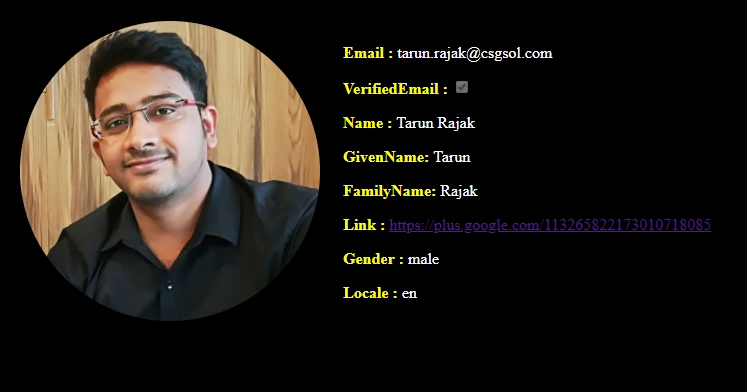
Now, the Google API will ask for your permission to grant access to your app. Click on "Allow" button and you will see your basic details on our user profile page.
The user data response you will get from Google API will look like this.
Now, the Google API will ask for your permission to grant access to your app. Click on "Allow" button and you will see your basic details on our user profile page.
The user data response you will get from Google API will look like this.
- {
- "id": "118150916278741694330",
- "email": "[email protected]",
- "verified_email": true,
- "name": "tarun kumar",
- "given_name": "tarun",
- "family_name": "kumar",
- "link": "https://plus.google.com/118150916278741694330",
- "picture": "https://lh3.googleusercontent.com/-3fcBPvz0ZQI/AAAAAAAAAAI/AAAAAAAAANY/kk8e3oOWIlY/photo.jpg",
- "gender": "male",
- "locale": "en"
- }
Our code will deserialize this JSON data into an object named UserProfile.
User details page will look like the following one.
As the source code is larger than the upload limit, it is first compressed using the 7-Zip compressor and then it is zipped. Please first unzip and then decompress using the 7-Zip software.
For any queries and feedback, please write in the comment box. Check "Login using LinkedIn". In an upcoming coming article, I will demonstrate how to integrate "Login using Facebook".


gupta rsysPosted Mar 17, 2021, 8:40 AM EDT
Very good .........
Azdev XxiPosted Nov 13, 2019, 3:22 AM EST
Thank the article your
Vaimik PatelPosted Jun 28, 2019, 4:05 AM EDT
How to signout from google and i want to ask user everytime to log in with different account if they want to. Is it possible to do so? please let me know how can i develop? Thanks in advance.
Azhagu MuthukumaranPosted Mar 13, 2019, 7:55 PM EDT
How to signout from google
jonnatan gonzalezPosted Aug 21, 2018, 3:25 PM EDT
Hello, very good example. I have a doubt.How can I import contacts and groups in my organization? If you know any example, I would appreciate it
Bhavesh JadavPosted Apr 11, 2018, 7:46 PM EDT
Very good, thanks for sharing it.
Tushar DikshitPosted Apr 9, 2018, 7:48 AM EDT
Good, useful post.