




JavaScript addition operator
The first is to perform a simple addition on numbers.
The second operation is to perform string concatenation (combine strings).
1. Addition
- <script>
- var a = 3;
- var b = 2;
- var c = a + b;
- document.write(c);
- </script>

2. String Concatenation
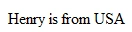
- <script>
- var user = "Henry";
- var country = "USA";
- var output = user + " is from " + country;
- document.write(output);
- </script>
JavaScript subtraction operator
The first is to perform simple subtraction on numbers (6 - 2).
The second operation is to specify negative numeric values (-20).
1. Subtraction
- <script>
- var a = 10;
- var b = 3;
- var c = a - b;
- document.write(c);
- </script>

2. Assigning negative values
- <script>
- var a = 10;
- var b = -10;
- var c = a + b;
- document.write(c);
- </script>

JavaScript multiplication operator
The JavaScript multiplication operator ( * ) is used to multiply numbers.
- <script>
- var a = 4;
- var b = 3;
- var c = a * b;
- document.write(c);
- </script>

JavaScript division operator
- <script>
- var a = 8;
- var b = 4;
- var c = a / b;
- document.write(c);
- </script>

JavaScript increment operator
Example 1
- <script>
- var i = 0;
- i++;
- document.write(i);
- </script>

Example 2
- <script>
- for (var i = 0; i < 5; i++)
- {
- document.write(i + "<br />");
- }
- </script>

JavaScript decrement operator
Example 1
- <script>
- var i = 1;
- i--;
- document.write(i);
- </script>

Example 2
- <script>
- for (var i = 10; i > 0; i--)
- {
- document.write(i + "<br />");
- }
- </script>

JavaScript modulus operator
Modulus produces the remainder value only. It is very useful for seeing if values are divisible by a specified number, check Example 2 below to see it in action that way.
Example 1
- <script>
- var a = 10;
- var b = 3;
- var c = a % b;
- document.write(c);
- </script>

We get the value of "1" as the modulus when 10 is evaluated against 3 because the remainder of dividing those numbers would be "1".
Evaluating 10 against 3 gives us an answer of "3 with the remainder of 1".
If you have "10" divided by "5" you get a modulus of "0" since there would be no remainder, 5 goes into 10 twice with no remainder left over so we would get modulus of "0".
Example 2
- <script>
- for (var i = 1; i <= 20; i++)
- {
- if (i % 2 == 0)
- { // if value is divisible by the number 2 make it red
- document.write("<span style='color:red;'>" + i + "</span><br />");
- }
- else
- {
- document.write(i + "<br />");
- }
- }
- </script>

JavaScript equal operator
The expression created will then return a value of either "true" or "false" to you.
left_operand == right_operand
- <script>
- var a = 4;
- var b = 3;
- document.write(a == b);
- </script>

You will see it in use most commonly within if...else condition statements.
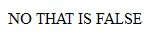
- <script>
- var a = 4;
- var b = 3;
- if (a == b)
- {
- document.write("YES THAT IS TRUE");
- }
- else
- {
- document.write("NO THAT IS FALSE");
- }
- </script>
JavaScript strict equal operator
If the values are the same but the object types are not the same, this will return false whereas the normal equal operator will return true.
left_operand === right_operand
- <script>
- var v1 = "5";
- var v2 = 5;
- if (v1 === v2)
- {
- document.write("TRUE");
- }
- else
- {
- document.write("FALSE");
- }
- </script>

Now run the same exact code using the normal equal operator.
You will notice that it does not take object type into consideration at all and will return a value of true even though a left operand is a string object and a right operand is a number object.
- <script>
- var v1 = "5";
- var v2 = 5;
- if (v1 == v2)
- {
- document.write("TRUE");
- }
- else
- {
- document.write("FALSE");
- }
- </script>

JavaScript not equal operator
The expression created will then return a value of either "true" or "false".
left_operand != right_operand
- <script>
- var v1 = 30;
- var v2 = 50;
- document.write(v1 != v2);
- </script>

JavaScript strict not equal operator
The expression created will then return a value of either "true" or "false" to you.
left_operand !== right_operand
- <script>
- var v1 = "50";
- var v2 = 50;
- document.write(v1 !== v2);
- </script>

"50" does not strictly equal 50 because the first is a string object and the second is a number object.
Even though the values match, the object types do not.
Now run the same exact code using the normal "not equal" operator to see how it does not take object type into consideration in the comparison.
- <script>
- var v1 = "50";
- var v2 = 50;
- document.write(v1 != v2);
- </script>

JavaScript less than the operator
The JavaScript less than comparison operator ( < ) is used to see if the operand on the left is less than the operand on the right.
The expression created will then return a value of either "true" or "false" to you.
left_operand < right_operand
- <script>
- var v1 = 4;
- var v2 = 7;
- document.write(v1 < v2);
- </script>
or
- <script>
- var v1 = "abc";
- var v2 = "def";
- document.write(v1 < v2);
- </script>
That will work on strings as well.

JavaScript greater than operator
The expression created will then return a value of either "true" or "false" to you.
left_operand > right_operand
- <script>
- var v1 = 4;
- var v2 = 7;
- document.write(v1 > v2);
- </script>
or
- <script>
- var v1 = "abc";
- var v2 = "def";
- document.write(v1 > v2);
- </script>
I Will work on strings as well.

JavaScript less than or equal operator
The expression created will then return a value of either "true" or "false" to you.
left_operand <= right_operand
- <script>
- var v1 = 5;
- var v2 = 5;
- document.write(v1 <= v2);
- </script>
or
- <script>
- var v3 = "c";
- var v4 = "d";
- document.write(v3 <= v4);
- </script>
I Will work on strings as well.
 The JavaScript greater than or equal to comparison operator ( >= ) is used to evaluate if the operand on the left is greater than or equal to the operand on the right.
JavaScript greater than or equal operator
The expression created will then return a value of either "true" or "false" to you.
left_operand >= right_operand
- <script>
- var v1 = 100;
- var v2 = 50;
- document.write(v1 >= v2);
- </script>
or
- <script>
- var v3 = "ghi";
- var v4 = "def";
- document.write(v3 >= v4);
- </script>
I Will work on strings as well.

JavaScript ternary operator
A ternary operation is one that requires three parameters. It will return the value on the left of the colon ( : ) if the expression is true, and return the value on the right of the colon if the expression is false.
(expression) ? "output for true" : "output for false"
- <script>
- var a = 5;
- var b = 3;
- var result = (a > b) ? "that is true" : "that is false";
- document.write(result);
- </script>

Here is a more advanced example that will show you how to fire off functions in place of returning simple strings.
- <script>
- var a = 5;
- var b = 3;
- function funcForTrue()
- {
- document.write("Executed function for a TRUE result");
- }
- function funcForFalse()
- {
- document.write("Executed function for a FALSE result");
- }
- var result = (a > b) ? funcForTrue() : funcForFalse();
- </script>

JavaScript append operator
- First, we use it to append to or compound variable data.
- Secondly, we use it is as a mathematical shorthand to make the left operand equal to the value of both the right and left operands of the expression.
left_operand += right_operand
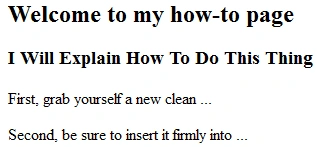
- <script>
- var myVar = "<h2>Welcome to my how-to page</h2>";
- myVar += "<h3>I Will Explain How To Do This Thing</h3>";
- myVar += "<p>First, grab yourself a new clean ...<p>";
- myVar += "<p>Second, be sure to insert it firmly into ...<p>";
- document.write(myVar);
- </script>
Simple shorthand arithmetic example
- <script>
- var a = 2;
- var b = 3;
- document.write(a += b);
- </script>

JavaScript assignment operator
It is probably the most commonly used operator of them all. Each time you assign values in this way, the existing value that the left operand contained is overwritten with a new value.
To append to a variable use the string append operator instead:
left_operand = right_operand
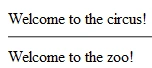
- <script>
- var myVar = "Welcome to the circus!";
- document.write(myVar);
- document.write("<hr />");
- myVar = "Welcome to the zoo!";
- document.write(myVar);
- </script>
JavaScript logical or operator
It makes perfect sense if you replace the characters "||" with the word "or" when you read a script that has this in place.
It could help save you a few lines of code here and thereby allowing you to group expressions or values.
(value || value)
- <script>
- if ((8 || 35 || 14) < 10)
- { // if 8 or 35 or 14 is less than 10
- document.write("At least one value is less than 10");
- }
- else
- {
- document.write("No values are less than 10");
- }
- </script>

Here is an example evaluating some string variable data lengths as a group:
- <script>
- var u1 = "John";
- var u2 = "Sara";
- var u3 = "Kate";
- if ((u1.length || u2.length || u3.length) == 4)
- {
- document.write("All names have exactly 4 letters in them.");
- }
- else
- {
- document.write("At least one name does not have 4 letters.");
- }
- </script>

Here is an example that shows sub-expressions that are grouped together as one expression.
Each sub-expression can be wrapped in parenthesis like I did below but that is not a requirement unless your expression logic demands parenthesis grouping.
- <script>
- var sky = "blue";
- var blood = "green";
- var sun = "yellow";
- if ((sky != "blue") || (blood != "red") || (sun != "yellow"))
- {
- document.write("Uh Oh! At least one thing is wrong in the world!");
- }
- else
- {
- document.write("Everything is normal in the world.");
- }
- </script>

JavaScript logical and operator
It makes good sense if you replace the characters ( && ) with the word "and" when you see that symbol sequence in scripts to get a mental grasp of it.
(value && value && value && etc...)
- <script>
- if ((3 && 5 && 12) < 10)
- {
- document.write("All values are less than 10");
- }
- else
- {
- document.write("Not all of the values are less than 10");
- }
- </script>

Here is an example of evaluating string data.
This script is ready to perform a check to make sure all values are present before the program can continue.
- <script>
- var uname = "Josh";
- var email = "[email protected]";
- var country = "";
- if ((uname.length && email.length && country.length))
- {
- document.write("We can now proceed because all values are present");
- }
- else
- {
- document.write("We seem to be missing a value we need, try again");
- }
- </script>

JavaScript logical, not operator
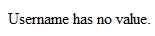
The JavaScript logical not ( ! ) operator is used to evaluate a single operand or expression.
It will return true if the operand is empty, and returns false if the operand has some value in it.
( !value )
- <script>
- var uname = "";
- if (!uname)
- {
- document.write("Username has no value.");
- }
- else
- {
- document.write("Username is: " + uname);
- }
- </script>
JavaScript comma operator
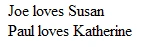
It can be used to establish and iterate multiple variables in a loop, as well as establishing multiple arguments in functions and arrays.
( param, param )
- <script>
- var myArray = ["Joe", "Paul", "Katherine", "Susan"];
- for (var i = 0, x = 3; i < 2; i++, x--)
- {
- document.write(myArray[i] + " loves " + myArray[x] + "<br />");
- }
- </script>
JavaScript this operator
The JavaScript this special operator is used to dynamically access all of an object's properties.
If passed through an HTML element, the element passing it becomes the dynamic object of focus in any functions or methods that the element is invoking in JavaScript.
- <a onclick="alert(this.innerHTML)" href="#" onmousedown="return false">
- If you click me I will kick you in the teeth
- </a>

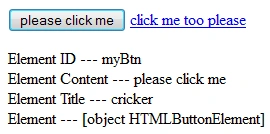
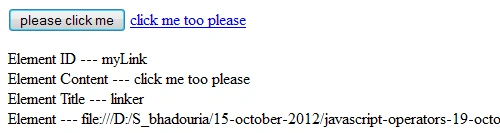
This example really shows how to gain access to all properties of an element dynamically.
- <script type="text/javascript">
- function learnAbout(x)
- {
- var result = "Element ID --- "+x.id+"<br />";
- result += "Element Content --- "+x.innerHTML+"<br />";
- result += "Element Title --- "+x.title+"<br />";
- result += "Element --- "+x;
- document.getElementById("status").innerHTML = result;
- }
- </script>
- <button onclick="learnAbout(this)" id="myBtn" title="cricker">
- please click me
- </button>
- <a onclick="learnAbout(this)" href="#" id="myLink" title="linker" onmousedown="return false">
- click me too please
- </a>
- <p id="status"></p>

JavaScript new operator
When you create instances of your custom object you must use the new operator in order for the object to be created properly.
In this code example below we have created a custom object constructor named character for defining and managing game characters.
You can create your custom objects to have any properties you wish, and also apply custom methods to them.
- <script>
- function character(name, type, age, strength, charisma, wisdom)
- {
- this.name = name;
- this.type = type;
- this.age = age;
- this.strength = strength;
- this.charisma = charisma;
- this.wisdom = wisdom;
- }
- var player1 = new character("Brutus", "Fighter", 32, 10, 5, 6);
- var player2 = new character("Sticky Fingers", "Thief", 25, 7, 8, 8);
- var player3 = new character("Abracadabrus", "Wizard", 67, 4, 6, 10);
- var playerArray = [player1, player2, player3];
- document.write("<h1>Adventuring Party</h1>");
- for (var player in playerArray)
- {
- document.write("<h3>"+playerArray[player].name+"</h3>");
- document.write("Type : "+playerArray[player].type+"</br>");
- document.write("Age : "+playerArray[player].age+"</br>");
- document.write("Strength : "+playerArray[player].strength+"</br>");
- document.write("Charisma : "+playerArray[player].charisma+"</br>");
- document.write("Wisdom : "+playerArray[player].wisdom+"</br>");
- }
- </script>

JavaScript in operator
It will return a value of true if the property exists in the object scope, and returns false if the property cannot be found in the object.
- <script>
- var adam = new Object();
- adam.quote = "I love to party";
- adam.age = 72;
- adam.nature = "Chaotic Neutral";
- if ("nature" in adam)
- {
- document.write("That property is there: " + adam.nature);
- }
- else
- {
- document.write("That property is NOT in the object scope.");
- }
- </script>
- in-operator-1-in-javascript.png
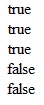
- Here is an example using the in operator to see if an array index exists.
- <script>
- var girls = new Array("Lisa", "Michelle", "Tracy");
- document.write((0 in girls) + "<br />");
- document.write((1 in girls) + "<br />");
- document.write((2 in girls) + "<br />");
- document.write((3 in girls) + "<br />");
- document.write((4 in girls) + "<br />");
- </script>
JavaScript delete operator
It can also delete values from specified indexes of an array, but it will not remove the array element itself.
To remove array elements completely use the array shift() method.
Delete properties from user-created custom objects
- <script>
- var adam = new Object();
- adam.quote = "I love dorky stuff";
- adam.nature = "Evil";
- document.write(adam.nature + "<hr />");
- delete adam.nature
- document.write(adam.nature);
- </script>

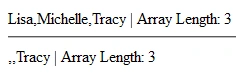
Delete array values at specified indexes
- <script>
- var girls = new Array("Lisa", "Michelle", "Tracy");
- document.write(girls + " | Array Length: " + girls.length);
- document.write("<hr />");
- delete girls[0];
- delete girls[1];
- document.write(girls + " | Array Length: " + girls.length);
- </script>
JavaScript typeof operator
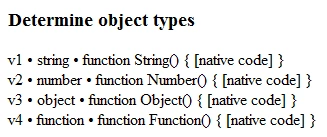
You can also access the constructor property of objects to see the constructor function they use.
- <script>
- var v1 = "Welcome Partner";
- var v2 = 50;
- var v3 = new Object();
- var v4 = Function();
- var output = "<h3>Determine object types</h3>";
- output += "v1 • " + typeof (v1) + " • " + v1.constructor + "<br />";
- output += "v2 • " + typeof (v2) + " • " + v2.constructor + "<br />";
- output += "v3 • " + typeof (v3) + " • " + v3.constructor + "<br />";
- output += "v4 • " + typeof (v4) + " • " + v4.constructor + "<br />";
- document.write(output);
- </script>
JavaScript instanceof operator
The JavaScript instanceof special operator evaluates whether or not the left operand explicitly matches the data type you specify as the right operand in the expression.
- <script>
- var myVar = new String("abcdefghi");
- if (myVar instanceof String)
- {
- document.write("Yes it is string type : " + myVar.constructor);
- }
- else
- {
- document.write("No that is not string type : " + myVar.constructor);
- }
- </script>

JavaScript void operator
You can see the contrast by running an expression without void first, then run the same expression using void.
It processes the expression but where there is normally a return value, it is void.
- <script>
- var a = 2;
- var b = 3;
- document.write(c = a + b);
- document.write("<br />" + c);
- document.write("<hr />");
- var c = 2;
- var d = 3;
- document.write(void (e = c + d));
- document.write("<br />" + e);
- </script>

Summary
This article provides much more practical knowledge than theoretical knowledge.
Mskommik MiriaMPosted Apr 19, 2013, 6:12 PM
May Our GOD Bless You And All your work
Sonia Bhadouria VishvkarmaPosted Nov 17, 2012, 12:00 AM
Thank's.....
Anil Kumar YadavPosted Nov 16, 2012, 7:16 AM
good one .....
Sonia Bhadouria VishvkarmaPosted Oct 25, 2012, 3:37 AM
Thank's.
Venkatesh KumarPosted Oct 25, 2012, 2:26 AM
Good Post... Refreshing JS syntax after long time...