

This article briefly talks about jQuery function calling from a HTML control.
Step 1
Create a simple website in the 4.0 Framework.
Step 2
In the Default.aspx page add the following scripts: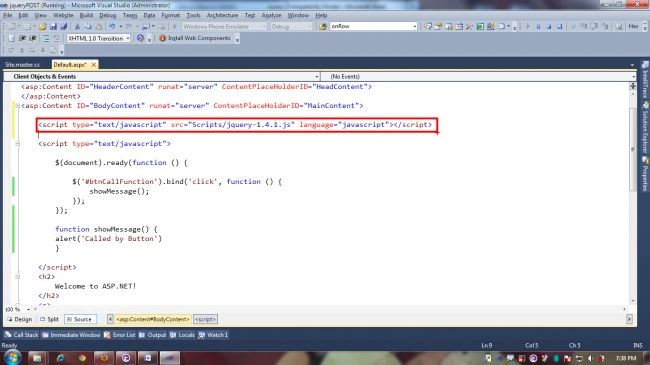
This script file can be found under the "Scripts" Folder in the project Solution Explorer.
Step 3
Once you have added a reference to the jQuery file, now to bind the "click" event of the HTML Button control.
Note: This is very important to see that this button is not a server control, so it would be worth watching how we are doing a postback using jQuery .
Step 4
The following code binds the click event before the DOM loads or any other process happens:
<script type="text/javascript">
//Section1: Before the page gets load itself jQuery binds the click //event successfully.
$(document).ready(function () {
$('#btnCallFunction').bind('click', function () {
showMessage();
});
});
//Section 2: This is the function while shows the message
function showMessage() {
alert('Called by Button')
}
</script>
In .aspx page
<input type="button" value="Call Function" id="btnCallFunction" />
Step 5
In jQuery, the control is accessed using '#controlid'.. since the $('#btnCallFunction').bind statement binds the click event and tells the compiler that once the button is clicked the specified function/method will be called.
So in a few steps with the help of jQuery, a HTML control can access the code behind methods without writing a single line of code in the .aspx.cs file.
In the next article I will demonstrate DataAccess with the same control using JQueryPOST.
I hope you liked the article. Thanks.
Megha GoyalPosted Sep 27, 2012, 12:05 AM
yes...
Megha GoyalPosted Sep 27, 2012, 12:05 AM
yes...
Kamal RawatPosted Sep 26, 2012, 12:33 AM
Yes but obvious..as its very light to load..even if u have tried jquery controls..very light and handy to use..
Megha GoyalPosted Sep 25, 2012, 11:06 PM
Kamal u r means to say that jquery increase the performance of the Website .i.e. Response time...
Kamal RawatPosted Sep 25, 2012, 7:36 AM
javascript is itself a kind of framework.. jquery is another good technology like javascript framework. I think using jquery is better instead of using pure javascript and doing all the stuff from the scratch..unless you have that kind of requirement. Benefit of jquery with asp.net are too much cant take all but few of them: 1. For rich UI controls. 2. Jquery also provide seamless data access across the pages using POST() techniques..which i will take shortly..and many more..
Megha GoyalPosted Sep 25, 2012, 12:09 AM
I want to know what is the benefit of using Jquery in ASP.NET... Why we called it JavaScript library?