

- onkeyUp
- onkeyDown
- onkeyPress
You can use any of these events for handling key events in your application. The following is an example showing a user entering data into only the first textbox; let's suppose the name he/she enters in the first textbox and it should be displayed in upper as well as in lower case as in the following two textboxes.
The following is the design of the application:
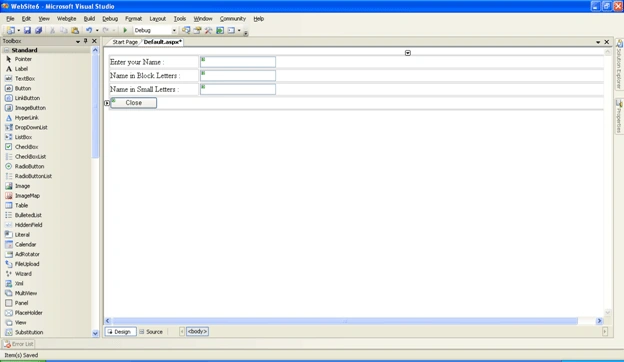
The following is the source code for it; we'll be calling the getUpper and getLower functions on the onkeyUp event so that as soon as the key is pressed the same effect should be displayed in the rest of the textboxes. Similarly we have a button control after the three textboxes if you want that when a user clicks on the button the following window should be closed. Then here is the source code for doing that.
<%@ Page Language="C#" AutoEventWireup="true" CodeFile="Default.aspx.cs" Inherits="_Default" %>
<!DOCTYPE html PUBLIC "-//W3C//DTD XHTML 1.0 Transitional//EN" "http://www.w3.org/TR/xhtml1/DTD/xhtml1-transitional.dtd">
<html xmlns="http://www.w3.org/1999/xhtml" >
<head runat="server">
<title>Untitled Page</title>
<script type="text/javascript">
function getUpper(a)
{
var upper=a.toUpperCase();
document.forms[0]["TextBox2"].value=upper;
}
function getLower(s)
{
var lower=s.toLowerCase();
document.forms[0]["TextBox3"].value=lower;
}
function CloseTab()
{
self.close();
}
</script>
</head>
<body>
<form id="form1" runat="server">
<div>
<table width="100%">
<tr>
<td style="width: 181px">
Enter your Name :</td>
<td>
<asp:TextBox ID="TextBox1" onkeyUp="getUpper(this.value);getLower(this.value)" runat="server"></asp:TextBox></td>
</tr>
<tr>
<td style="width: 181px">
Name in Block Letters :</td>
<td>
<asp:TextBox ID="TextBox2" runat="server"></asp:TextBox></td>
</tr>
<tr>
<td style="width: 181px">
Name in Small Letters :</td>
<td>
<asp:TextBox ID="TextBox3" runat="server"></asp:TextBox></td>
</tr>
<tr>
<td colspan="2">
<asp:Button ID="Button1" runat="server" Text="Close" OnClientClick="CloseTab()" Width="97px"/>
</td>
</tr>
</table>
</div>
</form>
</body>
</html>
Now run the application.
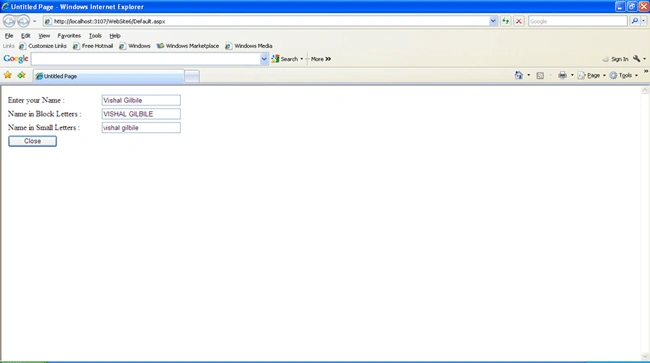
Your data will be displayed in upper and lower case in the respective textboxes and when you click on the close button the following alert box will displayed.
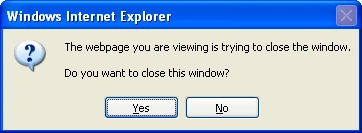
If you click on yes the window will be closed and if no then the window will not be closed.
I hope that you have enjoyed the article and it will help you for your project.
Shalini JunejaPosted Jul 5, 2011, 12:51 AM
Useful article
Vishal GilbilePosted Jul 4, 2011, 8:54 AM
It is basically used to close the tab or the internet explorer which is currently displaying the data of our web page. If you want that on click of a button the particular window should be closed we can make you of this self.close() method. For Eg:- you can make use of this in pop up dialog boxes where by you can close the popup on a click event. Are I didn't understood your last question which you posted in passing values from javascript function to asp.net articles kindly let me know abt it. With Regards, Vishal Gilbile.
Mayur GujrathiPosted Jul 4, 2011, 3:40 AM
Nice example illustrating events, Also i get how to call two javascript at a time Can you please tell me more about self.close