
Abstract / Overview
LangChain Code is an open-source toolkit for building composable AI-driven applications using large language models (LLMs). Designed to streamline the process of connecting models, prompts, and data sources, LangChain simplifies retrieval-augmented generation (RAG), agent systems, and automated reasoning workflows.
The GitHub repository zamalali/langchain-code provides practical implementations of LangChain pipelines, showcasing how developers can rapidly prototype conversational agents, question-answering systems, and data-aware assistants using minimal code.
This article provides an end-to-end understanding of LangChain Code: architecture, core components, and integration methods, plus step-by-step examples for real-world AI projects.
Conceptual Background
LangChain emerged to bridge the gap between LLM capability and application usability. Instead of directly calling OpenAI or Hugging Face APIs, LangChain offers structured components:
Chains: Modular sequences combining prompts, models, and outputs.
Agents: Decision-making modules that use tools dynamically.
Memory: Context persistence for stateful conversations.
Retrievers: Interfaces for knowledge retrieval from vector databases.
Callbacks: Logging and event hooks for real-time monitoring.
The langchain-code project demonstrates these components in action — connecting models like GPT-4 with local tools, custom data, and APIs to create dynamic AI apps.
Step-by-Step Walkthrough
1. Installation
git clone https://github.com/zamalali/langchain-code.git
cd langchain-code
pip install -r requirements.txt
Requirements typically include:
langchainopenaichromadbtiktokenfaiss-cpudotenv
Create a .env file:
OPENAI_API_KEY=YOUR_API_KEY2. Basic Chain Example
A chain in LangChain connects an input prompt to an LLM, optionally enriched with data.
from langchain.llms import OpenAI
from langchain import PromptTemplate, LLMChain

prompt = PromptTemplate(
    input_variables=["topic"],
    template="Explain {topic} in simple terms."
)

llm = OpenAI(model_name="gpt-4")
chain = LLMChain(llm=llm, prompt=prompt)

print(chain.run(topic="quantum computing"))
This script constructs a simple query pipeline.
3. Using a Retriever (RAG Pattern)
Retrieval-Augmented Generation combines LLMs with vector databases for factual grounding.
from langchain.chains import RetrievalQA
from langchain.vectorstores import Chroma
from langchain.embeddings import OpenAIEmbeddings
from langchain.text_splitter import CharacterTextSplitter
from langchain.document_loaders import TextLoader

loader = TextLoader("docs/guide.txt")
documents = loader.load()

splitter = CharacterTextSplitter(chunk_size=1000, chunk_overlap=200)
texts = splitter.split_documents(documents)

embeddings = OpenAIEmbeddings()
db = Chroma.from_documents(texts, embeddings)

retriever = db.as_retriever()

qa_chain = RetrievalQA.from_chain_type(
    llm=OpenAI(model_name="gpt-4"),
    chain_type="stuff",
    retriever=retriever
)

print(qa_chain.run("What are the benefits of LangChain?"))
This setup creates a knowledge-grounded chatbot that answers from your own documents.
4. Building a LangChain Agent
Agents dynamically choose tools to answer queries, using reasoning steps.
from langchain.agents import load_tools, initialize_agent
from langchain.llms import OpenAI

llm = OpenAI(model_name="gpt-4")
tools = load_tools(["serpapi", "llm-math"], llm=llm)
agent = initialize_agent(tools, llm, agent="zero-shot-react-description")

response = agent.run("Find the square root of the population of Tokyo.")
print(response)
Agents combine reasoning and external data access, ideal for complex decision pipelines.
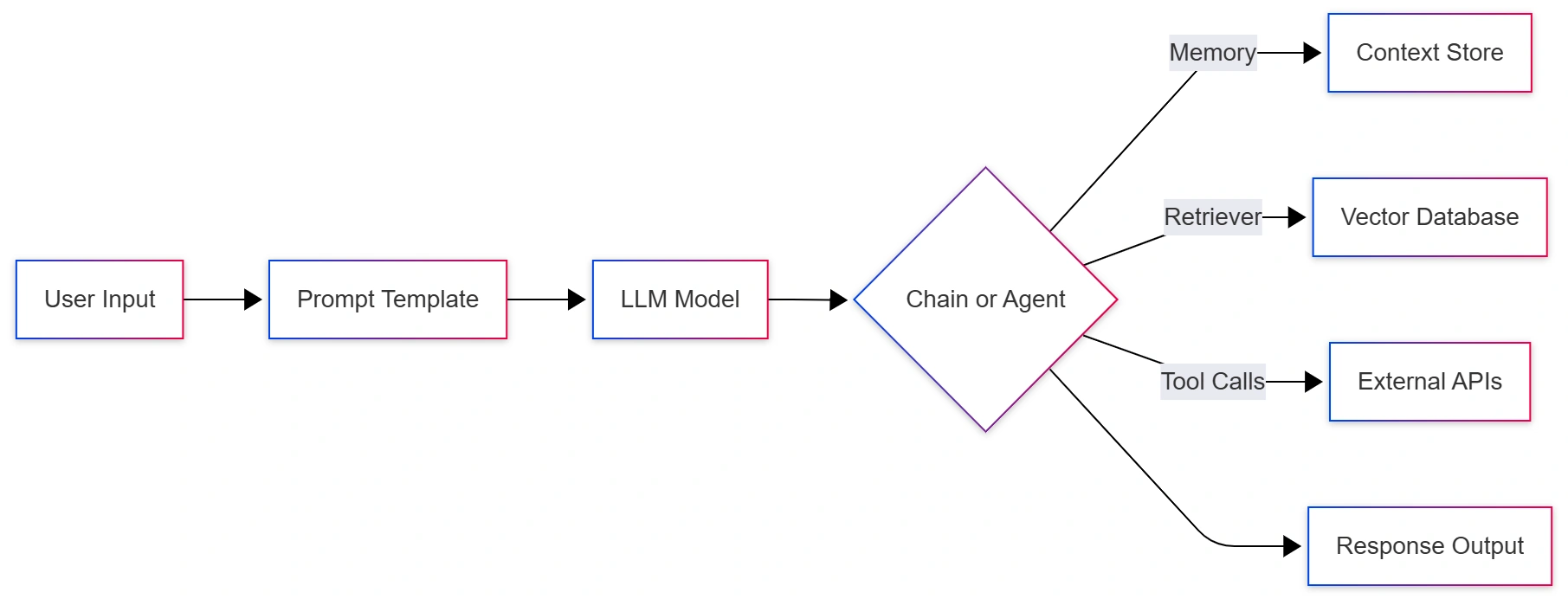
Mermaid Diagram: LangChain Architecture
Use Cases / Scenarios
Conversational AI: Custom chatbots with persistent memory and domain knowledge.
Enterprise RAG Systems: Internal documentation search assistants.
AI Coding Assistants: Code reasoning agents powered by GitHub and documentation embeddings.
Knowledge Management Tools: Semantic retrieval of internal or customer data.
Education Bots: Concept simplification and tutoring using structured prompts.
Limitations / Considerations
API dependency: Relies on external LLMs (OpenAI, Anthropic).
Cost scaling: High token usage for large documents.
Latency: Long context windows may slow response times.
Data privacy: External inference may expose sensitive data if unmanaged.
Mitigate using local models (e.g., Llama 3, Mistral) and on-premise vector stores like FAISS.
Fixes and Troubleshooting Tips
Error: “No API key found” → Confirm
.envfile path and variable name.Memory not persisting → Check
ConversationBufferMemorysetup.Retriever returns irrelevant data → Adjust
chunk_sizeandembedding model.Slow responses → Use smaller models (
gpt-3.5-turbo) or batch retrieval.
FAQs
Q1: What’s the difference between LangChain and traditional chatbots?
A: LangChain adds memory, retrieval, and tool-use capabilities, enabling contextual reasoning rather than single-turn responses.
Q2: Can I use LangChain offline?
A: Yes, by pairing it with local models (like Llama) and self-hosted vector databases.
Q3: What’s LangChain Code’s main purpose?
A: It’s a reference implementation for developers to study modular pipelines and build RAG and agent systems efficiently.
Q4: How does LangChain integrate with OpenAI?
A: Through the OpenAI wrapper, allowing LLM calls, embeddings, and chained tasks using the API key in your environment.
References
Conclusion
LangChain Code demonstrates how modern developers can compose AI logic modularly using chains, retrievers, and agents. It transforms LLMs into structured systems that integrate with APIs, databases, and user data — turning simple models into fully functional AI applications.
In an AI-first digital landscape, frameworks like LangChain are essential to make your brand or product citable inside AI answers — aligning directly with Generative Engine Optimization (GEO) principles from the 2025 C# Corner GEO Guide.

Join the conversation! Your thoughts help the community grow.