
Steps to Edit:
Step 1: Go to SharePoint online admin center.
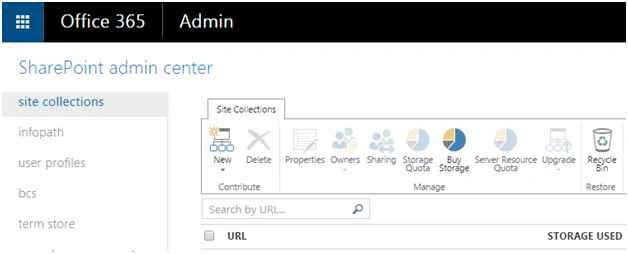
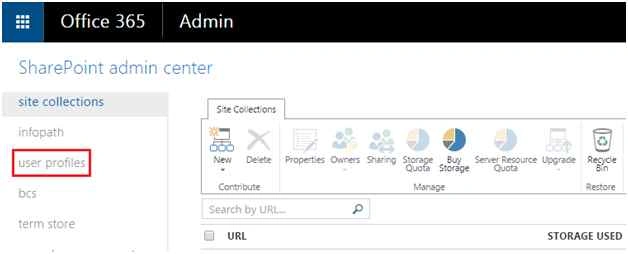
Step 2: Then click on the “user profiles” from the left navigation.
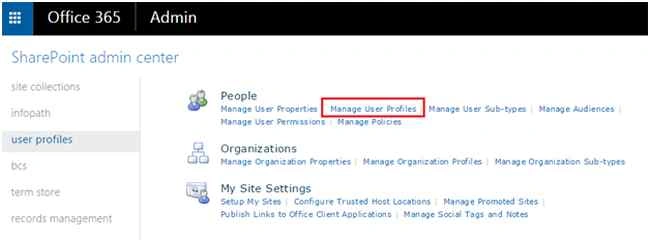
Step 3: On User profile settings page, select Manage User Profiles as in the following screenshot:
Step 4: On manage the user profile page, you can find the user using search box, which user you want to change the Property values,
Enter the User name on the Text box and click on the Find button.
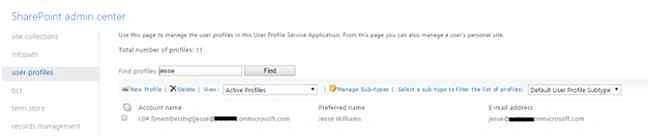
Step 5: Then click the drop down from user name and select Edit my profile as in the following screenshot:
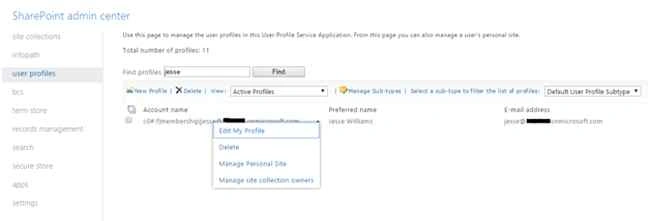
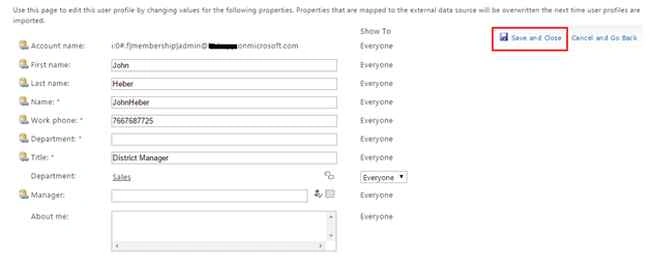
Step 6: On the Edit my profile page, change the value of the properties then click on the save for the changes.
Summary
In this article we explored how to manage the user profile for user in SharePoint online. Happy Learning!
Manage User Profiles In SharePoint Online
In this article I will share the steps to manage the user profiles in SharePoint.


Kaviya BalasubramanianPosted Sep 17, 2015, 9:32 PM EDT
Thank you all :)
Santhakumar MunuswamyPosted Sep 17, 2015, 6:31 AM EDT
Thanks for nice article:)
Prasham SabadraPosted Sep 15, 2015, 3:23 AM EDT
Thanks for Sharing :)
Sibeesh VenuTOP 100Posted Sep 15, 2015, 12:46 AM EDT
Nice Share
Harshad PansuriyaPosted Sep 14, 2015, 8:12 PM EDT
Nice one
Karthikeyan KPosted Sep 14, 2015, 7:24 PM EDT
Good one :)
Pankaj Kumar ChoudharyTOP 100Posted Sep 14, 2015, 5:39 PM EDT
Nice Explain...........
Vinodh NarayananPosted Sep 14, 2015, 9:13 AM EDT
nice
Mohammed IbrahimPosted Sep 14, 2015, 9:05 AM EDT
nice information