
In this article we are going to learn about the Master Detail animation using
the Fluid Move Behavior.
Create a New Silverlight Project.
Add the references as shown below to the Project.
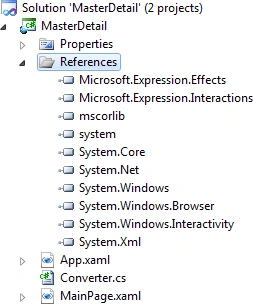
The XAML code is attached below:
<UserControl
x:Class="MasterDetail.MainPage"
xmlns="http://schemas.microsoft.com/winfx/2006/xaml/presentation"
xmlns:x="http://schemas.microsoft.com/winfx/2006/xaml"
xmlns:d="http://schemas.microsoft.com/expression/blend/2008"
xmlns:mc="http://schemas.openxmlformats.org/markup-compatibility/2006"
xmlns:local="clr-namespace:MasterDetail"
xmlns:i="http://schemas.microsoft.com/expression/2010/interactivity"
xmlns:ei="http://schemas.microsoft.com/expression/2010/interactions"
mc:Ignorable="d"
d:DesignHeight="300"
d:DesignWidth="400">
<UserControl.Resources>
<local:SecondsToDurationConverter
x:Key="SecondsToDurationConverter"/>
<DataTemplate
x:Key="ItemTemplate">
<Grid
Width="200">
<Image
Source="{Binding
Image}"
HorizontalAlignment="Right"
Width="64"
Margin="0">
<i:Interaction.Behaviors>
<ei:FluidMoveSetTagBehavior
Tag="DataContext"/>
</i:Interaction.Behaviors>
</Image>
<TextBlock
Text="{Binding
Name}"
Margin="0,4"
VerticalAlignment="Top"
d:LayoutOverrides="Width"
FontFamily="Segoe
UI"
FontSize="14.667"/>
<TextBlock
Text="{Binding
Price}"
VerticalAlignment="Top"
d:LayoutOverrides="Width"
Margin="0,25,0,0"
FontFamily="Segoe
UI"
FontSize="14.667"/>
</Grid>
</DataTemplate>
</UserControl.Resources>
<Grid
x:Name="LayoutRoot"
DataContext="{Binding
Source={StaticResource
ChairsDataSource}}">
<TextBlock
Margin="20,8,0,0"
VerticalAlignment="Top"
Text="V4
FluidMoveBehavior"
FontFamily="Segoe
UI"
FontSize="32"
Foreground="#FFF0F0F0"
HorizontalAlignment="Left"
d:LayoutOverrides="HorizontalAlignment,
GridBox"/>
<Slider
x:Name="BehaviorSpeed"
HorizontalAlignment="Right"
Height="37"
Margin="0,14,20,0"
VerticalAlignment="Top"
Width="71"
Maximum="2"
Value="0.75"/>
<ListBox
x:Name="listBox"
HorizontalAlignment="Left"
ItemTemplate="{StaticResource
ItemTemplate}"
ItemsSource="{Binding
Collection}"
Margin="20,80,0,20"
Width="228"
Background="#FF333333"
Foreground="#FFF0F0F0"
BorderBrush="{x:Null}"/>
<Grid
DataContext="{Binding
SelectedItem,
ElementName=listBox}"
Margin="270,100,20,40"
d:DataContext="{Binding
Collection[0]}">
<i:Interaction.Behaviors>
<ei:FluidMoveBehavior
InitialTag="DataContext"
Duration="{Binding
Value,
Converter={StaticResource
SecondsToDurationConverter},
ElementName=BehaviorSpeed}"
FloatAbove="False">
<ei:FluidMoveBehavior.EaseY>
<CubicEase
EasingMode="EaseIn"/>
</ei:FluidMoveBehavior.EaseY>
<ei:FluidMoveBehavior.EaseX>
<CubicEase
EasingMode="EaseIn"/>
</ei:FluidMoveBehavior.EaseX>
</ei:FluidMoveBehavior>
</i:Interaction.Behaviors>
<TextBlock
Text="{Binding
Description}"
VerticalAlignment="Bottom"
Margin="0,0,0,-20"
Foreground="White"
FontFamily="Segoe
UI"
FontSize="16"
TextAlignment="Center"/>
<Image
Source="{Binding
Image}"/>
<TextBlock
Text="{Binding
Name}"
HorizontalAlignment="Left"
VerticalAlignment="Top"
Margin="0,-25,0,0"
Foreground="White"
FontFamily="Segoe
UI"
FontSize="18.667"/>
<TextBlock
Text="{Binding
Price}"
HorizontalAlignment="Right"
VerticalAlignment="Top"
Margin="0,-25,0,0"
Foreground="White"
FontFamily="Segoe
UI"
FontSize="18.667"/>
</Grid>
</Grid>
</UserControl>
I have added Sample Data to the Project. The Source code is attached.
Define a Converter class as shown below:
public
sealed class
SecondsToDurationConverter :
IValueConverter
{
#region
IValueConverter Members
public object
Convert(object value, System.Type
targetType, object parameter,
CultureInfo culture)
{
return new
Duration(TimeSpan.FromSeconds((double)value));
}
public object
ConvertBack(object value, System.Type
targetType, object parameter,
CultureInfo culture)
{
throw new
System.NotImplementedException();
}
#endregion
}
App.xaml has to be modified as shown below:
<Application
xmlns="http://schemas.microsoft.com/winfx/2006/xaml/presentation"
xmlns:x="http://schemas.microsoft.com/winfx/2006/xaml"
xmlns:SampleData="clr-namespace:Expression.Blend.SampleData.ChairsDataSource"
xmlns:mc="http://schemas.openxmlformats.org/markup-compatibility/2006"
xmlns:d="http://schemas.microsoft.com/expression/blend/2008"
x:Class="MasterDetail.App"
mc:Ignorable="d">
<Application.Resources>
<ResourceDictionary>
<SampleData:ChairsDataSource
x:Key="ChairsDataSource"
d:IsDataSource="True"/>
</ResourceDictionary>
</Application.Resources>
</Application>
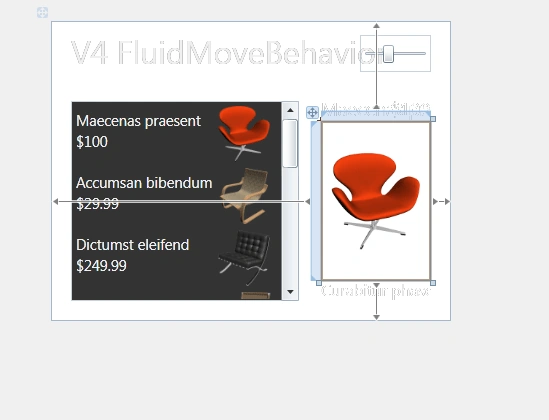
Once the Data has been setup properly, you should see the data in the
MainPage.xaml as shown below:
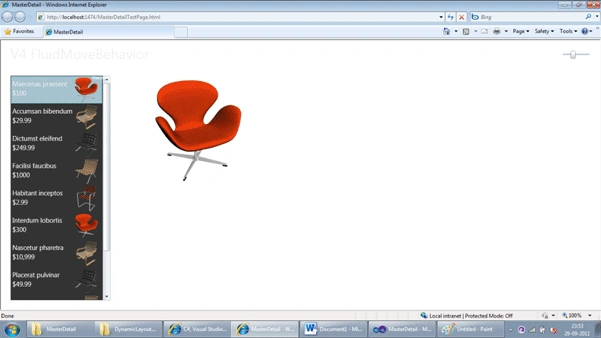
Now run the code.
Thanks.
Join the conversation! Your thoughts help the community grow.