
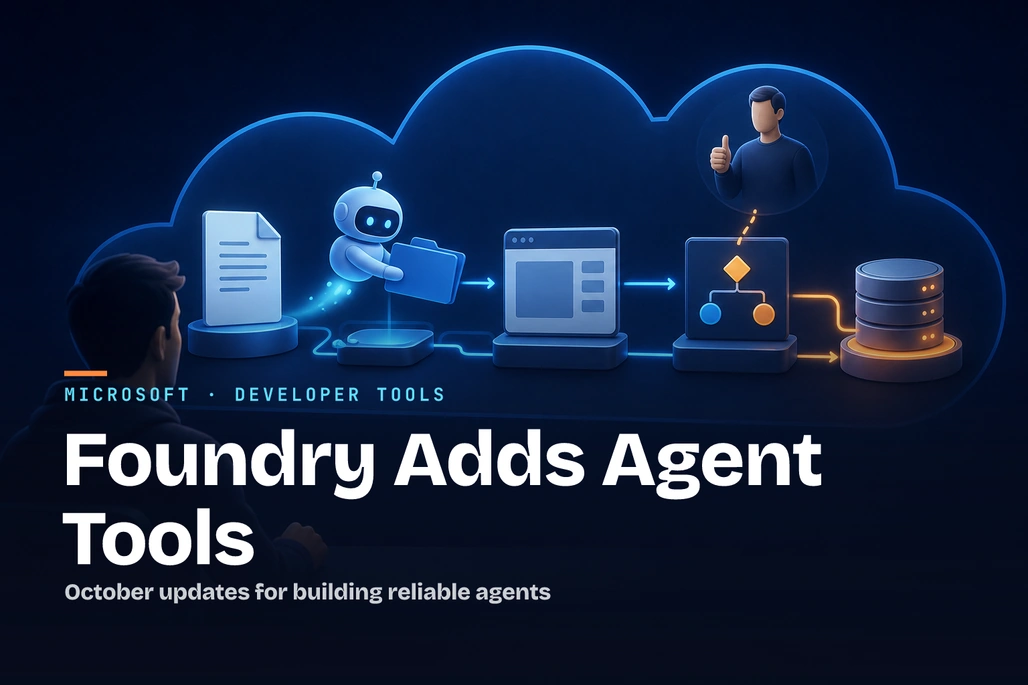
October’s Foundry updates focus on how agents execute, decide, recover, and act safely.
Microsoft Foundry’s October 2026 updates give beginners three practical ways to build more useful AI agents: a managed Microsoft Copilot harness for multi-step work, generally available Browser Automation for browser-based tasks, and the generally available Decisions API for returning typed classifications instead of generated prose. The safest starting point is usually the Decisions API for bounded routing tasks, while the Copilot harness and browser tools are better evaluated gradually with least-privileged access, human approval, and explicit testing of failures.
Key takeaways
- The Microsoft Copilot harness entered public preview on October 28, 2026, and lets Foundry run the agent loop and isolated execution environment for a prompt agent.
- Long-running resilience for hosted agents is generally available, but applications still need checkpoints and idempotent handling of external side effects.
- Browser Automation is generally available and uses Playwright Workspaces through a managed MCP-based tool connection.
- The Decisions API is generally available for
predicate,choice, andscorequestions, withgpt-6-lunaas its currently supported model. - Microsoft Foundry’s October roundup was published on November 5, 2026, ahead of Microsoft Ignite, scheduled for November 17 through November 20, 2026.
What did Microsoft announce in the October 2026 Foundry update?
In its October 2026 Microsoft Foundry roundup, Microsoft grouped its updates around a common production question: how can an agent finish a task reliably rather than merely generate a plausible answer? The biggest changes are aimed at the execution boundary around a model: tool coordination, browser interaction, recovery after interruption, and predictable application routing.
For a beginner, it helps to separate these capabilities into two categories. A generative response asks a model to write or explain something. A bounded decision asks the model to return one constrained result that code can use, such as whether a customer is requesting a refund or which support queue should receive a message.
| Capability | Status in October 2026 | Best beginner use case | What the developer still owns |
|---|---|---|---|
| Microsoft Copilot harness | Public preview | A prompt agent that needs files, supported tools, skills, or multi-step execution | Instructions, model choice, permitted tools, approvals, skills, and evaluation |
| Hosted-agent resilience | Generally available | Long-running custom agent work that can be interrupted | Checkpoints, state restoration, and duplicate-action prevention |
| Browser Automation | Generally available | Read-only inspection of a controlled internal website | Identity, connection permissions, approvals, monitoring, and tool scope |
| Decisions API | Generally available | Ticket routing, triage, or rubric-based evaluation | Questions, thresholds, refusal handling, and downstream business rules |
The update also includes GPT-6.1 Terra general availability for text-and-image work through the Responses API, MAI Image 2.6 preview availability in six Foundry regions, new MAI speech and voice models, Model Router updates, and Foundry Local SDK and runtime 2.2.1. Those additions matter for teams selecting models and local development tooling, but the agent, browser, and decision updates are the clearest entry points for a first application.
How does the Microsoft Copilot harness work?
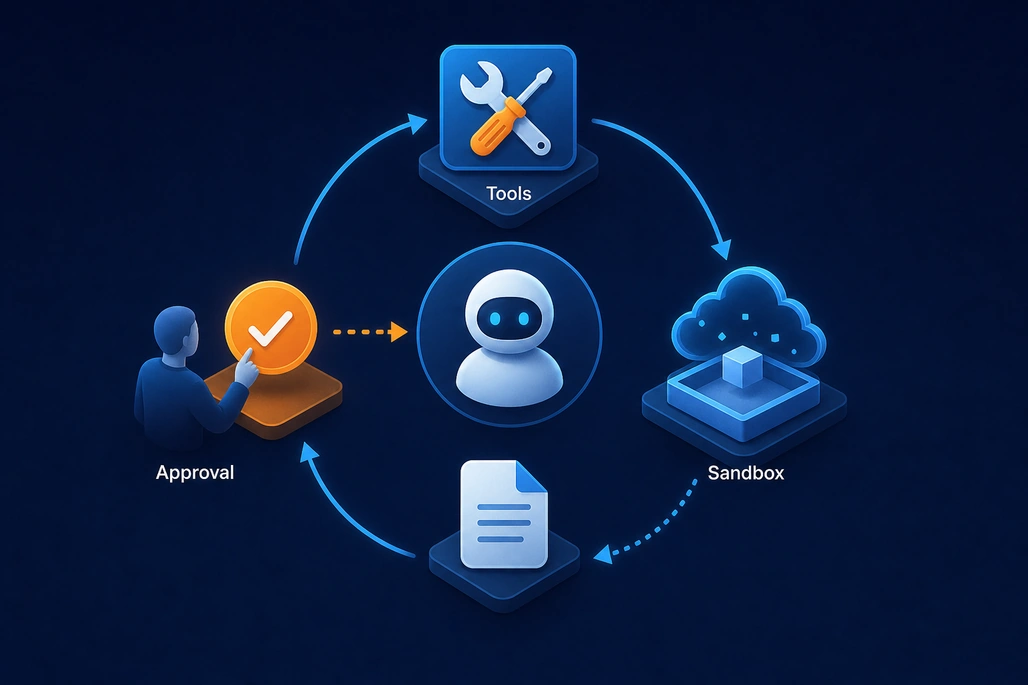
The Copilot harness manages multi-step execution within the tools and permissions a developer configures.
The Microsoft Copilot harness is an optional managed runtime for Foundry prompt agents. Instead of building and operating an agent loop that repeatedly calls a model, executes a tool, records context, and decides the next action, a developer configures the agent and lets Foundry operate the harness and sandbox.
This does not turn a prompt agent into unrestricted automation. Developers still select a supported model, define instructions, connect supported tools, decide which approvals are required, and control the agent’s permissions. The harness coordinates work only within those configured boundaries.
Microsoft describes four core building blocks: reusable skills, connected tools, execution and delegation, and source-controlled agent definitions. A skill can package instructions, scripts, and supporting resources for a repeatable procedure. For example, an internal release-notes agent could use a skill that requires it to collect public sources, distinguish announcement dates from documentation update dates, and return evidence with each claim.
A harness agent remains a prompt agent and is invoked through the Responses API. Foundry operates the execution environment, so a developer does not deploy or maintain separate harness code. Each harness request requires a conversation, and Microsoft’s documentation says it must use the agent-scoped endpoint rather than the project-level Responses endpoint.
#pragma warning disable AAIP001
#pragma warning disable OPENAI001

using Azure.AI.Extensions.OpenAI;
using Azure.AI.Projects.Agents;
using Azure.Identity;
using OpenAI.Conversations;
using OpenAI.Responses;

var foundryProjectEndpoint = "your_project_endpoint";
var foundryAgentName = "your-agent-name";

var options = new ProjectOpenAIClientOptions
{
    AgentName = foundryAgentName
};

var openAIClient = new ProjectOpenAIClient(
    projectEndpoint: new Uri(foundryProjectEndpoint),
    tokenProvider: new DefaultAzureCredential(),
    options: options);

ConversationResource conversation = openAIClient
    .GetProjectConversationsClient()
    .CreateProjectConversation();

ProjectResponsesClient responsesClient = openAIClient
    .GetProjectResponsesClientForAgentEndpoint(
        foundryAgentName, conversation.Id);

ResponseResult response = responsesClient.CreateResponse(
    "What can you help me do?");

Console.WriteLine(response.GetOutputText());
This example invokes an already deployed harness agent. Before it can run, the agent must be created in a supported Foundry project with a model that supports reasoning and tool calling, and the caller must have the required Foundry project role. The preview also has an important design constraint: developers choose the harness while creating a new prompt agent and cannot switch an existing agent to it during the initial public preview.
When should a beginner choose a harness instead of a hosted agent?
Choose the Copilot harness when the agent needs supported multi-step tool, file, command, or skill workflows and the team does not need to own the runtime. It is a good evaluation choice for an agent that researches internal documents, processes uploaded files, or uses a narrowly permitted toolbox.
Choose a hosted agent when the application must control its framework, orchestration design, middleware, dependencies, runtime policy, or process model. That flexibility also creates more engineering responsibility. A beginner should not select a hosted agent simply because it appears more customizable; a smaller managed surface is often easier to test and secure.
The harness is preview software. Microsoft’s documentation states that preview features have no service-level agreement and are not recommended for production workloads. Microsoft also announced that consumption-based billing for harness runtime usage begins on December 1, 2026; model inference and separately billed tools remain subject to their applicable charges.
Why does long-running hosted-agent resilience need application checkpoints?
Long-running resilience addresses a specific failure mode: an agent working for hours or days may be interrupted. When that happens, Foundry can restart hosted-agent work with the original input. That recovery foundation is useful, but it does not know which external actions the application already completed.
Consider an agent that gathers documents, saves a report, and sends a review request. If interruption happens after the report is saved but before the application records whether the review request was accepted, a restart must reuse the saved report and verify the request before sending anything else.
This is why checkpointing and idempotency belong together. A checkpoint stores meaningful progress, such as a completed step, report identifier, or external request identifier. Idempotency means repeating an operation does not create an unintended second result, such as another report, duplicate purchase, or duplicate approval request.
Before enabling recovery for consequential workflows, teams should intentionally interrupt the agent at every side-effect boundary. Test the gap between an external service accepting an operation and the application recording that acceptance. Conversation history is not sufficient to restore a durable workflow state.
How does Browser Automation work in Microsoft Foundry?
Foundry Browser Automation is generally available and gives an agent access to a managed remote browser. It uses Playwright Workspaces as the browser infrastructure layer and is commonly attached through a Foundry toolbox that exposes a remote Model Context Protocol endpoint.
The agent can create a browser session, navigate pages, inspect the current page, interact with elements, enter text, and repeat that observe-and-act cycle through a multi-step workflow. Because the browser runs in Playwright Workspaces, the agent does not require a locally installed browser or local Playwright runtime.
Browser Automation can be useful when a workflow depends on a web application without an API, such as looking up a known record in a legacy internal portal. Microsoft provides Live View for observing a session and Take control for human-in-the-loop intervention.
However, browser access makes an agent more powerful and more exposed to untrusted instructions on a page. Start with a read-only task on a website the team controls. Use a least-privileged browser identity, inspect traces, compare returned values with source data, and require human approval before the agent submits transactions, changes permissions, or takes another consequential action.
How can beginners try the Decisions API?
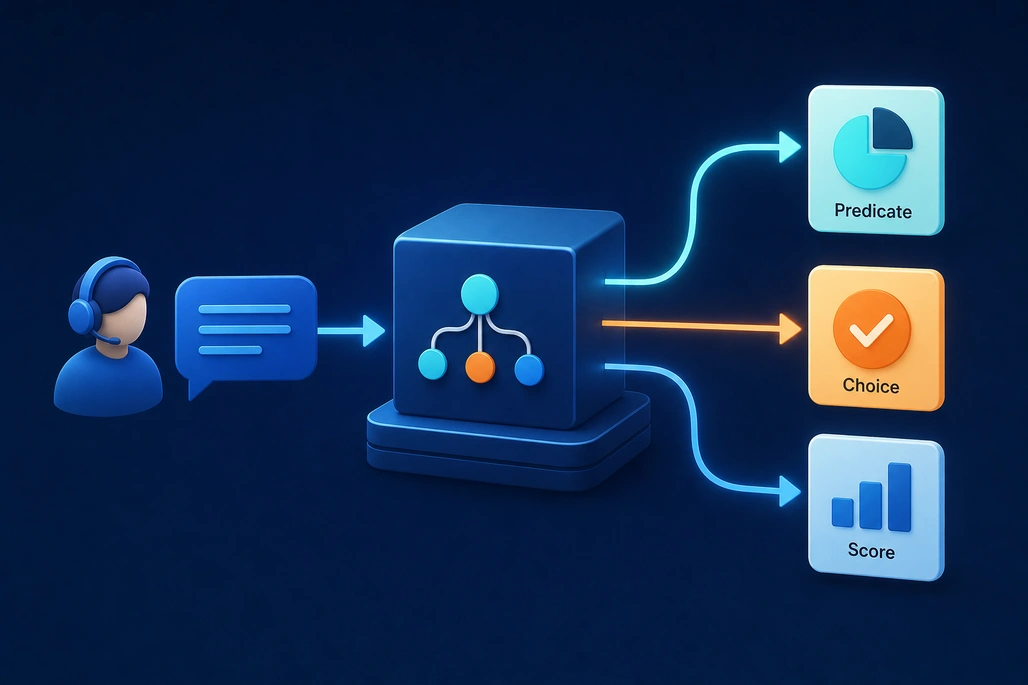
The Decisions API returns bounded answer types that application code can route and evaluate.
The Decisions API is the most focused October update for a beginner application because it returns a typed answer rather than free-form prose. It accepts shared input plus one or more questions, then returns answers in the same order. A program can use that result directly in routing or review logic without first parsing a natural-language response.
The API supports three question types. A predicate asks whether an observable condition is true and returns a probability from 0 to 1. A choice selects one value from a fixed list and returns that choice with probabilities and a confidence score. A score rates an input against ordered rubric levels and returns a probability-weighted score with confidence.
The following Python example follows Microsoft’s documented refund-request pattern. It needs an Azure OpenAI resource, a deployed gpt-6-luna model, an API key in AZURE_OPENAI_API_KEY, and OpenAI Python library version 3.26.0 or later. Use the deployment name in the model parameter; it may differ from the underlying model name.
import os
from openai import OpenAI

endpoint = "https://YOUR-RESOURCE-NAME.openai.azure.com/openai/v1/"

client = OpenAI(
    base_url=endpoint,
    api_key=os.environ["AZURE_OPENAI_API_KEY"],
)

decision = client.decisions.create(
    model="gpt-6-luna",
    input="I was charged twice for my order. Please return the extra charge.",
    questions=[
        {
            "type": "predicate",
            "name": "refund_requested",
            "instructions": "Does the customer ask for a refund?",
        },
        {
            "type": "choice",
            "name": "department",
            "instructions": "Which department should handle this complaint?",
            "choices": [
                {"value": "billing", "description": "Payments and refunds."},
                {"value": "technical", "description": "Product problems."},
                {"value": "shipping", "description": "Delivery and tracking."},
                {"value": "other", "description": "All other requests."},
            ],
        },
    ],
)

for answer in decision.answers:
    if answer.type == "predicate":
        print(f"{answer.name}: {answer.probability}")
    elif answer.type == "choice":
        print(f"{answer.name}: {answer.choice}, confidence: {answer.confidence}")
    elif answer.type == "refusal":
        print(f"{answer.name}: refused")
The probability is an estimate, not proof. The application should choose its own threshold using labeled examples and the actual cost of mistakes. For example, a low-risk support queue might accept a lower threshold, while a financial action should require much higher confidence and a human review step.
Each answer can also be a refusal. Production code must check the answer type before reading a predicate, choice, or score field, and it should have a defined fallback path for refusals. This could be a manual queue, a request for more information, or no action at all.
What are the trade-offs between a response, a decision, and browser automation?
The Responses API is appropriate when the application needs written content, an explanation, structured output matching the application’s own schema, or tool calls. The Decisions API is appropriate when the desired result is limited to a predicate, fixed option, or rubric score.
Browser Automation is not a replacement for a well-designed service API. An API is usually more stable, more observable, and easier to authorize. Browser automation is most defensible when there is no suitable API, the team can control access, and the workflow has clear approvals and verification points.
Third-party platform vendors are already treating typed decision outputs as a distinct integration category. For example, TrueFoundry added support for Microsoft Foundry among several decision providers in its AI Gateway, while Palantir announced support for OpenAI’s Decisions API in its AIP environment. Those integrations reinforce the practical use case: applications need constrained labels, probabilities, and scores for routing—not prose that must be parsed later.
How should a beginner get started with the October 2026 updates?
- Start with one bounded decision, such as identifying refund requests or routing a support ticket to a fixed department list.
- Create a small consented test set with expected outcomes, then measure false positives, false negatives, refusals, and threshold behavior.
- Use a prompt agent without browser tools for simple conversational or retrieval tasks.
- Evaluate the Copilot harness only when the agent genuinely needs multi-step tool, skill, file, or command work.
- Introduce Browser Automation with a read-only workflow on a controlled site, using a dedicated least-privileged identity.
- For hosted agents, add durable checkpoints before external side effects and test restart behavior deliberately.
Developers who want Microsoft-led guidance can plan Foundry sessions at Microsoft Ignite from November 17 through November 20, 2026. For immediate implementation, the more important step is smaller: choose one task with clear expected outcomes, constrain permissions, and confirm the application behaves correctly when the model is uncertain, refuses, or is interrupted.
Frequently asked questions
Is the Microsoft Copilot harness generally available?
No. The Microsoft Copilot harness in Foundry Agent Service entered public preview on October 28, 2026. Microsoft documentation says preview features have no service-level agreement and are not recommended for production workloads.
What is the difference between the Decisions API and the Responses API?
Use the Decisions API for typed predicates, fixed choices, and rubric scores. Use the Responses API when the application needs generated text, custom-schema structured output, or function calling.
Which model supports the Microsoft Foundry Decisions API?
Microsoft’s current Decisions API documentation lists gpt-6-luna as the supported model. Availability depends on region, and East US 2 is excluded from the rollout described in the documentation.
Is Browser Automation safe for production transactions?
Browser Automation can take unintended actions and web pages can contain malicious or confusing instructions. Teams should use least-privileged identities, test and monitor agent actions, and require human approval before consequential actions such as submitting transactions or changing access.
Does hosted-agent resilience prevent duplicate work automatically?
No. Foundry can restart interrupted work with its original input, but the application must store progress and use idempotent designs to detect completed external actions and avoid duplicates.
Based on reporting by Microsoft Foundry Blog, Microsoft Learn, TrueFoundry and Palantir.

Join the conversation! Your thoughts help the community grow.